



You probably have more apps than you think
Most companies are running three to four times more cloud apps than their IT team knows about. Not because anyone’s being sneaky. People just sign up for things. A marketer grabs HubSpot. A developer links their GitHub through the company Google login. A sales rep puts client data in a personal Dropbox because the official file share is slow.
Each of those is a blind spot. Collectively, they’re Shadow IT, and they’re the reason your security posture probably isn’t as clean as your last audit said it was.
Binadox finds these apps automatically, without putting anything on anyone’s laptop and without getting in the way of their work.
The trick: OAuth tokens already have the answers
When someone clicks “Sign in with Google” or “Sign in with Microsoft” on a third-party app, the identity provider logs it. Which app, which user, when, from what IP. It’s all there, sitting in your Google Workspace or Microsoft 365 admin logs, and almost nobody looks at it.
Binadox reads those logs. That’s the core of it.
What makes this useful is what it doesn’t require. No browser extensions. No network proxies. No software on employee machines. If someone uses their corporate Google account to sign into Canva from their phone at a coffee shop, it still shows up.
How the discovery pipeline works
Connecting to your identity provider
You link your Google Workspace or Microsoft 365 account to Binadox through a standard OAuth integration. This gives Binadox read-only access to audit and sign-in log APIs: the Admin SDK Reports API for Google, or the Microsoft Graph sign-in audit logs for Microsoft.
It doesn’t touch email, files, or anything else. Just the metadata about which apps people authenticate into.
Collecting sign-in events
On a regular schedule, Binadox pulls recent sign-in events from the identity provider. Each event has four pieces of information: the user’s email, the app name, the timestamp, and the IP address.
For big organizations, these arrive in batches of thousands. The system deduplicates and normalizes them as they come in.
Figuring out what the app actually is
This is where it gets interesting. App names in sign-in logs are messy. Microsoft might log “Slack Technologies” while Google just says “Slack.” Some apps show up as cryptic internal names that don’t match anything obvious.
Binadox keeps a curated database of 80+ common SaaS apps with their real names and URLs. Known names get matched instantly. Unknown names get sent to a language model that identifies the product and its website, with results cached so the same lookup doesn’t happen twice. If the AI can’t figure it out either, it gets flagged for a human to review rather than quietly dropped.
The system also filters out noise. When Microsoft 365 reports a sign-in to “Azure Active Directory” or “Office 365 Exchange Online,” those are internal platform components, not Shadow IT. Binadox skips them.
Categorizing what it finds
Every identified app gets sorted into one of 28 business categories: development and DevOps, cloud infrastructure, communication, file storage, marketing, HR, analytics, design, accounting, sales, security, healthcare, legal, and so on. (Think GitHub in “Development,” Slack in “Communication,” Dropbox in “File Storage.”)
Each category carries risk flags. File storage apps get flagged for data exfiltration risk. Healthcare apps get flagged for potential HIPAA issues. This gives IT teams a head start on triage without having to research every app from scratch.
Approval status
Newly discovered apps start as “None,” meaning IT hasn’t weighed in yet. From there it’s binary: Approved or Rejected. Rejected apps may trigger alerts if people keep using them.
Automating the boring decisions
Nobody wants to manually review every app in an organization with hundreds of employees. Binadox has a rule engine for that.
Domain rules target specific apps. Auto-approve slack.com. Auto-reject tiktok.com. Category rules cover whole groups: approve all collaboration tools, reject all gaming apps.
When a new app shows up, rejection rules run first, then approval rules, so you can set a broad block and carve out specific exceptions. This runs every time new events arrive, no manual intervention needed.
What the dashboard shows
The main view is a table of every discovered app: name, category, access count, detection method (OAuth or web visit), last used date, and approval status. You can filter by status, search by name, or sort by usage. There’s bulk select for approving or rejecting many apps at once, which you’ll want when you first set up the system and have a few hundred apps to classify.
A separate violations screen shows apps that have been rejected but are still being used, with a time-series chart so you can tell whether your “please stop using this” email actually worked. New violations generate tickets that plug into your existing notification workflow.
Click any app to drill into who’s using it, when, from which IPs, and what risk category it falls under. That’s the view you want open during a security investigation or compliance audit.
There’s also a rules management screen for creating, viewing, and deleting your auto-approval rules.
Beyond OAuth
OAuth analysis is the primary discovery method, but Binadox also supports network proxy-based discovery. If your organization routes web traffic through a corporate proxy, you can feed that data into the same pipeline to catch apps people access through direct browsing rather than OAuth.
Both methods feed into the same classification and approval system.
What happens after discovery
Finding Shadow IT is step one. Binadox also integrates directly with 50+ SaaS apps for deeper management: license tracking (who has a license and are they using it), user provisioning (create or deactivate accounts from Binadox), billing analysis, and usage analytics.
The typical path is straightforward. Shadow IT discovery reveals that an app is widely used, so you bring it under management, negotiate an enterprise license, integrate it with SSO, and add it to the portfolio.
Why you should care
I’ll be blunt about this part. Shadow IT isn’t just an IT annoyance.
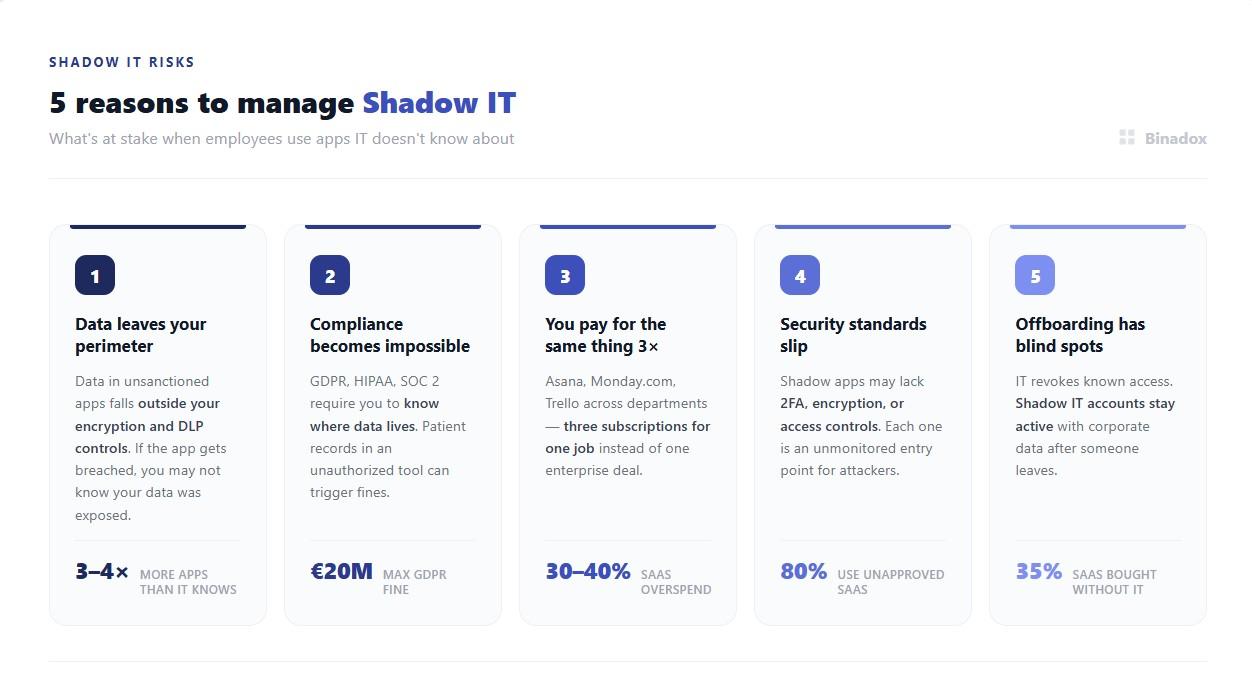
When someone stores company data in an app you don’t control, your encryption policies and DLP tools don’t apply. If that app gets breached, you might not even know your data was involved.
GDPR, HIPAA, and SOC 2 all require you to know where your data lives. An employee putting patient records in an unauthorized cloud tool can trigger penalties, and “we didn’t know about it” isn’t a defense regulators accept.
There’s also the money side. When three departments independently pick three different project management tools, you’re paying three times for roughly the same thing instead of negotiating one enterprise deal. Discovery finds those overlaps.
And offboarding is the one that keeps security people up at night. When someone leaves, IT deactivates their access to known systems. But their Shadow IT accounts, with corporate data in them, stay active. That gap is real.
The short version
Binadox reads the OAuth sign-in records your identity provider already collects and turns them into a complete picture of every cloud app in use. It identifies and categorizes apps automatically, lets you set rules for routine decisions, and gives you dashboards to manage the rest.
If your organization is like most, there are apps in use right now that nobody in IT knows about. That’s what Binadox is for.
 7-day free trial