



Manually tracking your Azure spending can feel like an uphill battle, especially as your cloud footprint grows. For teams needing precise, automated cost data, the Azure portal’s dashboards have limitations. A more powerful approach is to programmatically get Azure daily cost per resource group API data. This method allows for deep integration into your custom dashboards, FinOps platforms, and automated governance workflows, giving you granular control over your cloud expenditure.
Key takeaways:
- You can fetch daily cost data grouped by resource groups using a single POST request to the Azure Cost Management Query API.
- Authentication requires setting up a Service Principal in Microsoft Entra ID with at least “Cost Management Reader” permissions at the desired scope.
- The API request body uses JSON to define the timeframe, granularity (daily), and grouping dimensions (ResourceGroup).
- Automating this process in under 100 lines of a Python or PowerShell script can feed cost data directly into your team’s financial monitoring tools.
Prerequisites for API Access
Before you can query Azure cost data, you must establish secure, programmatic access. This involves two main steps: creating a Service Principal and assigning it the correct permissions.
Setting Up a Service Principal
First, you need an identity for your application or script to use when authenticating. In Azure, this is handled with a Service Principal, which is an application identity within your Microsoft Entra ID (formerly Azure AD). You can create one easily using the Azure CLI. This process generates a Client ID, Tenant ID, and a Client Secret that your script will use for authentication.
Assigning Permissions
Once the Service Principal is created, it needs permission to read cost data. You must assign it a role using Azure’s Role-Based Access Control (RBAC). For simply reading data, the Cost Management Reader role is sufficient and follows the principle of least privilege. However, if you plan to create budgets or data exports programmatically, the Cost Management Contributor role would be necessary. You can assign this role at different scopes, such as the entire subscription or a specific resource group, depending on your needs.
How to Get Azure Daily Cost per Resource Group API Data
The most flexible tool for this task is the Azure Cost Management Query API. Unlike the Exports API, which is better for large, recurring data dumps, the Query API is ideal for specific, on-demand requests.
Defining the API Request
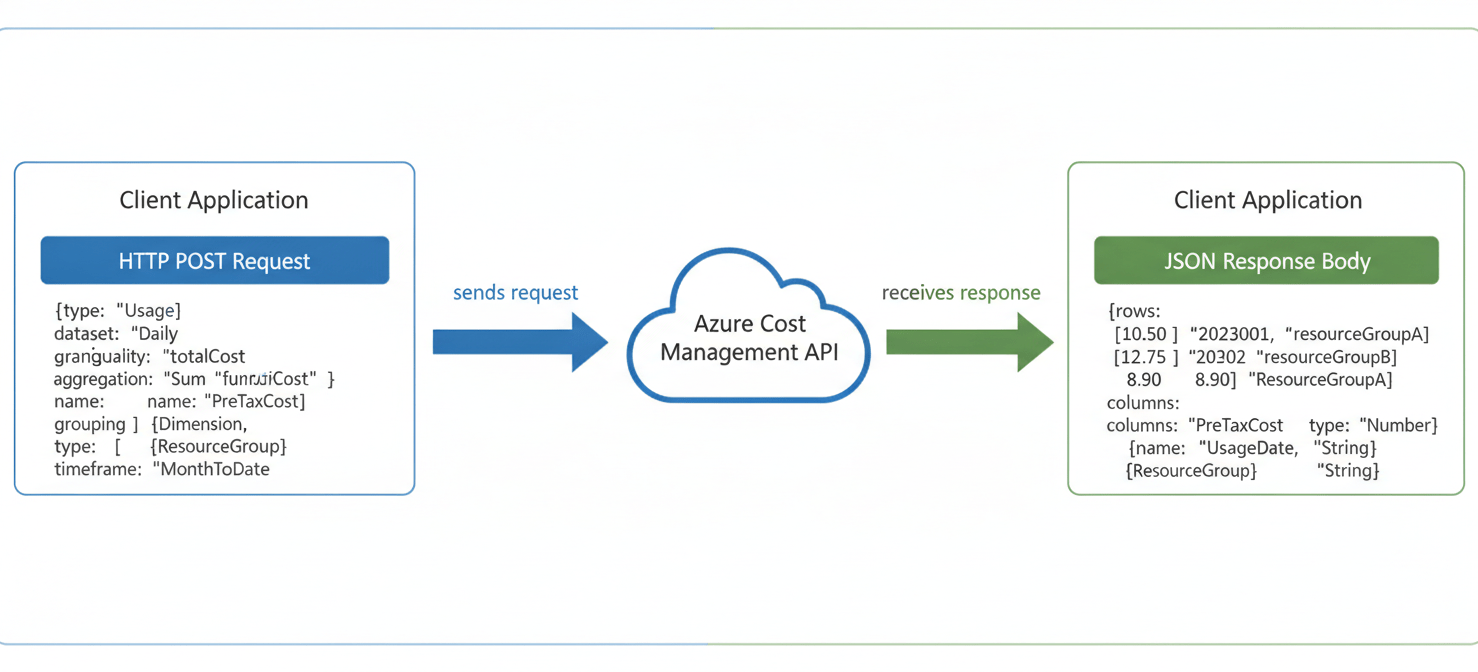
To get the data you need, you will send a POST request to the Query API endpoint. The URL for this request is structured to include the scope, which in this case would typically be your subscription ID.
The core of the request is the JSON body, where you define exactly what data you want. For daily costs grouped by resource group, your request body would specify:
type: Set toUsageto query cost and usage data.timeframe: Set toCustomand provide atimePeriodwithfromandtodates.dataset: This object contains the crucial parameters.granularity: Set this toDaily.aggregation: Defines the cost metric to sum, such asPreTaxCost.grouping: This is an array where you specify how to group the results. To group by resource group, you set thetypetoDimensionand thenametoResourceGroup.
Understanding the API Response
After sending the request, the API will return a JSON object. The response contains a properties object with a rows array. Each element in the rows array represents a single day for a specific resource group, containing the aggregated cost, the date, and the resource group name.
It’s important to note that the Cost Management APIs have rate limits. If you make too many requests in a short period, you will receive a 429 (Too Many Requests) error. Therefore, it’s best practice to implement a retry mechanism with exponential backoff in your scripts.
Automating Cost Reporting
The true power of using the API comes from automation. Instead of manually running reports, you can write a script to fetch this data daily and integrate it where your team needs it most.
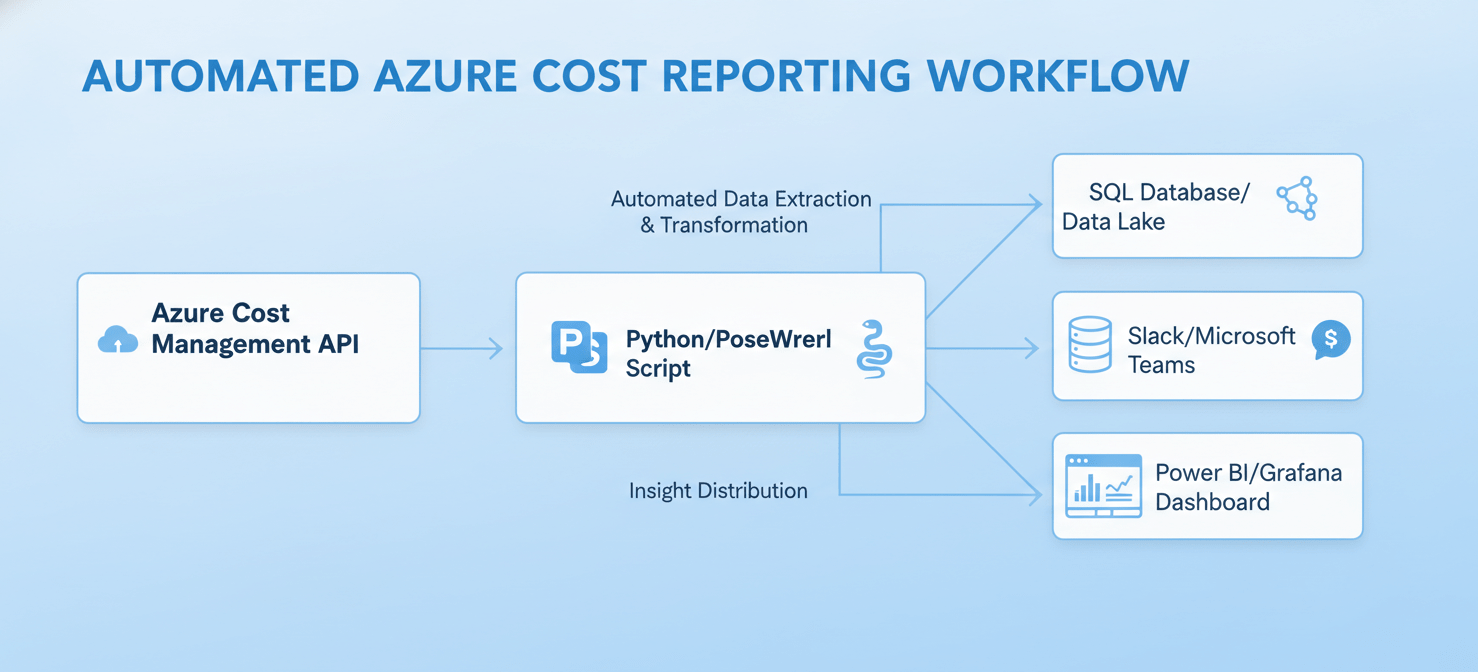
For example, a Python script using the azure-identity and azure-mgmt-costmanagement libraries can authenticate with your Service Principal and execute the query. The script can then process the response, format it, and send it to a variety of destinations.
Common automation scenarios include:
- Pushing daily cost data into a SQL database or a data lake for long-term analysis.
- Sending a formatted summary to a Slack channel or Microsoft Teams for daily visibility.
- Integrating the data into a custom Power BI or Grafana dashboard for richer visualization.
By automating this process, you create a reliable data pipeline that keeps stakeholders informed and helps prevent budget overruns before they happen.
Conclusion
While the Azure portal is useful for a quick glance at your spending, it falls short for customized and automated financial operations. Learning how to get Azure daily cost per resource group API data provides the flexibility and granularity needed for mature cloud financial management. By setting up a Service Principal, crafting a precise query, and automating the retrieval process, your team can transform raw cost data into actionable insights. This programmatic approach ensures you are no longer just reacting to a monthly bill but are actively managing your cloud spend day by day.
If you’re ready to move beyond reactive spending and gain proactive control, explore how Binadox can help you achieve this by experiencing our platform with a free trial or scheduling a personalized demonstration.
 7-day free trial