



Choosing a managed database service on AWS is a significant architectural decision. The “RDS vs. Aurora” debate often gets simplified to “cheaper and familiar” versus “pricier and cloud-native.” For an enterprise architect, this framing is insufficient. Your decision impacts platform standardization, vendor consolidation efforts, and total cost of ownership (TCO) for years to come. This Aurora vs. RDS cost comparison provides a TCO-centric view, focusing on the architectural differences that drive the final number on your invoice.
Key takeaways
- The 25% Rule: If your database I/O costs exceed 25% of your total Aurora bill, switching from the Standard to the I/O-Optimized configuration can reduce overall costs by up to 40%.
- Replica Scaling Advantage: For workloads requiring three or more read replicas, Aurora’s shared storage model often becomes cheaper than RDS, where each replica requires its own duplicate storage volume.
- Hidden I/O Costs: On Aurora Standard, a single complex query can generate hundreds of billable I/O operations, making I/O the most unpredictable and potentially largest cost driver.
- Instance Premium: Expect Aurora instances to cost roughly 20% more per hour than their RDS counterparts for the same instance class.
The Core Cost-Driver: How Aurora and RDS Architectures Differ
The fundamental difference between RDS and Aurora lies in their architecture, which directly dictates their pricing models. RDS adopts a traditional, monolithic structure: compute (the EC2 instance) is tightly coupled with storage (an EBS volume). You provision both. If you need a Multi-AZ deployment for high availability, you are effectively provisioning and paying for a second, fully replicated instance and storage volume.
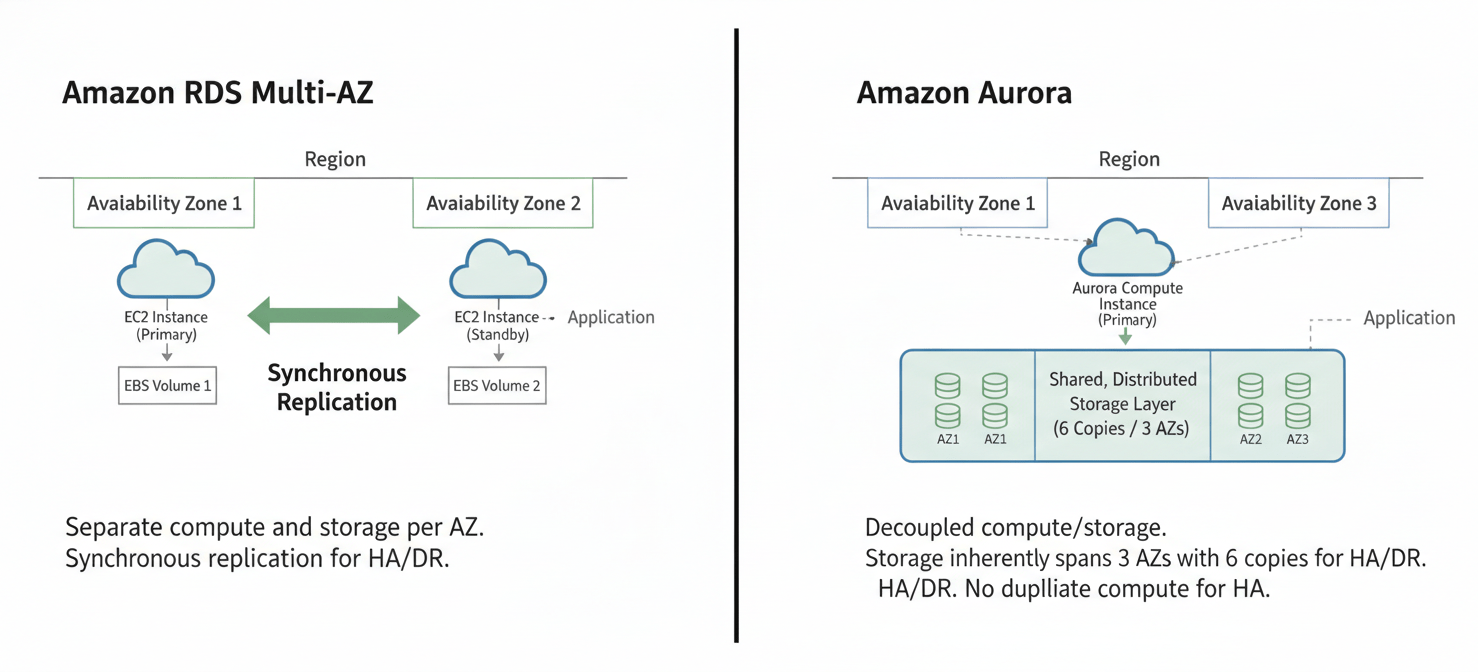
Aurora, by contrast, decouples compute and storage. The database instances you provision are purely for processing queries. The storage layer is a separate, custom-built, distributed service that automatically replicates six copies of your data across three Availability Zones (AZs). This architectural choice has profound cost implications. You don’t pay for a “standby” instance in a Multi-AZ setup because the resilience is inherent in the storage layer. Furthermore, Aurora’s storage scales automatically in 10 GB increments, so you only pay for what you use, whereas RDS requires you to provision storage capacity upfront.
Compute and Instance Sizing: Apples to Oranges
At first glance, comparing compute costs seems straightforward. An Aurora db.r6g.large instance costs more per hour than an RDS db.r6g.large instance—often by about 20-30%. However, this direct comparison is misleading. Because Aurora offloads much of the replication and logging work to its storage layer, the database instance has more resources available for handling queries. This can allow you to run workloads on a smaller Aurora instance than would be required on RDS, offsetting the per-hour price premium.
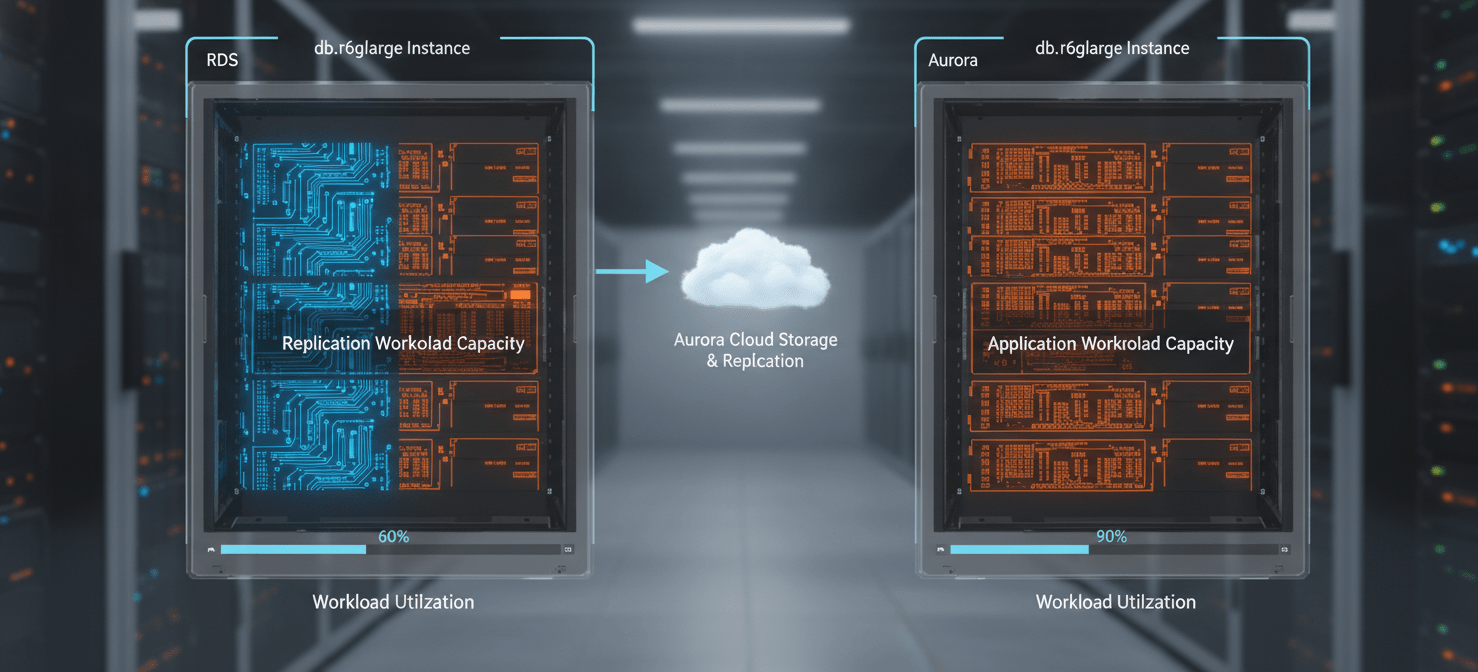
For enterprise workloads, the key is to benchmark, not just compare price sheets. Your team’s goal should be to determine the smallest instance size on each platform that meets your performance and availability KPIs. For smaller instances, RDS often maintains a cost advantage due to lower architectural overhead. For larger, more demanding workloads, Aurora’s efficiency can lead to a lower overall compute cost, even with the higher hourly rate.
Storage and I/O: The Hidden Multiplier in Your Aurora vs. RDS Cost Comparison
Storage and I/O are where the cost models diverge most dramatically and where most budget forecasts go wrong.
RDS Storage: Predictable Provisioning
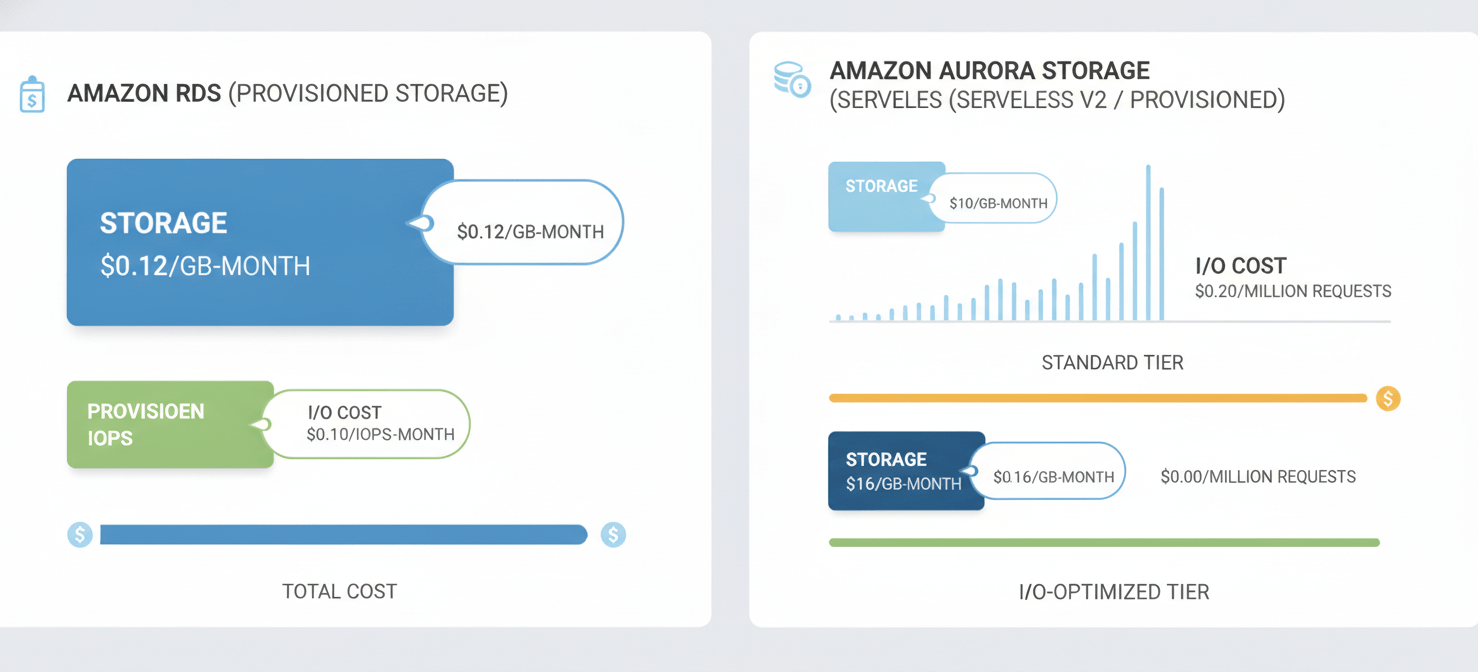
With RDS, you select a storage type (typically General Purpose SSD gp3) and provision a volume size. You pay a flat rate per GB-month for the provisioned space (e.g., $0.115 per GB-month for gp3). The gp3 storage type includes a baseline of 3,000 IOPS (I/O Operations Per Second) at no extra charge, which is sufficient for many workloads. If you need more performance, you can provision additional IOPS for a fee. This model is predictable but can lead to paying for unused capacity.
Aurora Storage: The Two-Tier Model
Aurora presents two distinct storage configurations that fundamentally alter the cost equation.
-
Aurora Standard: This configuration has a lower storage rate (e.g., $0.10 per GB-month) but adds a separate charge for I/O operations—typically $0.20 per million requests. This is the most common source of cost overruns. A single, unoptimized query joining large tables can trigger millions of I/O requests, turning a seemingly cheap database into an expensive one.
-
Aurora I/O-Optimized: This model eliminates the per-request I/O charge entirely. In exchange, you pay a higher rate for storage (e.g., $0.225 per GB-month) and a ~30% premium on instance costs. The breakeven point is clear: if your I/O charges on Aurora Standard consistently exceed 25% of your total Aurora bill, switching to I/O-Optimized will almost certainly lower your TCO.
For architects, the takeaway is that an Aurora vs. RDS cost comparison is incomplete without a thorough analysis of the application’s I/O patterns.
Multi-AZ and Disaster Recovery: Factoring in Resilience TCO
High availability and disaster recovery are non-negotiable for enterprise systems, and the two platforms approach this with different mechanisms and costs.
-
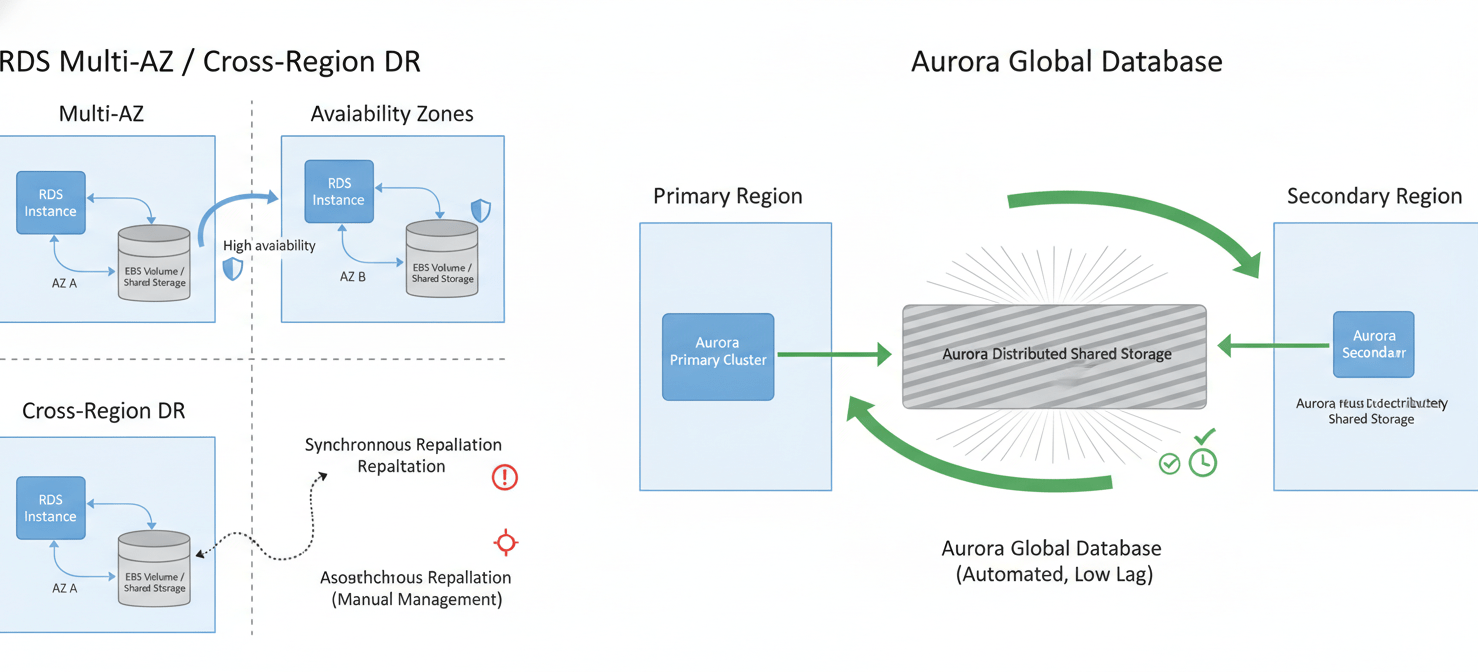
RDS Multi-AZ: To achieve high availability, you deploy RDS in a Multi-AZ configuration. This creates a synchronous standby replica in a different AZ. AWS manages the replication and failover. However, you pay for two full database instances and two full storage volumes. Failover typically takes 60-120 seconds. For cross-region disaster recovery, you must set up and manage cross-region read replicas, which incurs data transfer costs and adds operational overhead.
-
Aurora Multi-AZ and Global Database: Aurora’s resilience is built-in. The six-way storage replication across three AZs means you don’t pay for a duplicate standby instance for high availability. Failover to a read replica is much faster, often under 30 seconds. For global disaster recovery, Aurora Global Database provides a managed solution with typical cross-region replication lag of less than a second and failover times of under a minute. While you pay for the replicated storage and instances in the secondary region, the management is highly automated compared to the manual promotion process for RDS read replicas.
From a TCO perspective, Aurora’s integrated approach to high availability can be significantly more cost-effective, especially when the cost of engineering time to manage a more complex RDS DR strategy is factored in.
Scaling Models: On-Demand vs. Provisioned Throughput
Both platforms offer different ways to handle variable loads, impacting cost and performance.
Read Replica Scaling
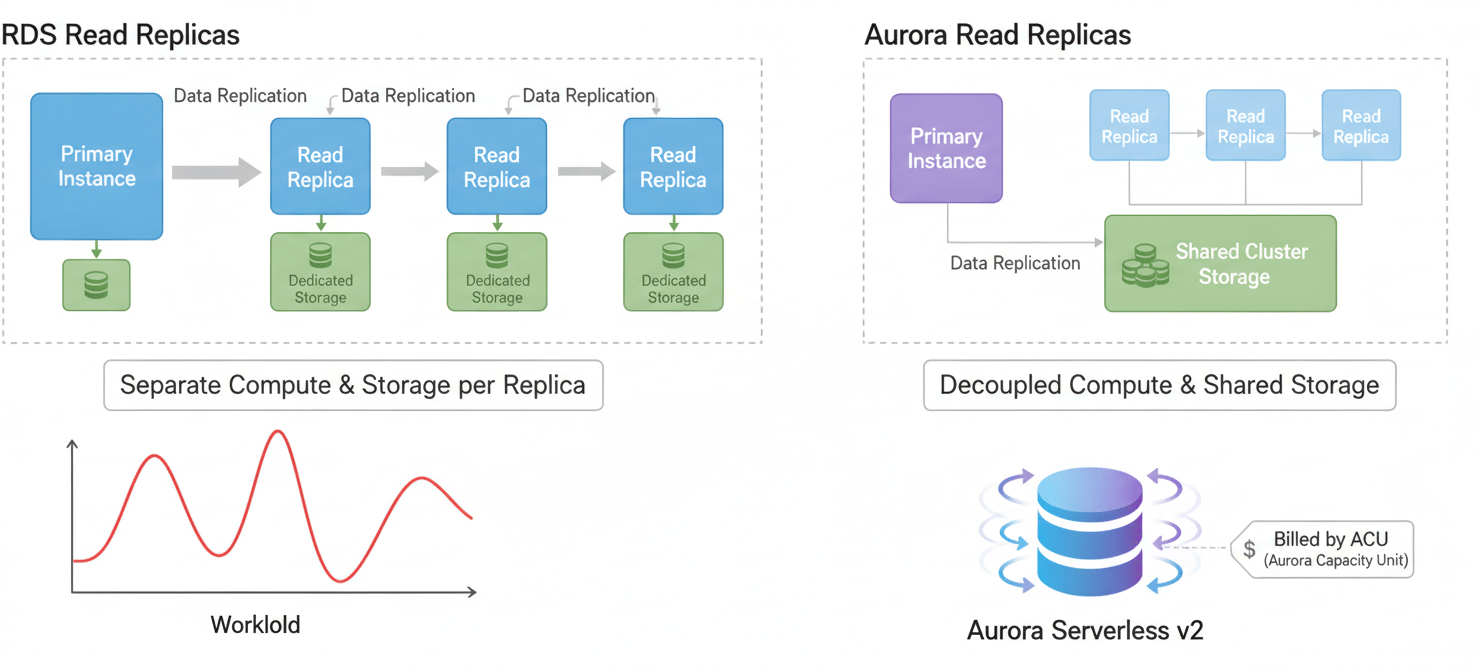
Both RDS and Aurora use read replicas to scale read-heavy workloads. However, the cost model differs significantly. An RDS read replica is a completely independent database instance with its own provisioned storage volume. An Aurora read replica, conversely, shares the same underlying storage volume as the writer instance. This means you only pay for the additional compute capacity of the replica, not for a full copy of the data. For applications requiring numerous read replicas (e.g., analytics dashboards, large-scale APIs), Aurora’s shared storage architecture provides a compelling cost advantage.
Aurora Serverless v2
For highly variable or unpredictable workloads, Aurora Serverless v2 offers a compelling alternative to provisioned instances. It automatically scales compute capacity up and down based on demand, billing in fine-grained “Aurora Capacity Unit” (ACU) increments. An ACU represents about 2 GiB of memory plus associated CPU and networking. This model can be significantly cheaper than provisioning an RDS or Aurora instance for peak capacity that sits idle most of the time. For development, testing, or applications with spiky traffic, Serverless v2 can provide a lower aurora tco.
Beyond the Bill: Operational Overhead and Vendor Lock-in
A true TCO analysis extends beyond the AWS invoice.
-
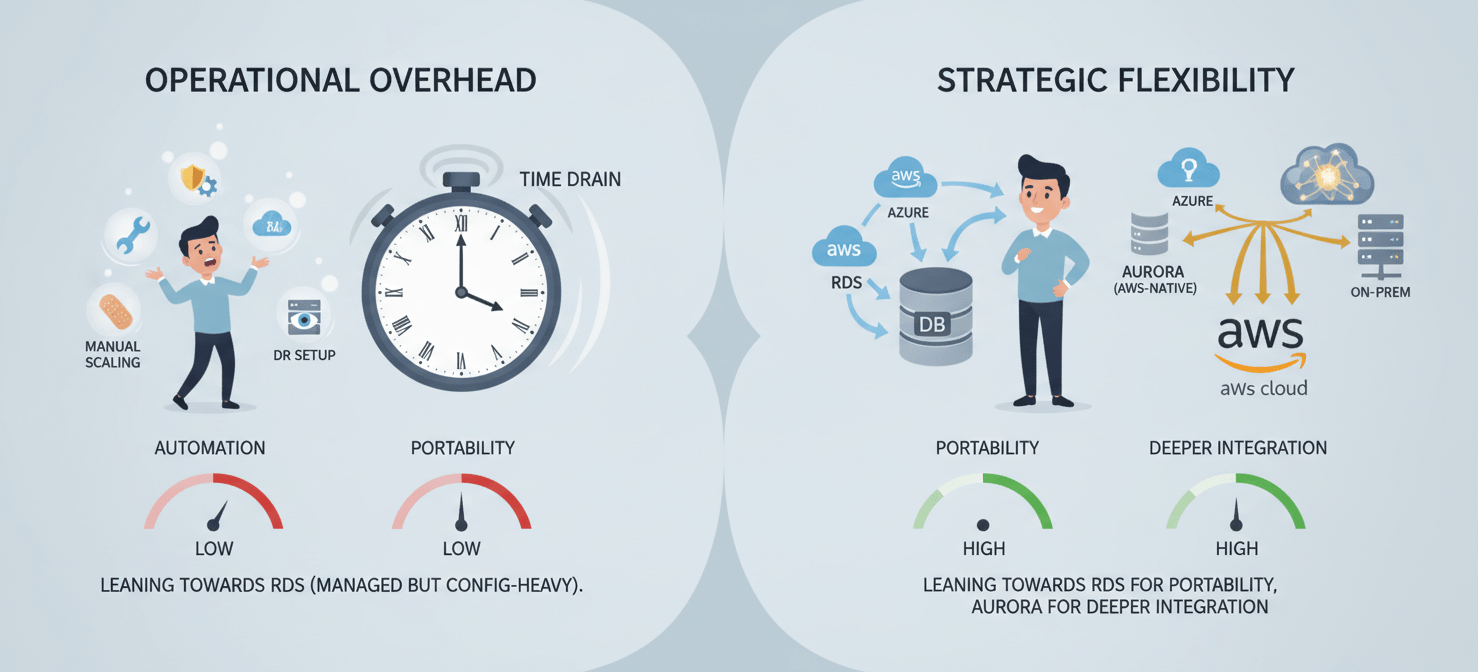
Operational Overhead: Aurora’s design automates tasks that often require manual intervention or custom scripting in RDS. Features like automatic storage scaling, faster failover, and clone-from-snapshot reduce the operational burden on your platform and database teams. This translates to lower labor costs and allows engineers to focus on higher-value work.
-
Vendor Consolidation and Lock-in: While both are AWS services, Aurora represents a deeper commitment to the AWS ecosystem. It is a proprietary technology, compatible with MySQL and PostgreSQL at the API level, but not a drop-in replacement for the open-source engines. Migrating away from Aurora to an on-premises or multi-cloud solution would be more complex than migrating from standard RDS PostgreSQL or MySQL. For enterprise architects focused on multi-cloud strategies and avoiding vendor lock-in, the familiarity and portability of standard RDS engines may carry strategic value that outweighs Aurora’s potential TCO benefits.
Conclusion
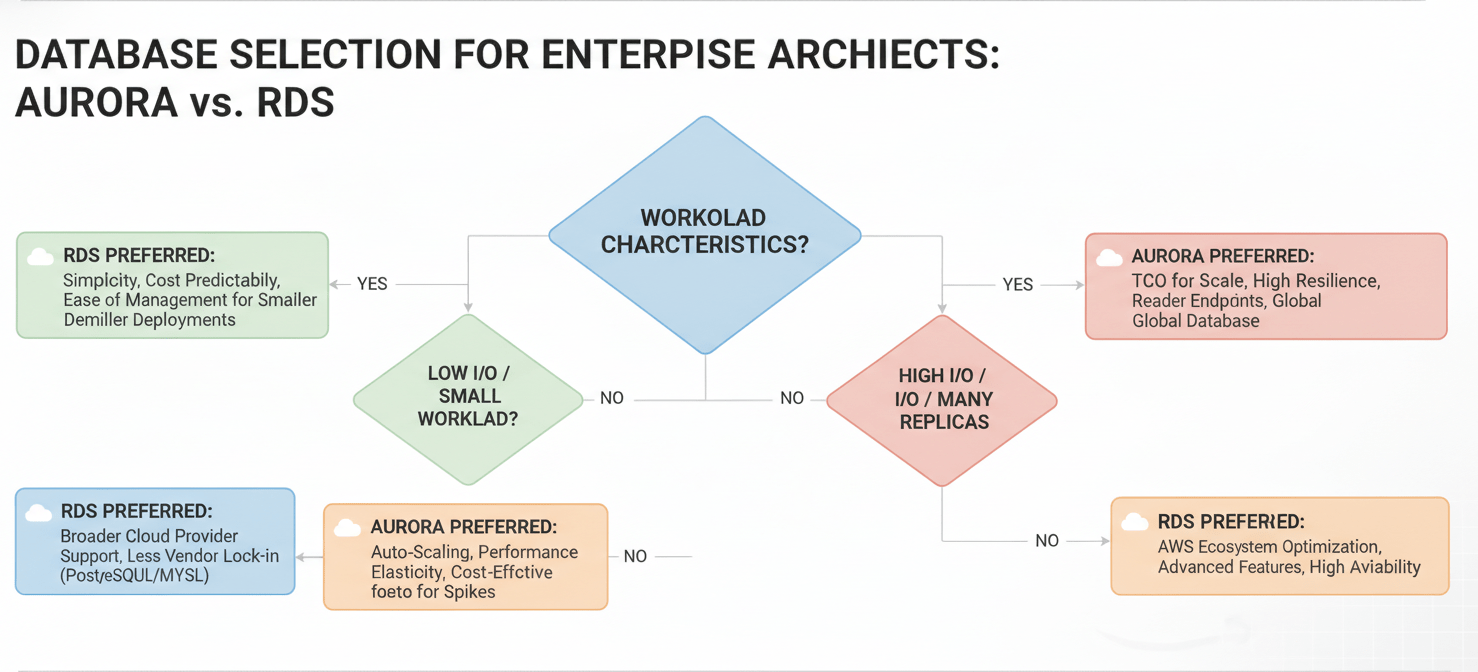
The question is not simply “is Aurora cheaper than RDS?” The answer depends entirely on the workload’s architecture and scale. For small, stable applications with low I/O, RDS often provides the lowest TCO. Its simplicity and predictability are valuable. However, for I/O-intensive applications, workloads requiring high availability and multiple read replicas, or systems with unpredictable traffic patterns, Aurora frequently emerges as the more cost-effective solution once the full TCO is calculated. A proper Aurora vs. RDS cost comparison requires moving beyond instance-hour prices and modeling the costs of I/O, storage, resilience, and operational effort. The correct choice is the one that aligns not just with your budget, but with your long-term platform strategy and the engineering trade-offs your organization is willing to make. After all, the most expensive database is the one that fails to meet your business requirements, regardless of what the monthly bill says.
To confidently navigate this complex architectural decision and truly optimize your TCO, consider exploring a personalized consultation to discuss your specific needs or begin a free Binadox trial to experience the benefits directly.
 7-day free trial