


Kind of usage Feature Guide
Overview
Kind of usage is a cloud cost analysis feature in Binadox that transforms raw cloud billing data into a structured, easy-to-understand view of resource consumption and costs.
Instead of reviewing a long list of individual billing records, users can analyze expenses grouped by usage category. The feature displays resource consumption, charges, credits, net costs, and each category’s share of charges.
Kind of usage is available for AWS, Microsoft Azure, and Google Cloud Platform (GCP).
The feature helps FinOps teams, cloud engineers, support specialists, and other stakeholders understand how cloud costs are distributed, identify major spending categories, and determine where further investigation is needed.
How Kind of usage works
Cloud providers supply billing records that describe resource consumption and associated charges. These records may contain technical identifiers, usage quantities, regions, service information, and other billing attributes.
Kind of usage classifies the underlying billing data by usage type and groups related records into logical categories. This produces an aggregated view of cloud spending that is easier to interpret than individual billing entries.
For example, AWS Elastic Block Store (EBS) costs can be presented in categories such as:
- EBS volume usage — charges associated with EBS volume consumption.
- EBS snapshot usage — charges associated with storing EBS snapshots.
Each category summarizes the corresponding usage and cost information for the selected reporting period.
The purpose of this classification is to help users answer two questions:
- Which types of cloud resource usage contribute to the bill?
- How much does each usage category contribute to total charges?
The aggregated report is intended for cost analysis, while the Raw data view provides the underlying details for investigating individual billing records.
Understanding the Report Columns
The Kind of usage report contains the following columns.
Kind of usage
Identifies the usage category to which the billing data belongs. Categories are based on the classification of cloud billing records. The category name may include additional information about the billing unit, such as GB-months.
For example, AWS EBS volume usage and EBS snapshot usage appear as separate categories because they represent different types of resource consumption.
Volume
Shows the reported quantity of resource usage for the category during the selected period. The unit depends on the usage type. For storage-related categories, the report may display GB-months, which represent storage capacity consumed over time.
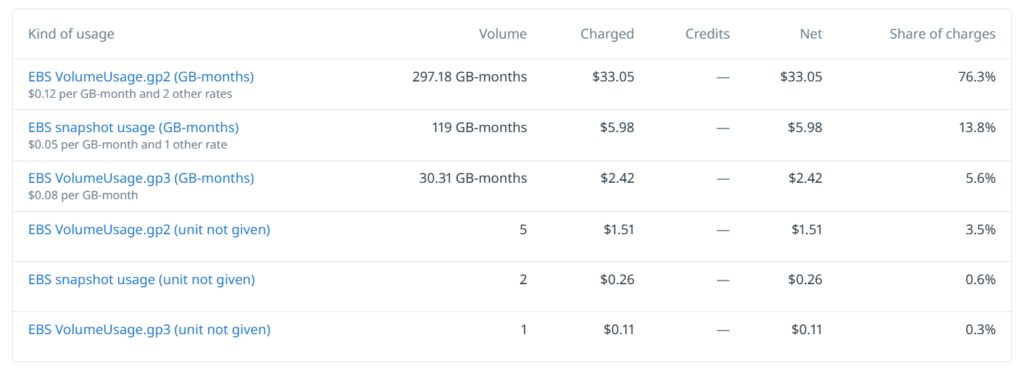
For example, a value of 297.18 GB-months indicates the reported amount of storage usage for the corresponding category over the reporting period.
Some billing entries may use other units or may not provide a unit in the displayed record. In these cases, the report may show a numeric quantity without an explicit unit. Volume represents consumption, not monetary cost. The unit and meaning of the value should therefore be considered when comparing different categories.
Charged
Shows the charges attributed to the usage category. This column helps users identify the amount billed for each category before accounting for credits shown separately in the report.
For example, if EBS volume usage has a Charged value of $33.05, that amount represents the charges attributed to the category for the selected reporting period.
Credits
Shows credits associated with the category, where applicable. Credits may reduce the amount ultimately payable. If no credits are reported for a category, the column may display a dash. The presence and amount of credits depend on the underlying billing data and the cloud provider’s billing model.
Net
Shows the net cost for the category after accounting for applicable credits. At a conceptual level:
Net = Charged − applicable Credits
For example, if a category has $33.05 in charges and no applicable credits, its net cost is $33.05.
The displayed values depend on the billing data available for the selected period.
Share of charges
Shows the percentage of total charges attributed to the category. This metric helps users understand which usage categories account for the largest portions of cloud spending.
Share of charges = Category charges / Total charges × 100%
For example, if EBS volume usage represents 76.3% of charges in the report, it is the largest contributor among the displayed categories.
Share of charges is useful for prioritization: categories with a larger share may warrant closer investigation when reviewing cost trends or looking for optimization opportunities.The percentage should be interpreted in the context of the report’s billing scope and selected period.
How Costs Are Grouped and Displayed
Kind of usage groups billing records by classified usage category and presents the resulting consumption and cost figures in an aggregated report.
The report allows users to compare categories using several complementary metrics:
- Consumption: How much of a resource was used.
- Charged: How much was charged for that usage.
- Credits: What credits were applied, where available.
- Net: The resulting cost after applicable credits.
- Share of charges: How significant the category is within total charges.
These metrics provide different perspectives on cloud spending. A category with high consumption does not necessarily have the highest cost, because pricing varies by resource type, region, usage tier, and other billing conditions.
Similarly, categories with comparable usage quantities may have different costs because their units or pricing structures differ.
For this reason, Volume should be compared only when the units and usage definitions are compatible. Charged, Credits, Net, and Share of charges provide additional context for evaluating the financial impact of each category.
The report displays the cost information available from the underlying billing data. The exact classification and pricing details depend on the cloud provider and the billing records received.
Kind of usage and Raw data
Kind of usage and Raw data provide complementary views of cloud billing information.
Kind of usage: aggregated analysis
Kind of usage groups related billing records into logical usage categories. It is designed to help users understand the overall structure of their cloud costs without manually reviewing every individual entry.
For example, the report may show the following AWS EBS categories:
| Kind of usage | Volume | Net | Share of charges |
|---|---|---|---|
| EBS VolumeUsage.gp2 | 297.18 GB-months | $33.05 | 76.3% |
| EBS snapshot usage | 119 GB-months | $5.98 | 13.8% |
| EBS VolumeUsage.gp3 | 30.31 GB-months | $2.42 | 5.6% |
This view helps users identify major spending categories and decide where additional analysis is needed.
Raw data: individual billing records
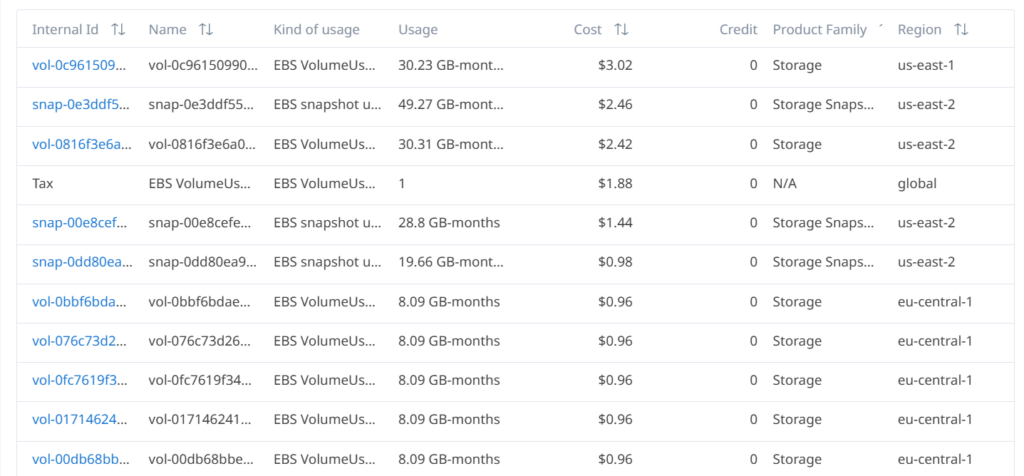
Raw data provides a more detailed view of the underlying billing entries. Depending on the available source data, records may include:
- Resource or record identifiers.
- Resource names.
- Usage types.
- Usage quantities.
- Individual costs and credits.
- Product families.
- Cloud regions.
For example, the Raw data view can show individual EBS volumes and snapshots, their reported usage, associated costs, and regions such as us-east-1, us-east-2, or eu-central-1.
This level of detail is useful when investigating a specific resource, checking a regional cost, or examining the records associated with an aggregated category.
Using both views together
A recommended workflow is:
- Open Kind of usage to identify the categories contributing most to cloud spending.
- Compare Volume, Charged, Credits, Net, and Share of charges to understand the financial impact of each category.
- Open Raw data to investigate individual records associated with the area of interest.
- Use the available record details, such as resource identifiers and regions, to narrow down the investigation.
Kind of usage provides the higher-level cost structure, while Raw data supports detailed investigation. The two views serve different purposes and should be used together when a category requires further analysis.
Filtering by Reporting Period
The reporting period determines which billing data is included in the analysis.
When reviewing costs, use a consistent reporting period when comparing usage categories or investigating individual records. This helps ensure that the figures being compared refer to the same billing interval.
Keep in mind that cloud billing data may be updated or adjusted by the provider. The information available in a report can therefore depend on the billing data received for the selected period.
Use the reporting controls available in Binadox to select the period you need to analyze.
Exporting and Display Limitations
The report presents billing data according to the usage categories, fields, and records available in Binadox.
The following considerations are important when interpreting the results:
- Provider-specific billing structures: AWS, Azure, and GCP use different billing attributes and pricing models. Category names, units, and available cost details may therefore vary.
- Usage units: Quantities expressed in GB-months should not be directly compared with quantities expressed in other units.
- Missing units: Some records may display a numeric quantity without an explicit unit. In such cases, do not infer a measurement unit from the number alone.
- Credits: A dash in the Credits column indicates that no credit value is displayed for that category. It should not automatically be interpreted as evidence that the provider never offers credits.
- Rounding: Displayed monetary amounts and percentages may be rounded. As a result, summing the visible values may not always reproduce a total exactly.
- Underlying records: An aggregated category does not replace the individual billing entries. Use Raw data when you need to inspect specific resources or billing details.
- Reporting scope: Totals and percentages should be interpreted within the scope of the selected report and period.
Export availability, supported file formats, and any export-specific record limits depend on the controls provided in the relevant Binadox view. Consult the available interface options for the current export workflow.
Summary
Kind of usage makes cloud billing data easier to understand by grouping individual records into meaningful usage categories and presenting consumption alongside cost metrics.
Use Kind of usage to identify your largest cloud spending categories, prioritize cost investigations, and drill down into individual billing records when needed.
Together, these views help turn cloud billing information into a practical basis for cost analysis and FinOps decision-making.