



Forecasting cloud spending can feel like predicting the weather—complex and often surprising. For teams using Microsoft’s global traffic manager, a practical Azure Front Door cost estimation is essential to avoid unexpected bills. This service combines a content delivery network (CDN), global load balancing, and security features, which means its pricing has several moving parts. Understanding these components is the first step toward building a predictable budget for your web applications.
Key takeaways
- Azure Front Door pricing is composed of four main elements: a monthly base fee, outbound data transfer costs, inbound request charges, and data transfer from edge to origin.
- The Standard tier starts at a $35 monthly base fee, while the Premium tier, which includes advanced security, begins at $330 per month before usage charges.
- Outbound data transfer rates vary significantly across eight geographic zones, so knowing your user locations is critical for an accurate estimate.
- Using the official Azure Pricing Calculator is a crucial step to model your specific traffic patterns and feature requirements.
Understanding Azure Front Door’s Pricing Model
Azure Front Door’s billing is broken down into a few core components. First, every profile you create incurs a fixed monthly base fee, which differs between the Standard and Premium tiers. The Standard tier is optimized for content delivery, while the Premium tier adds comprehensive security features like a managed Web Application Firewall (WAF) and bot protection.
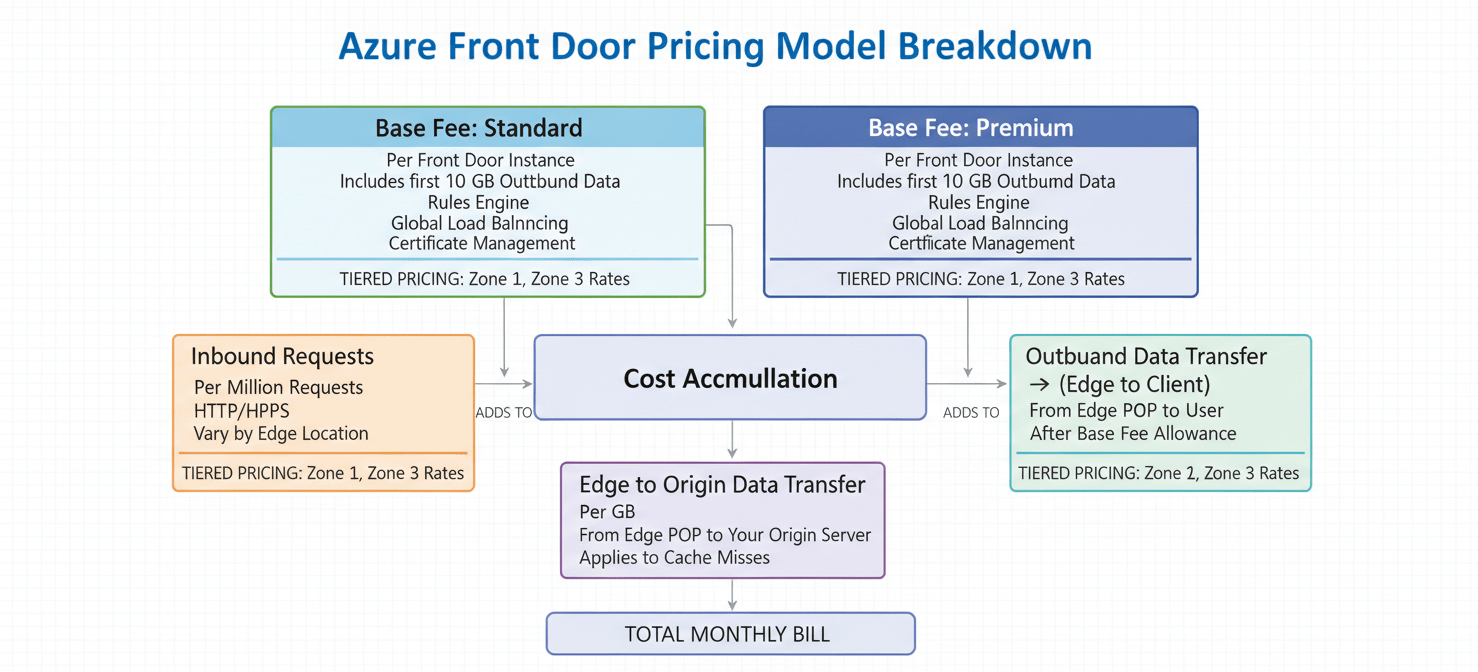
Beyond the base fee, you are charged for usage. The main variable costs are:
- Outbound Data Transfer (Edge to Client): This is the cost of data delivered from Front Door’s edge locations to your users. Prices are tiered and vary by geographic zone. For example, traffic to North America and Europe starts at approximately $0.083 per GB for the first 10 TB.
- Inbound Requests: You are billed for the number of incoming HTTP/HTTPS requests that hit the Front Door edge locations. This is typically priced per 10,000 requests, with slightly higher rates for the Premium tier.
- Edge to Origin Data Transfer: This fee applies when Front Door needs to fetch content from your backend service (the “origin”) because it isn’t cached at the edge. However, data transfer from an origin located in an Azure data center to Front Door’s edge is free.
It’s important to note that many features are bundled into the base fees. For instance, with the Standard and Premium tiers, there are no separate charges for routing rules, SSL certificates, or basic DDoS protection. Furthermore, the Premium tier includes the cost of the managed WAF, which is a separate charge on other services.
Key Factors Influencing Your Azure Front Door Bill
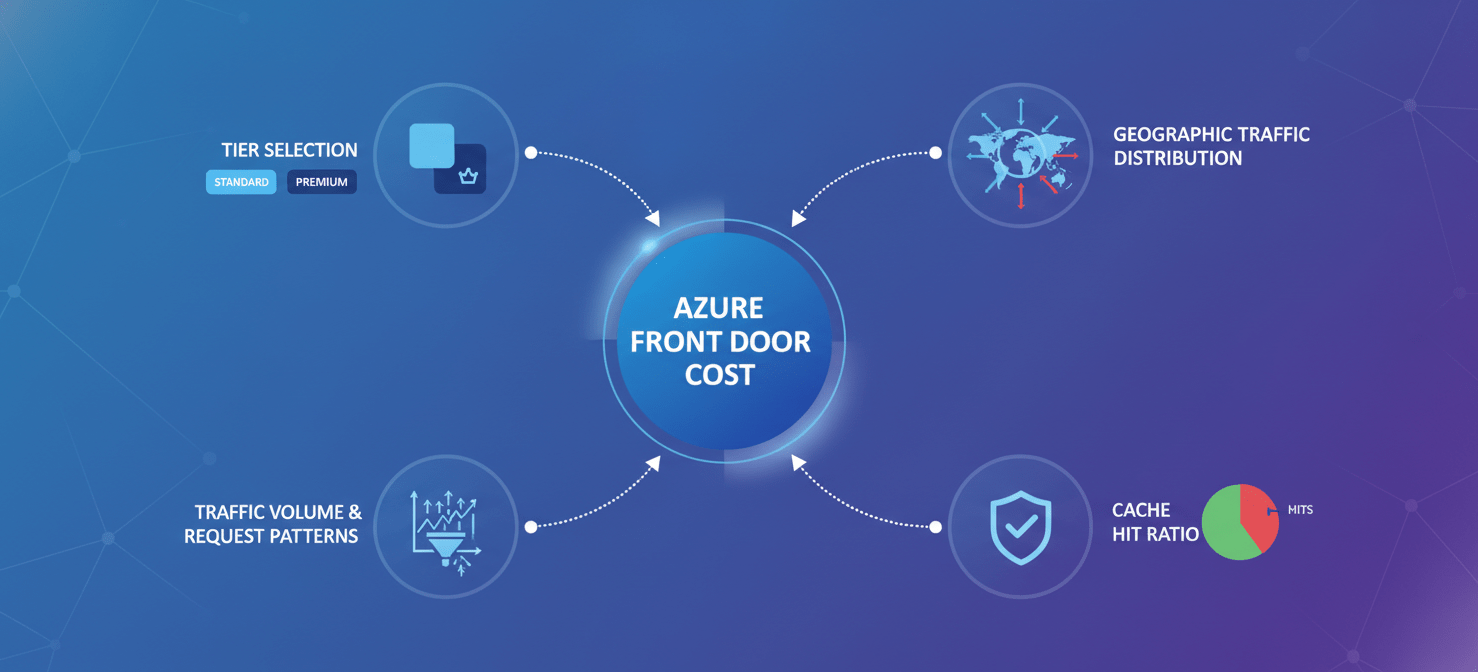
Several key variables will determine your final monthly cost. Getting a handle on these factors is central to any accurate Azure Front Door cost estimation.
Tier Selection: Standard vs. Premium
Your choice between the Standard and Premium tiers is the most significant cost driver. The Standard tier starts at a $35 monthly base fee, making it a cost-effective choice for applications that need global load balancing and content acceleration. In contrast, the Premium tier begins at a much higher $330 monthly base fee. This tier is designed for applications requiring advanced security, bundling features like managed WAF rules, bot protection, and Private Link support at no extra charge. If you need these security tools, Premium can be more economical than adding them piecemeal to the Standard tier or another service.
Geographic Traffic Distribution
Where your users are located matters immensely. Azure prices outbound data transfer based on eight different zones. North America and Europe are in the least expensive zones, while regions like South America or Australia have higher data transfer rates. Therefore, an application serving a global audience will have a blended rate that you must calculate based on traffic percentages from each region. Misjudging your geographic user base can lead to significant forecast errors.
Traffic Volume and Request Patterns
The sheer volume of your traffic is a primary cost component. This includes both the total gigabytes of data transferred out to users and the total number of requests processed. An application with millions of small API requests will have a different cost profile than one that serves large video files, even if the total data transferred is the same. For example, 100 million requests on the Standard tier in North America would add about $90 to your bill.
Cache Hit Ratio
Your cache hit ratio—the percentage of requests served directly from the Front Door edge cache without contacting your origin server—is another critical factor. A high cache hit ratio reduces “edge to origin” data transfer costs. More importantly, it lowers the load on your backend services, potentially reducing their cost and improving performance. Optimizing your caching strategy is a direct way to control your Front Door expenses.
A Step-by-Step Azure Front Door Cost Estimation
Here is a practical, four-step approach to creating a reliable cost estimate.
- Gather Your Traffic Data: First, collect data on your application’s traffic. You will need to know your average monthly outbound data transfer (in GB), the total number of user requests, and the geographic distribution of your users by percentage. Furthermore, estimate your expected cache hit ratio.
- Select Your Tier: Next, decide between the Standard and Premium tiers based on your security needs. If you require a comprehensive WAF with managed rulesets, the Premium tier is likely the correct choice.
- Use the Azure Pricing Calculator: With your data in hand, use the official Azure Pricing Calculator. This tool allows you to input your estimated data transfer and request volumes for different regions to get a detailed monthly cost breakdown. It is the most reliable tool for modeling your specific scenario.
- Model Different Scenarios: Finally, don’t just create one estimate. Model a few scenarios, such as a low-traffic month, an average month, and a peak-traffic month. This will give you a realistic cost range instead of a single, potentially misleading number.
Comparing Costs: Azure Front Door vs. Application Gateway
When considering a web application firewall and load balancer in Azure, many teams evaluate the Front Door vs. Application Gateway cost. The primary difference is that Front Door is a global service operating at the network edge, while Application Gateway is a regional service that operates within your virtual network.
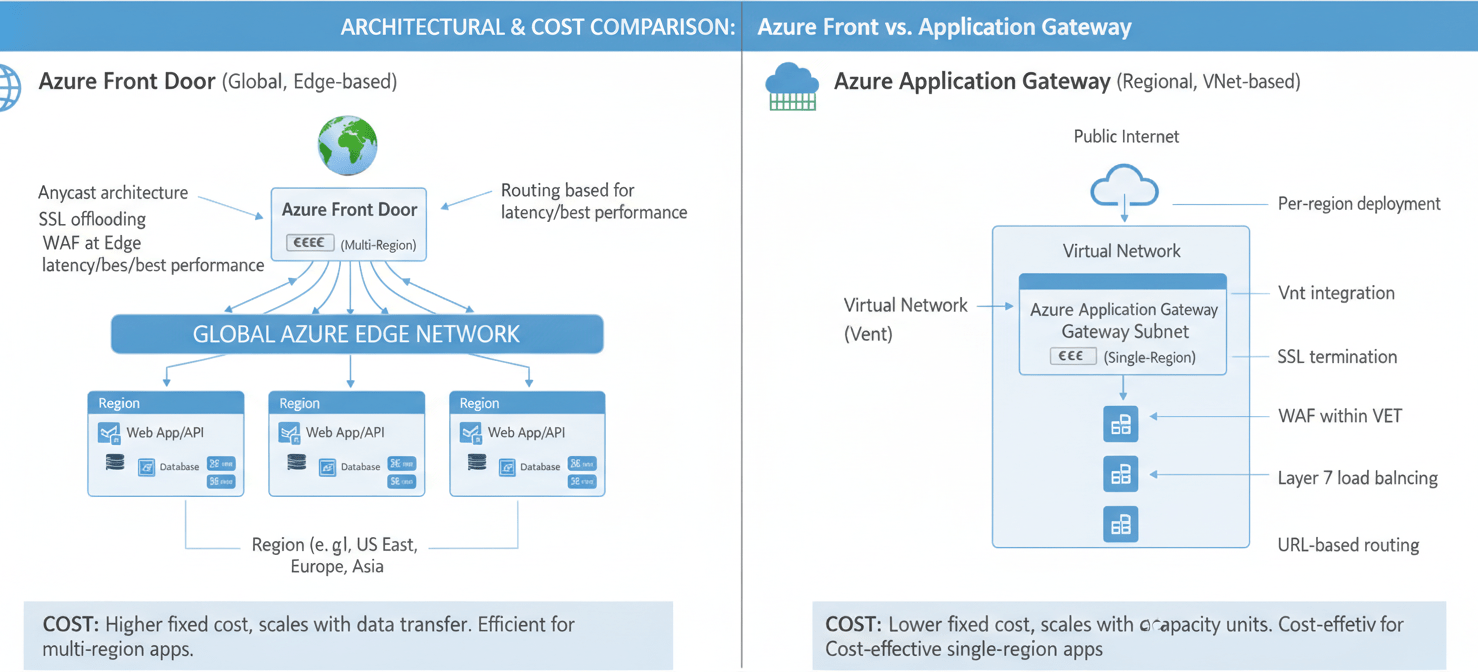
For applications serving users across multiple geographic regions, a single Front Door instance is often more cost-effective than deploying multiple Application Gateway instances. Application Gateway pricing is based on provisioned capacity units and data processing, which can become expensive when scaled across several regions.
However, for a single-region application with lower traffic, Application Gateway can be the cheaper option. Its pricing model may be more predictable for localized workloads. The best approach is to model your specific architecture in the Azure Pricing Calculator to see which service offers a better total cost of ownership for your needs.
Tips for Optimizing Your Azure Front Door Costs
Controlling your Azure Front Door bill doesn’t stop after the initial estimate. Proactive management can yield significant savings.
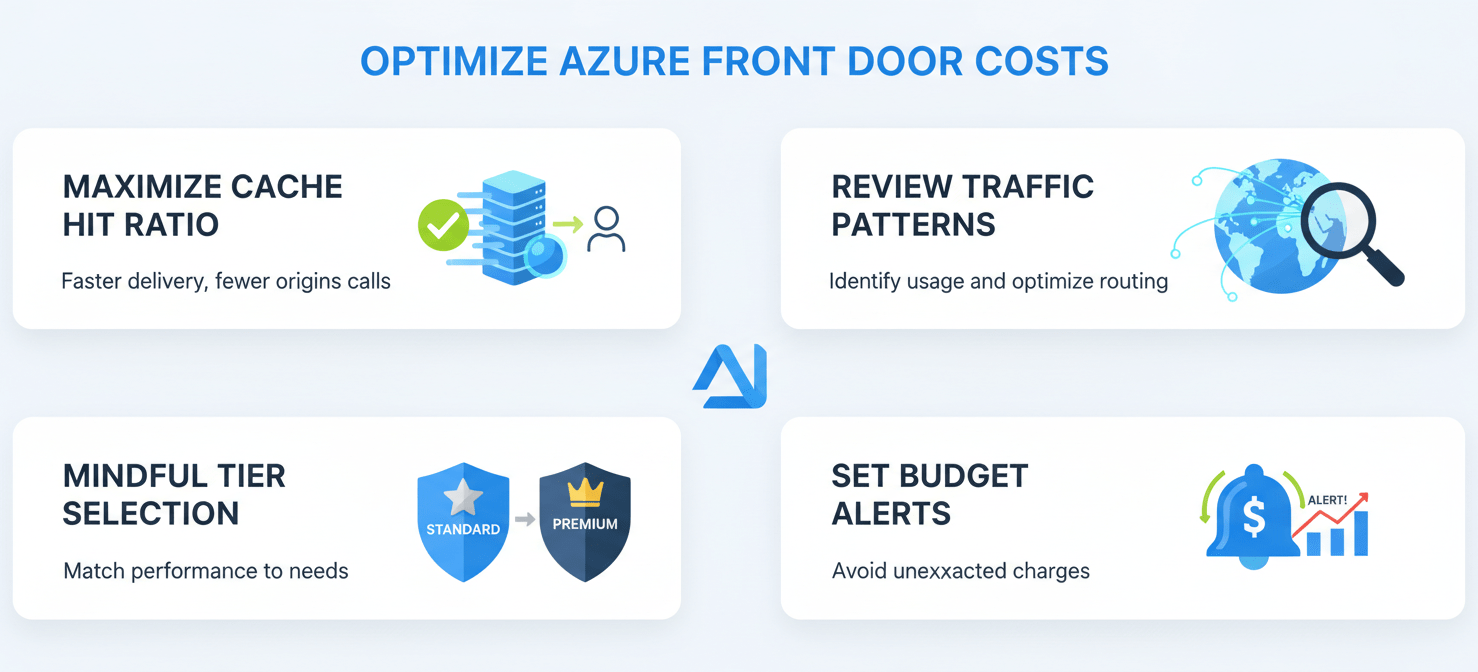
First, focus on maximizing your cache hit ratio. By configuring caching rules effectively, you can serve more content from the edge, which reduces costly data transfers from your origin servers. This not only saves money but also accelerates performance for your users.
Next, regularly review your traffic patterns and analytics. If you notice a significant amount of traffic from a more expensive data transfer zone, you might consider architectural changes or content strategies to better serve that region.
In addition, be mindful of your tier selection. If your security requirements change and you no longer need the advanced features of the Premium tier, downgrading to Standard can drastically cut your fixed monthly costs. Conversely, if you find yourself paying for separate WAF solutions on top of the Standard tier, upgrading to Premium might consolidate costs and be cheaper overall.
Finally, implement monitoring and alerts for your Azure spending. Setting budget alerts in Azure Cost Management can notify you when costs are trending higher than expected, allowing you to investigate and react before the end of the billing cycle.
Conclusion
An accurate Azure Front Door cost estimation requires a clear understanding of its multi-faceted pricing model and your application’s specific traffic profile. By breaking down the costs into base fees, data transfer, and request charges, you can move from a vague guess to a data-driven forecast. Remember to account for your user geography and tier selection, as these are the most significant variables. Ultimately, the goal is not just to predict costs but to control them. A well-planned Azure Front Door cost estimation is the foundation for an architecture that is not only performant and secure but also financially sustainable. After all, a surprise on your cloud bill is one of the few surprises no engineer enjoys.
To ensure your Azure Front Door architecture remains financially sustainable and free from billing surprises, you can book a demo to explore advanced cost management strategies or start your free Binadox trial for immediate insights.
 7-day free trial