



For a founder or CTO, runway is everything. Every dollar spent on idle cloud resources is a dollar not spent on product development or go-to-market. Yet, many startups get a nasty surprise when their monthly AWS bill arrives, a phenomenon known as AWS bill shock. This isn’t just a minor budget variance; it’s an unexpected spike in cloud spending that can materially impact your financial runway. The pay-as-you-go model that makes AWS so attractive can also become a liability without rigorous oversight. The good news is that with proactive strategies and a cost-conscious culture, you can prevent these shocks and manage your startup’s AWS bill effectively.
Key takeaways:
- Implement Proactive Guardrails: Set up AWS Budgets to alert your team when spending exceeds predefined thresholds, such as 80% of your monthly forecast. This is your first line of defense.
- Clean Up and Right-Size Continuously: Regularly audit for and eliminate unused resources like unattached EBS volumes and idle load balancers. Studies show that organizations waste an average of 28% of their cloud spend, often on over-provisioned resources.
- Leverage Cost-Saving Models: For predictable workloads, use AWS Savings Plans, which offer significant discounts (up to 72%) over on-demand pricing in exchange for a commitment to a consistent amount of usage.
- Foster a Culture of Cost Awareness: Make cloud cost a shared metric across engineering and finance. Discuss cost implications during architecture reviews and sprint planning.
What Causes AWS Bill Shock in Startups?
Unexpected AWS bills rarely come from a single source. Instead, they are often the result of several small, overlooked issues that compound over time. For a lean startup, these seemingly minor leaks can quickly escalate into a major financial drain.
Common Culprits and Hidden Costs
The most frequent causes of bill shock are not malicious but are born from a focus on speed over financial governance. Common offenders include:
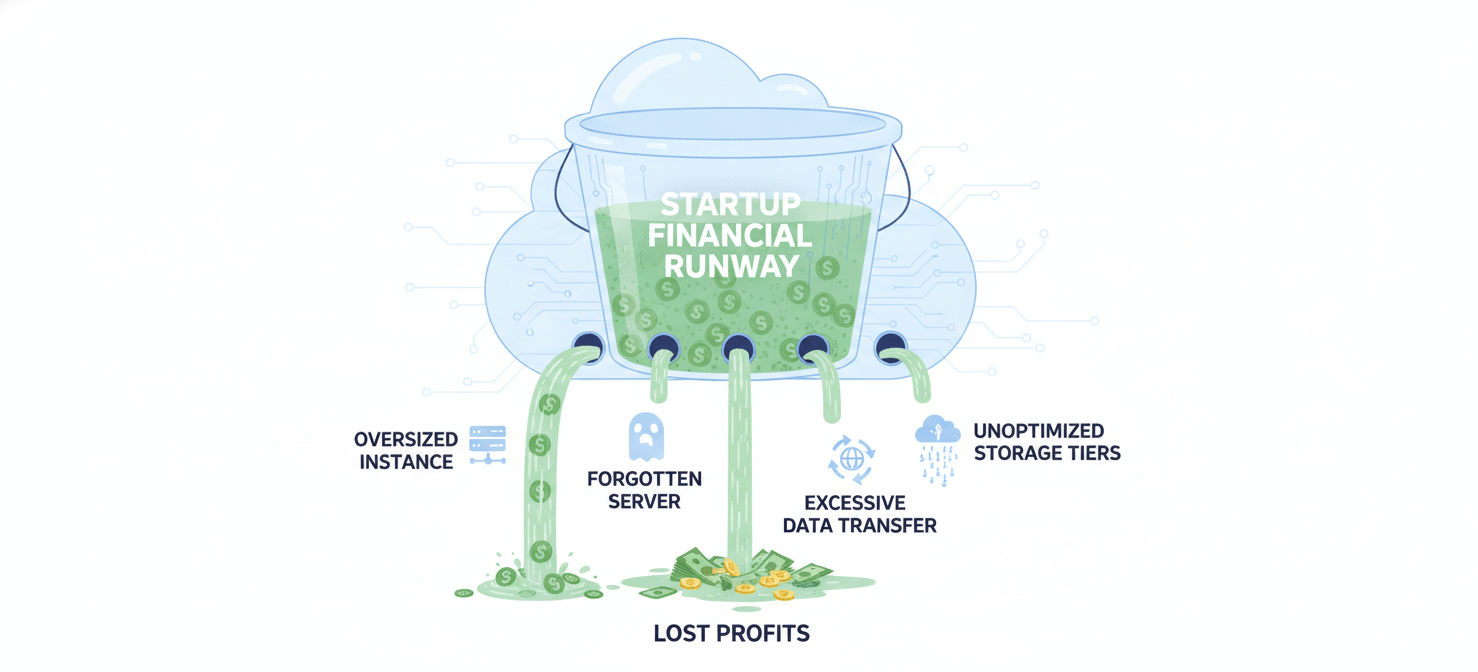
- Forgotten Resources: Development and test environments are notorious for this. An engineer spins up a few large EC2 instances for a proof-of-concept, gets pulled into another priority, and forgets to terminate them. These “zombie” resources can burn cash for weeks or months before being discovered.
- Data Transfer Fees: While data ingress to AWS is generally free, data egress (transferring data out to the internet) and inter-region or even inter-availability zone data transfers come with a cost. A seemingly simple architectural choice, like replicating data across regions for redundancy, can lead to surprisingly high data transfer charges.
- Over-provisioned Resources: In the rush to launch, it’s common to provision larger instances “just in case.” However, many workloads can run on much smaller, cheaper instances. One analysis found that roughly 40% of EC2 instances are at least one size larger than their workload requires.
- Storage Mismanagement: Startups often store all data in high-performance tiers like S3 Standard, even when much of it is rarely accessed. Moving logs, backups, and other infrequently accessed data to cheaper storage tiers like S3 Glacier Deep Archive can dramatically reduce costs.
- Misunderstanding the Free Tier: The AWS Free Tier is a great way to get started, but its limits can be confusing. For example, the 750 hours of free t2.micro or t3.micro EC2 usage is for a single instance; running two instances will exhaust your free hours in about two weeks. Furthermore, services like NAT Gateways and Elastic IP addresses not attached to a running instance are not included and can incur charges.
Proactive AWS Cost Control for Startups
The most effective way to deal with AWS bill shock is to prevent it from happening in the first place. This requires moving from a reactive, end-of-month bill review to a proactive, continuous system of cost management.
Setting Up Your Financial Guardrails
Your first step should be to establish automated alerts and monitoring. This is your early warning system.
- AWS Budgets: This tool is non-negotiable. You can create budgets that track your costs and usage, and set custom alerts that notify you via email or Slack when your spending exceeds a certain threshold. A common practice is to set alerts at 50%, 80%, and 100% of your forecasted monthly spend. You can even create zero-spend budgets to get notified the moment you exceed the Free Tier limits.
- AWS Cost Explorer: This is your primary tool for visualizing and analyzing your spending patterns. Use it to identify your top cost-driving services and understand trends over time. You can filter and group costs by service, region, or custom tags to pinpoint exactly where your money is going.
- AWS Trusted Advisor: For accounts with Business-level support or higher, Trusted Advisor provides automated checks to identify idle resources, underutilized instances, and other cost-saving opportunities. It can flag things like unassociated Elastic IP addresses or idle RDS DB instances that are easy to miss manually.
Architectural and Purchasing Decisions
Beyond monitoring, your architectural choices and purchasing models have a huge impact on your bill.
- Right-Sizing: Before you commit to long-term plans, make sure your resources are right-sized. Use tools like AWS Compute Optimizer to get recommendations based on your actual usage data. The goal is to match instance capacity to workload demand, avoiding payment for idle CPU and memory.
- Choosing the Right Pricing Model: Don’t just stick with on-demand pricing. For your baseline, predictable workloads, commit to a one- or three-year AWS Savings Plan. These plans offer discounts comparable to Reserved Instances but with much more flexibility; they automatically apply to EC2, Fargate, and Lambda usage regardless of instance family, size, or region. This is ideal for startups whose architecture is likely to evolve.
- Leverage Spot Instances: For non-critical, fault-tolerant workloads like CI/CD pipelines, batch processing, or development environments, use EC2 Spot Instances. These offer discounts of up to 90% off on-demand prices, but with the caveat that AWS can reclaim the capacity with a two-minute warning.
Reactive Strategies: What to Do When You Get a Surprise AWS Bill
Even with the best proactive measures, mistakes can happen. When you receive a bill that’s significantly higher than expected, it’s crucial to act quickly and methodically.
Step 1: Don’t Panic. Investigate.
The first step is to understand the “what” and “why.”
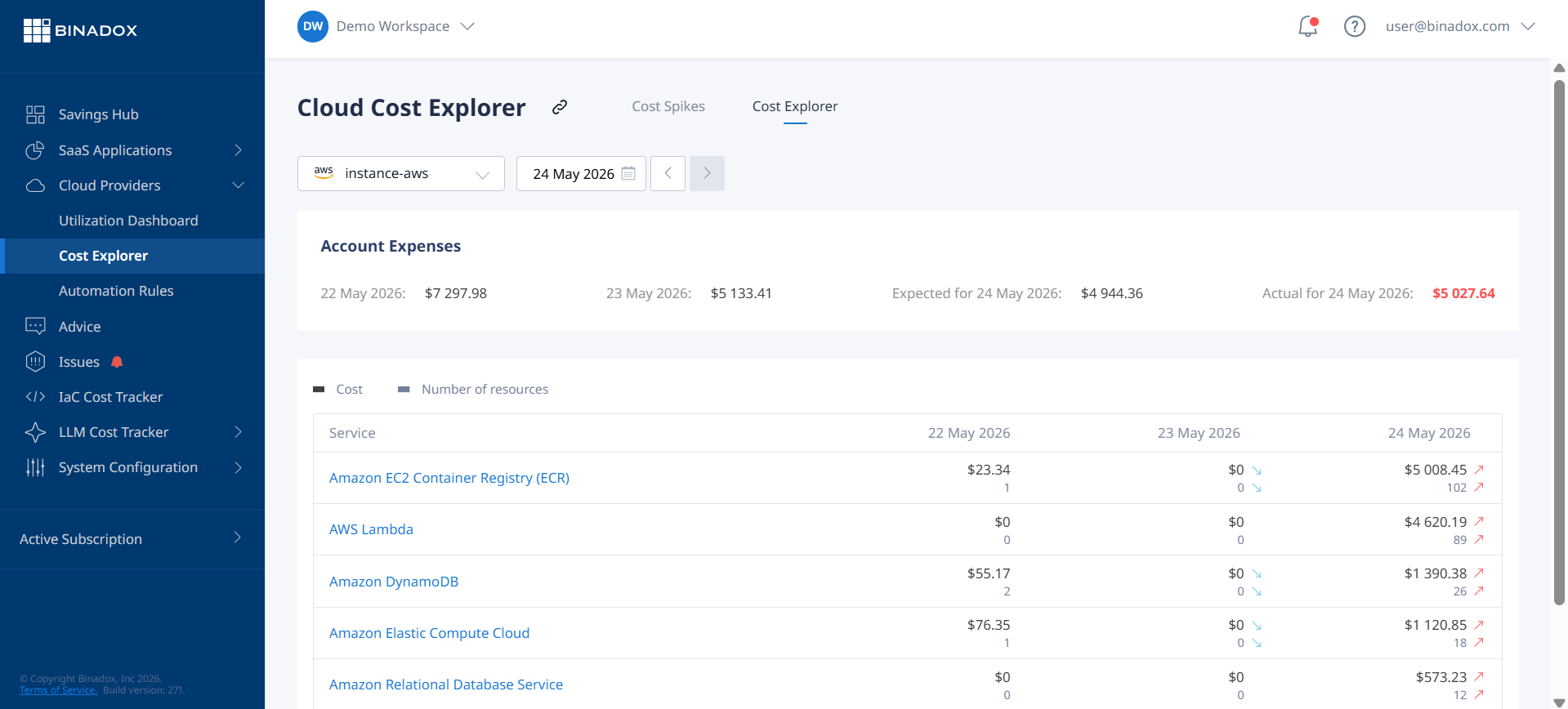
- Dive into AWS Cost Explorer: Use the billing console to break down the charges. Filter by service and region to identify the source of the spike. The tool allows you to view data with daily or even hourly granularity, which can help you correlate the cost increase with a specific deployment or event.
- Check for Obvious Offenders: Look for the common culprits mentioned earlier. Did a developer leave a large GPU instance running? Is there a sudden spike in data transfer out of a specific S3 bucket? Are there a large number of unattached EBS volumes?
- Review CloudTrail Logs: AWS CloudTrail records all API activity in your account. If you suspect unauthorized access or a misconfigured script, CloudTrail logs can help you trace the activity back to its origin.
Step 2: Remediate and Communicate
Once you’ve identified the root cause, take immediate action to stop the financial bleeding.
- Terminate Unused Resources: If the cause is forgotten or idle resources, terminate them immediately. Remember that stopping an EC2 instance doesn’t stop charges for its associated EBS volumes or Elastic IPs.
- Contact AWS Support: If the charges are the result of a genuine mistake or a system error, open a support case under “Account and Billing”. Be polite, honest, and detailed in your explanation. Explain what happened, the steps you’ve taken to fix it, and the measures you’re putting in place to prevent it from happening again. In many cases of unintentional usage, AWS support may be willing to offer a one-time credit or waive some of the charges.
Building a Cost-Conscious Engineering Culture
Technology and tools are only part of the solution. Long-term, sustainable cost control comes from building a culture where every engineer understands and takes ownership of the cost implications of their work.

Making Cost a Shared Responsibility
Cost should not be a topic that only comes up when the finance team reviews the monthly bill. It needs to be an engineering metric, just like latency or uptime.
- Implement Cost Allocation Tagging: Enforce a strict tagging policy for all resources. Use tags to associate costs with specific projects, teams, or features. This creates visibility and accountability. When a team can see exactly how much their new feature is costing to run, they are more likely to build it efficiently.
- Integrate Cost into a DevOps Workflow: Discuss potential cost impacts during architectural design reviews. Include cost optimization as a non-functional requirement in your development process. Some teams even include cost estimates in their pull requests.
- Regular Cost Reviews: Hold brief, regular meetings (e.g., bi-weekly) with engineering leads to review spending trends and discuss anomalies. This keeps cost top-of-mind and creates a forum for sharing best practices.
Ultimately, preventing AWS bill shock is not about slashing costs indiscriminately. It’s about efficiency and extending your runway. By implementing proactive controls, choosing the right tools and purchasing models, and fostering a culture of financial accountability, you can ensure that your cloud spend is directly contributing to building your product and growing your business—not just disappearing into a black hole of idle resources. It’s the difference between treating your cloud budget as an uncontrollable force of nature and managing it like the critical business asset it is.
To truly manage your cloud budget as the critical business asset it is and prevent future AWS bill shock, you can easily sign up for our free cost management tools or book a personalized demo to explore advanced features.
 7-day free trial