



That end-of-month invoice arrives in your inbox. Instead of the expected five figures, you see six. A developer forgot to tear down a testing environment, or a new service auto-scaled far beyond projections. Now, you have to explain a 46,000% cost overrun to leadership. This isn’t a hypothetical; it’s a real scenario that highlights the critical need for robust GCP FinOps governance. Without proactive controls, your cloud spend is a ticking time bomb. This article provides a practical framework for implementing governance that moves your team from reactive fire-fighting to proactive cost control, focusing on the metrics and mechanisms that matter for showback, chargeback, and predictable forecasting.
Key takeaways
- Visibility is the foundation: Achieve over 95% cost allocation accuracy by enforcing a consistent labeling and project hierarchy strategy.
- Guardrails are not optional: Use a combination of budgets, alerts, and resource quotas to create hard and soft limits on spending.
- Automation is your enforcement arm: Connect budget alerts to Pub/Sub and Cloud Functions to automatically cap billing or de-provision non-essential resources when thresholds are breached.
- Culture eats strategy for breakfast: Embed cost-awareness into engineering workflows through shared dashboards and aligning team KPIs with FinOps metrics.
Why Proactive Governance Beats Reactive Cost Cutting
Reactive cost optimization is a losing game. It’s a cycle of manual reviews, frantic cutbacks, and strained relationships with engineering teams who feel blindsided. Proactive governance, in contrast, establishes the rules of the road before the journey begins. It’s about building financial guardrails directly into your cloud environment, making cost-consciousness the path of least resistance.
For a FinOps lead, the difference is stark. Instead of explaining past overages, you’re managing a predictable system. Your key performance indicators (KPIs), such as forecast accuracy and the percentage of allocated spend, become more reliable. This shift allows you to focus on strategic initiatives—like optimizing commitment-based discounts or improving unit economics—rather than constantly chasing down the source of the latest spending spike.
A proactive approach embeds financial accountability into the operational framework. It transforms cost management from a monthly financial exercise into a continuous, automated process that aligns cloud consumption with business value. The goal isn’t just to save money; it’s to make spending predictable, efficient, and directly attributable to the teams and products driving revenue.
Foundational GCP FinOps Governance: Visibility and Allocation
You cannot control what you cannot see. The first principle of any gcp cost governance framework is achieving granular visibility into where every dollar is going. Without a clear system for cost allocation, showback and chargeback models are impossible to implement, and accountability remains a vague aspiration.
Structuring for Clarity: Projects and Folders
Your GCP resource hierarchy is your first line of defense. A well-designed structure of folders and projects simplifies cost attribution immensely. Instead of a flat list of hundreds of projects, group them logically.
Consider a structure that mirrors your organization:
- By Business Unit:
BU > Product > Environment(e.g.,Retail > Checkout-API > Prod) - By Environment:
Environment > Application > Service(e.g.,Production > Web-Frontend > Caching-Layer)
This hierarchical approach allows you to see aggregated costs at each level. You can instantly view the total spend for the entire Retail business unit or drill down into the production costs of a single microservice.
The Power of Consistent Labeling
While a good project structure provides a high-level view, labels offer the granular detail needed for true chargeback. Labels are key-value pairs you attach to resources like Compute Engine instances or Cloud Storage buckets. When you export your billing data to BigQuery, these labels are included, allowing you to slice and dice your spending data with precision.
Your team should define and enforce a mandatory labeling policy. Key labels to standardize include:
team: The engineering team responsible (e.g.,backend-api-team).cost-center: The financial owner (e.g.,engineering-123).application: The specific application the resource serves (e.g.,payment-service).environment: The deployment stage (e.g.,prod,staging,dev).
The goal is to achieve a high percentage of tagged resource spend—aim for over 95%. Use tools like Cloud Asset Inventory to audit label compliance and create dashboards that highlight untagged resources, making it easy to assign ownership and close visibility gaps.
Establishing Guardrails: Budgets, Alerts, and Quotas
With clear visibility established, the next step is to implement controls that prevent costs from spiraling. These guardrails act as an early warning system and, in some cases, a hard stop on spending.
Budgets and Alerts: Your Early Warning System
In Google Cloud, a budget is more than just a number in a spreadsheet; it’s an active monitoring tool. You can create budgets for an entire billing account, specific projects, or even a group of services.
A critical best practice is to set multiple alert thresholds. Don’t wait until 100% of the budget is consumed. Configure alerts at 50%, 90%, and 100% of the budgeted amount. Furthermore, use forecasted spend alerts. These use your current consumption rate to predict your end-of-month bill, warning you of a potential overage long before it actually happens.
By default, budget alerts are sent to Billing Administrators. This is often a mistake. The finance team can’t shut down a misconfigured VM. Instead, you should use Cloud Monitoring notification channels to route alerts directly to the engineering teams responsible via Slack, PagerDuty, or other operational tools. This ensures the people who can fix the problem get the information immediately.
Quotas: The Hard Stop
While budgets provide warnings, they don’t actually stop spending. For that, you need quotas. Quotas are service-level limits that prevent the provisioning of new resources once a certain threshold is reached. For example, you can set a quota on the number of VM instances that can be created in a development project.
Think of quotas as a safety net. They are particularly useful for non-production environments where experimentation can sometimes lead to accidentally provisioning a massive, expensive resource. By setting reasonable quotas on high-cost services (like high-core-count VMs or GPUs) in development projects, you can cap the potential financial damage from a simple mistake.
Automating Governance for Real-Time Control
Email alerts are useful, but they rely on a human to see the message and take action. For true, real-time FinOps on GCP, you must automate your cost controls. This is where programmatic budget notifications come into play.
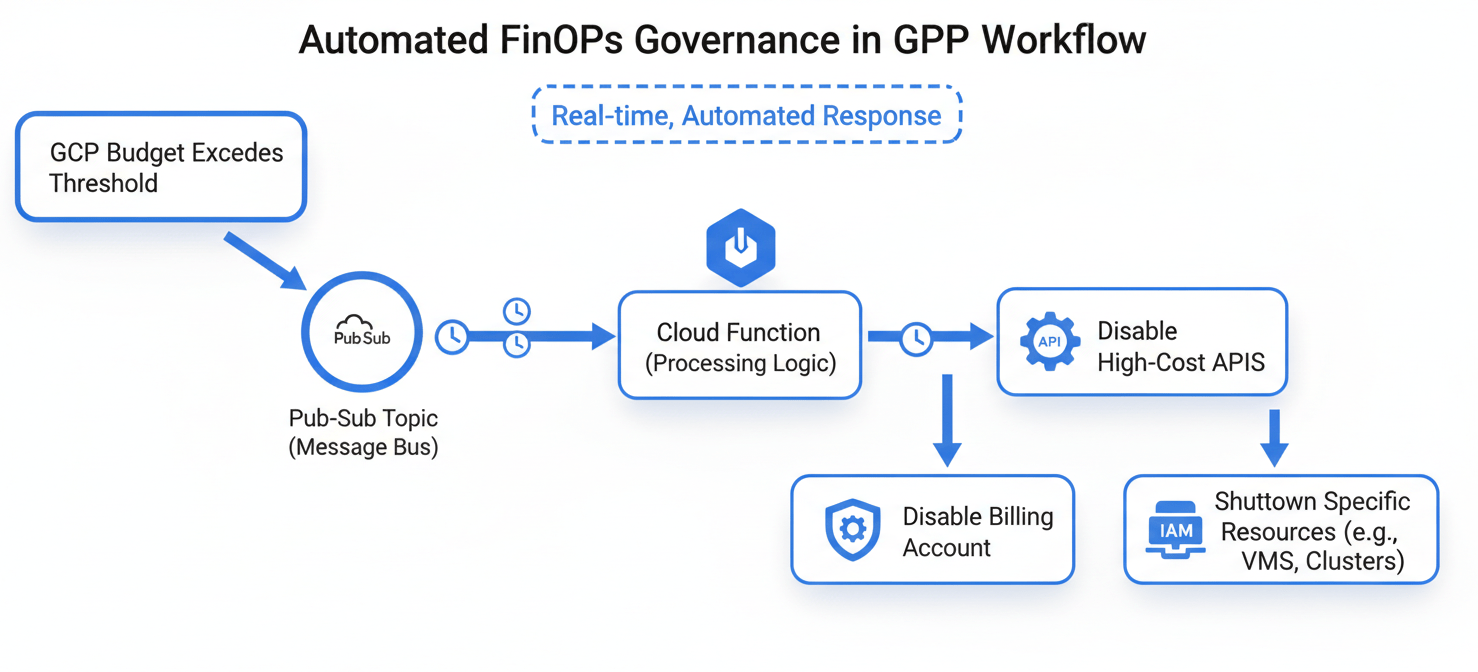
Instead of just sending an email, you can configure a GCP budget to publish a message to a Pub/Sub topic when a threshold is met. This message contains all the relevant data about the budget and the current cost. From there, you can trigger a Cloud Function to take immediate, automated action.
Building a “Billing Kill Switch”
This programmatic approach allows you to build powerful, automated governance workflows. For example:
- Capping Non-Production Spend: When a development project hits 110% of its budget, a Cloud Function can be triggered to run a
gcloud projects update --billing-account ""command, effectively detaching the project from billing and shutting down all resources. - Disabling High-Cost APIs: If a specific service’s budget is exceeded, the function could programmatically disable the APIs for that service.
- Selective Resource Shutdown: A more sophisticated function could parse the cost data, identify the highest-costing resources (based on labels), and selectively shut down only those specific VMs or services.
This level of automation is the pinnacle of proactive governance. It moves your response time from hours or days to mere seconds, ensuring that a cost anomaly is contained before it can cause significant financial damage.
Cultivating a Cost-Conscious Culture
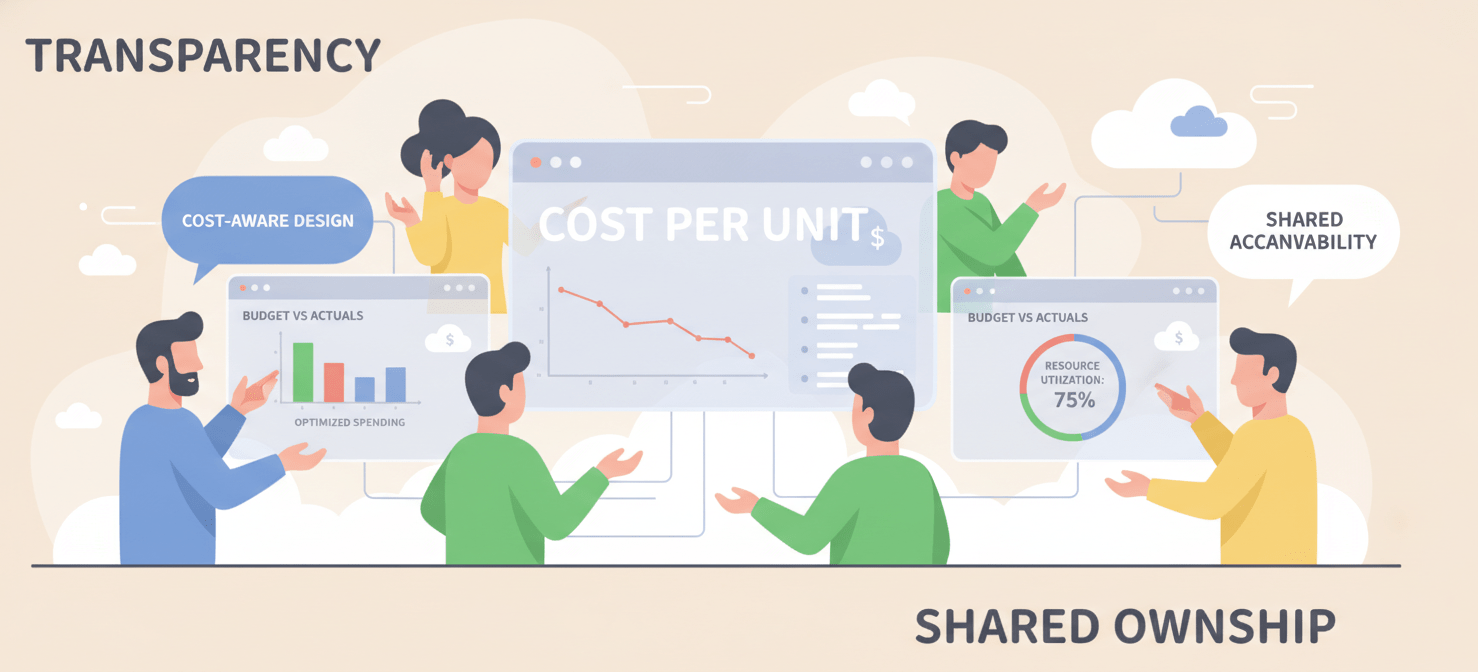
Tools and automation are essential, but a truly effective GCP FinOps governance strategy requires a cultural shift. Financial accountability must become a shared responsibility, not just a task for the FinOps team.
Shared Dashboards and KPIs
Democratize your cost data. Use Looker Studio (formerly Data Studio) to build dashboards on top of your BigQuery billing export. Create views that are relevant to different audiences:
- Engineering Leads: Show spend broken down by application and microservice, highlighting cost-per-transaction or other relevant unit metrics.
- Product Managers: Display the total cost of ownership (TCO) for their products.
- Finance/Executives: Provide high-level views of spend vs. forecast, commitment utilization, and overall cloud ROI.
When engineers can see the cost impact of their code in near-real-time, they start to think like owners. This visibility fosters a sense of accountability and encourages them to build more cost-efficient applications from the start.
Integrating FinOps into Workflows
Embed cost considerations directly into the development lifecycle.
- Cost Estimation: Require a cost estimate (using the Google Cloud Pricing Calculator) as part of the design and approval process for any new feature or service.
- Pull Request Checks: Integrate cost analysis tools that can flag potentially expensive infrastructure changes before they are merged.
- Team-Level KPIs: Make FinOps metrics, like “Cost vs. Budget” or “Untagged Resource Percentage,” part of the regular performance reviews for engineering teams.
By making cost a standard part of the engineering conversation, you shift the culture from one where finance polices spending to one where engineering manages value.
Conclusion
Eliminating bill shock isn’t about finding a single magic bullet. It’s about building a layered system of proactive controls. It starts with the unglamorous but essential work of establishing visibility through a logical project hierarchy and a strict labeling discipline. Upon that foundation, you build automated guardrails using budgets, alerts, and quotas that warn you of danger and can even take action on your behalf. Ultimately, this technical framework for GCP FinOps governance must be supported by a cultural shift that empowers every engineer to see, understand, and own their piece of the cloud bill. The alternative is to keep your fingers crossed at the end of each month, hoping that this isn’t the one where a forgotten test environment costs more than a small acquisition. And hope is not a strategy.
To move beyond hoping for the best and truly master your GCP FinOps, you can explore our platform’s capabilities with a free account, or schedule a personalized walkthrough to see how our solutions can integrate with your existing setup.
 7-day free trial