



Cloud computing offers incredible flexibility, but that same elasticity can lead to unpredictable and volatile costs. When demand for your services spikes or development teams spin up resources for temporary projects, your AWS bill can quickly spiral out of control. This volatility makes budgeting a nightmare and can erode the financial benefits of the cloud. However, a structured approach to monitoring, planning, and optimization can bring these costs back in line. A key part of this is a consistent strategy for reducing AWS cloud cost that doesn’t sacrifice performance or agility. By implementing a few core practices, your team can transform cloud spending from a reactive expense into a predictable, managed investment.
Key takeaways
- Implement a 5-step continuous cycle: gain visibility, set guardrails, match spending to usage, choose the right pricing models, and automate.
- Use native AWS tools like Cost Explorer and AWS Budgets to get a clear picture of spending patterns and receive alerts before you overspend.
- Leverage elasticity through auto-scaling and scheduling to automatically align resources with real-time demand, avoiding payment for idle capacity.
- Combine pricing models like Savings Plans and Spot Instances to significantly lower costs, with potential savings of up to 72% for predictable workloads and up to 90% for fault-tolerant ones.
The High Cost of Surprises: Why Volatility Wrecks Budgets
The primary challenge with cloud costs isn’t just the total amount, but its unpredictability. A successful marketing campaign, a seasonal traffic surge, or an unexpected batch processing job can cause resource consumption to skyrocket. Without a plan, you are left overprovisioning “just in case,” paying a premium for resources that sit idle most of the time. This reactive approach is inefficient and expensive.

Furthermore, a lack of visibility makes it difficult to attribute costs to specific projects, teams, or features. When the bill arrives, it’s just a single large number, with no clear indication of what drove the expense. This makes it impossible to make informed decisions about where to optimize or to hold teams accountable for their consumption. The goal is to move from a state of surprise to one of control, where costs align with business value.
Step 1: Gain Visibility with an AWS Cost Analysis Tool
You cannot control what you cannot see. Therefore, the first step in any cost optimization strategy is to gain deep visibility into your spending patterns. Guesswork leads to waste. Instead, you need granular data to understand exactly where your money is going.
Uncover Spending Patterns with AWS Cost Explorer
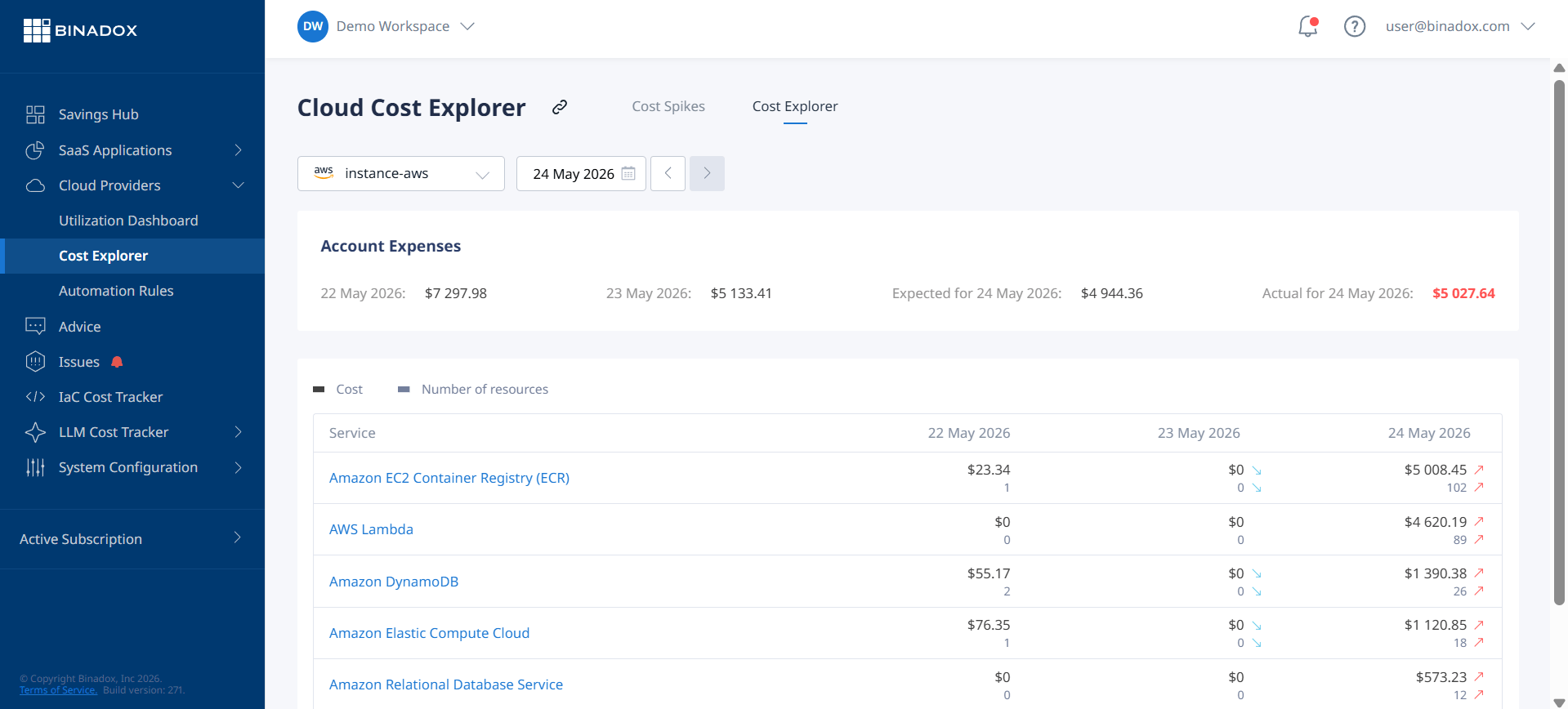
AWS Cost Explorer is a built-in tool that allows you to visualize, understand, and manage your AWS costs and usage over time. After enabling it, AWS prepares data for the current month and the past 13 months, allowing you to identify trends and pinpoint cost drivers.
Use Cost Explorer to:
- Filter and group data: Break down costs by service (e.g., EC2, S3, RDS), linked account, region, or resource tags. This helps you attribute spending to the correct team or project.
- Analyze historical trends: View your spending over the last 13 months to understand patterns, such as month-end processing spikes or seasonal traffic increases.
- Identify top cost drivers: Quickly see which services and resources contribute most to your bill, focusing your optimization efforts where they will have the most impact.
Use Tagging for Granular Cost Allocation
A consistent tagging strategy is fundamental to cost visibility. By applying tags (key-value pairs) to your AWS resources, you can categorize them by project, department, environment (e.g., production, development), or owner. This allows Cost Explorer to provide detailed reports that show not just what you’re spending on, but why. Without proper tagging, attributing costs becomes a forensic exercise.
Step 2: Set Guardrails with Budgets and Forecasting
Once you have visibility, the next step is to establish proactive controls. Instead of just analyzing past spending, you can set up guardrails to prevent future overruns. This involves creating budgets and using forecasting tools to anticipate costs.
Prevent Overspending with AWS Budgets
AWS Budgets allows you to set custom cost and usage thresholds and receive alerts when you approach or exceed them. This transforms cost management from a reactive to a proactive process. You can create budgets based on overall monthly cost, or get more specific by filtering by service, linked account, or tags.
For example, you can set a budget for a specific development team’s sandbox environment. If their spending is forecasted to exceed the budgeted amount, they receive an alert, giving them time to shut down unused resources before they blow through their allocation.
Look Ahead with Cost Forecasting
Cost Explorer also provides cost forecasts for up to 12 months into the future based on your historical usage data. While not a crystal ball, this forecast provides a reasonable estimate of your future bill, helping you plan and allocate funds more effectively. The forecast can also help you decide when to purchase long-term commitments like Savings Plans by showing you your baseline, predictable usage.
In addition, AWS Cost Anomaly Detection uses machine learning to identify unusual spending, helping you catch issues like resource misconfigurations or unexpected usage spikes before they become major problems.
Step 3: Match Spending to Usage with Elasticity
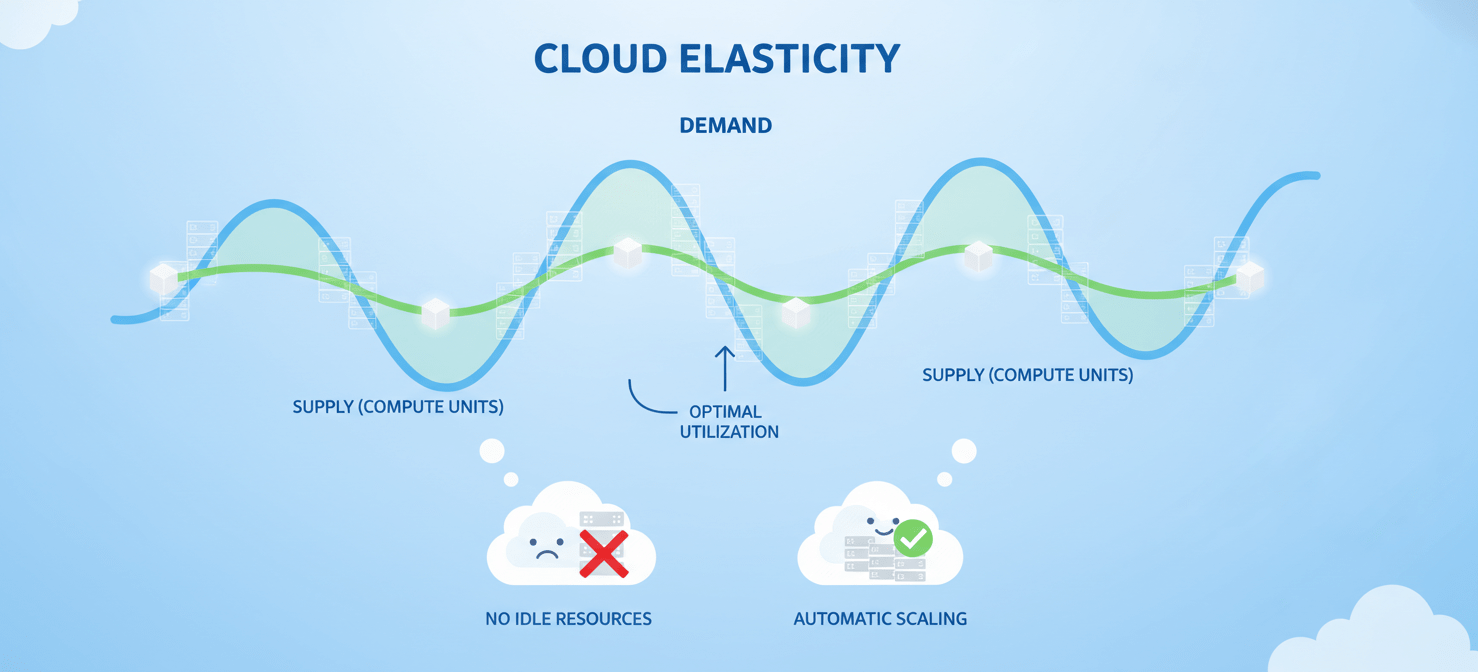
One of the core promises of the cloud is elasticity—the ability to scale resources up and down to match demand. However, many organizations fail to take full advantage of this, leading to significant waste. The key is to stop paying for idle resources.
Implement Auto Scaling
For workloads with variable demand, Auto Scaling is essential. It automatically adjusts the number of EC2 instances in your fleet to meet current traffic levels. During periods of high demand, it adds instances to maintain performance. When demand subsides, it terminates unneeded instances, ensuring you only pay for the compute capacity you actually use. This is far more efficient than provisioning for peak capacity 24/7.
Schedule Non-Production Resources
Development, testing, and staging environments often don’t need to run outside of business hours. By using a tool like AWS Instance Scheduler, you can automate the process of stopping these resources in the evenings and on weekends. Shutting down a non-production environment for 12 hours a day can reduce its compute costs by 50% or more.
Step 4: Choose the Right Pricing Models
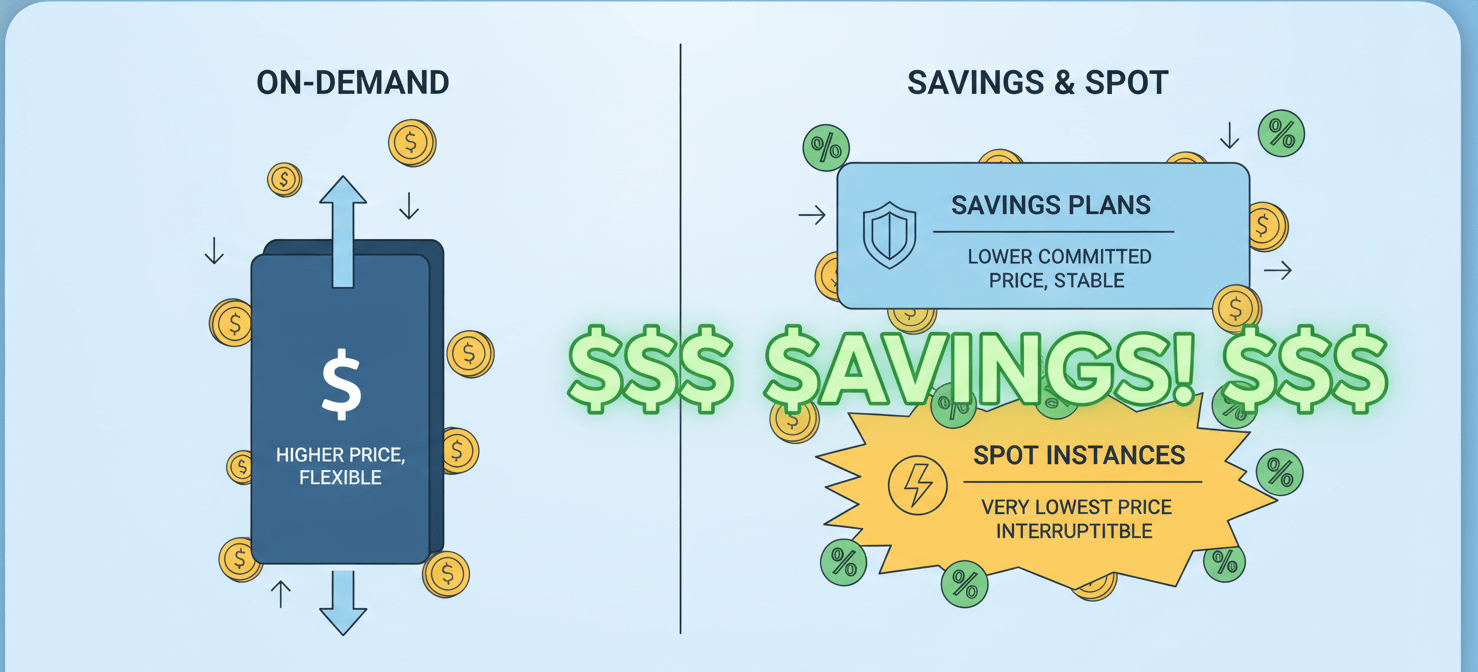
Relying solely on On-Demand pricing is one of the most common and costly mistakes. AWS offers several pricing models designed to reduce costs for different usage patterns. A blended approach that combines these models is the most effective way to lower your bill.
Commit to a Baseline with Savings Plans
For predictable, steady-state workloads, Savings Plans offer significant discounts—up to 72% compared to On-Demand prices—in exchange for a one- or three-year commitment to a consistent amount of usage (measured in $/hour). They are more flexible than Reserved Instances, as the discount automatically applies to different instance families and even other services like AWS Fargate and Lambda. This makes them ideal for establishing a baseline of committed spending while retaining architectural flexibility.
Use Spot Instances for Fault-Tolerant Workloads
Spot Instances let you take advantage of unused EC2 capacity at discounts of up to 90% off On-Demand prices. The trade-off is that these instances can be reclaimed by AWS with a two-minute warning. This makes them unsuitable for critical, stateful applications. However, they are an excellent fit for fault-tolerant and stateless workloads like batch processing, data analysis, and CI/CD pipelines.
Step 5: Automate and Iterate for Continuous Improvement
Cost optimization is not a one-time project; it’s an ongoing process. The cloud environment is constantly changing, with new services being launched and usage patterns evolving. Therefore, you must continuously monitor, analyze, and optimize.
Leverage AWS Trusted Advisor and Compute Optimizer
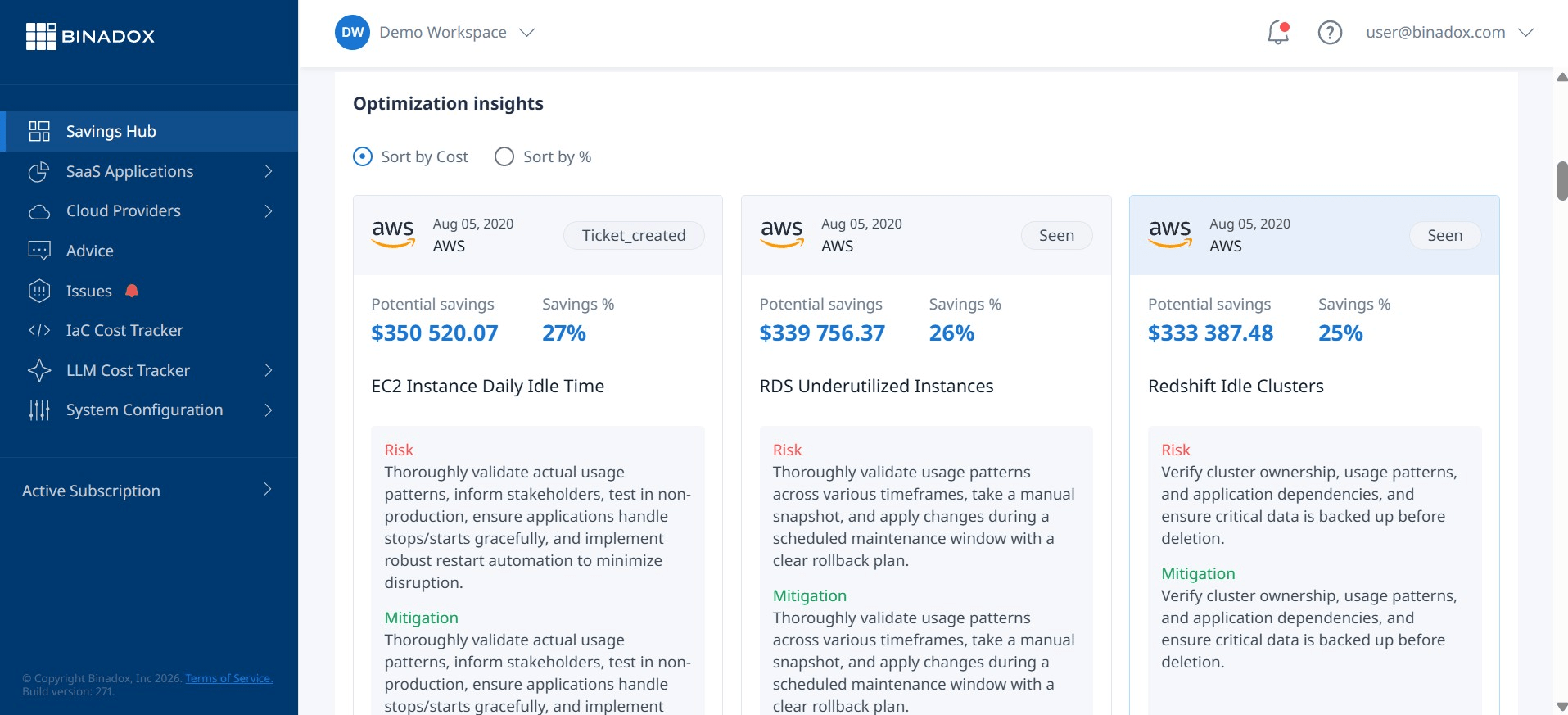
AWS Trusted Advisor is an automated service that inspects your AWS environment and provides real-time recommendations based on best practices. Its cost optimization checks can identify idle resources like unattached EBS volumes or underutilized EC2 instances, providing concrete steps for immediate savings.
For more advanced analysis, AWS Compute Optimizer uses machine learning to analyze your resource utilization and recommend optimal configurations. It can suggest right-sizing instances or moving to newer, more cost-effective instance types like those powered by Graviton processors.
Create a FinOps Culture
Ultimately, the most effective way to control costs is to build a culture of cost awareness across your organization. This practice, often called FinOps, involves creating a partnership between finance and technology teams to manage cloud spending collaboratively. When engineers are given visibility into the cost of the resources they provision and are held accountable for that spending, they are empowered to make more cost-effective decisions from the start.
Putting It All Together: A Practical Workflow for Reducing AWS Cloud Cost
Taming volatile cloud spending requires a systematic, multi-faceted approach. It begins with deep visibility, using tools like Cost Explorer and a robust tagging strategy to understand where money is going. From there, you establish proactive controls with AWS Budgets to prevent overspending before it happens.
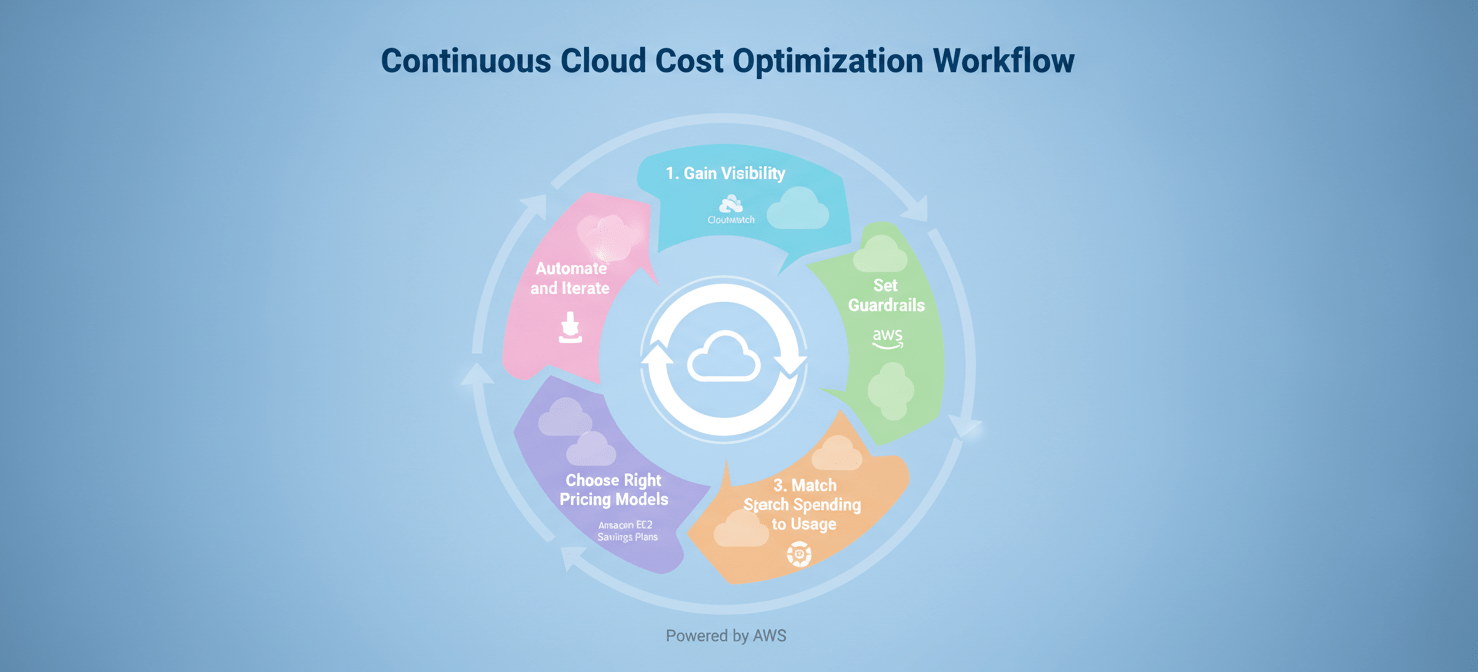
Next, you actively align your infrastructure with actual demand through elasticity mechanisms like Auto Scaling and scheduling non-production resources. You then optimize your rates by layering different pricing models, using Savings Plans for your predictable baseline and Spot Instances for interruptible workloads. Finally, you make this an ongoing process by leveraging automated recommendation tools and fostering a culture of cost ownership.
Conclusion
Managing cloud costs in a volatile environment is less about finding a single magic bullet and more about implementing a continuous, disciplined process. The tools and strategies are readily available, but they require consistent application. By moving from a reactive to a proactive stance, your team can stop being surprised by the monthly bill. A deliberate strategy for reducing AWS cloud cost transforms your cloud investment from an unpredictable operational expense into a powerful, efficient, and financially sound engine for innovation. After all, the goal of the cloud is to enable the business, not to become a financial liability in a nicely formatted invoice.
To implement a truly proactive and disciplined approach to your AWS costs, you can start your free Binadox trial or book a demo to explore how dedicated platforms can provide even greater control and efficiency.
 7-day free trial