




Browser Extension for SaaS and Shadow IT Discovery
The Binadox Browser Extension helps organizations discover SaaS applications and shadow IT directly in employee browsers. It detects authentication events and web activity to identify the cloud tools employees actually use.
How it connects
The extension works as a Chrome or Firefox add-on installed on employee browsers. It runs as a content script injected on every page load. Configuration comes from an internal discovery server (a hostname binadox.config that your DNS resolves to the server address), which tells the extension where to send its data and what API token to use. There is no cloud dependency for configuration. The discovery server lives on your network, and the extension fetches its settings from there.
What the Browser Extension Detects
The Binadox Browser Extension helps identify SaaS activity in real time by detecting:
- SaaS login events
- OAuth authentication flows
- Web application usage
- SaaS domains accessed from the browser
- Shadow IT applications used without IT approval
This allows organizations to build a complete inventory of SaaS tools used by employees.
How the Browser Extension Detects SaaS Applications
The extension does two things: it detects login pages and it records authentication events.
Login page detection uses a multi-factor algorithm that examines page structure — password fields, SSO buttons, OAuth redirects, “Sign in” form patterns. This is not keyword matching. The extension looks at DOM structure to handle dynamic pages where login forms load after initial render.
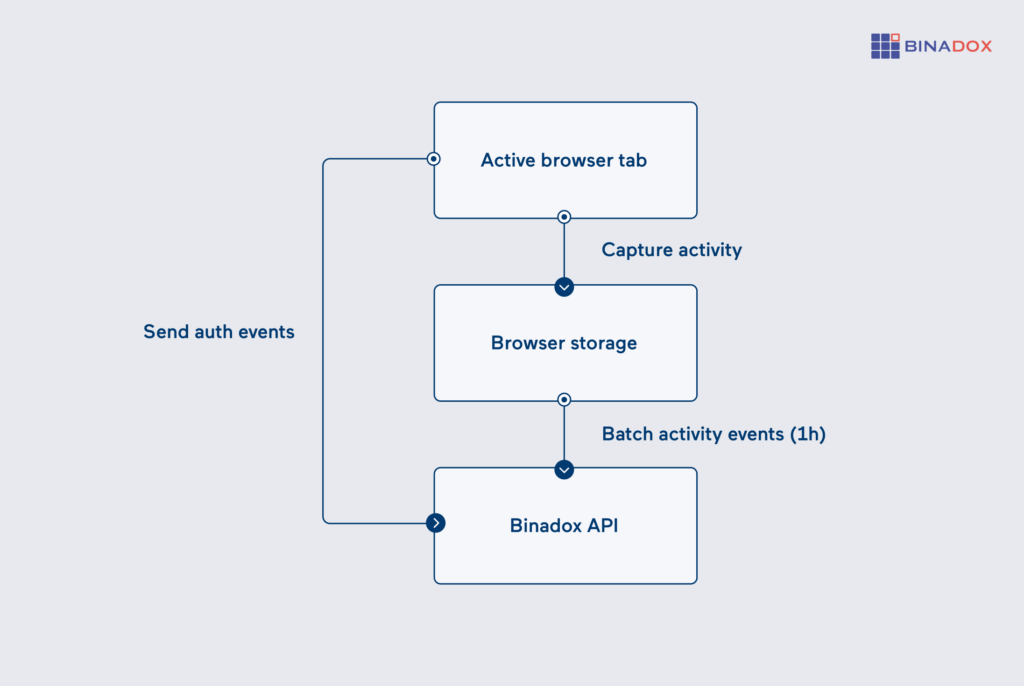
Authentication monitoring captures the moment a user submits credentials. It records the URL, the username (from the form field, not the password), and the timestamp. After submission, it watches for DOM changes that indicate a successful login — page redirects, dashboard elements appearing, session cookie creation — and marks the event accordingly.
Everything goes into local browser storage first. The extension uploads to the Binadox API in hourly batches, not on every login. This keeps network traffic minimal and means a temporary network outage doesn’t lose any data.
Key features:
- Multi-browser support: Chrome and Firefox support via extension stores or centralized MDM/GPO deployment.
- Tab-level session tracking: Tracks authentication state per tab, distinguishing multiple accounts or services opened simultaneously.
- Success verification: Validates login success by analyzing post-submit DOM changes, not just form submission.
- Passive operation: Doesn’t block, modify, or interfere with login flows; remains invisible to users.
- Offline resilience: Stores auth events locally and batches uploads; syncs automatically when connectivity is restored.
Optimization and automation
Once deployed, the extension operates without manual intervention. Newly used SaaS applications are reflected in the Binadox dashboard as soon as employees authenticate. No predefined application lists or URL pattern configuration are required.
Discovery data can be integrated with ticketing systems such as Zendesk, Jira, or similar platforms to automatically generate tickets when unauthorized applications are detected. Each ticket can include the username, URL, and timestamp of the authentication event, enabling immediate follow-up.
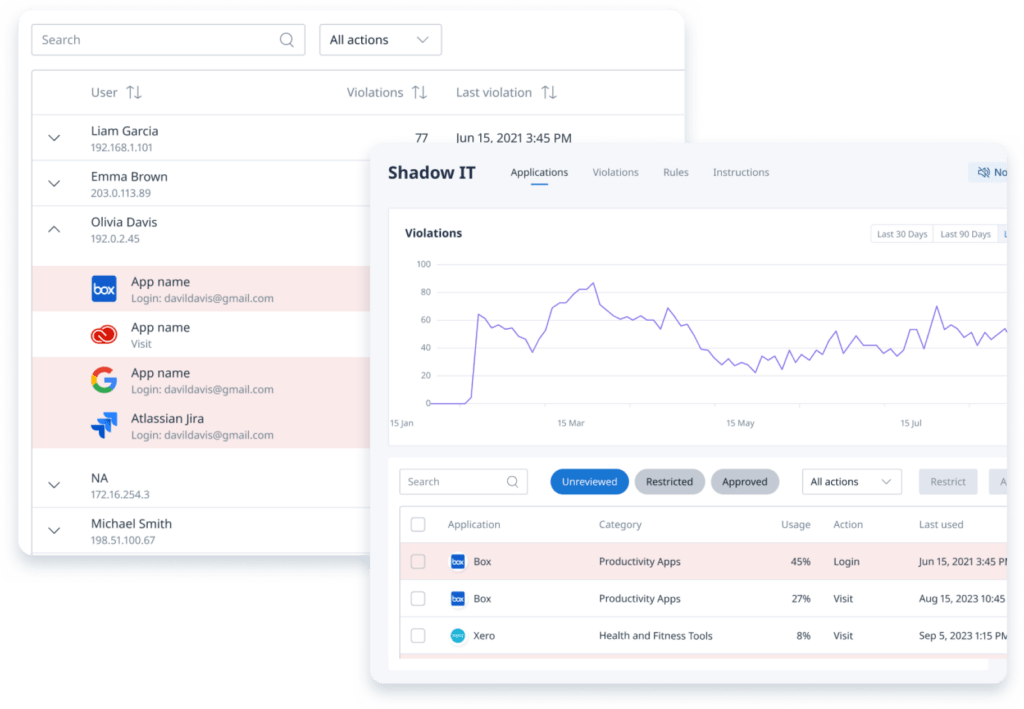
Extension data is sent to the Shadow IT Dashboard in Binadox, where discovered applications and login activity are analyzed. If multiple users authenticate to an unapproved application, IT teams can make an informed decision to restrict access, approve the tool, or recommend an approved alternative. The extension provides the factual usage data needed to support that decision.
Why Browser-Based SaaS Discovery Matters
Most modern SaaS applications are accessed through a web browser. Monitoring browser activity provides one of the most accurate ways to discover shadow IT and unauthorized cloud applications.
Unlike network monitoring or financial audits, browser-based discovery detects SaaS tools at the moment users authenticate or interact with them.
How it works
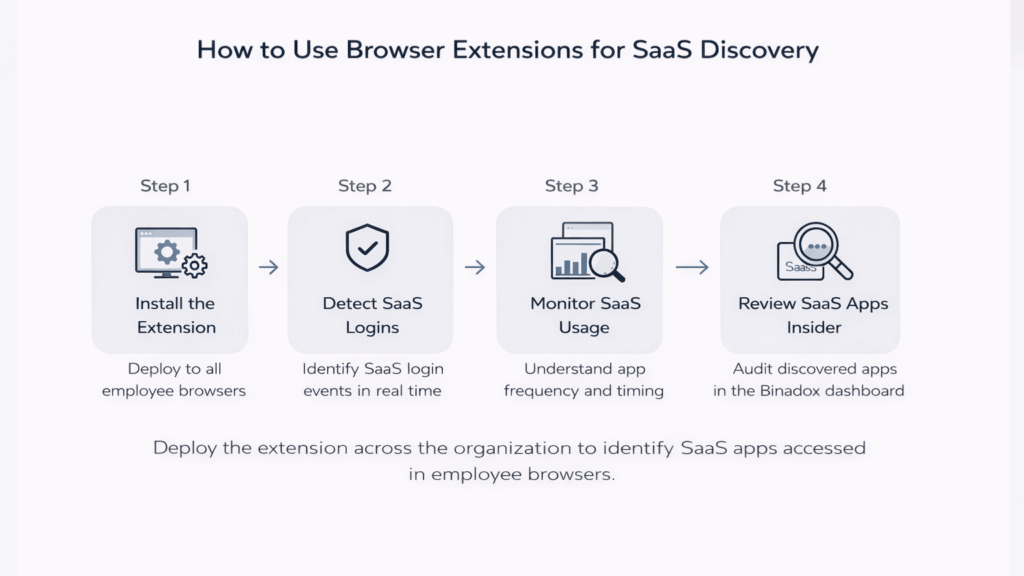
Extension Deployment and Initialization
The browser extension is deployed to employee environments via the Chrome Web Store, Firefox Add-ons marketplace, or centralized distribution (MDM/GPO). On initial launch, the extension retrieves its configuration from an internal discovery endpoint, including the required API endpoint and authentication token.
Authentication Event Detection
On each page load, the content script evaluates the document for the presence of login forms. When credentials are submitted, the extension records the application URL, username, and timestamp. It then verifies authentication success by detecting post-login page changes such as redirects or updated content.
Data Processing and Classification
Authentication events are stored locally in the browser and transmitted to the Binadox Discovery API in scheduled batches. On the server side, each event is matched against the SaaS catalog. Recognized applications are mapped accordingly, while unrecognized services are flagged. The Discovered Applications dashboard updates automatically.
Technical Architecture
The extension leverages observable patterns to manage detection across dynamic web pages. Content scripts are injected at an early document stage to capture login forms rendered before full page load. Communication between content scripts and the background service worker is handled through the standard WebExtension messaging API.
Access and permissions
Browser permissions required: The extension needs access to all URLs (to detect login pages on any site) and storage (to buffer events locally). It does not need access to browsing history, bookmarks, or downloads.
Deployment options: Administrators can deploy through Chrome Web Store / Firefox Add-ons for self-service install, or push through enterprise MDM (Google Workspace admin, Microsoft Intune, etc.) for managed rollout.
Data access: Auth event data is visible to Binadox organization administrators. Individual employees cannot see the discovery data from their own or other users’ activity within the Binadox dashboard.
Gain Full Visibility and Control Over Shadow IT with Binadox
The Browser Extension closes the gap between what IT thinks the company is using and what employees actually log into every day. Deploy it once, and new SaaS applications start appearing on your dashboard automatically — no configuration, no URL lists, no ongoing maintenance.
If your organization has more than a handful of employees, there are SaaS tools in use right now that IT doesn’t know about. The only question is whether you’d rather find out from a browser extension or from a security audit.




 7-day free trial