




OAuth Integration: Discover SaaS Apps Through Identity Sign-Ins
Binadox OAuth Integration discovers SaaS applications by reading sign-in events from your identity provider — no browser extensions, desktop agents, or network proxies required.
Every time an employee signs into a third-party app using Google Workspace or Microsoft 365, the identity provider records the event. Binadox reads these audit logs through the API and automatically identifies which applications are being used across your organization.
How it connects
An organization administrator authorizes Binadox through a standard OAuth consent flow.
For Google Workspace, Binadox connects to the Admin SDK Reports API. For Microsoft 365, it connects to the Microsoft Graph sign-in audit endpoint. In both cases, the OAuth grant provides read-only access to authentication metadata: user email, application name, timestamp, and IP address.
Binadox does not access email content, files, calendars, or drive data. Only sign-in audit records are processed.
The setup takes a few minutes. After authorization, Binadox begins polling the identity provider API on a regular schedule and automatically ingests new events.
Core functionality
OAuth discovery runs as a structured processing pipeline.
First, Binadox collects authentication events from the identity provider in batches. Large organizations may generate thousands of events per polling cycle. Events are deduplicated during ingestion to prevent redundant records.
Next comes application identification. Sign-in logs are inconsistent by nature — one provider may log “Slack Technologies” while another logs “Slack.” Binadox matches application names against a curated catalog of common SaaS platforms. If no direct match is found, the name is sent to an AI resolver for identification. Once resolved, the mapping is cached so it never needs to be processed again. Internal identity platform components such as Azure AD or Exchange Online are filtered out automatically to avoid noise.
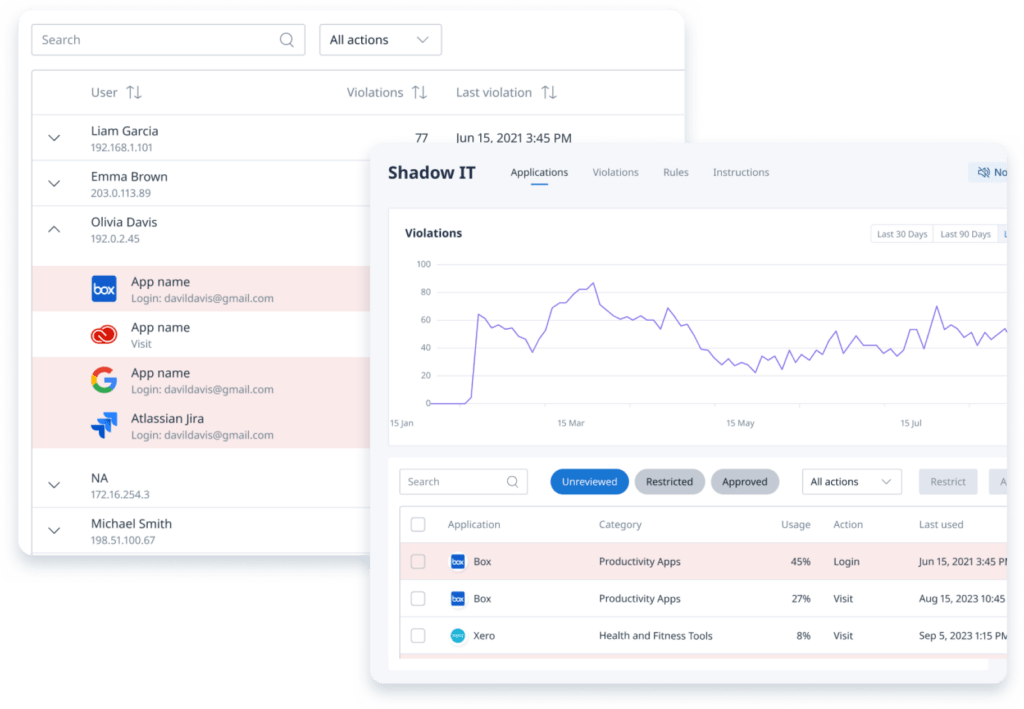
After identification, each application is assigned to one of 28 business categories. Categories are more than labels — they carry risk metadata. A file storage application flags potential data exfiltration risk. A healthcare-related application may indicate compliance exposure. This categorization enables structured filtering and reporting.
The rule engine then evaluates the discovered application against organizational policies. Rules can operate at the domain level or at the category level. Rejection rules are processed first, followed by approval rules. If no rule applies, the application remains in a neutral “None” state until IT reviews it.
Finally, results appear in the Shadow IT dashboard. Applications are clearly marked as approved, rejected, or undecided. If a rejected application continues to be accessed, the system registers a violation and can automatically create a ticket in connected systems.
Optimization and automation
OAuth discovery scales through policy automation.
Without rules, every newly discovered application requires manual review. With well-defined category and domain policies, most applications classify themselves automatically. A typical baseline configuration approves communication and project management tools, rejects games and unauthorized file storage services, and leaves the remainder for review. This approach often auto-classifies the majority of applications immediately.
When violations occur, generated tickets include the application name, the users involved, timestamps, and categorization data — enough context for IT to act without navigating the dashboard.
OAuth discovery operates alongside the Browser Extension, Desktop Agent, and Proxy integrations. If an application is detected through multiple sources, the dashboard displays a combined view with source attribution.
Access and permissions
The OAuth grant provides read-only access to sign-in audit logs only. Binadox cannot read user emails, open files, access calendars, or inspect drive contents.
Authorization requires a Google Workspace Super Admin or a Microsoft 365 Global Admin. Once connected, no ongoing administrative interaction is required.
This OAuth grant is how Binadox reads from your identity provider. It is not a way to authenticate to Binadox: the Binadox API is called with a workspace API token (Authorization: ApiToken <token>), and Binadox does not operate an OAuth authorization server or an OpenID Connect endpoint.
Shadow IT data is visible to Binadox organization administrators. Regular employees do not have access to discovery data.
Licensing and requirements
OAuth Integration requires either Google Workspace with Admin SDK access or Microsoft 365 with access to Microsoft Graph audit logs. Most business-tier plans include these capabilities.
No infrastructure is required. There are no servers to deploy, no containers to manage, and no network configuration changes. The integration is fully cloud-based.
OAuth Integration is included in the SaaS Cost Management module of Binadox.
Lightweight Shadow IT Visibility
OAuth Integration is the simplest way to discover shadow IT across your organization.
Connect your identity provider, and every third-party application accessed with corporate credentials begins appearing in the dashboard automatically.
No endpoint software. No network changes. No operational overhead.
The data already exists in your identity provider. Binadox turns it into structured visibility and actionable control.

 7-day free trial