



Effective AWS AMI governance is a cornerstone of a secure, compliant, and efficient cloud environment. Without a clear strategy for managing Amazon Machine Images (AMIs), your organization can face significant risks, including security vulnerabilities from unpatched software, configuration drift, and unnecessary costs from outdated resources. Establishing firm guardrails around which AMIs your teams can use is not just a best practice—it’s essential for maintaining control over your AWS infrastructure.
Key takeaways
- Golden Image Strategy: Create and maintain a set of approved, hardened “golden AMIs” to ensure all new EC2 instances meet your security and compliance standards from the moment they launch.
- Automate Enforcement: Use AWS services like Service Control Policies (SCPs) and AWS Config to automatically enforce your AMI policies, for instance, by blocking the use of unapproved or public AMIs.
- Lifecycle Management is Key: Implement a full lifecycle strategy that includes regular patching, versioning, and a defined process for deprecating and removing AMIs older than 180 days to minimize your attack surface.
- Centralize and Simplify: Leverage AWS Organizations to manage and apply AMI governance policies consistently across all your accounts from a central location.
What Is an AMI and Why Is Governance Critical?
An Amazon Machine Image (AMI) is a pre-configured template for your EC2 instances. It packages an operating system, software applications, and configuration files. When you launch an instance, you select an AMI, which acts as the blueprint. While AWS provides many public AMIs, organizations often create their own custom AMIs to standardize deployments.
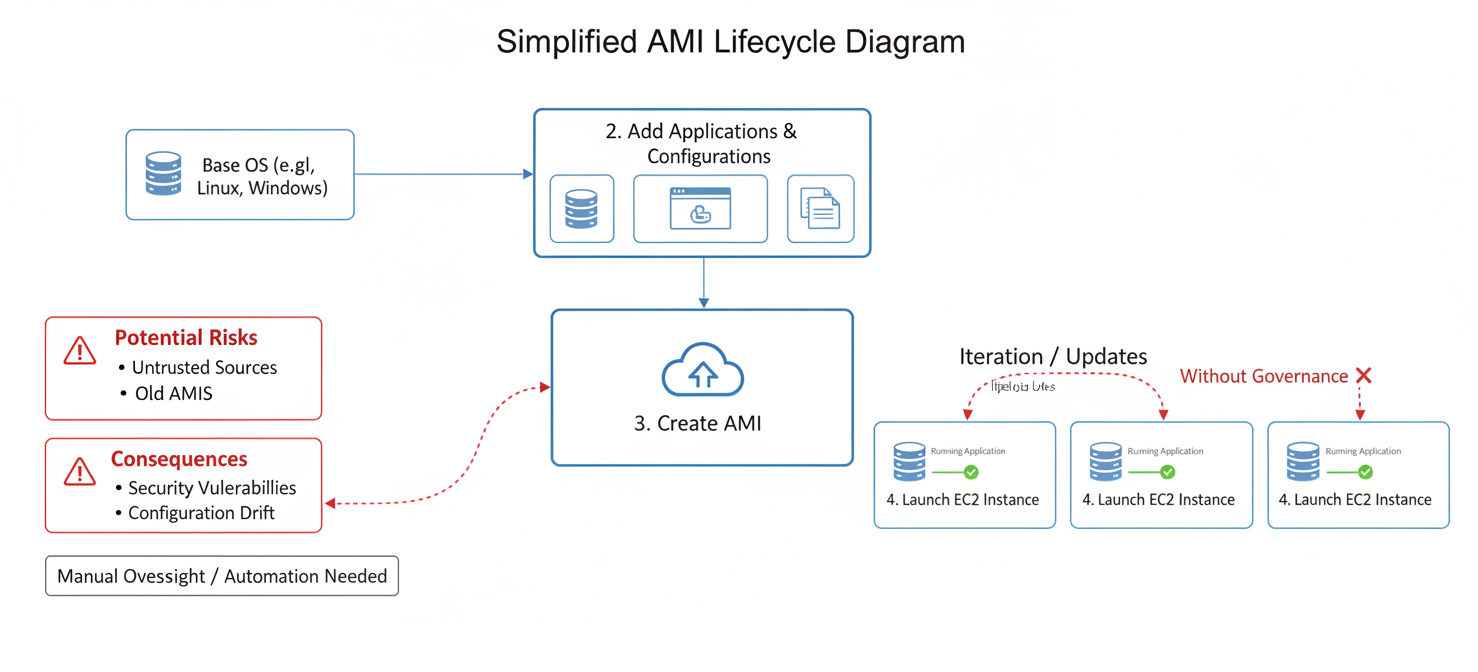
However, this flexibility introduces significant governance challenges. Without proper oversight, developers might use AMIs from untrusted public sources, which could contain malware or security vulnerabilities. They might also use old, unpatched internal AMIs, leaving systems exposed to known exploits. This lack of control leads to “configuration drift,” where your environment becomes inconsistent and difficult to manage, ultimately increasing your security risk and operational overhead.
Effective AMI governance addresses these issues by establishing clear rules for the creation, use, and retirement of AMIs, ensuring every instance launched aligns with your organization’s security and operational standards.
Strategy 1: Creating an ‘Allowed List’ of Approved AMIs
An “allowed list” or “golden image” strategy is a proactive approach to AMI governance. Instead of reacting to non-compliant instances, you define a curated set of approved AMIs that your teams are permitted to use. This ensures that every new EC2 instance is launched from a template that has been vetted, hardened, and configured according to your organization’s standards.
Building and Maintaining Golden AMIs
The first step is to create your golden AMIs. This process, often called “hardening,” involves taking a base AMI from a trusted source (like an official AWS AMI) and applying your security configurations. This can include:
- Applying the latest security patches and updates.
- Removing unnecessary software to reduce the attack surface.
- Configuring the operating system to meet compliance benchmarks, such as those from the Center for Internet Security (CIS).
Services like EC2 Image Builder can automate this entire process, creating a pipeline that builds, tests, and distributes your hardened AMIs consistently.
Enforcing the Allowed List
Once you have your golden AMIs, you need to enforce their use.
- AWS Service Control Policies (SCPs): SCPs are a powerful tool within AWS Organizations that can set permission guardrails for all accounts under your management. You can create an SCP that denies the
ec2:RunInstancesaction unless the instance is launched from one of your approved AMI IDs. - AWS Config Rules: You can use the
approved-amis-by-idmanaged rule in AWS Config to continuously monitor for EC2 instances launched from unapproved AMIs. This provides detective control, flagging non-compliant resources for remediation. - Allowed AMIs Feature: Amazon EC2 now includes a feature called “Allowed AMIs,” which lets you specify which AWS account IDs are authorized AMI providers at the account level. This helps prevent the use of AMIs from untrusted sources.
Strategy 2: Maintaining a Blocklist of Forbidden AMIs
While an allowed list is highly effective, a blocklist serves as an important secondary defense. This strategy involves explicitly forbidding the use of specific AMIs known to be insecure or non-compliant. This is particularly useful for preventing the use of public AMIs, which can pose a significant security risk.
Why Block Public AMIs?
Public AMIs, while convenient, can be a major security blind spot. An attacker could publish a malicious AMI with a name similar to a trusted one, tricking users into deploying it. These rogue AMIs might contain malware, crypto miners, or embedded credentials that expose your environment. Furthermore, even legitimate public AMIs may not meet your organization’s specific security standards.
Implementing a Blocklist
You can implement a blocklist using several AWS services:
- Block Public Access for AMIs: AWS provides an account-level setting to block public access for your AMIs, which prevents your internal AMIs from being shared publicly. While this protects your own AMIs, you also need to prevent the use of external public AMIs.
- Service Control Policies (SCPs): You can use condition keys in an SCP to deny instance launches if the AMI owner is not on a list of trusted account IDs. This effectively blocks all other public and unapproved AMIs.
- AWS Config Integration: The Allowed AMIs feature integrates with AWS Config, allowing you to track and detect instances launched from non-compliant sources before fully enforcing restrictions.
Strategy 3: Managing Old and Outdated AMIs
An AMI is a point-in-time snapshot. As time passes, new vulnerabilities are discovered, and the software packaged within an AMI can become dangerously outdated. An old AMI can accumulate hundreds of new vulnerabilities within months of its support ending. Therefore, a critical part of your AWS AMI governance is managing the entire lifecycle of your images, which includes a clear process for handling old ones.
Identifying and Deprecating Old AMIs
First, you need a clear definition of “old.” A common best practice is to consider any AMI older than 180 days as outdated and in need of replacement. You can identify these AMIs by checking their creation date via the AWS Management Console or AWS CLI.
Once identified, these AMIs should be deprecated. AWS allows you to formally deprecate an AMI, which discourages its use for new instance launches, although it doesn’t prevent it entirely. The real goal is to replace the old AMI with a newly patched and hardened version created through your automated pipeline.
Automating AMI Lifecycle Management
Manually tracking and updating AMIs is not scalable. Automation is essential.
- Amazon Data Lifecycle Manager (DLM): DLM can automate the creation, retention, and deletion of your EBS-backed AMIs. You can set up policies to automatically create new AMIs on a schedule and delete old ones that exceed your defined retention period.
- EC2 Image Builder Pipelines: As mentioned earlier, EC2 Image Builder can be scheduled to run automatically, ensuring you always have access to fresh, up-to-date AMIs.
- Cleanup Process: A complete cleanup involves two steps: first, deregistering the unused AMI, and second, deleting the associated EBS snapshot to avoid incurring further storage costs.
Implementing Your AWS AMI Governance Strategy
Combining these three strategies provides a comprehensive framework for robust AWS AMI governance. The goal is to create a secure and efficient system where developers have the freedom to innovate but are guided by clear, automated guardrails.
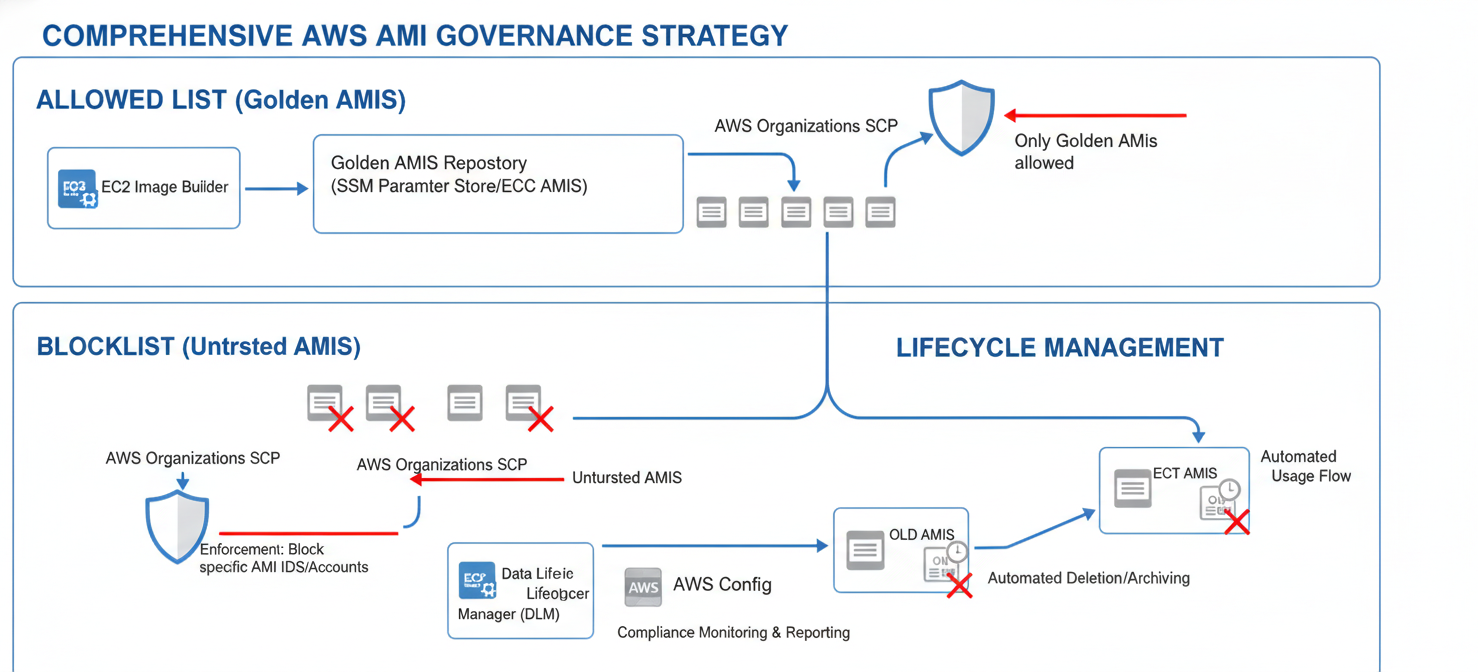
Start by establishing your golden image pipeline. Use EC2 Image Builder to automate the creation and hardening of your core AMIs. Next, use AWS Organizations and SCPs to enforce an allowed list, ensuring only these vetted images can be used. Supplement this with AWS Config rules to continuously monitor your environment for any deviations.
Finally, implement a strict lifecycle management policy using Amazon DLM to regularly retire and replace old AMIs. This ensures your security posture doesn’t degrade over time. By automating detection and remediation, you can maintain compliance and security without creating operational bottlenecks for your team.
Conclusion
Ignoring AMI management is like leaving your front door unlocked. It’s an open invitation for security risks, compliance failures, and operational chaos. A well-defined AWS AMI governance strategy, built on the principles of allowed lists, blocklists, and lifecycle management, is not optional. By creating a pipeline for hardened golden images, enforcing their use with SCPs, and automatically retiring old AMIs, you move from a reactive to a proactive security posture. This approach doesn’t just reduce risk; it creates a stable, predictable, and efficient foundation for all your AWS workloads. After all, you can’t build a secure house on a shaky foundation, especially when that foundation is riddled with six-month-old security holes.
To move beyond a reactive security posture and truly solidify your AWS foundation against vulnerabilities, you can explore a free trial of a platform designed to automate these governance strategies, or connect with our team for a personalized demo to see how it fits your specific environment.
 7-day free trial