



Amazon Web Services offers a powerful way to lower your cloud bill with Savings Plans, which can reduce compute costs by up to 72% compared to On-Demand prices. To help you commit confidently, AWS provides automated suggestions based on your past usage. But this raises a critical question for any team managing cloud spend: when it comes to AWS Savings Plan recommendations, can you trust them? The short answer is yes, but with important qualifications. These recommendations are a solid starting point, but treating them as a final, unquestionable verdict is a mistake.
Key takeaways
- Trust, but verify: AWS recommendations are a reliable starting point based on historical data, but they don’t account for future business changes, workload migrations, or recent rightsizing efforts.
- Lookback period is key: The recommendation engine analyzes your usage over the last 7, 30, or 60 days. Choosing a period that doesn’t reflect your future usage can lead to inaccurate and costly commitments.
- Rightsizing comes first: Always optimize your instances before purchasing a Savings Plan. Committing to an oversized instance just locks in your waste at a discounted rate.
- Start conservatively: It’s often better to under-commit initially and layer additional Savings Plans later. Once purchased, a Savings Plan commitment cannot be changed or resold.
Understanding How AWS Generates Recommendations
AWS Savings Plan recommendations are not arbitrary guesses. They are the product of a data-driven analysis of your historical compute usage. Specifically, AWS Cost Explorer examines your On-Demand spend for services like EC2, Fargate, and Lambda over a “lookback period” that you select—typically 7, 30, or 60 days.
The engine then calculates the hourly commitment that would have yielded the maximum possible savings for that historical period. It simulates different commitment levels and identifies the sweet spot where you save the most money. The system presents this as a recommended hourly spend, along with estimated monthly savings.
However, it’s crucial to understand what this process doesn’t do. The recommendations are purely backward-looking; they do not forecast future usage. If your team is planning a major new product launch or decommissioning a large application, the historical data won’t capture that.
Payer vs. Linked Account Views
For organizations using AWS Organizations, recommendations can differ between the management (payer) account and individual member (linked) accounts. The payer account view is holistic, analyzing usage across all accounts to find optimization opportunities. In contrast, a linked account’s recommendation only considers its own usage. This can lead to discrepancies where the sum of linked account recommendations doesn’t match the payer account’s suggestion. Generally, the payer-level recommendation is more efficient as it leverages variable usage patterns across the entire organization.
The Limitations: Why Blind Trust Is a Bad Idea
While the underlying data is accurate, several factors can make the final recommendation a poor fit for your actual needs. Relying solely on the AWS Cost Explorer recommendations without further analysis can lead to significant financial waste.

Historical Data Isn’t a Crystal Ball
The biggest limitation is the reliance on past data. A 60-day lookback period might seem safe, but it can be misleading if:
- You recently right-sized your instances: If you just completed a project to eliminate over-provisioned resources, a recommendation based on the last 30 or 60 days will be inflated. It will suggest a commitment based on waste you’ve already cut.
- Your workloads are seasonal or spiky: A business that has a massive holiday peak in December will get a skewed recommendation in January based on that spike.
- You are migrating workloads: If you’re moving applications from EC2 to Lambda or adopting a new instance family, your past usage patterns are no longer relevant.
Data Lag and Refresh Cycles
The data used for recommendations is not real-time. AWS Cost Explorer data can take up to 24 hours to populate, and the underlying data for recommendations may only refresh every 72 hours. For a large organization, a three-day lag can mean the recommendation is based on a usage picture that is already thousands of dollars out of date.
Recommendations Don’t Account for Business Context
The recommendation engine knows your usage, but it doesn’t know your business. It has no insight into:
- Upcoming application retirements.
- Planned migrations to different AWS regions.
- New projects that will soon enter production.
Committing to a one- or three-year plan based on the needs of an application that will be decommissioned in six months is a recipe for wasted spend. Since Savings Plans cannot be resold or modified after purchase, this is a critical oversight.
A Practical Framework for Evaluating AWS Savings Plan Recommendations
Instead of blindly accepting the recommendation, use it as the first step in a more thorough evaluation process. A healthy dose of skepticism and diligence will ensure you make a commitment that truly benefits your bottom line.
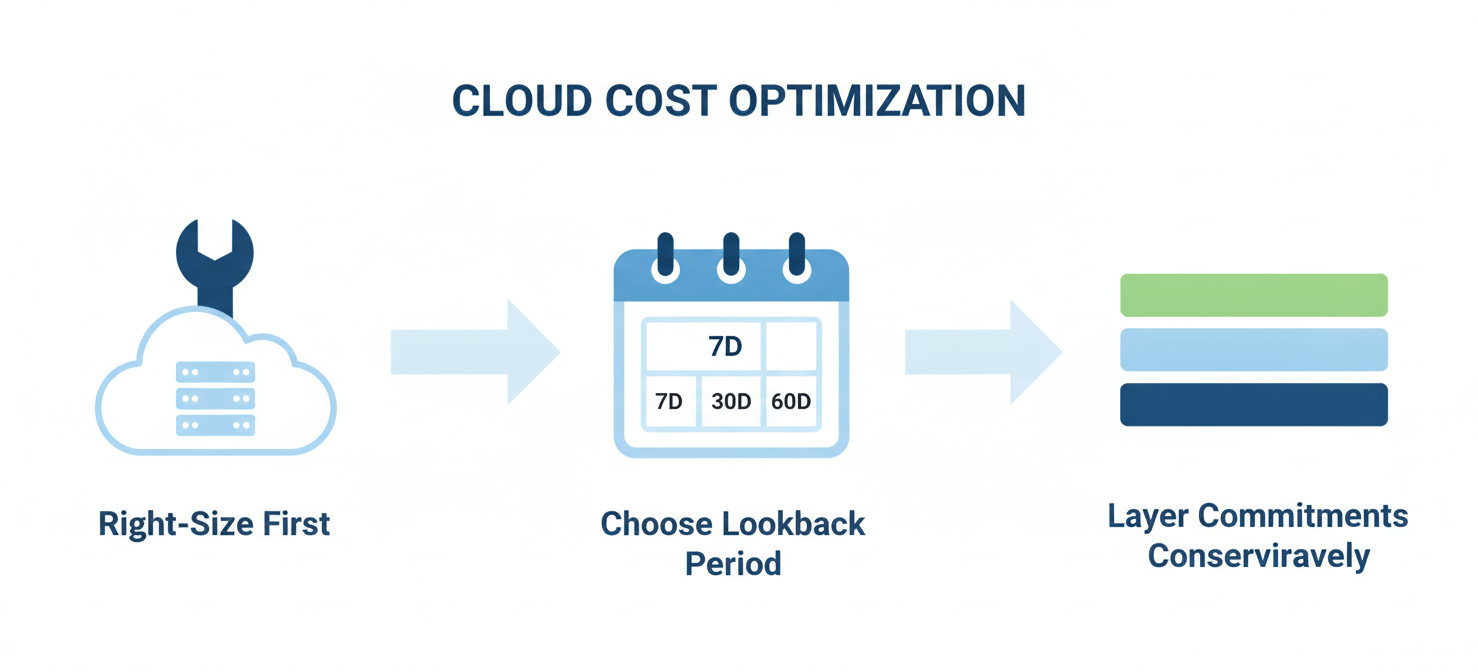
Step 1: Right-Size First, Commit Second
This is the most critical rule. Before you even look at Savings Plan recommendations, use tools like AWS Compute Optimizer to identify and eliminate waste. Downsizing over-provisioned instances can cut compute costs significantly on its own. Committing to a Savings Plan for an oversized instance only means you’re locking in that waste, albeit at a discount. After rightsizing, wait at least 14 days for a new, stable usage baseline to emerge before analyzing recommendations.
Step 2: Choose the Right Lookback Period
Carefully consider which lookback period—7, 30, or 60 days—most accurately reflects your expected future usage.
- If your usage is stable, 60 days is a safe choice.
- If you recently launched a new, stable workload, a 7- or 30-day period might be more accurate.
- Avoid periods that contain significant anomalies, like a one-time data processing job or a major service outage.
Step 3: Start Conservatively and Layer Commitments
It is almost always safer to under-commit than to over-commit. Unused portions of a Savings Plan commitment are lost, so a 100% utilization rate on a smaller commitment is better than 80% utilization on a larger one.
Consider a layering strategy. Start with a conservative commitment that covers your absolute baseline, “always-on” usage. Monitor your utilization and coverage reports in AWS Cost Explorer. After a few months, if your usage remains consistently above your commitment, you can purchase an additional, smaller Savings Plan to “top up” your coverage.
Step 4: Involve Engineering and Finance
Finally, cost optimization is a team sport. Before purchasing, consult with the engineering teams who manage the workloads. They will have insight into future architectural changes or new service launches. Likewise, involve your finance department to align on the one- or three-year financial commitment.
Conclusion
So, are AWS Savings Plans worth it? Absolutely. They are a fundamental tool for managing cloud costs effectively. And can you trust the AWS Savings Plan recommendations? Yes, as a starting point. The automated suggestions from AWS Cost Explorer are a valuable, data-backed foundation for your analysis. However, they are not a substitute for critical thinking and due diligence.
The key is to treat the recommendation not as an answer, but as a question: “Does this historical number accurately reflect our future needs?” By first rightsizing your resources, carefully selecting a relevant lookback period, and starting with a conservative commitment, you can turn that recommendation into a smart financial decision. Blindly clicking “purchase” is easy, but a thoughtful approach is what separates a real cost-saving strategy from just discounted waste.
To transform AWS recommendations into truly smart financial decisions, you can experience Binadox firsthand to refine your strategy, or book a personalized walkthrough to discuss your specific needs.
 7-day free trial