



As an engineering manager, you own your team’s architecture, delivery, and performance. You also own its budget. In the cloud, that budget is no longer a fixed, top-down allocation; it’s a direct, real-time reflection of the architectural and operational decisions your team makes every day. Effective Azure cost management for engineering managers is not about cutting costs—it’s about instilling a culture of ownership where every engineer understands the financial impact of their work. This is about transforming your engineering team’s cloud budget from a line item in a finance report into a key performance indicator for engineering excellence.
Key takeaways
- Shift from Visibility to Accountability: Implement a “showback” or “chargeback” model to directly attribute cloud costs to the teams and projects that incur them, moving beyond simple reporting.
- Enforce Governance as Code: Use Azure Policy to mandate resource tags (like
CostCenterandOwner) at the time of creation, making cost allocation automatic and non-negotiable. This prevents untracked resources from ever being deployed. - Automate Budget Guardrails: Create budgets in Azure Cost Management for every subscription and critical resource group, with automated alerts at 75%, 90%, and 100% of spend to prevent surprises.
- Make Cost a Feature: Integrate cost analysis into your team’s existing workflows, such as weekly sprint reviews and CI/CD pipelines, to make financial impact a standard part of the development lifecycle.
Why Cost Management is an Engineering Problem, Not a Finance Problem
Cloud spend is a direct output of engineering decisions. The choice of a VM SKU, a storage tier, or a database performance level has immediate and ongoing financial consequences. When finance teams own the cloud bill, engineering teams are disconnected from the impact of these choices. This creates a feedback loop that is too slow and too abstract to influence behavior. The result is predictable: overprovisioned resources, idle development environments, and a budget that grows without clear justification.
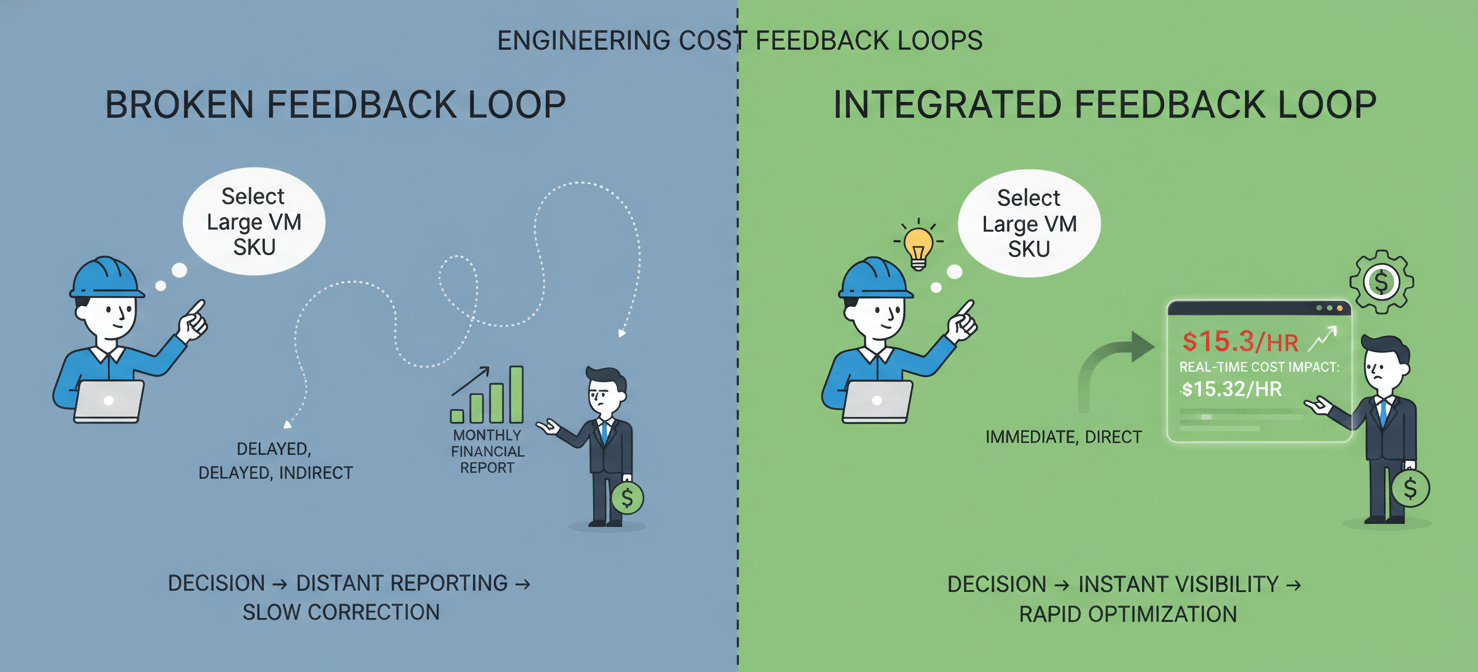
For an engineering director, this isn’t just a financial issue; it’s a process and governance failure. An unmanaged cloud budget signals a lack of discipline in resource lifecycle management. It suggests that teams are not being held accountable for the full scope of their work. Therefore, bringing cost management into the engineering domain aligns financial responsibility with technical decision-making authority. It empowers your teams to make smarter, more efficient choices that improve both performance and profitability.
Foundational Step: Achieving Visibility with a Rock-Solid Tagging Strategy
You cannot hold teams accountable for costs they cannot see. The first and most critical step in driving Azure cost accountability is implementing a comprehensive and mandatory tagging strategy. Tags are simple key-value pairs that you attach to Azure resources, but they are the foundation of all cost allocation and reporting.
Designing Your Tag Taxonomy
A good tagging strategy starts by working backward from the questions you need to answer. For most engineering teams, these questions revolve around ownership and purpose. Start with a small set of 5-8 mandatory tags enforced by policy.
Mandatory Tags:
CostCenter: The business unit or department budget that this resource rolls up to.Owner: The email alias of the team responsible for the resource’s lifecycle and cost.ApplicationName: The specific application or service the resource supports.Environment: The deployment stage (e.g.,Production,Staging,Development).Project: A specific initiative or feature the resource is tied to.
Enforcing Tagging with Azure Policy
Voluntary tagging policies fail. The only way to ensure 100% coverage is to enforce your tagging strategy programmatically using Azure Policy. You can create policies that audit for missing tags or, more effectively, deny the creation of any resource that does not have the required tags. This shifts the responsibility for tagging from a manual cleanup task to a mandatory step in the deployment process.
Creating an Engineering Team Cloud Budget and Setting Guardrails
Once you have visibility through tagging, you can establish clear financial guardrails. This involves creating explicit budgets for teams and projects and setting up automated alerts to prevent overspending before it happens.
Scoping and Creating Budgets
Within Azure Cost Management + Billing, you can create budgets that track spending against a defined threshold. Do not create a single, monolithic budget for your entire department. Instead, create granular budgets scoped to specific subscriptions or resource groups that align with your team structure. For example, you can create a monthly budget for each application’s production environment and a separate, smaller budget for its development environment.
Configuring Proactive Alerts
A budget is only useful if it triggers action. For each budget, configure multiple alert thresholds to create an early warning system. A common and effective pattern is to set alerts at 75%, 90%, and 100% of the budget.
Crucially, these alerts should not just go to a central finance alias. They must be sent directly to the team that owns the resources, using an Action Group that can post a message to a specific Teams channel or Slack channel. This ensures that the engineers who have the context and ability to act are the first to know when spending is approaching its limit. You can also configure alerts based on forecasted costs, which can warn you of a potential overage before the month is even over.
Implementing Showback or Chargeback for True Accountability
With visibility and budgets in place, the next step is to implement a system of financial accountability. The two primary models for this are showback and chargeback.
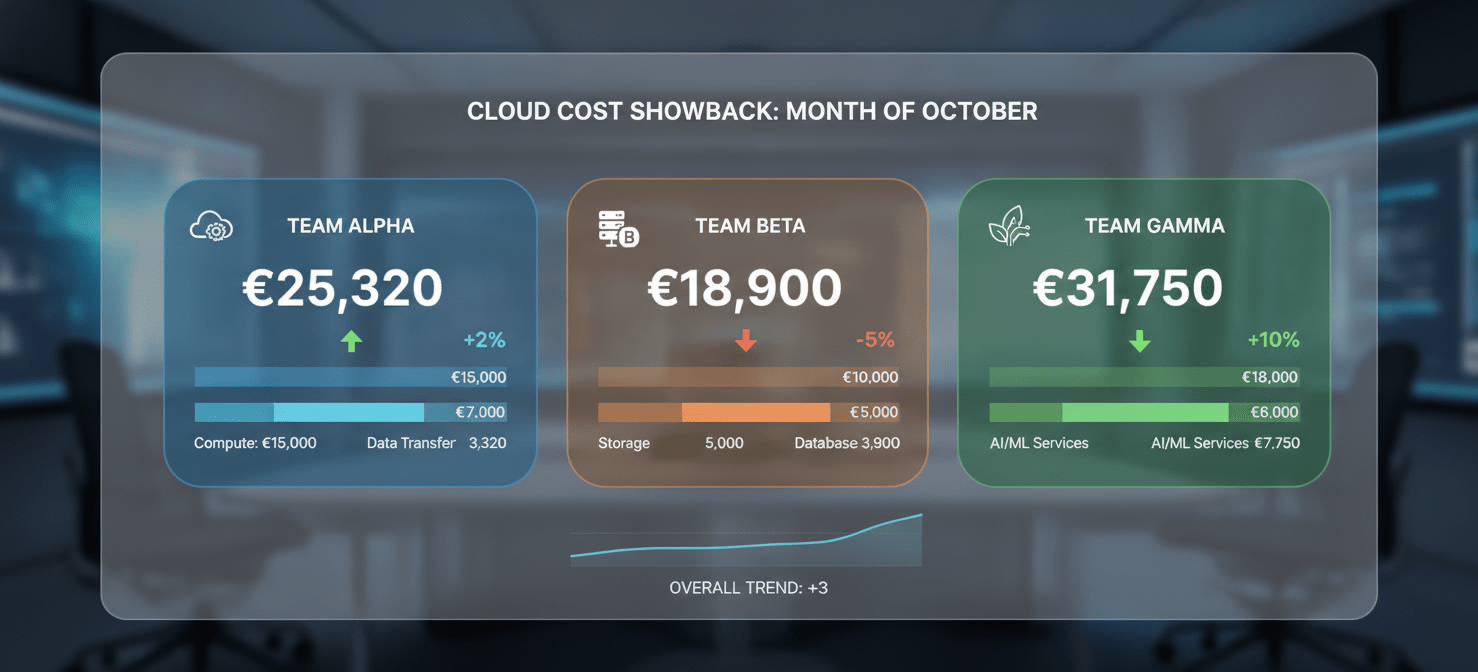
- Showback is an informational model where you report cloud costs back to each team or business unit without actually transferring funds. It’s about creating awareness and influencing behavior through transparency. This is often the best place to start, as it builds cost-aware habits with less organizational friction.
- Chargeback is a formal accounting model where the costs are actually deducted from each team’s budget and allocated to them on the company’s financial statements. This creates direct financial ownership and is highly effective at driving optimization.
For most engineering organizations, a robust showback model is sufficient to drive significant change. You can use the cost analysis tools in Azure to create dashboards and saved views filtered by your Owner or CostCenter tags. These views should be reviewed in regular team meetings, such as sprint reviews or operational readiness meetings. This makes the engineering team cloud budget a recurring topic of conversation and a shared responsibility.
Azure Cost Management for Engineering Managers: Integrating Cost into Your Team’s Workflow
To make cost accountability stick, it must become part of your team’s daily and weekly operating rhythm. It cannot be a separate, once-a-quarter review.
Weekly Cost Reviews
Dedicate a small portion of a weekly team meeting to review a dashboard showing the team’s Azure spend for the past week. Use the cost analysis tool to group spending by resource type and identify any anomalies or unexpected trends. This creates a tight feedback loop, allowing the team to correlate recent deployments or architectural changes with their cost impact.
Leveraging Azure Advisor
Azure Advisor is a free, built-in tool that provides personalized recommendations to optimize your Azure resources across cost, security, and performance. The cost recommendations are particularly valuable, as they identify idle resources, underutilized VMs, and opportunities to purchase reserved instances for predictable workloads. Make it a process for your tech leads to review Azure Advisor recommendations weekly and create backlog items to address high-impact suggestions.
Cost Awareness in the CI/CD Pipeline
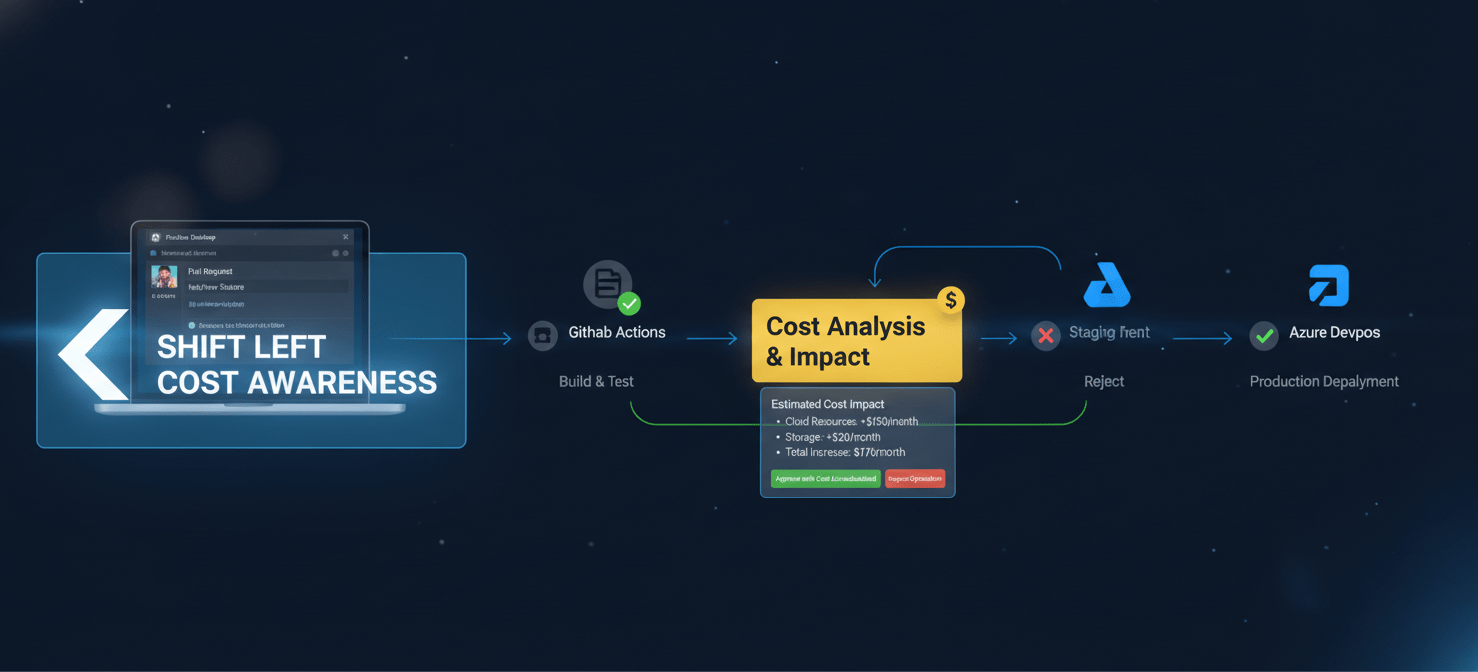
The ultimate goal is to shift cost awareness “left,” making it a consideration during development, not just after deployment. Tools are emerging that can estimate the cost impact of infrastructure changes within a pull request. By providing this feedback early, you empower engineers to evaluate the cost-performance trade-offs of their decisions before they ever hit production.
Allocating Shared Costs Fairly
One of the most common challenges in Azure cost accountability is how to handle shared infrastructure. Resources like networking hubs, shared Kubernetes clusters, or centralized monitoring services are consumed by multiple teams, but their costs are often consolidated in a single subscription.
To address this, Azure Cost Management provides cost allocation rules. These rules allow you to take the cost of a shared resource and split it proportionally among the teams or applications that consume it. You can distribute costs based on fixed percentages or by using tags to link the shared resource to its consumers. Establishing a clear and agreed-upon methodology for allocating these shared costs is crucial for maintaining trust in your accountability model.
Conclusion
Driving financial accountability is a core function of modern engineering leadership. It is not about micromanaging expenses or stifling innovation with restrictive budgets. Instead, it is about creating a system of transparency, ownership, and intelligent decision-making. By implementing a mandatory tagging strategy, establishing granular budgets with proactive alerts, and integrating cost reviews into your team’s regular workflow, you can transform your engineering team’s relationship with its cloud spend. Effective Azure cost management for engineering managers turns the cloud bill from a source of friction with the finance department into a powerful data point that reflects the efficiency and maturity of your engineering practice. After all, an unmanaged budget is just a symptom of an unmanaged process.
To truly empower your teams with this level of financial insight and control, you can create your free Binadox account today or book a demo to see how our platform integrates seamlessly with your Azure environment.
 7-day free trial