



It’s a common scenario for teams managing cloud spend: you meticulously review your Azure Cost Management reports throughout the month, only to find the final invoice tells a different story. This frustrating gap between the dashboard and the bill can lead to confusion and make budget forecasting feel like guesswork. Understanding the nuances of the azure cost management vs invoice relationship is key to accurate financial planning. The discrepancy isn’t usually an error, but a result of how and when Azure processes different types of cost data.
Key takeaways
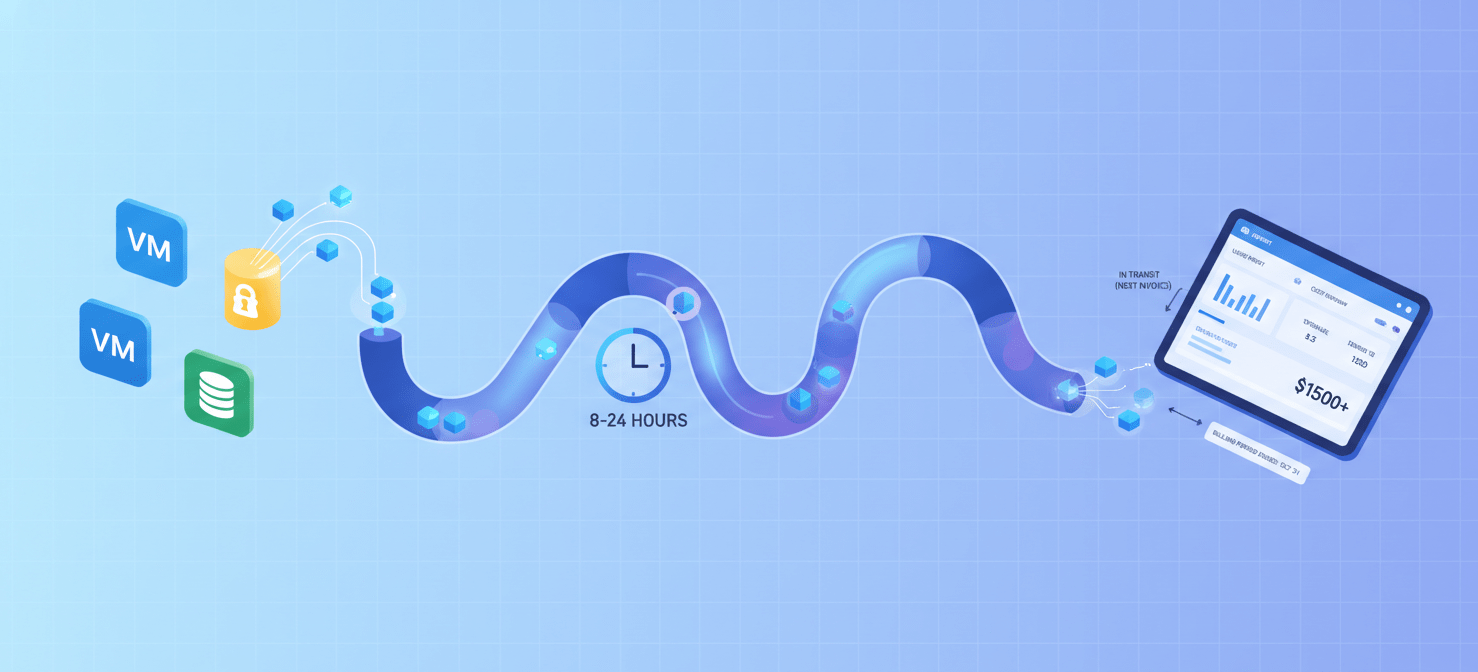
- Timing is everything: Cost Management data can have a latency of 8-24 hours, and sometimes more, meaning the report you see today doesn’t include all of yesterday’s usage.
- Reports and invoices show different things: Your invoice includes taxes, certain Marketplace purchases, and applied credits, which are often absent from the default Cost Management views.
- Amortized vs. Actual Cost: Cost Management often shows amortized costs for reservations, spreading the expense out daily. Your invoice, however, shows the actual purchase charge as a lump sum in the month it occurred.
- Four key areas cause discrepancies: Data latency, the treatment of credits and taxes, different views for one-time purchases, and partner-specific pricing models are the primary culprits.
Data Latency and Processing Times
One of the most frequent causes of an Azure billing discrepancy is the inherent delay in data processing. The cost data you see in the Azure portal is not truly real-time.
How Latency Affects Your Report
Azure services emit usage data at different intervals. This information then travels through a data pipeline before it appears in Cost Management. For most enterprise customers, this process takes between 8 and 24 hours. For some pay-as-you-go subscriptions, the delay can be up to 72 hours.
As a result, the costs you review mid-month are always estimates. Charges incurred in the last 24-48 hours of a billing period may not appear in your final Cost Management view before the period closes, but they will be on the invoice. Microsoft typically finalizes a billing period up to 72 hours after it ends, capturing all trailing usage data.
Credits, Taxes, and Discounts
Your final invoice is a financial document that includes all charges, payments, and adjustments. The standard Cost Analysis view in the portal, however, is designed to show consumption costs and often excludes financial items like taxes and credits until the invoice is finalized.
What Your Cost Report Leaves Out
- Taxes: Your invoice will include applicable taxes based on your billing address, which are not displayed in the main Cost Analysis dashboard.
- Azure Credits: If you have Azure credits (for example, from a sponsorship or as part of your partner agreement), they are applied to your total invoice amount when it’s generated, not to the daily costs shown in Cost Management.
- Discounts and Partner Pricing: For those working with a Cloud Solution Provider (CSP), the Azure portal may show standard pay-as-you-go rates. Your partner invoice, however, reflects your negotiated discounts or Partner Earned Credit (PEC). This can create a significant and expected difference.
Actual vs. Amortized Costs: The Impact of Reservations and Savings Plans
How Azure accounts for large, upfront purchases like Reservations and Savings Plans is a major point of divergence between cost reports and invoices. This is a core issue in the azure cost management vs invoice debate.
Understanding the Two Cost Views
Azure provides two ways to look at your costs: Actual and Amortized.
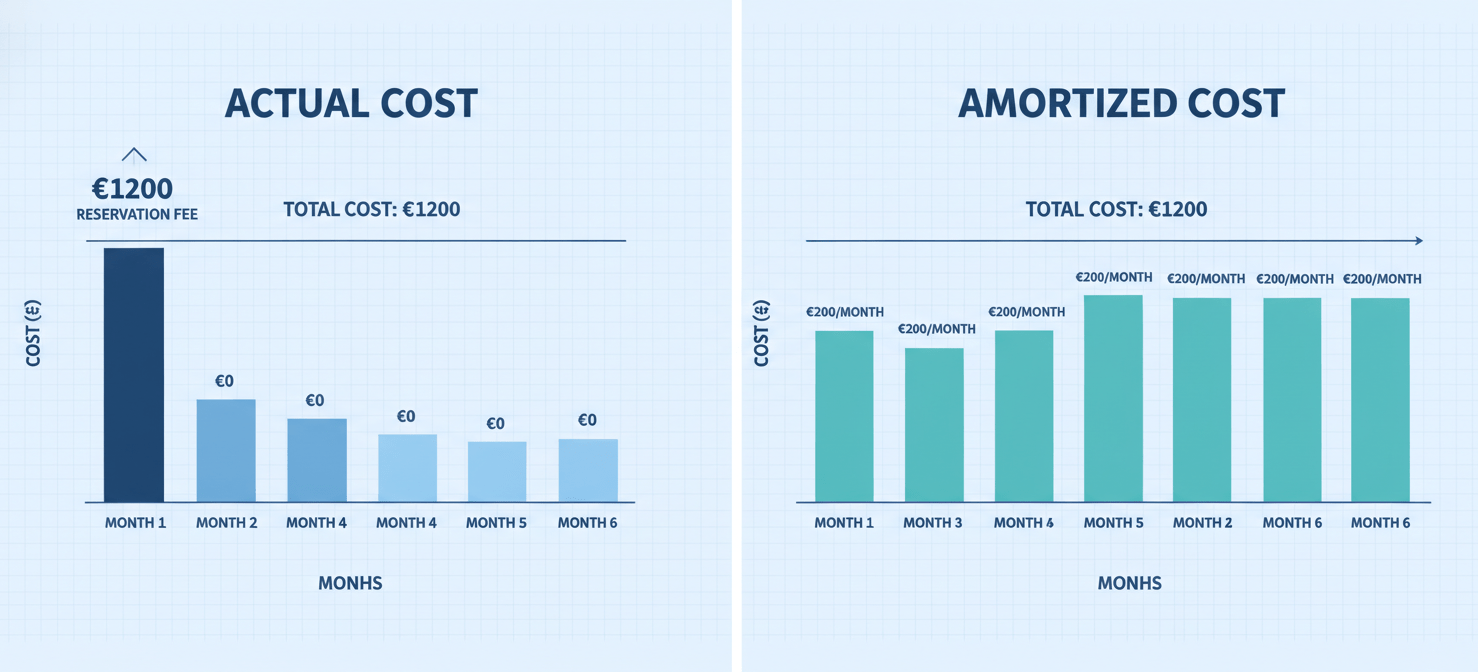
- Actual Cost: This view shows charges as they appear on your bill. A one-year Reserved Instance purchased on the first of the month will show up as a single, large charge on that day. This view is best for reconciling your invoice.
- Amortized Cost: This view spreads the cost of a reservation or savings plan evenly over its entire term. That same one-year reservation would instead appear as a smaller, daily charge. This view is useful for understanding the effective daily cost of your commitments.
By default, many views in Cost Management use amortized cost to provide a more predictable spending trend. However, your invoice will always reflect the actual purchase date and amount, leading to a mismatch if you’re not comparing the correct views.
Marketplace and Third-Party Charges
Charges for third-party products and services purchased through the Azure Marketplace can also introduce delays and differences. While many Azure services report usage data within a day, some Marketplace vendors may have a longer latency.
This means that usage of a third-party tool might not appear in your cost analysis until much later in the billing cycle. Depending on your agreement type, some Marketplace charges might even be billed on a separate invoice entirely, further complicating reconciliation efforts.
How to Reconcile Your Report and Invoice
When you encounter an Azure cost analysis that seems incorrect, a systematic approach can help you pinpoint the source of the difference.
A Practical Checklist for Reconciliation
- Check Your View: In Cost Analysis, ensure you are viewing “Actual cost” if your goal is to match the invoice. Switch to this view to see reservation purchases as lump sums.
- Confirm the Billing Period: Invoices are generated for a specific billing period. Ensure your Cost Management date range perfectly aligns with the invoice dates. Remember that charges from the last few days of the period might have been delayed.
- Account for Excluded Items: Manually add the tax amount from your invoice to your Cost Management total. If you have credits, understand that they are applied at the invoice level.
- Download the Usage Details: For the most granular comparison, download the usage and charges file from the Azure portal. This CSV file provides line-by-line details of every charge that contributes to your invoice and is the ultimate source of truth for billed amounts.
Conclusion
The perceived conflict between your Azure cost report and your final bill is rarely an error. Instead, it stems from the different purposes each tool serves. Cost Management is a dynamic dashboard for monitoring trends and analyzing consumption, often using estimated and amortized data to provide a smooth overview. The invoice, on the other hand, is a static, precise financial record of all charges, credits, and taxes within a fixed period. By understanding the roles of data latency, amortized costs, and invoice-only items like taxes, you can bridge the gap. The key to mastering the azure cost management vs invoice reconciliation is to know which view to use for which task—and to trust the detailed usage file when you need to account for every last cent.
To truly gain clarity and control over your Azure spending, consider how a specialized platform can help automate this reconciliation; you can explore Binadox’s capabilities by scheduling a personalized demonstration or begin optimizing your cloud costs today when you activate your complimentary Binadox trial.
 7-day free trial