



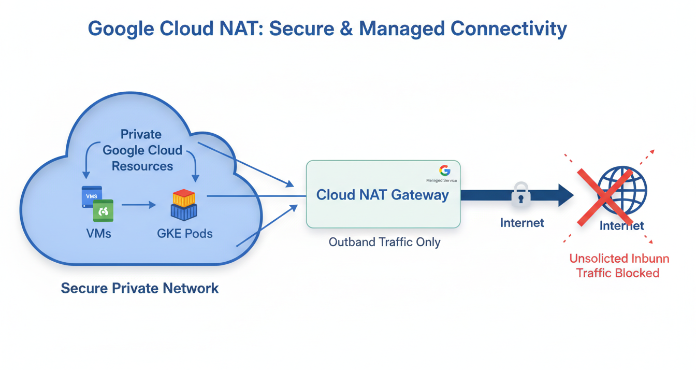
In modern cloud architectures, it’s a best practice to limit the public internet exposure of your resources. However, many private resources, like backend virtual machines or containerized workloads, still need to connect to the internet for essential tasks such as downloading updates or accessing external APIs. This creates a classic networking challenge: how to allow outbound connections while blocking unsolicited inbound traffic. The google cloud nat service is a managed, software-defined solution designed to solve precisely this problem, providing a secure and scalable way for your private resources to reach the internet.
Key takeaways
- Enhanced Security: Cloud NAT allows internal-only resources, like Compute Engine VMs and private GKE clusters, to access the internet without needing individual public IP addresses, significantly reducing your network’s attack surface.
- Managed & Scalable: As a distributed, software-defined service, it is not based on proxy VMs or appliances, which means it scales automatically with your workloads and has no single point of failure.
- Simplified Configuration: You can set up a NAT gateway for an entire VPC region and all its subnets in just a few steps through the Google Cloud Console or
gcloudcommand-line tool. - Granular Control: With NAT Rules, you can define policies that map specific internal sources to use different public NAT IPs for different external destinations, offering greater control over your egress traffic.
What is Google Cloud NAT and How Does It Work?
Google Cloud NAT is a managed Network Address Translation service that allows Google Cloud resources without external IP addresses to create outbound connections to the internet. It functions as a secure gateway, translating the private, internal IP addresses of your resources into a shared set of public IP addresses for outgoing traffic. Consequently, return traffic corresponding to those established connections is allowed back, but any unsolicited inbound connection attempts from the internet are blocked.
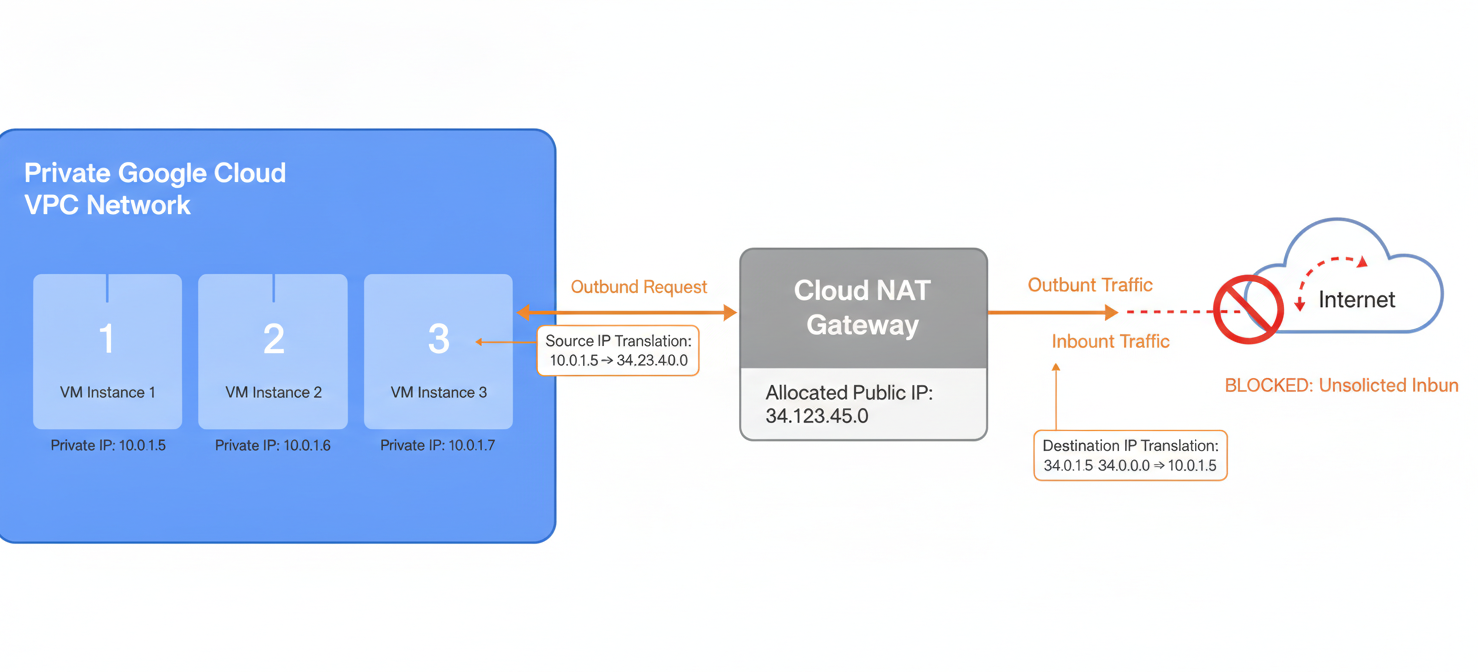
Unlike traditional NAT solutions that rely on proxy virtual machines or physical appliances, Cloud NAT is a distributed, software-defined service. It is built on Google’s Andromeda network virtualization stack, which means there are no VMs for your team to manage and no single chokepoint for your traffic. This architecture provides significant benefits in availability, scalability, and performance, as the service does not reduce the network bandwidth per VM.
There are two main types of Cloud NAT:
- Public NAT: This is the most common type. It enables instances without public IPs to send outbound traffic to the public internet. For example, you would use this to allow a backend server to fetch software updates.
- Private NAT: This is a more specialized service used for private-to-private translations, often in scenarios where you have overlapping IP address ranges between different VPC networks that need to communicate.
Step-by-Step Configuration of Google Cloud NAT
Setting up a NAT gateway is a straightforward process. It requires associating the gateway with a Cloud Router, which acts as the control plane for the NAT service.
Prerequisites
Before you begin, ensure you have the following:
- A Virtual Private Cloud (VPC) network and a subnet in your desired region.
- A VM instance or GKE cluster within that subnet that does not have an external IP address.
- The necessary IAM permissions to create and manage Cloud Routers and Cloud NAT gateways.
Creating the NAT Gateway
You can configure the gateway using either the Google Cloud Console or the gcloud command-line tool. The process generally involves these five steps:
- Navigate to Cloud NAT: In the Google Cloud Console, go to the “Network services” section and select “Cloud NAT.”
- Start Configuration: Click “Get Started” or “Create Cloud NAT gateway.”
- Name and Select Network: Give your gateway a name and select the VPC network and region where it will operate.
- Create or Select a Cloud Router: The gateway needs a Cloud Router to function. You can either select an existing one in the region or create a new one directly from this interface.
- Configure NAT Mapping: Here, you specify which subnets the NAT gateway will serve. You can choose to have it apply to all subnets in the region or select specific subnets for more granular control. You will also configure how external IP addresses are allocated—either automatically by Google Cloud or by manually selecting static IPs you’ve reserved.
After completing these steps and clicking “Create,” the gateway will be provisioned, and resources in the specified subnets will be able to initiate outbound traffic through it.
Key Security Controls and Features
The primary security benefit of using Google Cloud NAT is the reduction of your network’s attack surface. By allowing VMs to operate without individual public IP addresses, you shield them from direct exposure to the internet. However, the service includes several other features that enhance your security posture.
Integration with Firewall Rules
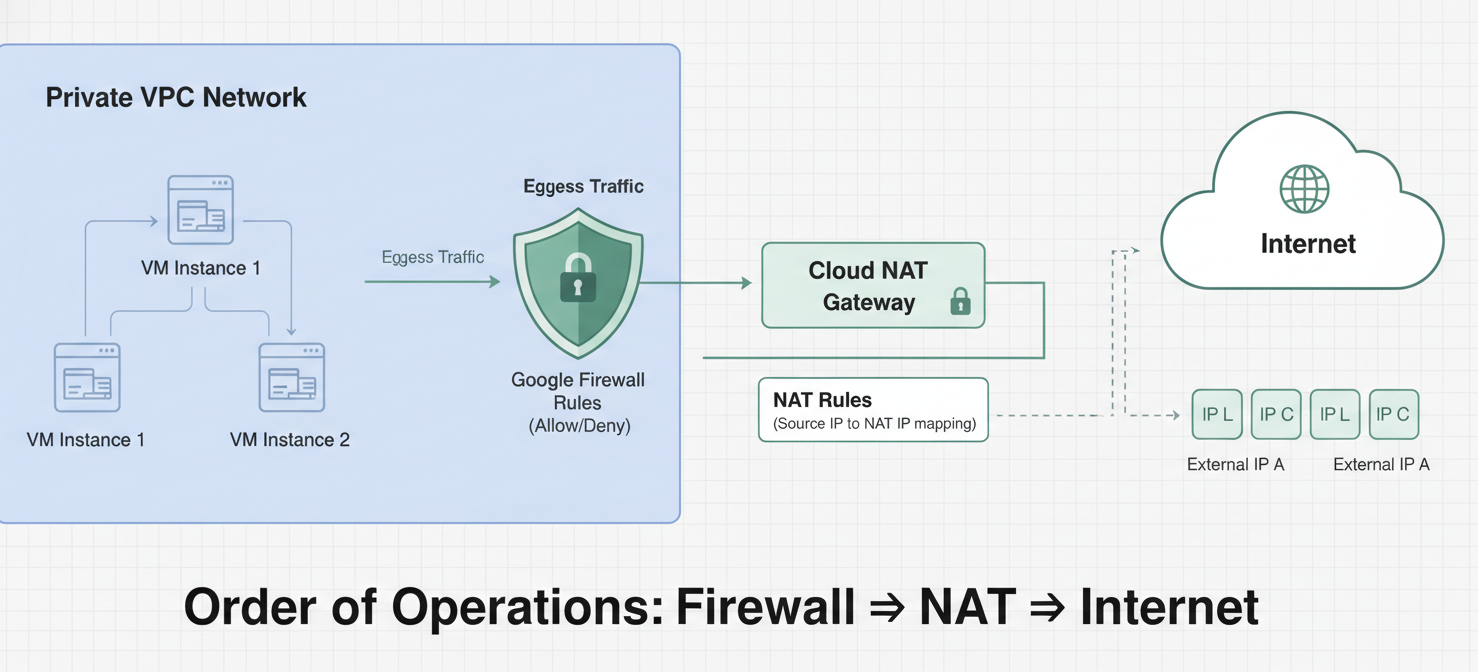
Cloud NAT works in tandem with Google Cloud Firewall rules. For egress (outbound) traffic, firewall rules are evaluated before the NAT translation occurs. This means you can apply security policies based on the original, internal source IP of your workloads, allowing you to enforce strict egress controls. For example, you can create a rule that only allows a specific set of backend VMs to access a particular external API endpoint.
NAT Rules for Granular Egress Control
For more advanced control, you can use NAT Rules. This feature allows you to create policies that define how traffic is translated based on its destination. For instance, you might have a third-party service that requires connections to originate from a specific, allowlisted IP address. With NAT Rules, you can configure your gateway to use a dedicated NAT IP address for all traffic going to that service’s destination IP range, while using a different pool of IPs for all other internet traffic.
Endpoint-Independent Mapping
Cloud NAT uses a feature called Endpoint-Independent Mapping. This means that for a given internal IP address and port, all connections to any external destination will be mapped to the same external NAT IP address and port. This predictable behavior is essential for some applications and can simplify troubleshooting.
Logging, Monitoring, and Compliance
Effective monitoring and logging are crucial for maintaining security and troubleshooting issues. Cloud NAT is fully integrated with Google’s Cloud Logging and Cloud Monitoring services, providing deep visibility into its operations.
You can enable logging when you create or edit a NAT gateway. When enabled, Cloud NAT can generate logs for two key events:
- Successful network translations: Records of new outbound connections being established.
- Errors: Logs for dropped packets, typically because no ports were available for translation.
These logs contain detailed information, including source and destination IPs and ports, protocol, and the name of the NAT gateway, which is invaluable for debugging and security audits.
In addition to logs, Cloud NAT sends key metrics to Cloud Monitoring automatically. You can monitor metrics such as the number of allocated ports, dropped packets, and data throughput. A particularly useful metric to watch is nat_allocation_failed, which should always be zero. If this metric shows any failures, it’s a clear indicator that you need to allocate more external IP addresses to your gateway to handle the traffic volume.
Common Use Cases and Scenarios
Cloud NAT is a versatile service that addresses several common cloud networking needs. Its primary function is to provide internet access for resources that should remain private.
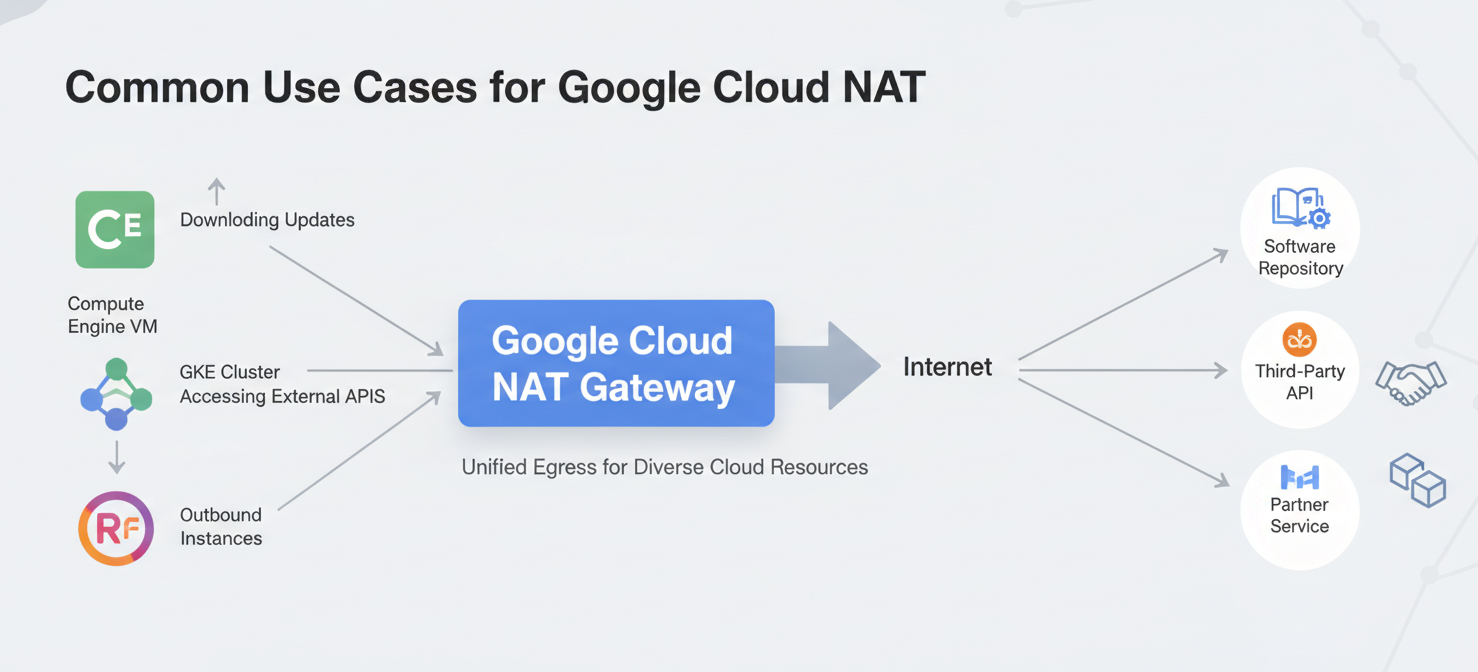
Supported resources include:
- Compute Engine VM instances
- Private Google Kubernetes Engine (GKE) clusters
- Cloud Run and Cloud Functions instances via Serverless VPC Access
- App Engine standard environment instances
Common scenarios where your team would use this service include:
- Software Updates and Patching: Backend VMs that need to download security patches or software packages from external repositories.
- Accessing External APIs: Private workloads that need to connect to third-party APIs for data processing or other services.
- Allowlisting with Partners: When a partner or external service requires your connections to come from a known, static IP address, you can manually assign a static IP to your NAT gateway for this purpose.
Pricing and Performance Considerations
The pricing model for Public NAT is based on a few components. First, there is an hourly charge for the gateway itself, which is priced based on the number of VM instances it serves, capped at 32 instances. In addition, you pay for the data that is processed by the gateway, charged per gigabyte. Finally, standard costs for the external IP addresses used by the gateway and any network egress traffic also apply.

Because Cloud NAT is a distributed, software-defined service, it does not act as a performance bottleneck. It is implemented directly within Google’s networking fabric and does not reduce the network bandwidth available to each VM instance. The service can be configured to automatically scale the number of NAT IP addresses it uses, ensuring it can handle the demands of dynamic workloads, such as those in an autoscaling instance group.
Conclusion
Ultimately, providing internet access to private resources is a fundamental requirement in the cloud, but doing so without a proper strategy introduces unnecessary risk. The google cloud nat service offers a robust, managed, and scalable solution to this challenge. By eliminating the need for individual public IPs on backend resources, it inherently strengthens your security posture. Furthermore, its integration with firewall rules, detailed logging capabilities, and predictable performance make it a superior alternative to managing your own fleet of NAT proxy instances. It’s a simple configuration for a complex problem, which is precisely the kind of engineering that keeps networks secure and administrators sane.
To see how Google Cloud NAT can simplify your network security, you can explore the service with a free trial or connect with our experts to book a demo and discuss your specific needs.
 7-day free trial