



Understanding your cloud bill is essential for managing expenses. However, when you use a shared platform like Azure Kubernetes Service (AKS), cost visibility can become cloudy. Multiple teams often deploy many applications into a single cluster. As a result, it becomes difficult to determine which team or application is responsible for which part of the bill. This article provides a clear path to achieving effective kubernetes cost allocation. You will learn how to untangle shared AKS costs and provide clear financial reporting to different teams within your organization.
Key takeaways
- The primary challenge in AKS cost management is attributing the expense of shared cluster resources like CPU, memory, and networking to specific teams or applications.
- A consistent and enforced resource labeling strategy is the most critical prerequisite for any successful cost allocation effort.
- You can begin implementing cost visibility using a 4-step process with native Azure tools before exploring more advanced open-source solutions.
- Tools like OpenCost can provide more granular, real-time cost data that goes beyond the capabilities of built-in cloud provider tools.
The Challenge of Shared Costs in AKS
Kubernetes is brilliant at abstracting infrastructure. It lets your teams deploy applications without worrying about the specific virtual machines underneath. However, this same abstraction creates a significant accounting problem. A single AKS cluster runs on a set of Azure Virtual Machines (nodes), and all applications share this pool of resources.

When the monthly Azure bill arrives, it shows the total cost for those VMs, load balancers, and storage. It does not, however, automatically break down that cost by the individual microservices, namespaces, or teams using the cluster.
This shared responsibility model leads to several issues:
- Lack of Accountability: Without clear data, no single team feels responsible for optimizing its resource consumption. This can lead to bloated applications and wasted spending.
- Inaccurate Budgeting: It is nearly impossible to forecast future costs for a specific product or business unit if you cannot measure its current consumption accurately.
- Friction Between Teams: Finance departments need to assign costs, while platform engineering teams are pressured to reduce them. Without data, these conversations are based on guesswork, not facts.
Ultimately, you cannot control what you cannot measure. The goal of AKS cost allocation is to bring this measurement and control back to your shared cloud environment.
Prerequisites for Accurate Cost Allocation
Before you can implement any tool or process, you must lay the proper groundwork. Attempting AKS showback without these fundamentals is like trying to build a house on a weak foundation. Success depends entirely on a solid data and governance strategy.
Consistent Labeling and Tagging Strategy
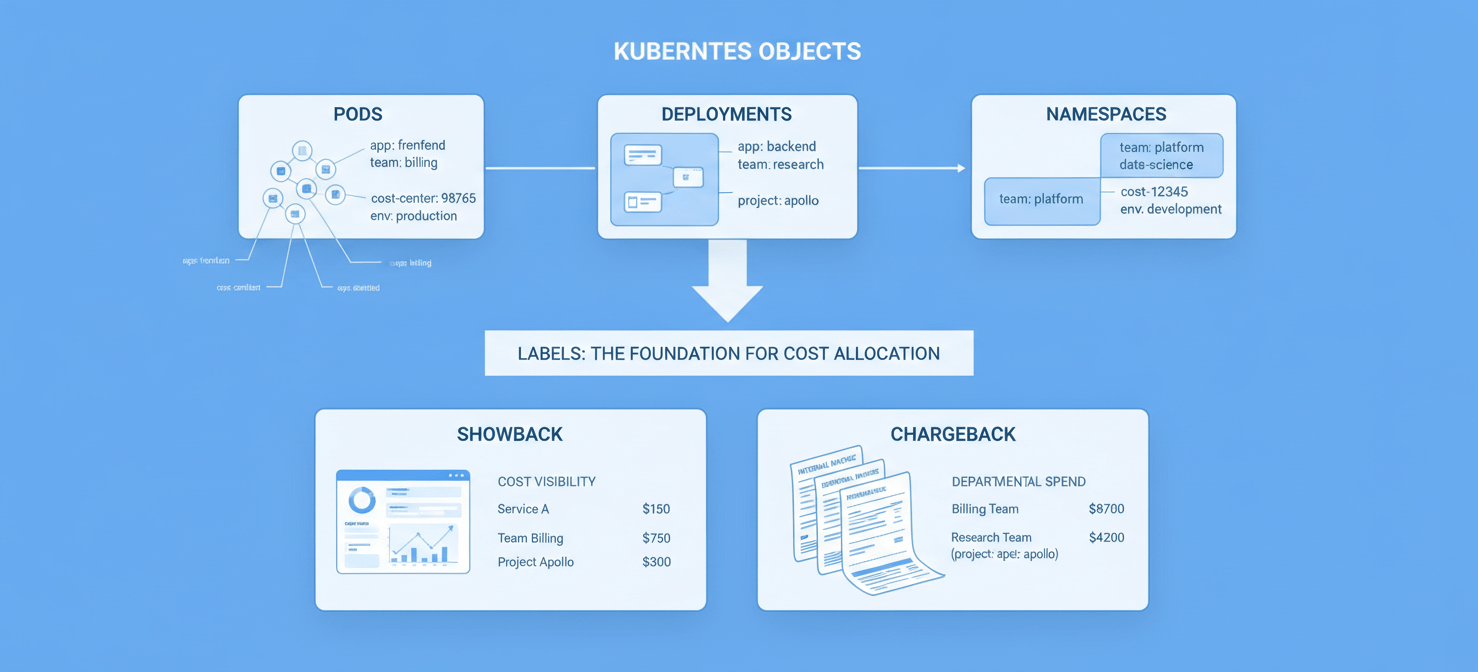
The core mechanism for tracking resources in Kubernetes is the label. Labels are key-value pairs you attach to objects like pods, deployments, and namespaces. For cost allocation, you must establish a mandatory labeling policy for all workloads.
For example, you could enforce the following labels on every deployment:
app: The name of the application (e.g.,frontend-api).team: The owning team (e.g.,billing-squad).cost-center: The associated financial code (e.g.,98765).
It is also important to distinguish between Kubernetes labels and Azure tags. Labels are for Kubernetes-internal organization, while Azure tags apply to the Azure resources themselves, like the entire AKS cluster or its node pools. A good strategy uses both. For instance, you can tag the entire cluster with a cost-center tag for high-level reporting in Azure Cost Management. Then, you can use Kubernetes labels for the granular, in-cluster breakdown.
Defining Your Cost Allocation Model
You also need to decide what you are trying to achieve. The two common models are showback and chargeback.
- Showback is about visibility. You show teams how much their workloads are costing the company. This encourages responsible behavior without complex internal billing.
- Chargeback is a formal accounting practice where you actually bill internal departments for their resource usage. This requires a much higher degree of accuracy and is often more complex to implement.
For most organizations, showback is the ideal starting point. It provides the necessary visibility to drive change without the overhead of a formal chargeback system.
Methods for Kubernetes Cost Allocation in AKS
There are two primary technical approaches to calculating costs within a cluster. The method you choose depends on the level of accuracy you need.
Top-Down (Proportional) Allocation
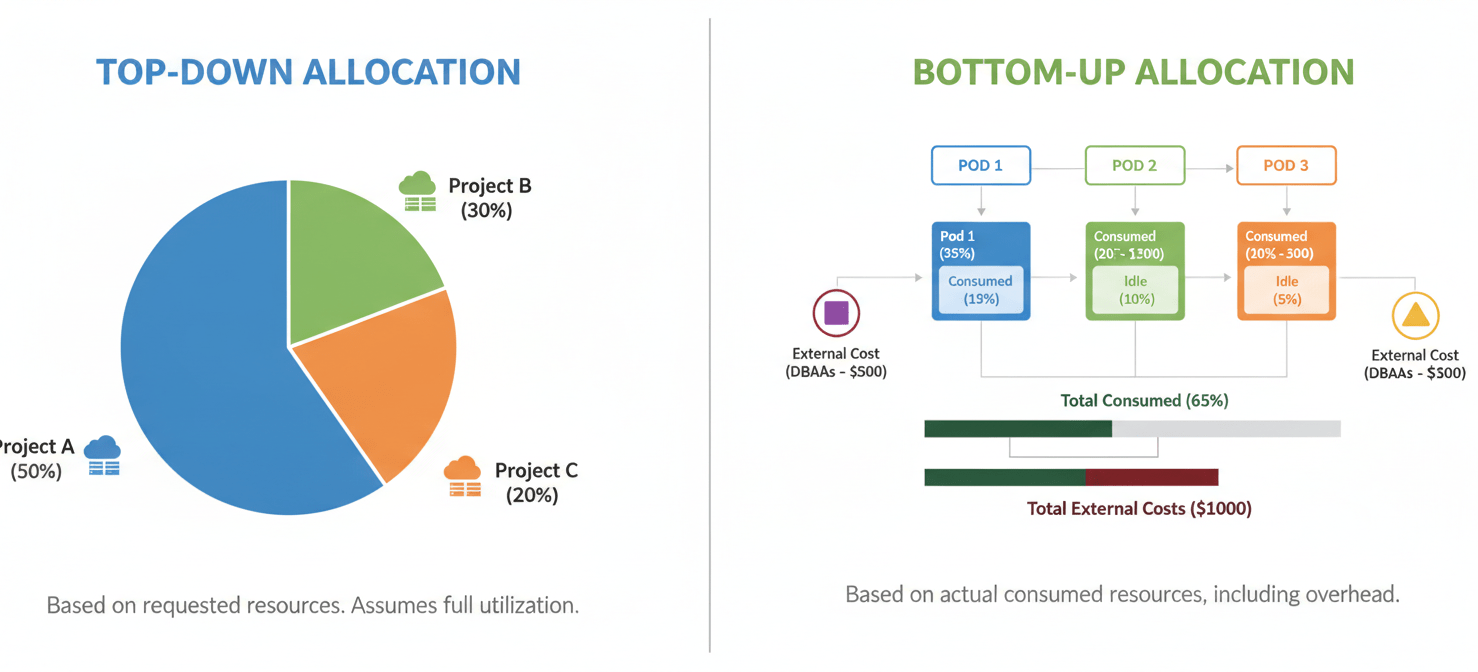
The simplest method is to take the total cost of the cluster’s infrastructure (the nodes) and divide it proportionally among the workloads. This division is typically based on the amount of CPU and memory each application requests.
For example, if Team A’s pods request 40% of the total CPU requested in the cluster, you allocate 40% of the compute cost to Team A. This method is easy to understand and implement. However, its main drawback is that it penalizes teams for requesting resources they do not actually use. It reflects what a team asked for, not what it consumed.
Bottom-Up (Asset-Based) Allocation
A more accurate method is to calculate the cost of the actual resources consumed by each pod over time. This approach looks at real usage data, providing a much truer picture of costs. It also allows you to account for the cost of idle resources—the unused capacity in your cluster that you are still paying for.
Furthermore, this bottom-up approach makes it possible to allocate other costs more precisely. These include expenses for networking, storage volumes, and even out-of-cluster resources like an Azure SQL Database that a specific application uses. While more complex, this method provides the data needed for true financial accountability.
Step-by-Step: Implementing Showback with Native Azure Tools
You can get started with AKS cost allocation using the tools already available in your Azure subscription. Microsoft provides a feature specifically for this purpose.
Step 1: Enable the AKS Cost Analysis Add-on
The first step is to enable cost analysis for your cluster. This feature, when activated, breaks down cluster costs by Kubernetes-specific objects like namespaces and assets. According to Microsoft’s documentation, you can enable this during cluster creation or on an existing cluster using the Azure CLI or Azure portal. This add-on collects cost data and sends it to Azure Cost Management.
Step 2: Ensure Consistent Labeling
As discussed in the prerequisites, your labels are the key to everything. Ensure your development teams are applying the agreed-upon labels (app, team, cost-center) to their deployments and services. Without these labels, the cost analysis tool can only report on a namespace level, which may not be granular enough.
Step 3: Use Azure Cost Management + Billing
Once the add-on has been active for a day or two, you can view the data in Azure Cost Management.
- Navigate to your subscription’s Cost Management + Billing section in the Azure portal.
- Go to Cost analysis.
- Select the aks-clusters (preview) view.
This view provides a breakdown of your AKS spending. You can then use the Group by filter to organize costs by Namespace or by a specific Label key. For example, grouping by the team label will show you exactly how much each team’s workloads cost to run.
Step 4: Analyze and Share the Reports
From here, you can analyze the data to identify high-cost applications or teams. You can also identify the cost of idle capacity. Azure Cost Management allows you to save these views as custom reports and schedule regular emails to share them with stakeholders. This creates a simple but effective AKS showback loop, providing teams with the feedback they need to optimize their applications.
Beyond Native Tools: Leveraging Open-Source Solutions
While Azure’s native tools are a great starting point, they primarily provide a top-down view of costs based on resource requests. For more precise, real-time, and comprehensive aks cost allocation, many organizations turn to dedicated open-source tools.
Introducing OpenCost
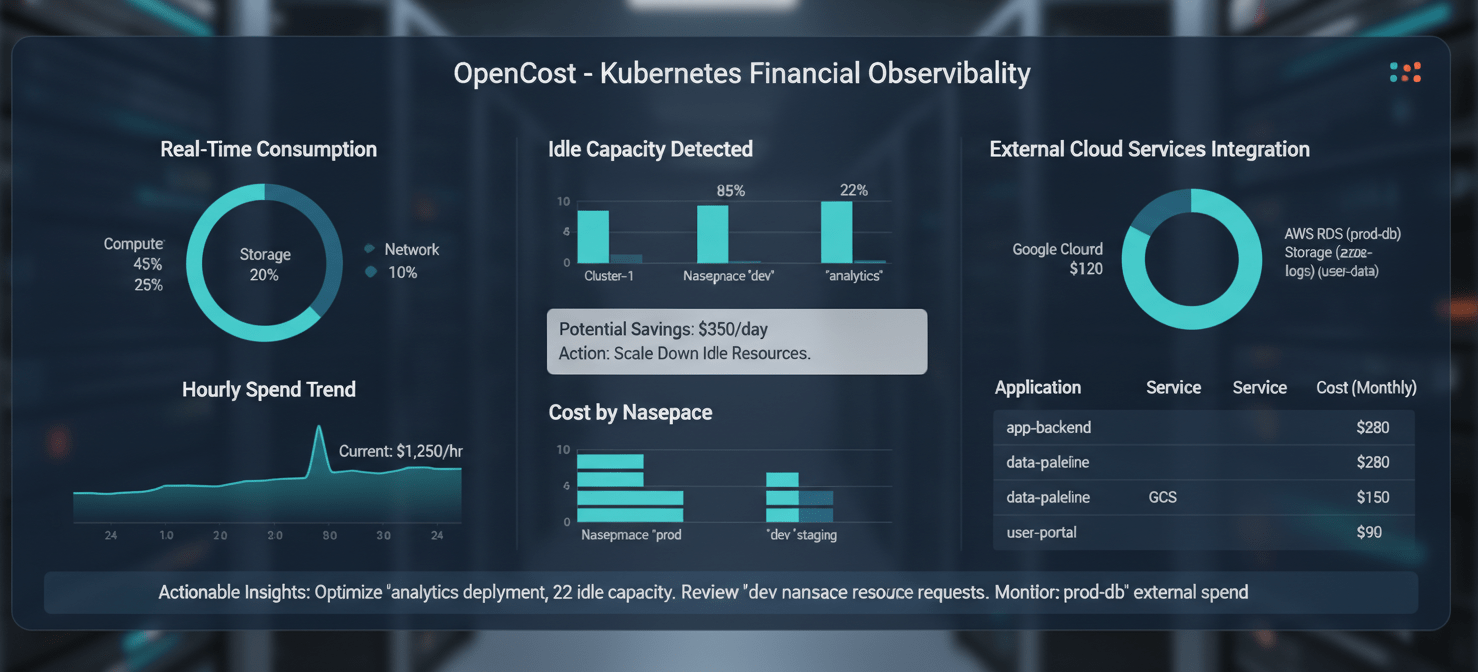
One of the most popular tools in this space is OpenCost. OpenCost is a sandbox project of the Cloud Native Computing Foundation (CNCF) that provides real-time cost monitoring for Kubernetes. It was originally developed by Kubecost and is now maintained as an open-source, vendor-neutral standard.
You can install OpenCost directly into your AKS cluster using a simple Helm chart. Once running, it begins monitoring the resources consumed by your workloads and combines this data with the pricing information from your cloud provider.
How OpenCost Improves AKS Showback
OpenCost offers several advantages over relying solely on native tools:
- Real-Time Data: Instead of waiting up to 24 hours for data to appear in Azure Cost Management, OpenCost provides cost information in near real-time.
- Consumption-Based Metrics: It calculates costs based on actual resource usage, not just requests. This provides a more accurate picture and helps you precisely measure the cost of idle capacity.
- Allocation of Shared and External Costs: OpenCost can allocate shared in-cluster costs (like monitoring tools) and link out-of-cluster costs (like storage buckets or databases) to the Kubernetes workloads that use them.
- Health and Optimization Insights: It provides recommendations for right-sizing your resource requests, helping teams reduce waste.
By deploying a tool like OpenCost, you can mature your AKS showback practice from periodic reporting to a continuous, data-driven optimization effort.
Conclusion
Moving to a shared platform like AKS delivers huge operational benefits, but it should not come at the price of financial clarity. Ignoring the challenge of shared costs leads to waste and prevents teams from making data-informed decisions about their applications. Therefore, implementing a robust kubernetes cost allocation strategy is not just a financial exercise; it is a critical part of running a mature and efficient cloud-native platform.
You can begin today with Azure’s native tools to achieve basic showback. However, as your needs for accuracy and real-time data grow, exploring open-source solutions like OpenCost will provide the deeper insights required for true optimization. Ultimately, the goal is to make cost a visible and manageable metric for every team using your cluster, turning a confusing cloud bill into a clear map for improvement.
To transform your confusing cloud bill into a clear map for improvement and achieve true optimization, you can easily start a free trial with Binadox to experience its capabilities, or simply book a demo to see how it can address your specific cost allocation challenges.
 7-day free trial