



For DevOps engineers, Kubernetes is the de facto standard for container orchestration. It provides incredible power for scaling and managing applications. However, that power comes with a hidden cost: complexity. Without the right visibility, Kubernetes costs can quickly spiral out of control, turning a powerful tool into a budget black hole. This is where kubernetes cost optimization tools become essential. They provide the necessary insights to track, manage, and reduce your cluster-related expenditures, ensuring you only pay for the resources you actually use.
Key takeaways
- Visibility is the first step: You cannot optimize what you cannot see. The best tools provide granular cost allocation by namespace, pod, label, and team.
- Automation is the goal: Top-tier tools move beyond recommendations to automate rightsizing, node selection, and the use of spot instances, often reducing infrastructure spend by 30-50%.
- Open source offers a solid start: Tools like OpenCost provide a free, robust foundation for cost monitoring, while commercial products add enterprise features like advanced governance and dedicated support.
- Choose based on your workflow: The right tool depends on your primary goal. For FinOps-driven reporting and chargeback, Kubecost is a strong choice. For automated cost reduction, platforms like CAST AI are more suitable.
Why Kubernetes Costs Spiral Out of Control
Kubernetes itself is free, but the infrastructure it runs on is not. The primary drivers of high Kubernetes costs are often a direct result of its flexibility and the abstraction it provides. Engineers can provision resources with a few lines of YAML, but without a clear understanding of the underlying cost implications, waste becomes almost inevitable.
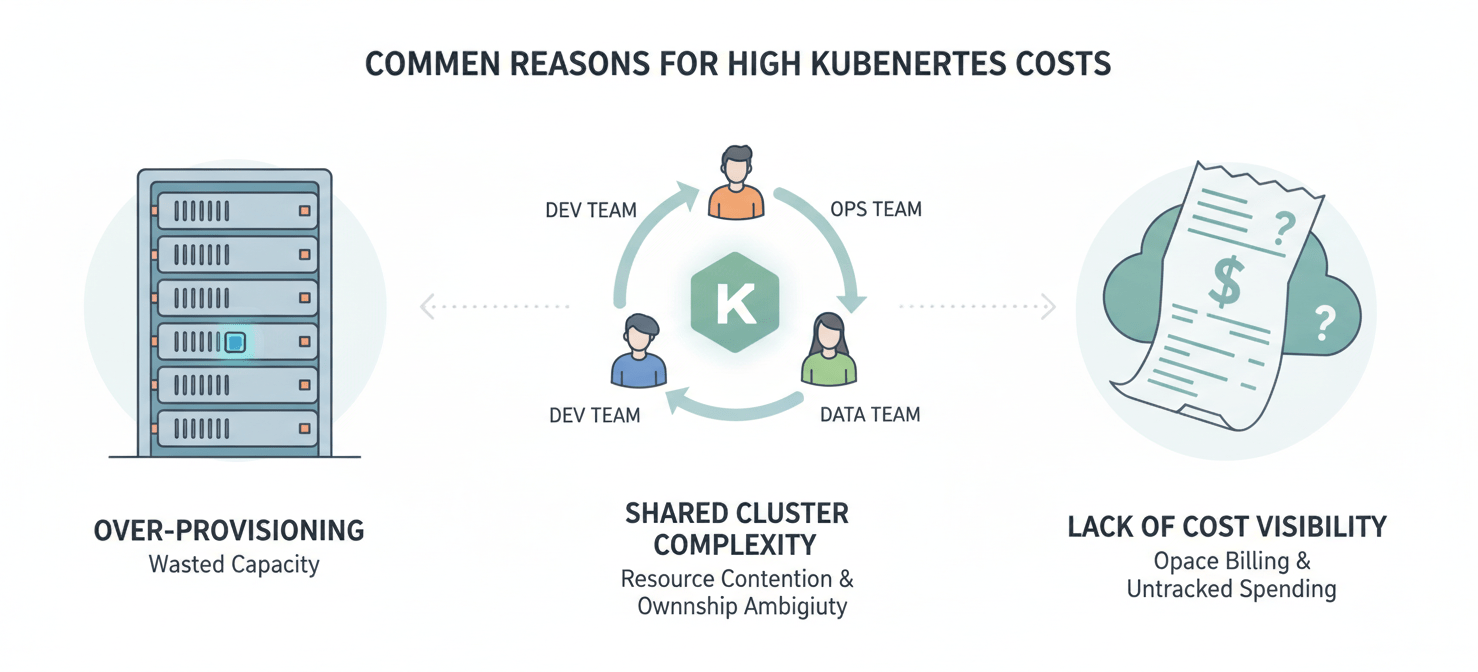
Over-provisioning is the default
The most common cause of inflated Kubernetes bills is resource over-provisioning. When deploying a new service, engineers often estimate resource requests (cpu and memory) with a wide safety margin to prevent performance issues. These requests tell the Kubernetes scheduler to reserve a minimum amount of resources, whether the application uses them or not. As a result, you pay for capacity that sits idle, leading to low node utilization and significant waste.
Lack of cost visibility
Native Kubernetes tools provide deep operational metrics but lack any concept of cost. It’s easy to see CPU utilization but nearly impossible to see how that usage translates into dollars without a third-party tool. This creates a disconnect where engineering teams make technical decisions without financial context, and finance teams see a rising cloud bill without understanding the technical drivers.
Shared cluster complexity
In multi-tenant clusters, attributing costs back to specific teams, applications, or customers is a significant challenge. Shared resources, control plane overhead, and networking costs are difficult to divide fairly. Without accurate showback or chargeback, no single team feels accountable for their consumption, making it difficult to incentivize cost-conscious behavior.
Key Features to Look for in Kubernetes Cost Optimization Tools
When evaluating different solutions, focus on the capabilities that directly address the root causes of overspending. The goal is to move from reactive cost analysis to proactive, automated optimization.
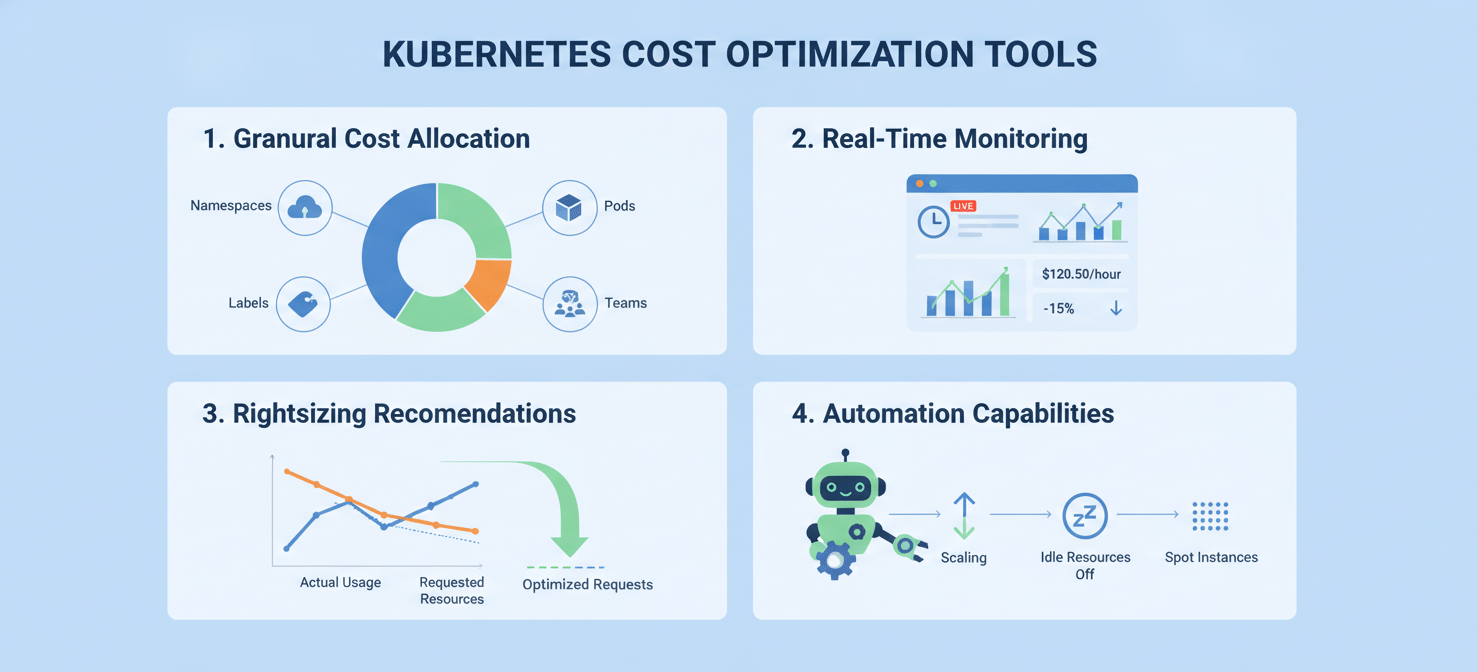
- Granular Cost Allocation: The ability to break down costs by Kubernetes-native objects like namespace, deployment, service, pod, and labels is fundamental. This allows you to see exactly which applications and teams are driving spend.
- Real-Time Monitoring: Cloud provider bills often have a delay of 24 hours or more. Effective tools provide real-time (or near real-time) visibility into cost data, enabling you to spot anomalies as they happen, not days later.
- Rightsizing Recommendations: The tool should analyze historical utilization data to provide actionable recommendations for adjusting resource requests and limits. This helps eliminate the guesswork involved in manual tuning.
- Idle and Unallocated Resource Identification: A significant portion of waste comes from resources that are provisioned but unused. The tool should clearly identify idle clusters (e.g., staging environments over the weekend) and unallocated capacity on nodes.
- Multi-Cloud and Hybrid Support: If your workloads run across different cloud providers (like AWS, Azure, and GCP) or in on-premises data centers, you need a tool that can provide a unified view of costs across all environments.
- Automation Capabilities: The most advanced tools don’t just provide recommendations; they can automatically implement them. This includes features like dynamic pod rightsizing, intelligent node selection, and automated use of spot instances to reduce compute costs.
Top Kubernetes Cost Optimization Tools: A Detailed Comparison
The market for Kubernetes cost management is diverse, with options ranging from open-source monitoring projects to fully autonomous optimization platforms. Here’s a look at some of the leading tools.
Kubecost
Kubecost is one of the most widely adopted tools for Kubernetes cost visibility and is built on the open-source OpenCost standard. It excels at providing detailed cost allocation, making it a favorite among FinOps teams for showback and chargeback. It integrates directly with your cloud billing data to provide accurate, real-time insights into what you’re spending and where.
- Pros: Excellent for cost allocation and reporting. Strong multi-cloud support. Offers a free tier for smaller environments.
- Cons: Optimization features are more recommendation-based than fully automated. The enterprise pricing can be significant for larger clusters.
- Best for: Teams whose primary need is deep cost visibility, reporting, and establishing a FinOps practice.
OpenCost
Originally developed by the team at Kubecost, OpenCost is now a CNCF-governed open-source project that provides the foundational cost allocation engine. It is vendor-neutral and offers a standardized way to measure Kubernetes infrastructure costs.
- Pros: Completely free and open source. Provides accurate, real-time cost allocation by namespace, workload, and other Kubernetes concepts.
- Cons: It’s a monitoring tool, not an optimization platform; it provides no savings recommendations. Requires you to bring your own visualization tools (like Grafana) and lacks enterprise features like SSO and dedicated support.
- Best for: DevOps teams with strong in-house expertise who want a foundational, open-source tool for cost visibility and are comfortable building their own dashboards and alerting.
Harness Cloud Cost Management
Harness Cloud Cost Management (CCM) provides a broad view of cloud costs, with specific capabilities for Kubernetes. A key feature is its “AutoStopping” capability, which can automatically shut down non-production resources when they are idle, potentially saving up to 70% on non-production cloud spend.
- Pros: Strong automation features for shutting down idle resources. Provides a unified view of costs across Kubernetes and other cloud services.
- Cons: Kubernetes features are part of a larger platform, which may be more than what a team solely focused on K8s needs. Cost management features are primarily in the Enterprise plan.
- Best for: Organizations already using the Harness platform for CI/CD or those looking for a single solution to manage costs across both containerized and traditional cloud infrastructure.
Datadog Cloud Cost Management
For teams already invested in the Datadog ecosystem for observability, adding Cloud Cost Management can be a natural fit. It allows you to correlate cost data directly with performance metrics, logs, and traces, providing a holistic view. You can see how a code deployment impacts both application performance and infrastructure cost in one place.
- Pros: Unifies cost data with observability metrics. Granular cost allocation for Kubernetes, EKS, and ECS workloads.
- Cons: Can become expensive, as pricing is often based on the number of hosts or containers being monitored. Primarily a visibility tool; optimization is a manual process based on the insights provided.
- Best for: Engineering and DevOps teams that are heavy Datadog users and want to integrate cost into their existing monitoring workflows.
Open Source vs. Commercial Solutions: Which is Right for You?
The choice between open-source and commercial tools often comes down to a trade-off between cost, features, and the level of internal expertise required.
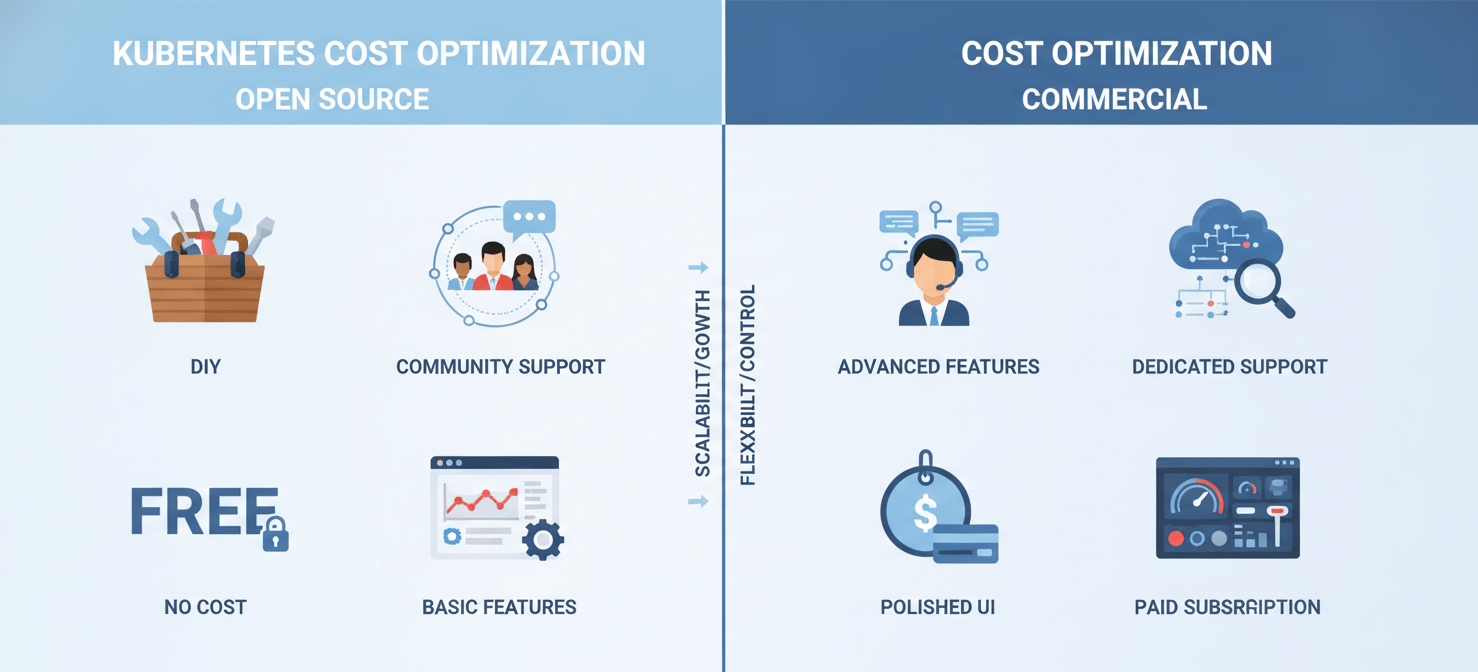
Open-source tools like OpenCost provide a powerful, free foundation for cost monitoring. They give you the core data you need to understand your spending. However, they require significant DIY effort. Your team will be responsible for setting up and maintaining the tool, integrating it with visualization platforms like Grafana, and building your own alerting and reporting workflows. There is no vendor support to call when something breaks.
Commercial solutions like Kubecost and Harness build upon this foundation by adding polished user interfaces, advanced features, and enterprise-grade support. They offer out-of-the-box dashboards, automated budget alerting, governance features, and dedicated support teams. While they come with a licensing fee, the total cost of ownership can often be lower when you factor in the engineering time saved on setup, maintenance, and feature development.
For smaller teams or those just starting their cost optimization journey, starting with an open-source tool is a low-risk way to gain initial visibility. As your needs mature and the cost of manual effort outweighs the licensing fees, transitioning to a commercial platform often becomes the more practical choice.
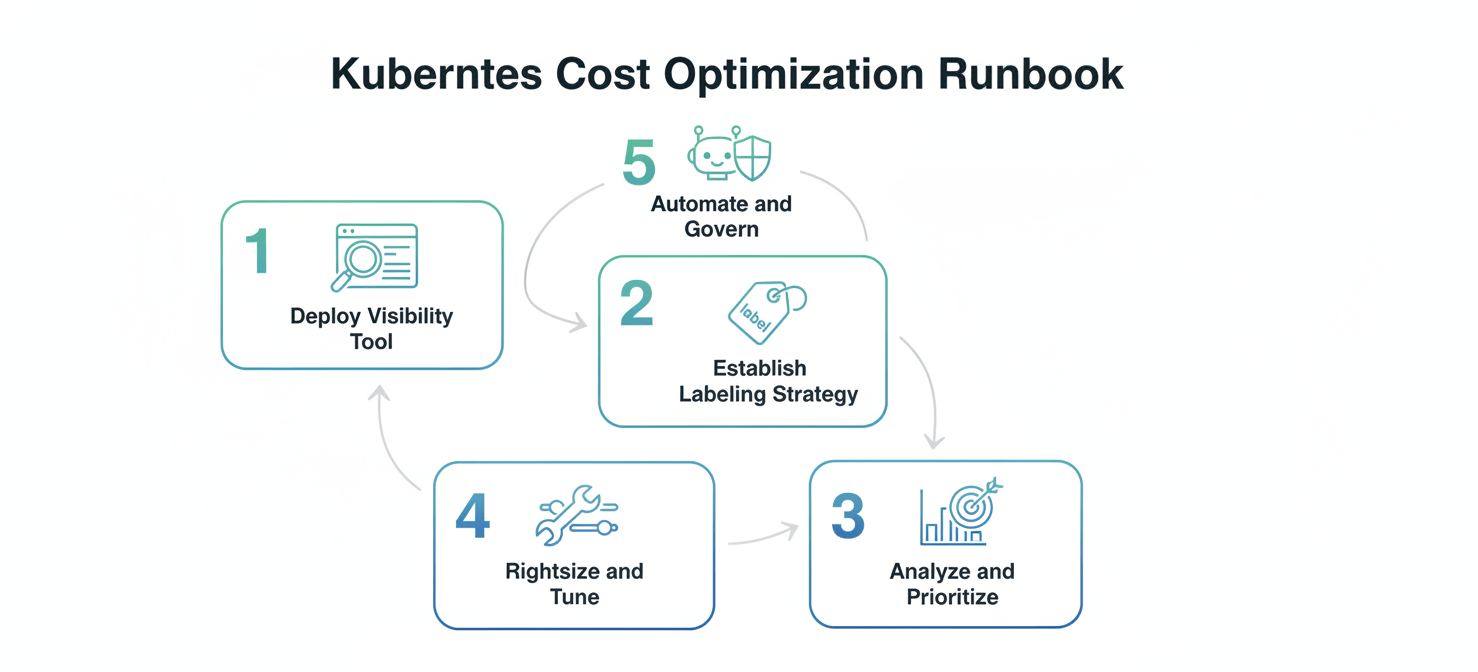
Practical Implementation: A 5-Step Runbook for Getting Started
- Deploy a Visibility Tool: Start by installing a tool like OpenCost or the free tier of Kubecost. This can typically be done in minutes with a simple Helm chart. The immediate goal is to get a baseline understanding of your current spend and identify the top cost drivers by namespace and workload.
- Establish a Labeling Strategy: Consistent labeling is crucial for accurate cost allocation. Define and enforce a mandatory set of labels for all deployments, such as
team,product, andenvironment. Use policy-as-code tools like OPA Gatekeeper to enforce these standards at deployment time. - Analyze and Prioritize: Use the tool’s dashboard to identify the “low-hanging fruit.” Look for over-provisioned workloads with a large gap between resource requests and actual usage. Focus on the top 5-10 most expensive deployments first for the biggest impact.
- Rightsize and Tune: Begin iteratively adjusting the resource requests and limits for the prioritized workloads based on the tool’s recommendations and historical data. Implement Horizontal Pod Autoscalers (HPA) and Vertical Pod Autoscalers (VPA) to allow workloads to scale dynamically based on demand.
- Automate and Govern: Once you have addressed the most significant inefficiencies, move towards automation. Use tools that can automatically manage spot instances, turn off idle environments, and continuously rightsize workloads. Set up budget alerts to notify the responsible teams when they are approaching their spending limits.
Conclusion
Ignoring Kubernetes costs is a luxury no DevOps team can afford. The complexity that makes Kubernetes so powerful also makes it prone to significant financial waste if left unmanaged. The good news is that a mature ecosystem of kubernetes cost optimization tools has emerged to provide the necessary visibility and control. Whether you start with a foundational open-source tool like OpenCost or adopt a comprehensive commercial platform, the key is to make cost a first-class metric in your engineering workflow. By moving from guesswork to data-driven decisions, you can ensure your clusters run efficiently, reliably, and—most importantly—without delivering a nasty surprise on your next cloud bill. After all, the only thing worse than an unexpected outage is an unexpected invoice that’s just as painful.
To ensure your clusters run efficiently without delivering a nasty surprise on your next cloud bill, you can gain immediate control over your spending by initiating a free Binadox trial or explore comprehensive optimization capabilities by scheduling a personalized demo.
 7-day free trial