



Mobile Device Management (MDM) is essential for securing and managing your organization’s fleet of smartphones, tablets, and laptops. However, navigating the complexities of software licensing and controlling expenses can be a significant challenge. Effective MDM licensing and cost management is not just about finding the cheapest price; it’s about selecting a model that aligns with your operational needs, ensuring compliance, and avoiding unforeseen expenses that can strain your IT budget. This guide provides a clear path through the often-confusing landscape of mobile device management pricing, helping you make informed decisions that support your organization’s goals.
Key takeaways
- MDM licensing typically follows a per-device or per-user model, with costs ranging from $3 to $9 per device monthly.
- Total Cost of Ownership (TCO) is a critical metric, as 60-70% of a mobile device’s total cost occurs after the initial purchase, including support, maintenance, and software licensing.
- Conducting regular audits of your MDM licenses can identify unused or underutilized licenses, offering a direct path to cost savings.
- Automating license reclamation for employees who leave the company can immediately free up licenses and reduce unnecessary spending.
Understanding MDM Licensing Models
Choosing the right MDM solution starts with understanding how vendors structure their pricing. The licensing model you select will have a direct and lasting impact on your IT budget and administrative overhead. Most providers offer subscription-based plans, but the way they calculate that subscription can vary significantly.
Per-Device vs. Per-User Licensing
The two most common licensing models are per-device and per-user.
-
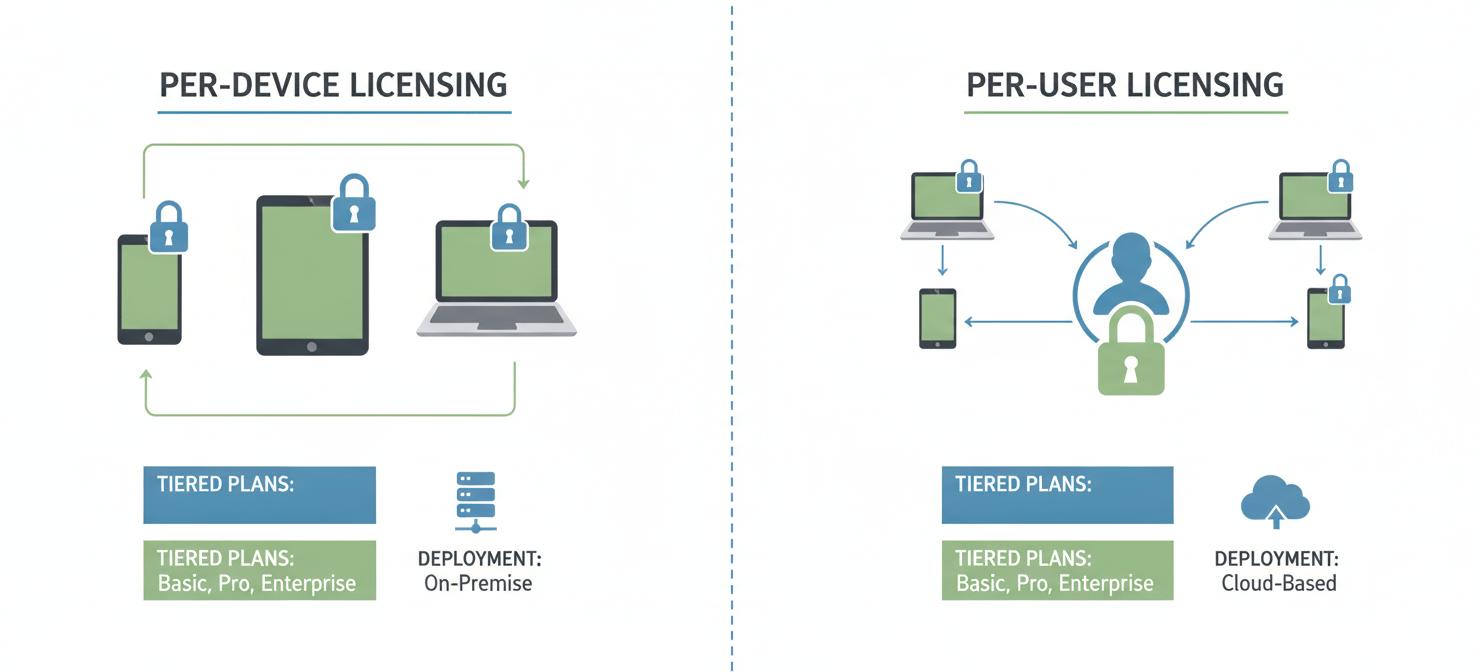
Per-Device Licensing: In this model, you pay a flat fee for each device managed by the MDM platform. This approach is straightforward and often cost-effective for organizations where employees use a single, company-issued device. It’s ideal for managing shared devices like those in a kiosk, warehouse, or clinical setting. For example, Microsoft Intune offers a device-only license for hardware not tied to a specific user.
-
Per-User Licensing: Here, a single license covers all the devices an individual employee uses. This is highly advantageous in “Bring Your Own Device” (BYOD) environments or for users who work across a laptop, tablet, and smartphone. A user license from a vendor like Ivanti may allow an employee to register up to five devices before a second license is consumed. This model simplifies administration, as you only need to track licenses by employee headcount.
The best choice depends entirely on your use case. If your workforce is equipped with one device each, the per-device model offers predictable costs. However, if your team uses multiple devices, a per-user model almost always provides better value and scalability.
Tiered Plans and Add-On Modules
Beyond the basic licensing structure, many MDM vendors offer tiered plans (e.g., Basic, Standard, Enterprise) that bundle different feature sets. A basic tier might cover core functionalities like device enrollment and policy enforcement, while premium tiers add advanced security, analytics, and integration capabilities.
Furthermore, vendors often sell specialized features as separate add-ons. For instance, Microsoft Intune allows customers to purchase tools like Remote Help or Endpoint Privilege Management individually. While this à la carte approach provides flexibility, it can also complicate budgeting. It’s crucial to map your specific technical requirements to these tiers and add-ons to avoid paying for features you don’t need or missing critical capabilities.
Cloud vs. On-Premise Deployment
The deployment model also influences cost.
- Cloud (SaaS): This is the most common model, where the MDM provider hosts the software, and you pay a subscription fee. It eliminates the need for your organization to manage servers and infrastructure, reducing upfront capital expenditure and ongoing maintenance costs.
- On-Premise: In this model, you host the MDM software on your own servers. This requires a significant upfront investment in hardware and software licenses, plus ongoing costs for maintenance, support, and upgrades. However, it offers greater control over data and security, which is often a requirement for organizations in highly regulated industries.
Comparing Major MDM Vendor Pricing
Mobile device management pricing varies widely between vendors. Understanding the specific structures of leading platforms is key to making a cost-effective choice. Here’s a look at how some of the major players approach licensing.
Microsoft Intune
Microsoft Intune is a popular choice, especially for organizations already invested in the Microsoft 365 ecosystem. Its licensing is often bundled with other Microsoft products, which can make it a very economical option.
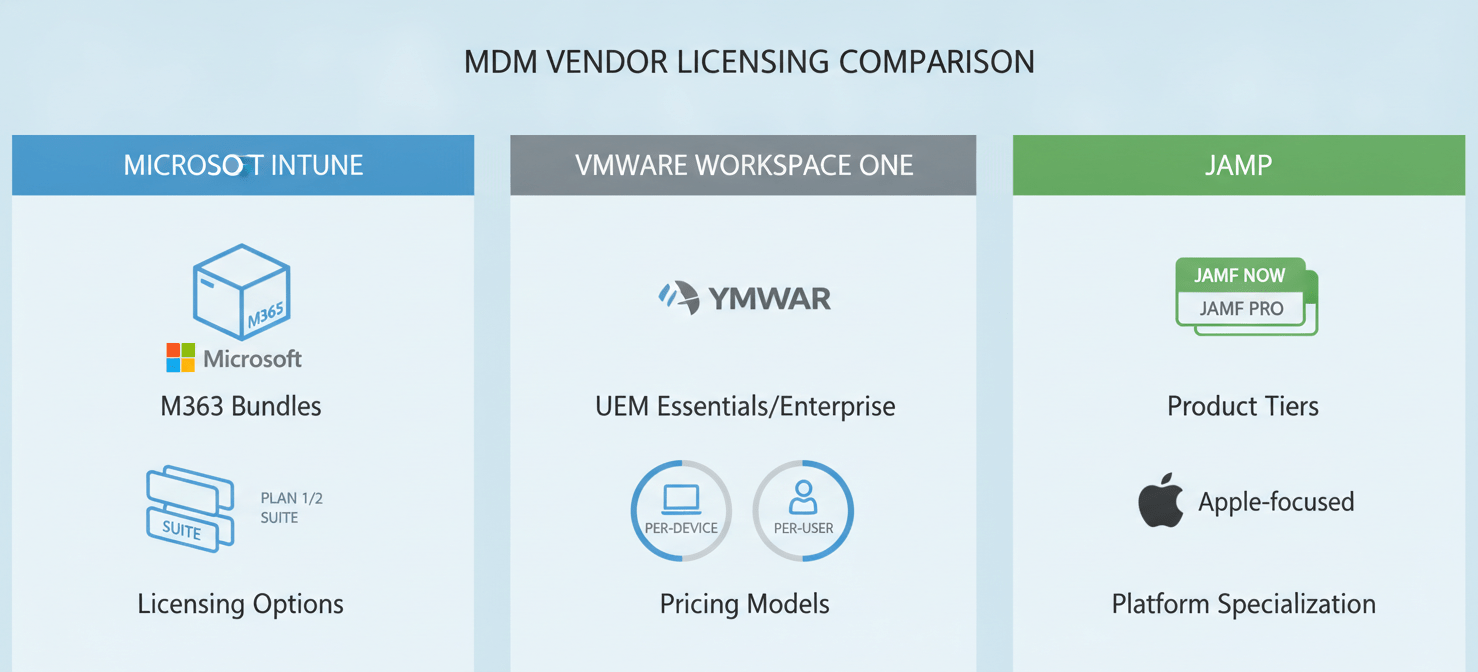
- Intune Plan 1: This is the core offering, providing endpoint management across Windows, macOS, iOS, and Android. It is included in many Microsoft 365 E3 and E5 licenses or can be purchased standalone for around $8.00 per user per month.
- Intune Plan 2: An add-on to Plan 1, this tier adds management for specialty devices like AR/VR headsets and conference room equipment for an additional $4.00 per user per month.
- Intune Suite: This premium bundle includes advanced features like Remote Help, Endpoint Privilege Management, and Advanced Analytics. It costs an additional $10.00 per user per month on top of Plan 1.
VMware Workspace ONE (by Broadcom)
Workspace ONE is known for its comprehensive unified endpoint management (UEM) capabilities, supporting a wide range of devices. Pricing is typically subscription-based and offered in several tiers.
- UEM Essentials: This entry-level tier provides essential device and app management.
- Enterprise Edition: This tier offers more advanced features, including robust security and analytics.
Pricing for Workspace ONE generally starts around $3.78 per device or $6.52 per user per month for standard plans, with enterprise tiers costing up to $10 per device or $15 per user.
Jamf
Jamf specializes exclusively in managing Apple devices (macOS, iOS, iPadOS, and tvOS). This focus allows for deep integration with Apple’s ecosystem.
- Jamf Now: Aimed at small to mid-sized businesses, this plan costs around $4 per device per month, with the first three devices free.
- Jamf Pro: This is the flagship enterprise product. Pricing for iOS devices is around $3.67 per device per month, while macOS devices are more. The Jamf Business Plan bundles management, security, and identity features for a higher per-device cost.
Identifying the Hidden Costs of MDM
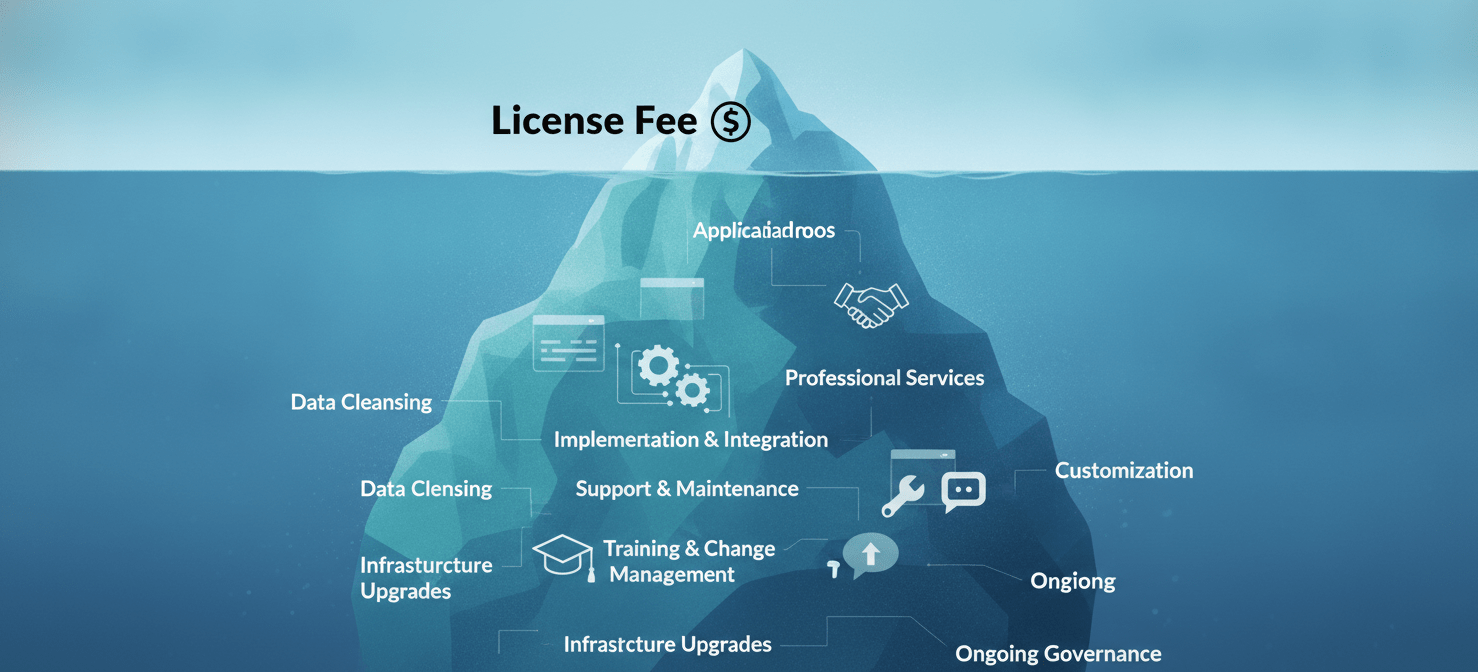
The sticker price of an MDM license is only one part of the equation. The Total Cost of Ownership (TCO) includes all direct and indirect costs over the solution’s lifecycle. Failing to account for these hidden expenses can lead to significant budget overruns.
Implementation and Integration
Deploying an MDM solution is rarely a simple plug-and-play process. Enterprise-level implementations can range from $300,000 to over $3 million, depending on complexity. Key cost drivers include:
- Professional Services: Many organizations require assistance from the vendor or a third-party consultant for initial setup, configuration, and policy creation.
- System Integration: Connecting the MDM platform with other IT systems like your directory service (e.g., Azure AD), helpdesk software, and security tools often requires custom development or specialized connectors.
- Data Migration: If you are switching from another MDM provider, migrating devices, policies, and data can be a complex and time-consuming task.
Support and Maintenance
Ongoing support is another critical cost factor. While basic support is often included in the subscription fee, many vendors offer premium support tiers at an additional cost. These premium plans typically provide faster response times, access to dedicated support engineers, and proactive assistance.
For on-premise deployments, you are also responsible for server maintenance, software updates, and security patching, which adds to the operational workload of your IT team.
Training and Change Management
Your team needs to know how to use the MDM platform effectively. This requires an investment in training for IT administrators who will manage the system daily. Furthermore, you must communicate changes to end-users, especially in BYOD scenarios where employees may have concerns about privacy. A well-planned change management strategy is essential for smooth adoption and can prevent costly helpdesk calls down the line.
Strategies for MDM Licensing and Cost Management
Proactive management of your MDM environment is essential to control costs and maximize the value of your investment. Simply purchasing licenses and deploying the software is not enough. You need a continuous strategy for optimization.
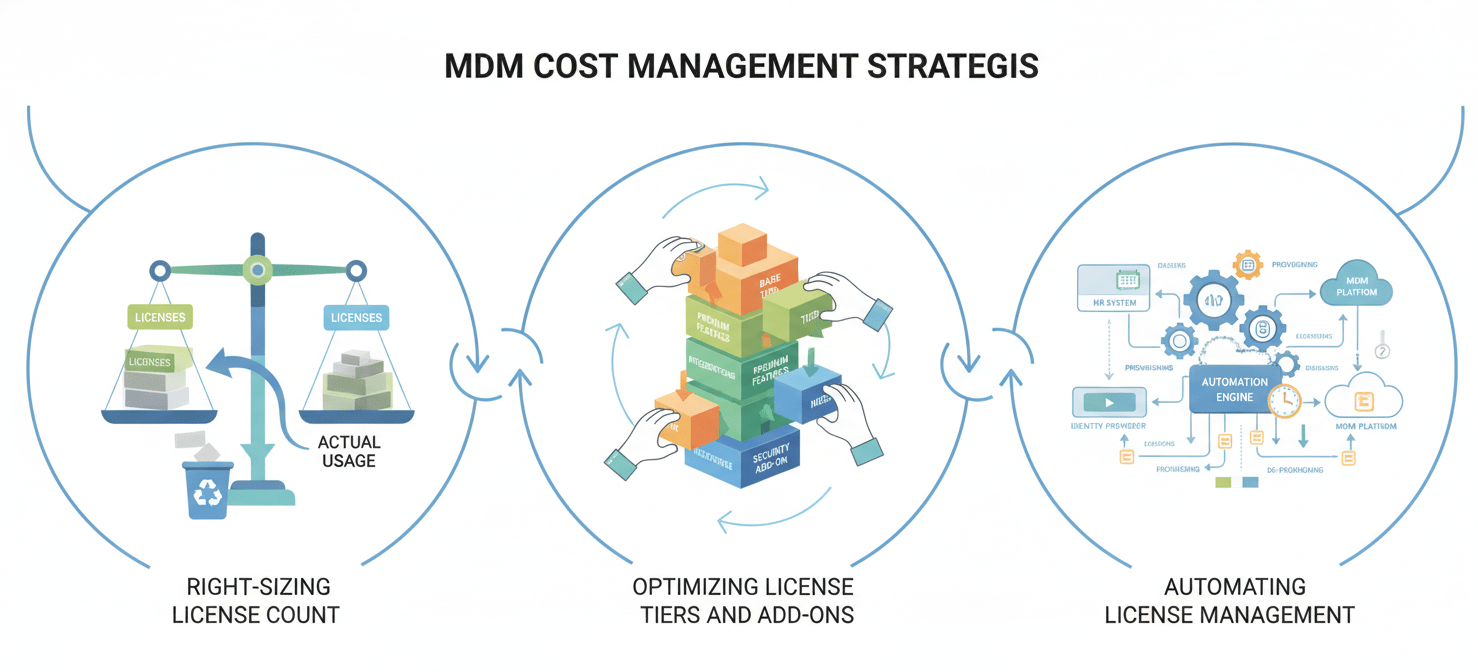
Right-Sizing Your License Count
One of the most direct ways to save money is to ensure you are only paying for the licenses you actually need.
- Conduct Regular Audits: Schedule quarterly or semi-annual reviews of your MDM license usage. Compare the number of active licenses against your employee headcount and device inventory. This process will quickly reveal unused licenses from former employees or retired devices.
- Establish a License Reclamation Process: When an employee leaves your organization, their MDM license should be immediately reclaimed as part of the standard offboarding process. Automating this workflow can prevent licenses from sitting idle for months.
- Analyze Usage Patterns: Use the reporting and analytics features within your MDM platform to understand how devices are being used. Are there devices that have not connected to the network in over 90 days? These may be candidates for license removal.
Optimizing License Tiers and Add-Ons
As your organization’s needs evolve, the license tier that was once a perfect fit may no longer be the most cost-effective option.
- Re-evaluate Feature Requirements Annually: Before your contract renews, review the features included in your current plan. Are you using all the advanced capabilities of a premium tier? If not, downgrading to a lower tier could result in significant savings. Conversely, you may find that purchasing a few specific add-ons is cheaper than paying for a bundled enterprise plan.
- Leverage Bundles Strategically: For organizations heavily invested in a single ecosystem, such as Microsoft 365, leveraging bundled licenses is often the most economical approach. For example, if you already subscribe to Microsoft 365 E3, you likely have access to Intune Plan 1 at no additional cost.
Automating License Management
Manual license tracking is prone to error and can be incredibly time-consuming. Automation is key to efficient MDM licensing and cost management.
- Integrate with HR Systems: Connect your MDM platform to your HR information system (HRIS). This allows for the automatic provisioning of licenses for new hires and the de-provisioning of licenses upon termination.
- Use Automated Workflows: Set up rules to automatically retire devices and reclaim licenses after a set period of inactivity. For example, a policy could automatically wipe a device and free up its license if it hasn’t checked in for 120 days.
Conclusion
Effectively managing mobile device management pricing is not a one-time task but an ongoing discipline. It requires a clear understanding of different licensing models, a thorough evaluation of vendor offerings, and a vigilant eye on the hidden costs that extend far beyond the initial subscription fee. By choosing the right licensing model for your specific use case—whether per-device or per-user—and actively managing your license pool through regular audits and automation, you can prevent unnecessary expenditure.
Ultimately, successful MDM licensing and cost management is about achieving a balance. The goal is to implement a solution that provides robust security and management capabilities without over-provisioning licenses or paying for features your team will never use. A proactive, data-driven approach ensures your MDM investment remains a strategic asset rather than a budgetary drain. After all, the only thing more expensive than a well-managed device fleet is a poorly managed one.
Ready to transform your MDM investment into a strategic asset? Discover how our platform can streamline your operations and optimize costs by trying our solution with a free trial or connecting with our team for a personalized demo.
 7-day free trial