



That monthly AWS bill can be a source of constant frustration. It arrives, it’s higher than expected, and the reasons why are buried in layers of complexity. Your team is busy building, not deciphering billing reports. Consequently, you pay the invoice and hope for the best next month. However, there is a better way. With a structured approach, you can bring those costs under control without sacrificing performance. This practical aws cost optimization guide provides actionable steps to identify waste, implement savings, and create a culture of cost awareness on your team.
Key takeaways
- Embrace Automation: Leverage AWS tools like Compute Optimizer to automate the analysis of resource utilization and apply rightsizing recommendations, reducing manual effort.
- Commit, but Flexibly: Utilize Savings Plans for discounts up to 72% on compute services like EC2, Fargate, and Lambda, offering more flexibility than traditional Reserved Instances.
- Stop Paying for Idle: Systematically find and eliminate unused resources such as idle EC2 instances, unattached EBS volumes, and orphaned snapshots to prevent unnecessary charges.
- Monitor and Alert: Use AWS Budgets to set custom spending limits and configure alerts that notify your team before costs spiral out of control.
Understanding Your AWS Bill: The First Step
Before you can reduce your costs, you must first understand where the money is going. AWS provides several tools designed to give you visibility into your spending. Ignoring them is like driving without a dashboard; you’re moving, but you have no idea if you’re about to run out of gas. Therefore, the first step in any cost reduction strategy is to get familiar with these tools.
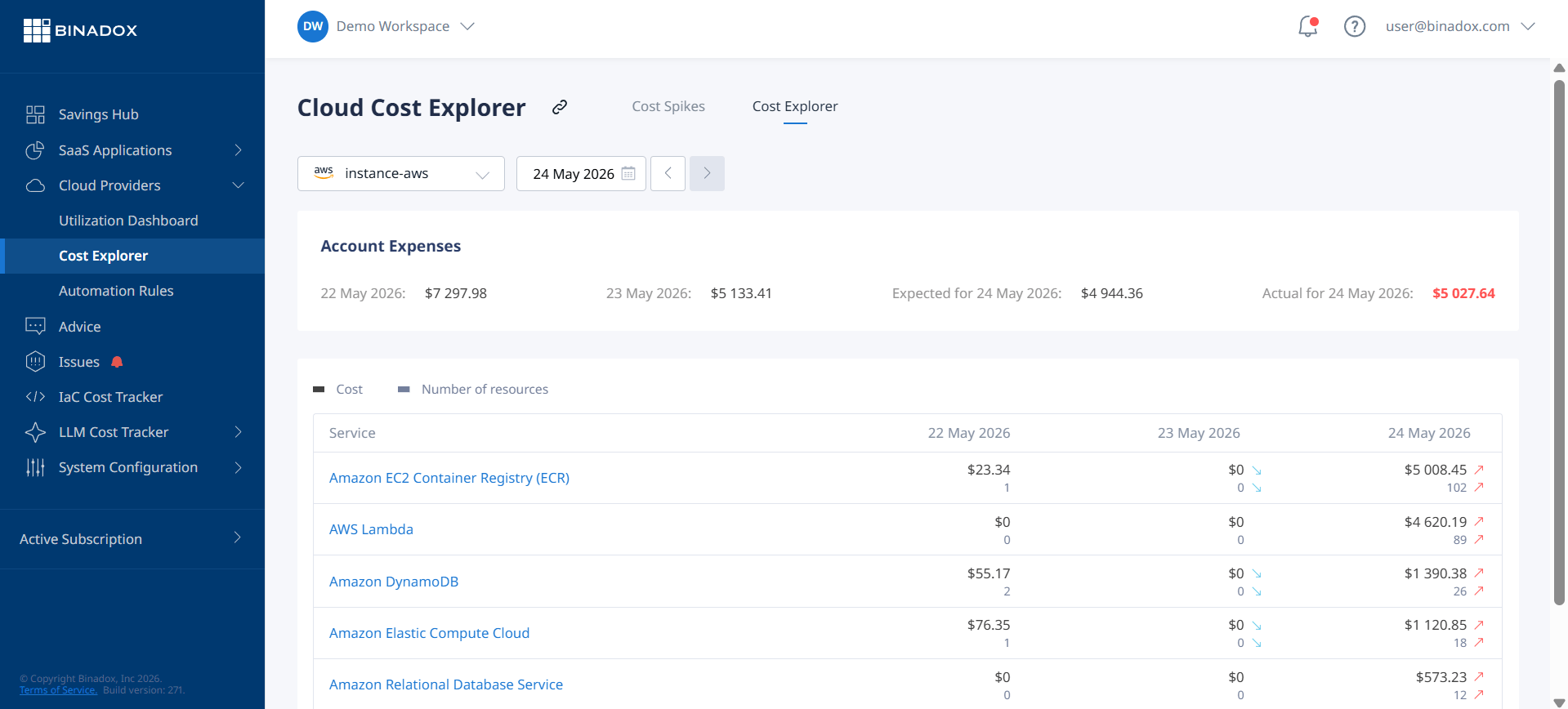
AWS Cost Explorer
AWS Cost Explorer is an essential starting point. It offers a visual interface to explore your costs and usage over time. You can filter and group your data by various dimensions, such as AWS service, region, or custom tags you’ve applied to your resources. For example, you can quickly identify which service is responsible for the largest portion of your bill or see how costs for a specific project are trending. Furthermore, Cost Explorer uses machine learning to provide cost forecasts for up to 12 months, helping you budget more accurately.
AWS Budgets
Once you have a handle on your spending patterns, the next step is to set up proactive monitoring. AWS Budgets allows you to create custom cost and usage budgets that trigger alerts when thresholds are met or forecasted to be exceeded. You can set a simple monthly cost budget for your entire account or create more granular budgets for specific services, linked accounts, or tags. For instance, you could set a budget to monitor your data transfer costs and receive an email notification when you’ve used 80% of your budgeted amount. This proactive approach helps prevent surprises at the end of the month.
Rightsizing Your Resources: A Core AWS Cost Reduction Strategy
One of the most common sources of wasted cloud spend is overprovisioning. Teams often select larger instances than necessary “just in case,” leading to significant and unnecessary costs. Rightsizing is the process of matching your instance types and sizes to your actual workload performance and capacity needs. This is a fundamental AWS cost reduction strategy.
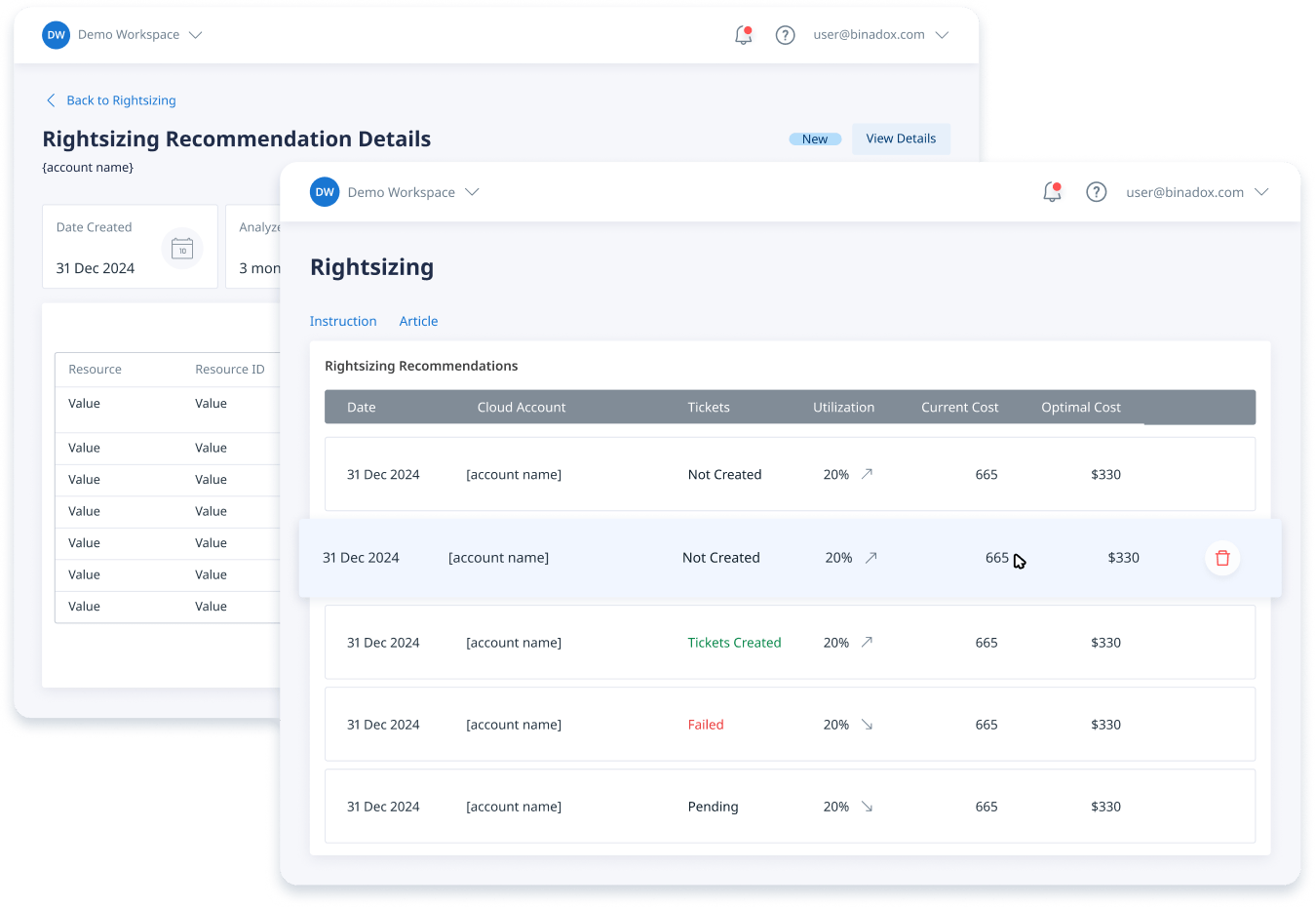
AWS Compute Optimizer
Manually analyzing every resource to determine if it’s the right size is a time-consuming and error-prone task. This is where AWS Compute Optimizer comes in. This service uses machine learning to analyze the utilization metrics of your AWS resources and provides rightsizing recommendations to reduce costs and improve performance. It analyzes resources like EC2 instances, EBS volumes, and Lambda functions.
For example, Compute Optimizer might identify an EC2 instance that has consistently low CPU utilization and recommend a smaller, cheaper instance type. A general rule is that if an EC2 instance’s maximum CPU and memory usage stays below 40% for several weeks, it can likely be downsized. The service is free to use and can be enabled with just a few clicks in the AWS Management Console.
AWS Trusted Advisor
AWS Trusted Advisor is another valuable tool that inspects your AWS environment and makes recommendations based on best practices. While it covers areas like security and performance, its cost optimization checks are particularly useful. Trusted Advisor can identify idle resources like load balancers with no backend instances, unattached Elastic IP addresses, and underutilized EBS volumes. Acting on these recommendations is a straightforward way to trim waste from your bill. Note that access to the full set of cost optimization checks requires a Business, Enterprise, or Unified Operations support plan.
Choosing the Right Pricing Models
Running all your workloads on On-Demand pricing is often the most expensive option. AWS offers several pricing models that provide significant discounts in exchange for usage commitments. Understanding how to manage AWS costs involves selecting the right model for the right workload.
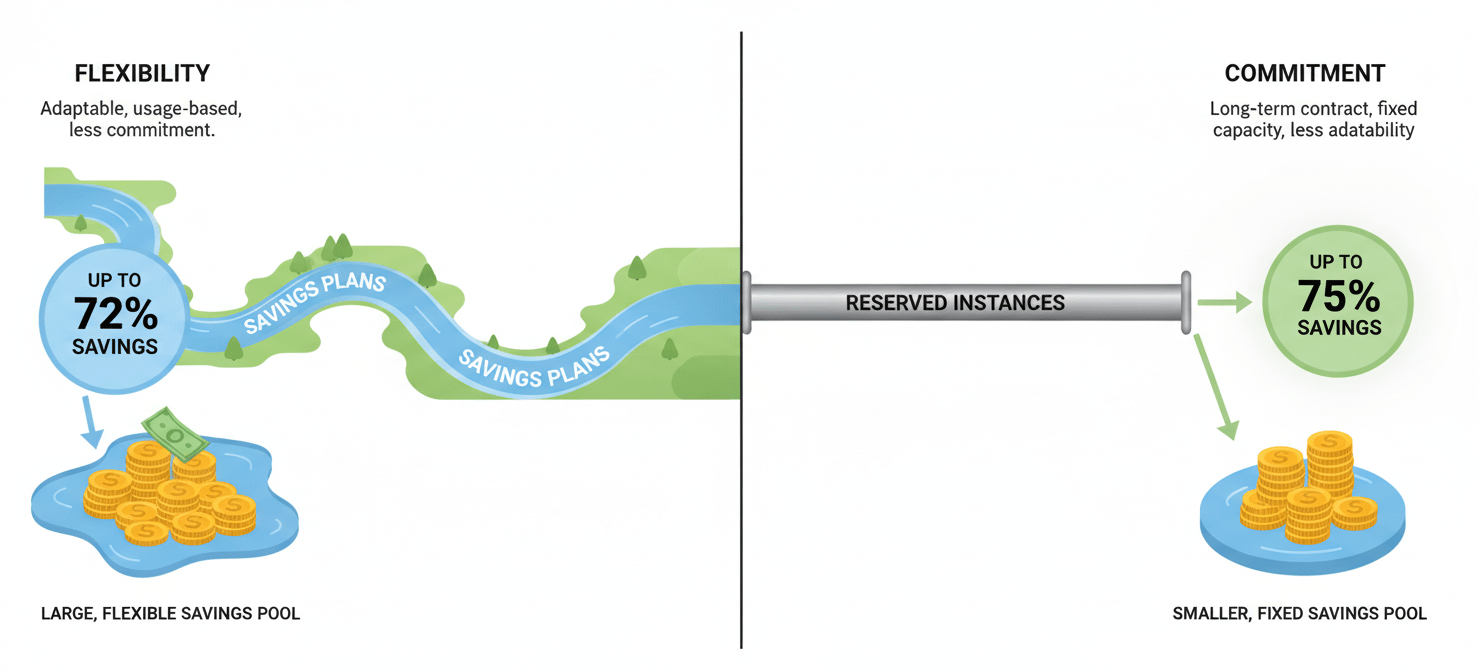
Savings Plans vs. Reserved Instances
For workloads with predictable, steady-state usage, committing to a 1- or 3-year term can unlock substantial savings. The two primary models for this are Savings Plans and Reserved Instances (RIs).
- Savings Plans offer flexibility by committing you to a specific amount of hourly spend (e.g., $10/hour) rather than a specific instance type. This discount automatically applies across EC2, Fargate, and Lambda usage, making it a great choice for dynamic environments where instance families or sizes might change. They can provide savings of up to 72% compared to On-Demand prices.
- Reserved Instances (RIs) require a commitment to a specific instance family, size, and region. While they can sometimes offer slightly deeper discounts than Savings Plans (up to 75%), their lack of flexibility makes them riskier if your architecture changes.
For most teams, Savings Plans provide a better balance of savings and flexibility.
Spot Instances
For fault-tolerant or stateless workloads, such as batch processing, data analysis, or CI/CD pipelines, Spot Instances offer the deepest discounts, potentially up to 90% off On-Demand prices. Spot Instances use spare EC2 capacity, but the catch is that AWS can reclaim this capacity with just a two-minute warning. Therefore, they are best suited for applications that can handle interruptions gracefully.
Tackling Data Transfer Costs
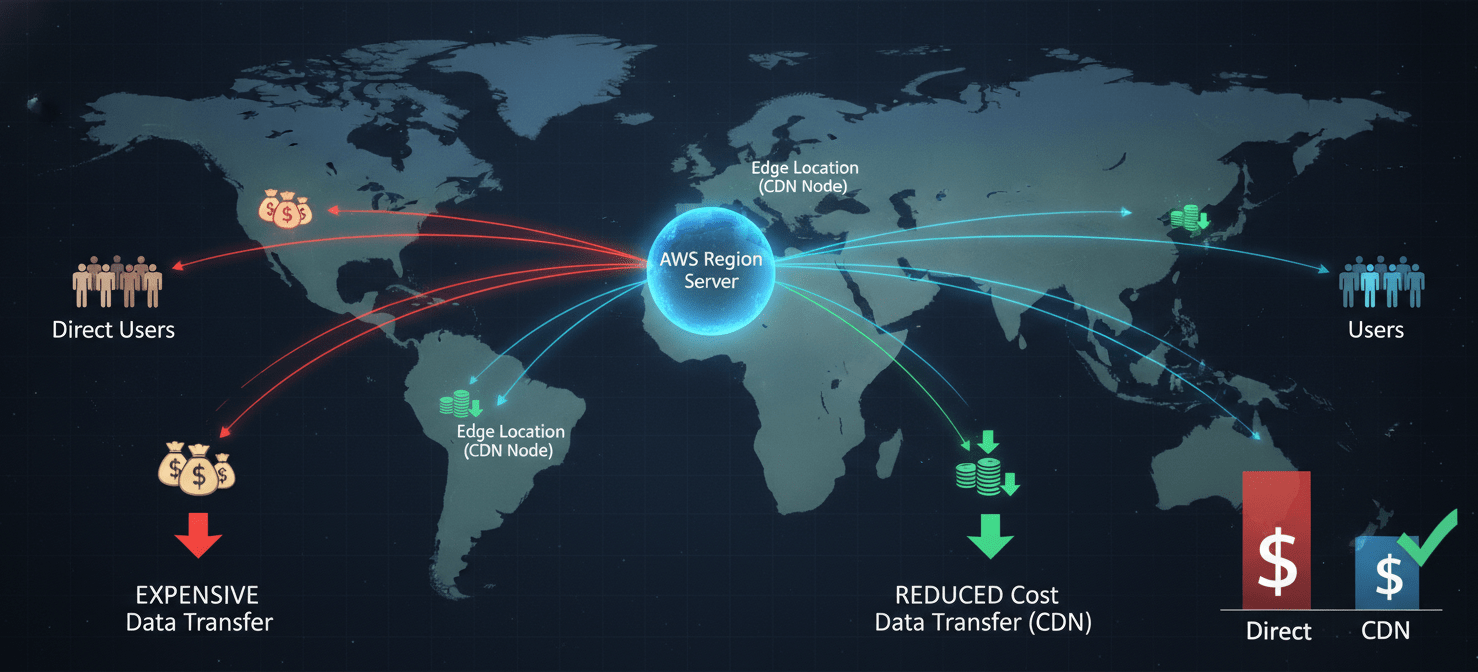
Data transfer costs can be a sneaky and significant portion of your AWS bill. While data transfer into AWS is generally free, you are charged for data moving out of AWS to the internet and between different AWS regions.
Use a Content Delivery Network (CDN)
One of the most effective ways to reduce outbound data transfer costs is to use a CDN like Amazon CloudFront. CloudFront caches your content at edge locations around the world, closer to your users. When a user requests your content, it’s served from the nearest edge location instead of your origin server. This not only improves latency for your users but also reduces the amount of data transferred out from your core AWS resources, as many requests are served from the cache.
Optimize Your Network Architecture
How you structure your network within AWS also has cost implications. For example, data transfer between Availability Zones (AZs) within the same region incurs a cost. For high-traffic applications, keeping communicating components within the same AZ can reduce these charges. Additionally, using VPC Endpoints allows your resources to communicate with AWS services like S3 and DynamoDB over the private AWS network, avoiding data transfer charges associated with public internet gateways.
Automating Cost Control: The Final Frontier in Your AWS Cost Optimization Guide
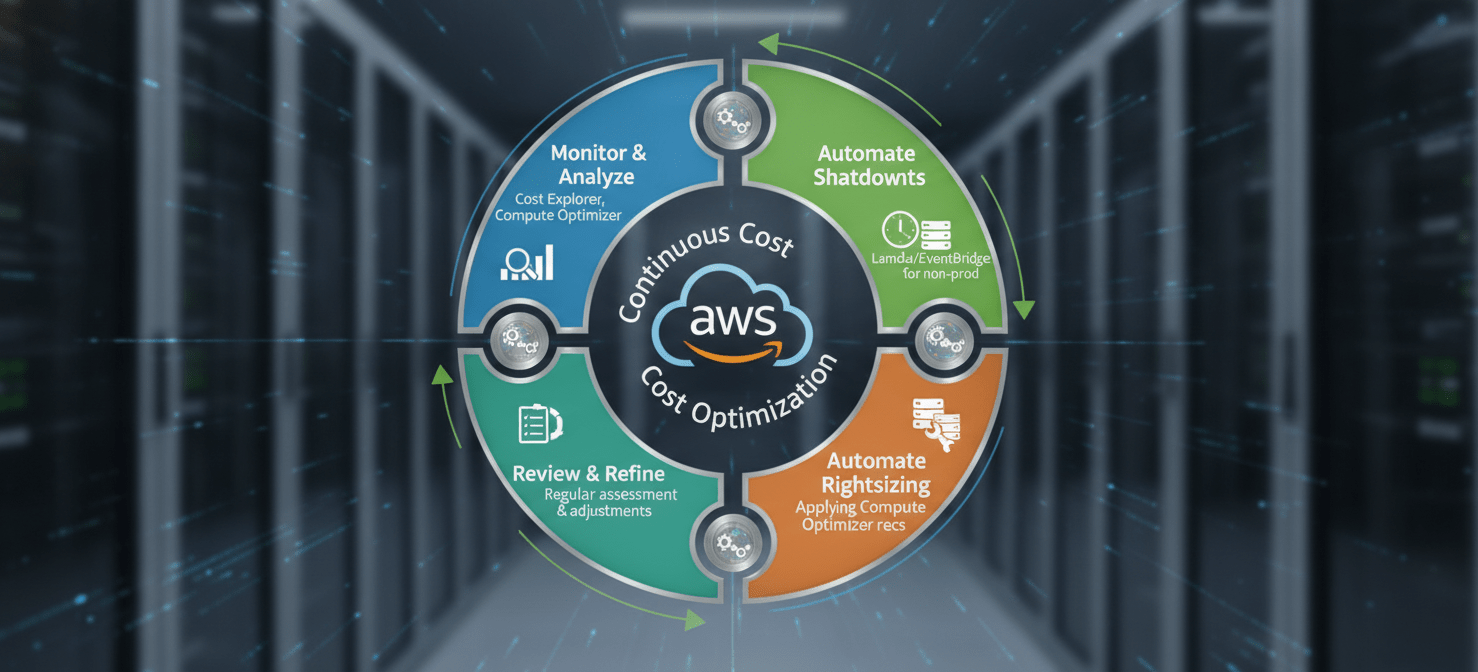
The final piece of a successful cost management strategy is automation. Manually checking for idle resources or rightsizing opportunities doesn’t scale. Instead, you should build automated processes to handle these tasks continuously.
Automating Shutdowns
A significant amount of waste comes from non-production environments (dev, staging, QA) that are left running 24/7. By simply shutting down these resources during non-business hours, such as nights and weekends, you can reduce their costs by over 70%. You can automate this process using services like AWS Lambda combined with Amazon EventBridge to schedule start and stop events.
Automating Recommendations
You can also automate the implementation of recommendations from AWS Compute Optimizer. AWS provides solutions that can automatically apply rightsizing recommendations that meet a predefined risk profile that you control. This creates a continuous optimization loop, ensuring your resources remain efficiently sized as your workloads evolve without requiring constant manual intervention.
Conclusion
Wrestling with a high AWS bill doesn’t have to be a monthly ritual of frustration. By moving from a reactive to a proactive stance, your team can regain control. It starts with understanding where your money is going using tools like Cost Explorer. Then, you must systematically eliminate waste by rightsizing resources with Compute Optimizer and terminating idle assets identified by Trusted Advisor. Furthermore, making intelligent pricing choices, like using flexible Savings Plans for stable workloads and reducing data transfer fees with CloudFront, provides a solid foundation. The final, crucial step is to automate these processes—scheduling shutdowns and applying recommendations automatically—to ensure your environment stays lean. This aws cost optimization guide isn’t about a one-time fix; it’s about building a sustainable practice of financial accountability into your cloud operations. The result isn’t just a lower bill, but a more efficient, well-managed infrastructure that frees up budget and engineering time for what truly matters: building great products.
To move beyond manual fixes and build a truly sustainable, automated cost optimization practice, you can easily experience our platform’s capabilities with a free trial or connect with an expert for a personalized walkthrough.
 7-day free trial