



The average company now uses over 100 different Software-as-a-Service (SaaS) applications, a number that climbs significantly higher in large enterprises. This explosion of cloud-based tools has unlocked incredible productivity and flexibility. However, it has also created a significant and often invisible financial drain: unmanaged subscription spending. Without a clear system to track software subscriptions, your organization is likely wasting a substantial portion of its budget on unused licenses, redundant applications, and forgotten recurring payments. This article provides a practical framework for getting control of your SaaS portfolio, from manual tracking methods to automated solutions, so you can eliminate waste and reinvest those savings into growth.
Key takeaways
- Significant Waste: As much as 53% of all software licenses go unused or underutilized, costing the average enterprise millions each year in wasted spend.
- Hidden Costs: Beyond direct license fees, unmanaged subscriptions create indirect costs through administrative overhead, security risks from unsanctioned “shadow IT,” and missed opportunities for volume discounts.
- Path to Control: Implementing a subscription management strategy involves four key stages: discovering all active subscriptions, centralizing them for visibility, analyzing usage to identify waste, and optimizing spend through strategic cancellations and negotiations.
- Automation is Key: While manual tracking in spreadsheets is a viable starting point, a dedicated subscription tracking app provides the automation needed to manage SaaS at scale, offering real-time discovery, usage analytics, and renewal alerts.
Why It’s Critical to Track Software Subscriptions
In the modern digital workplace, software is the engine of productivity. From communication and project management to marketing automation and customer relationship management, teams rely on a diverse stack of SaaS tools to get their work done. This reliance is reflected in budgets; global software spending is projected to reach $1.44 trillion in 2026.

However, the very ease of acquiring these tools—often with just a credit card and a few clicks—is what makes them so difficult to manage. This phenomenon, known as “SaaS sprawl,” leads to several critical business challenges that underscore the need for a robust system to track software subscriptions.
The Rise of Shadow IT and Security Risks
When employees or departments purchase software without the knowledge or approval of the IT department, it’s called “shadow IT.” While often done with good intentions to solve an immediate problem, this practice creates significant security and compliance vulnerabilities. Without centralized oversight, you have no way of knowing if these applications meet your organization’s security standards or comply with data protection regulations like GDPR and SOC 2.
Furthermore, when an employee leaves the company, these unsanctioned accounts are often forgotten. This leaves sensitive company data accessible to former employees, creating a serious security breach risk. A formal process to manage SaaS subscriptions ensures that all applications are vetted, approved, and properly offboarded, mitigating these risks.
Inefficient Workflows and Redundant Tools
A lack of visibility into your company’s software portfolio inevitably leads to redundancy. It’s not uncommon for different teams to independently purchase subscriptions for tools that serve the exact same purpose. For example, the marketing team might use one project management tool while the engineering team uses another, and the sales team a third.
This duplication creates several problems. First, it’s a direct waste of money. Your company is paying for multiple solutions when a single, consolidated contract could serve everyone’s needs at a lower cost. Second, it creates information silos and workflow inefficiencies. When teams use different systems, collaboration becomes more difficult, data sharing is cumbersome, and a unified view of projects and performance is nearly impossible to achieve. Tracking subscriptions allows you to identify these overlaps and standardize on the most effective tools for your organization.
Lack of Financial Control and Predictability
Unmanaged subscriptions make financial forecasting a guessing game. With recurring charges hitting various company credit cards and departmental budgets at different times, getting a clear, consolidated view of your total software spend is a major challenge. This lack of visibility makes it difficult to budget accurately and can lead to unpleasant surprises when unexpected renewal charges appear.
Moreover, without a central inventory, you lose all negotiating power with vendors. You can’t leverage your total number of users to secure volume discounts or enterprise pricing. Effective subscription management provides the data needed to forecast accurately, control spending, and negotiate contracts from a position of strength.
The High Cost of Unmanaged Subscriptions
The financial impact of unmanaged software subscriptions extends far beyond the simple monthly fee. The costs are both direct and indirect, accumulating over time to create a significant drain on resources that could otherwise be invested in strategic initiatives. Failing to actively manage SaaS subscriptions means you are not just paying for software; you are paying a premium for inefficiency and risk.

Direct Financial Waste
The most immediate and quantifiable cost of poor subscription management is paying for things you don’t use. This waste manifests in several ways:
-
Unused Licenses (“Shelfware”): This is the most common form of waste. Companies often purchase licenses in bulk to anticipate growth or secure a discount, but a significant portion of these seats are never assigned or used. Research consistently shows that a staggering amount of software licenses—sometimes as high as 50%—sit completely idle. For an enterprise, this can translate into millions of dollars in wasted budget annually.
-
Underutilized Subscriptions: A more subtle but equally costly issue is paying for premium features that your team never uses. A department might be on an “Enterprise” plan for a tool when their actual usage patterns only justify the “Pro” or “Business” tier. Without usage analytics, you have no way of knowing if you are overpaying for unnecessary functionality.
-
Forgotten and “Zombie” Subscriptions: These are subscriptions that were purchased for a specific project or by an employee who has since left the company. The recurring payments continue indefinitely, often unnoticed on a company credit card statement, providing zero value to the organization.
-
Automatic Renewals: Most SaaS contracts are set to auto-renew by default. Without a centralized calendar of renewal dates, companies often miss the window to cancel or renegotiate a contract for a tool that is no longer needed. This locks them into another year of unnecessary expense.
Indirect and Opportunity Costs
Beyond the direct waste, unmanaged subscriptions create a cascade of indirect costs that are harder to track but just as damaging.
-
Wasted Administrative Time: Your IT and finance teams spend an inordinate amount of time trying to hunt down information about who owns a particular subscription, what it’s for, and whether it’s still needed. This manual effort to track down expenses and manage a chaotic portfolio is time that could be spent on more strategic activities.
-
Reduced Bargaining Power: When you don’t have a consolidated view of all your subscriptions with a single vendor, you can’t negotiate effectively. For example, if three different departments have separate 10-seat contracts with a software provider, you are missing the opportunity to consolidate them into a single 30-seat enterprise contract that could come with a significant volume discount and better terms.
-
Opportunity Cost: Every dollar spent on an unused license is a dollar that cannot be invested elsewhere. This “opportunity cost” is perhaps the most significant hidden expense. The money wasted on shelfware could have been used to hire a new employee, fund a marketing campaign, invest in product development, or purchase a tool that genuinely drives business growth. When you consider that wasted spend can compound year after year, the lost potential becomes enormous.
How to Manually Track Software Subscriptions
Before jumping to a paid software solution, you can make significant progress by setting up a manual system to track software subscriptions. This approach requires discipline and diligence but is an excellent first step toward gaining visibility and control over your SaaS portfolio. The core of a manual system is a centralized spreadsheet, often referred to as a subscription tracker or SaaS master.

Step 1: Create a Centralized Subscription Inventory
The first objective is to create a single source of truth for all software subscriptions across the company. Your tool of choice will likely be a shared spreadsheet (e.g., Google Sheets or Microsoft Excel). This document should be accessible to key stakeholders in IT, finance, and department heads.
Create a spreadsheet with the following columns at a minimum:
- Software Name: The name of the application (e.g., Slack, Asana, Salesforce).
- Owner/Department: The primary person or team responsible for the subscription.
- Number of Licenses/Seats: The total number of paid seats.
- Pricing Tier/Plan: The specific plan you are subscribed to (e.g., Business, Pro, Enterprise).
- Billing Frequency: Monthly or Annual.
- Cost per Billing Cycle: The total cost for each period.
- Total Annual Cost: The calculated yearly expense.
- Renewal Date: The date the contract is set to renew.
- Payment Method: Which company card or bank account is used.
- Notes: Any other relevant details, such as contract terms or primary use case.
Step 2: Discover All Active Subscriptions
This is often the most challenging part of the manual process. You will need to conduct a thorough audit to find every active subscription. This is a cross-departmental effort.
- Review Financial Records: Start by combing through company credit card statements, expense reports, and accounts payable records. Look for recurring charges from software vendors. This is your most reliable data source for finding what you’re actually paying for.
- Survey Department Heads: Send your centralized spreadsheet to the leaders of each department and ask them to list all the software tools their team uses and pays for. Cross-reference their submissions with your financial data.
- Check with IT: Your IT team may have records of officially sanctioned software. They can also check login data from single sign-on (SSO) systems to see which applications employees are accessing.
Step 3: Analyze and Optimize
Once your inventory is populated, you can begin the process of analysis and optimization.
- Identify Redundancies: Sort your spreadsheet by software category (e.g., “Project Management,” “CRM,” “Design”). This will quickly reveal where you have overlapping tools. For instance, you might find you’re paying for Asana, Trello, and Jira across different teams. This is an opportunity to consolidate.
- Review Usage with Owners: Schedule brief meetings with the owner of each subscription. Ask critical questions: Is this tool still essential? Are all the purchased licenses actively being used? Could we downgrade to a cheaper plan without losing critical functionality?
- Set Calendar Reminders for Renewals: Go through your spreadsheet and create calendar alerts for 60 and 30 days before each renewal date. This gives you ample time to decide whether to keep, cancel, or renegotiate the contract. Never let a subscription auto-renew without a conscious decision.
Limitations of Manual Tracking
While a spreadsheet is a powerful starting point, it has significant limitations, especially as your company grows.
- It’s Time-Consuming: Manually updating the spreadsheet and chasing down information is a continuous and labor-intensive process.
- It’s Prone to Human Error: Data entry mistakes are inevitable, and it’s easy for the spreadsheet to become outdated the moment someone forgets to log a new purchase or cancellation.
- It Lacks Real-Time Visibility: A spreadsheet is a static snapshot. It can’t automatically detect new subscriptions or provide real-time usage data.
- It Doesn’t Scale: For a company with more than 20-30 subscriptions, a manual system quickly becomes unmanageable.
A manual tracker is an essential first step to understand the scope of the problem. However, for true, long-term control, automation is the answer.
Using a Subscription Tracking App for Automation
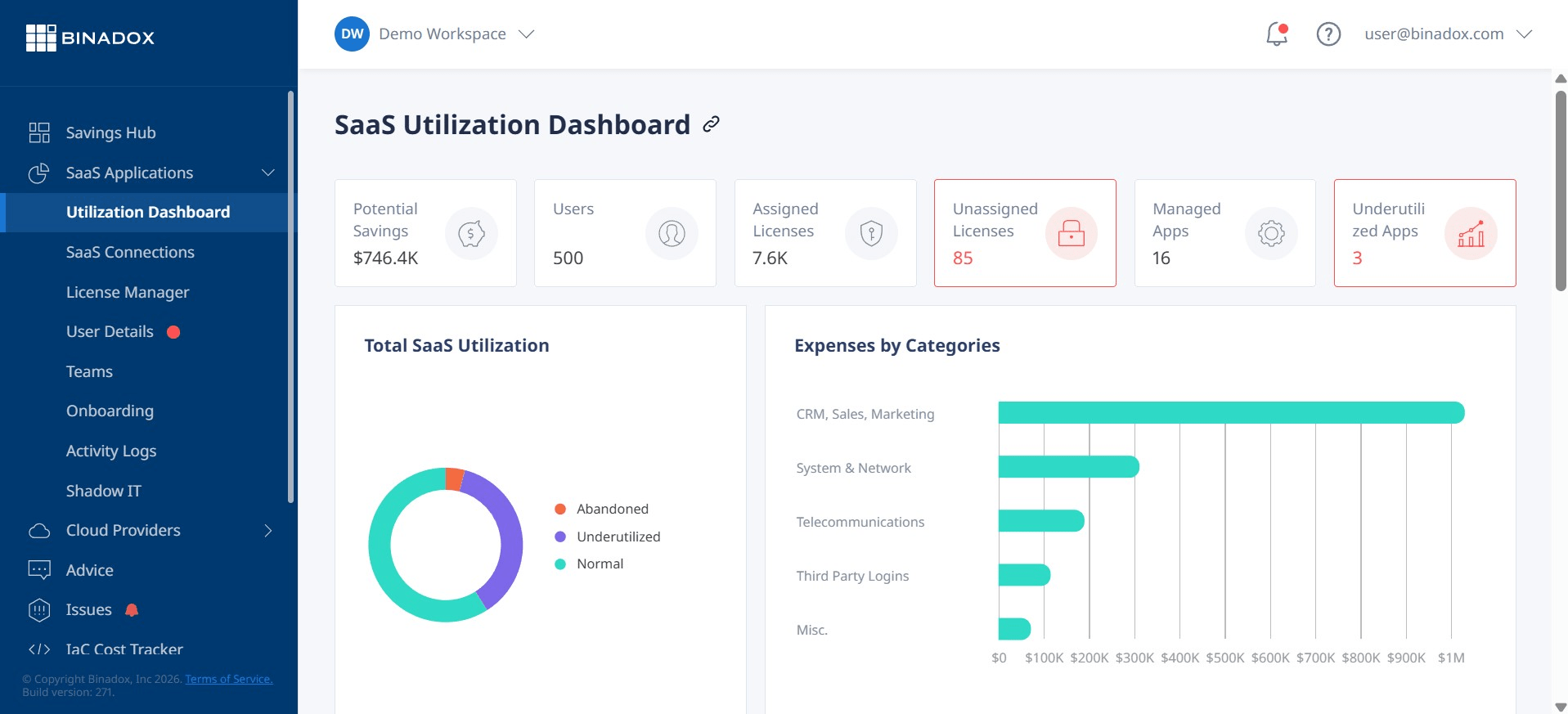
While a manual spreadsheet is a great starting point, it quickly becomes unsustainable as a company grows. The sheer volume of applications, decentralized purchasing, and constant changes make manual tracking a reactive and time-consuming chore. This is where a dedicated subscription tracking app, also known as a SaaS management platform (SMP), becomes essential. These tools automate the entire lifecycle of subscription management, providing the real-time visibility and control that spreadsheets lack.
How Subscription Management Platforms Work
SaaS management platforms integrate directly with your company’s financial and IT systems to create a dynamic, always-up-to-date inventory of your software subscriptions.
- Automated Discovery: Instead of manually hunting through expense reports, an SMP connects to your accounting software (like QuickBooks or Xero), expense platforms, and single sign-on (SSO) providers. This allows it to automatically detect any software-related spending and login activity, instantly flagging both sanctioned and shadow IT applications.
- Centralized Dashboard: All discovered applications are pulled into a single, centralized dashboard. This gives you a comprehensive, real-time view of your entire SaaS portfolio, including spend, renewal dates, and ownership, without any manual data entry.
- Usage and Utilization Analytics: This is a key advantage over manual methods. Many platforms can track how actively each license is being used. By analyzing login data and activity metrics, the system can pinpoint unused or underutilized licenses, providing clear, data-driven recommendations for cost savings. For example, it can flag a user who hasn’t logged into a paid tool in over 90 days, allowing you to de-provision that license and stop paying for it.
- Renewal Management: An automated system provides a calendar of all upcoming renewals and sends proactive alerts to stakeholders. This ensures you never miss a cancellation deadline and have ample time to review usage data, decide whether to renew, and negotiate terms with the vendor from an informed position.
The Benefits of Automation
Adopting a subscription tracking app offers numerous advantages that directly address the shortcomings of a manual approach.
- Time and Cost Savings: Automation drastically reduces the administrative overhead for IT and finance teams. Instead of spending hours on manual data entry and reconciliation, they can focus on strategic optimization. The platforms often pay for themselves quickly by identifying significant cost-saving opportunities, such as eliminating redundant apps and reclaiming unused licenses.
- Enhanced Security and Compliance: By automatically discovering shadow IT, these platforms allow you to bring all software under the purview of your security team. You can ensure that every application meets your company’s security standards and that proper offboarding procedures are followed when employees leave, closing potential data breach vulnerabilities.
- Data-Driven Decision Making: With accurate, real-time data on spending and usage, you can make informed decisions about your software stack. You can confidently consolidate redundant applications, downgrade underutilized plans, and negotiate contracts with vendors using concrete evidence of your usage patterns.
- Improved Financial Forecasting: A centralized and accurate view of all subscription costs allows for much more precise financial planning and budgeting. You can easily see your total monthly and annual recurring revenue (MRR/ARR) committed to software and forecast future spending with confidence.
For any organization looking to seriously manage SaaS subscriptions, moving from a manual spreadsheet to an automated platform is not a matter of if, but when.
How to Choose the Right Subscription Management Tool
Once you’ve decided to move beyond a manual spreadsheet, the next step is selecting a subscription tracking app or SaaS management platform (SMP) that fits your organization’s needs. The market for these tools is growing, with options ranging from simple expense trackers to comprehensive platforms designed for large enterprises. Evaluating them based on a clear set of criteria will ensure you choose a solution that delivers real value.

Core Features to Look For
While every platform has its unique selling points, any effective tool to manage SaaS subscriptions should include these fundamental features:
-
Automated SaaS Discovery: The platform’s primary function should be to automatically find all SaaS applications in use. Look for tools that offer multiple discovery methods, such as integrations with accounting software, expense platforms, direct bank feeds, and single sign-on (SSO) systems. The more data sources it can connect to, the more comprehensive your inventory will be.
-
Centralized Dashboard and Inventory: The tool must present all discovered subscriptions in a single, easy-to-understand dashboard. This dashboard should provide at-a-glance information on total spend, number of applications, upcoming renewals, and top vendors. It should serve as your central system of record for all things SaaS.
-
Spend and Usage Analytics: To move from simple tracking to active optimization, you need data. The platform should provide detailed analytics on spending trends and, crucially, license utilization. Look for features that can identify inactive users, unused licenses, and opportunities to downgrade to a more cost-effective plan based on actual usage.
-
Renewal Management and Alerts: A robust renewal management system is non-negotiable. The tool should provide a clear calendar of all renewal dates and send automated, timely alerts to the appropriate stakeholders. This prevents unwanted auto-renewals and gives your team the runway to make informed decisions about each contract.
-
Security and Compliance Features: A good SMP will help you get a handle on shadow IT and its associated risks. Look for features that help you vet the security posture of different applications, manage employee access, and streamline the offboarding process to ensure former employees can no longer access company data.
Evaluating Different Types of Tools
Subscription management tools can be broadly categorized, and understanding these categories will help you narrow your search.
-
For Individuals and Freelancers: Tools like Rocket Money or Monarch Money are designed for personal finance but can be adapted by freelancers or very small businesses to track recurring expenses. They excel at identifying subscriptions from bank statements but lack business-centric features like license management and team collaboration.
-
For Small to Mid-Sized Businesses (SMBs): This is a growing category with platforms like Chargebee and Zoho Subscriptions. These tools offer a balance of core SaaS management features, including discovery, spend tracking, and renewal alerts, at a price point that is accessible for smaller organizations. They are often designed for ease of use and quick implementation.
-
For Large Enterprises: Enterprise-grade platforms like Zylo or BetterCloud offer the most comprehensive feature sets, designed to handle the complexity of a large, sprawling SaaS portfolio. In addition to the core features, they often include advanced capabilities like workflow automation for provisioning and de-provisioning users, deep integration with HR and identity management systems, and sophisticated contract and vendor management modules.
Questions to Ask During a Demo
When you are evaluating potential vendors, be prepared with a list of specific questions that relate to your company’s unique challenges:
- Integration: “Which of our existing systems (e.g., accounting software, SSO provider, HR platform) do you integrate with out-of-the-box?”
- Discovery: “How do you differentiate between a one-time software purchase and a recurring subscription in our financial data?”
- Usage Tracking: “How do you measure application usage? Is it just based on logins, or can you provide deeper activity metrics?”
- Implementation: “What does the implementation process look like, and how much of a time commitment is required from my team?”
- Pricing: “Is your pricing based on the number of employees, the number of applications managed, or the amount of spend under management? What are the total costs we can expect?”
Choosing the right tool is a critical step. By focusing on your core needs and asking the right questions, you can find a platform that provides a clear return on investment by turning chaotic SaaS spending into a well-managed, optimized asset.
Implementing a SaaS Subscription Management Strategy
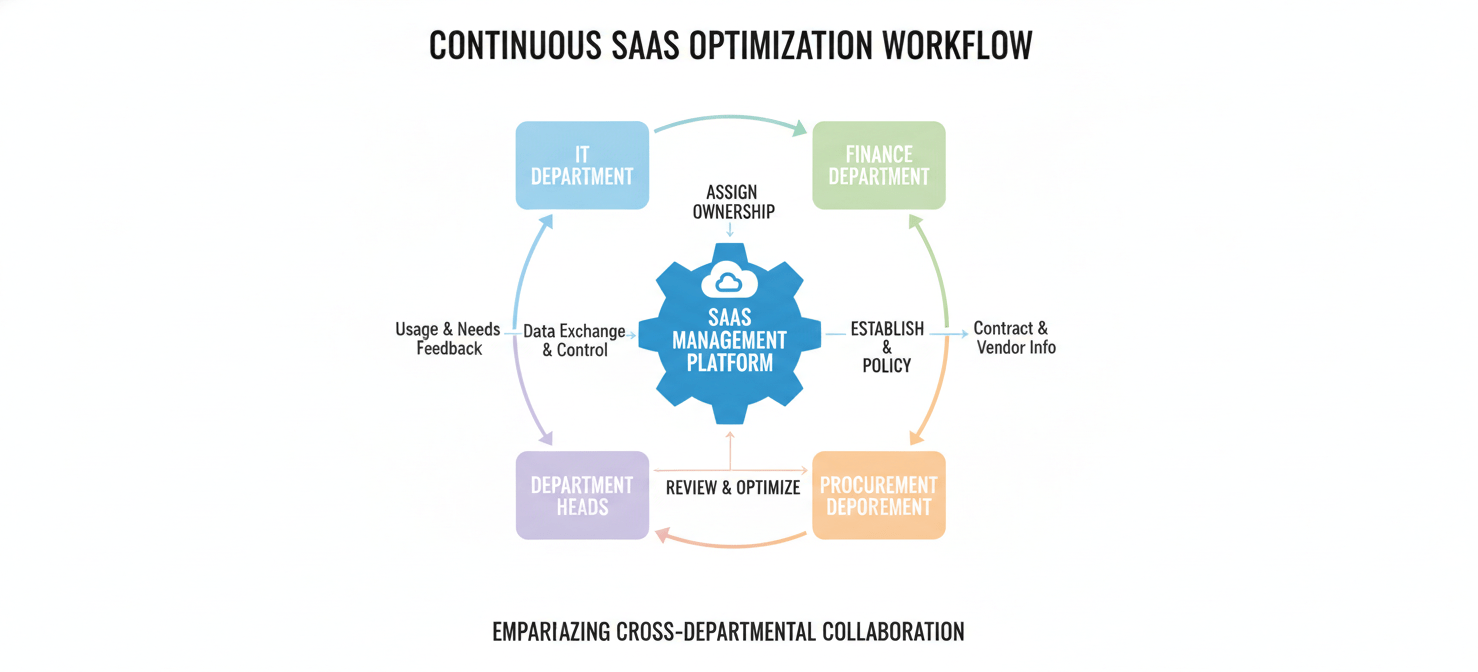
Adopting a tool is only the first step. To achieve long-term success, you need to embed subscription management into your organization’s operational processes. A clear strategy ensures that you not only clean up your existing SaaS portfolio but also maintain control as the company evolves. This involves defining roles, establishing clear policies, and creating a culture of accountability around software procurement and usage.
1. Assign Ownership and Define Roles
A successful SaaS management program requires clear ownership. Without it, the responsibility becomes diffused, and the system will eventually fail.
- Form a Cross-Functional Team: While a single person or department (often IT or Finance) might lead the effort, it’s best to create a small, cross-functional team. This team should include representatives from IT (for security and integration), Finance (for budget oversight), and Procurement (for vendor negotiation).
- Designate a SaaS Manager: This individual is the primary owner of the subscription management platform and the overall process. Their responsibilities include monitoring the dashboard, preparing reports for stakeholders, and ensuring that policies are being followed.
- Clarify Departmental Responsibilities: Each department head should be responsible for the software budget and usage within their team. They are the ones who can best determine if a tool is providing value and if all licenses are being actively used.
2. Establish a Clear Procurement and Approval Policy
To prevent future SaaS sprawl, you must standardize the way new software is requested, evaluated, and purchased.
- Create a Centralized Request Process: All requests for new software should go through a single, standardized process. This could be a simple intake form or a dedicated channel in your project management tool. The request should capture key information: what the tool is, why it’s needed, which team will use it, and the estimated cost.
- Develop an Approval Workflow: The request should trigger a formal approval workflow.
- IT Review: The IT department should first check for redundancies. Do we already have a tool that does this? They also need to conduct a security and compliance review to ensure the new software meets company standards.
- Finance Review: The finance department must approve the purchase against the requesting department’s budget.
- Centralize Purchasing: Whenever possible, new subscriptions should be purchased by a central person or department (like Procurement or IT) rather than by individual employees on personal or corporate credit cards. This ensures that all new subscriptions are immediately logged in your management platform.
3. Implement a Regular Cadence for Review and Optimization
SaaS management is not a one-time project; it’s an ongoing process. Establishing a regular review cycle is critical for continuous optimization.
- Quarterly Subscription Reviews: On a quarterly basis, the SaaS manager should generate reports from the management platform and share them with each department head. These reports should highlight key metrics: total spend for the department, newly added applications, and, most importantly, low-usage or inactive licenses.
- The “Use It or Lose It” Principle: Department heads should be required to review the low-usage report with their teams. For any license that is not being actively used, a decision must be made: reassign the license to another team member who needs it, or de-provision the license to eliminate the cost.
- Pre-Renewal Strategy Sessions: For high-cost enterprise contracts, the cross-functional team should meet 60-90 days before the renewal date. Armed with usage data from the SMP, they can develop a negotiation strategy. If usage is low, they can negotiate a lower seat count. If the tool is critical, they can focus on securing better pricing or more favorable terms.
By implementing this three-part strategy—clear ownership, a standardized procurement process, and a regular review cycle—you transform SaaS management from a chaotic, reactive task into a strategic business function that continuously optimizes costs and reduces risk.
Conclusion
The era of treating software subscriptions as minor, decentralized expenses is over. In an economy where efficiency and fiscal discipline are paramount, allowing hundreds of thousands—or even millions—of dollars to evaporate into a fog of unused licenses and redundant applications is no longer tenable. The path to financial control begins with a simple, foundational principle: you cannot manage what you cannot see. Therefore, the first and most critical step is to track software subscriptions with diligence.
Starting with a manual spreadsheet is a pragmatic first move, forcing an initial, necessary audit of your financial records and departmental habits. However, for any organization of meaningful size, this manual approach is merely a temporary solution. The dynamic, ever-changing nature of a corporate software stack demands an automated system—a dedicated subscription tracking app that can provide the real-time discovery, usage analytics, and proactive renewal management required for genuine oversight.
By implementing a formal strategy that combines the right technology with clear policies and defined roles, you can systematically eliminate waste. You can transform your SaaS portfolio from a source of budgetary anxiety into a streamlined, optimized, and fully leveraged asset. The process requires effort, but the return—in direct cost savings, enhanced security, and improved operational efficiency—is undeniable. Ultimately, managing your subscriptions isn’t just about saving money; it’s about running a smarter, more intentional business. And it spares you the indignity of discovering you’re still paying for a project management tool for a project that finished two years ago.
To truly run a smarter, more intentional business and reclaim control over your software spend, you can easily start a free trial of our platform to see the immediate impact, or schedule a demonstration to explore how our automated solutions can transform your SaaS management.
 7-day free trial