


Introducing Kind of usage
We’re introducing Kind of usage, a new Binadox feature that makes cloud cost analysis easier by turning raw billing data into a clear, categorized view of resource consumption and spending.
Available for AWS, Microsoft Azure, and Google Cloud Platform (GCP), the feature helps you understand what drives your cloud costs without having to start by reviewing individual billing records.
Understand Your Cloud Costs at a Glance
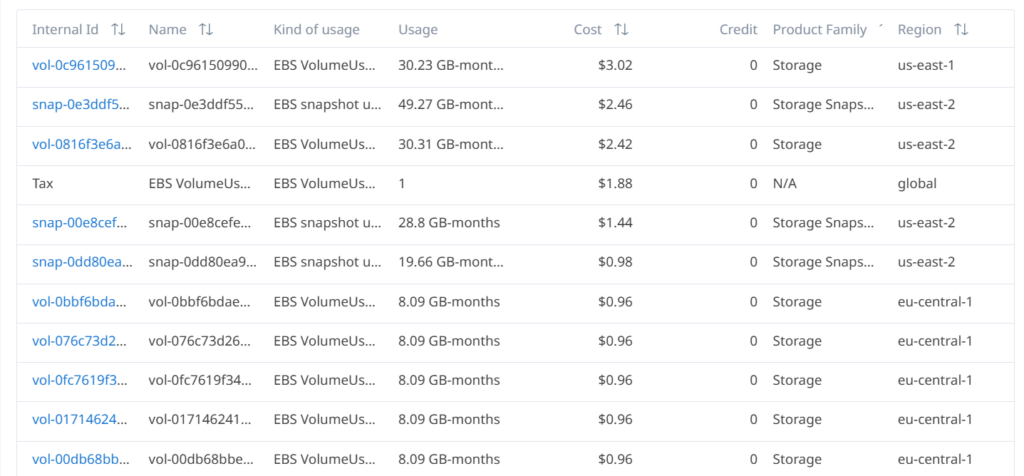
Cloud billing data can contain hundreds or thousands of individual entries, including resource identifiers, usage quantities, regions, and charges. Although these details are essential for technical investigations, reviewing them one by one can make it difficult to identify the main contributors to your cloud bill.
Kind of usage simplifies this process by grouping billing records into logical usage categories. Instead of working through a long list of technical entries, you can see how costs are distributed across different types of resource consumption.
The report includes:
- Volume — the amount of resource usage during the selected period.
- Charged — charges attributed to each usage category.
- Credits — applicable credits, where available.
- Net — the resulting cost after applicable credits.
- Share of charges — the percentage of total charges attributed to each category.
These metrics help you identify major spending categories, compare consumption with costs, and determine which areas deserve closer attention.
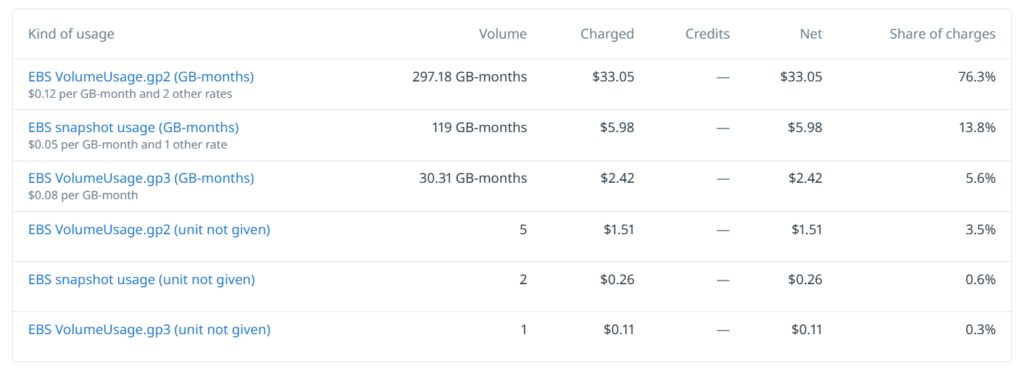
Example: Analyzing AWS EBS Costs
Consider a cloud environment where storage costs include EBS volumes and snapshots.
In the Kind of usage report, these expenses appear as separate usage categories. This makes it easier to understand how much each type of storage contributes to the bill.
For example, the report may show:
| Usage category | Volume | Net | Share of charges |
|---|---|---|---|
| EBS VolumeUsage.gp2 | 297.18 GB-months | $33.05 | 76.3% |
| EBS snapshot usage | 119 GB-months | $5.98 | 13.8% |
| EBS VolumeUsage.gp3 | 30.31 GB-months | $2.42 | 5.6% |
Example values from the Kind of usage report.
In this example, EBS gp2 volume usage accounts for the largest share of the displayed charges. Rather than manually reviewing individual storage records, you can quickly identify this category as a starting point for further cost analysis.
If you need to investigate the details behind a category, open Raw data to review individual billing records, including resource identifiers, usage quantities, costs, and regions.
From Cost Overview to Detailed Investigation
Kind of usage and Raw data work together to support different stages of cloud cost analysis.
- Kind of usage helps you understand the overall structure of spending and identify the categories with the greatest financial impact.
- Raw data provides access to individual billing entries for more detailed investigation.
Start with the aggregated report to identify where costs are concentrated, then use Raw data to investigate specific records when necessary.
Explore Kind of usage in Binadox
Kind of usage gives you a clearer view of cloud resource consumption and spending, helping you move from raw billing records to actionable cost insights.
For a detailed explanation of the report columns, cost calculations, classification principles, and reporting considerations, read the Kind of usage Feature Guide.
Use Kind of usage to understand what drives your cloud bill and make your cost analysis more efficient.