



Amazon Aurora offers remarkable performance and scalability, but its powerful features come with a complex, usage-based pricing model. Without a clear strategy, costs can quickly spiral out of control. Effective AWS Aurora cost optimization isn’t about slashing capabilities; it’s about paying only for the resources you truly need. This guide provides a comprehensive framework for understanding Aurora’s pricing components and implementing practical strategies to reduce your monthly bill without compromising performance.
Key takeaways
- Choose the Right Configuration: Switching to Aurora I/O-Optimized can save up to 40% on I/O-intensive workloads where I/O charges exceed 25% of the total bill.
- Commit to Save: For steady-state workloads, leveraging commitment-based models like Database Savings Plans can reduce database costs by up to 35%.
- Right-Size and Scale Smart: Continuously monitor and adjust instance sizes. For unpredictable workloads, Aurora Serverless v2 can save up to 90% compared to provisioning for peak capacity.
- Manage Data Lifecycle: Archive historical data to Amazon S3 and aggressively prune old snapshots to reduce ongoing storage and backup costs.
Understanding Aurora Pricing: Key Components
To effectively reduce Aurora costs, you first need to understand what you’re paying for. Unlike a simple hourly fee, the total bill is a sum of several distinct components. The pay-as-you-go model offers flexibility but requires vigilance.
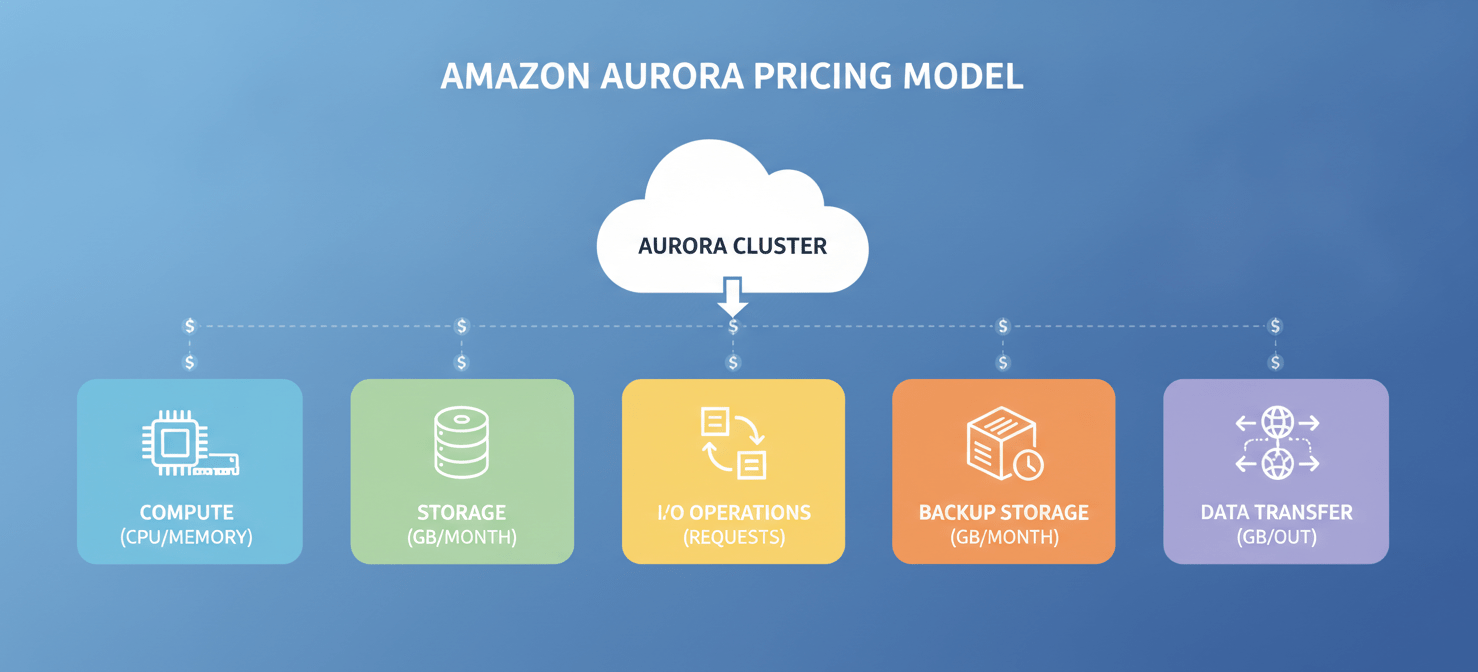
Compute (Instance-Hours)
This is the core cost, representing the processing power and memory for your database writer and reader nodes. You are billed per second for on-demand instances, from the moment an instance is launched until it’s terminated. The price varies significantly based on the instance family (e.g., general-purpose vs. memory-optimized) and size. Newer generation instances, such as those based on AWS Graviton processors, can offer better price-performance.
Storage and I/O Operations
Aurora’s pricing model separates storage from I/O (input/output) operations. You pay a per-GB-month rate for the actual storage your data consumes, which scales automatically. In the standard configuration, you are also billed for every million I/O requests. This can become a major expense for applications with high read/write activity.
Backup Storage
AWS provides free backup storage up to 100% of the size of your database cluster in a given region. However, any storage consumed by backups beyond this free allocation incurs a monthly fee. This includes automated backups and manual snapshots. It’s important to note that once you delete a cluster, the backups start incurring costs immediately.
Data Transfer
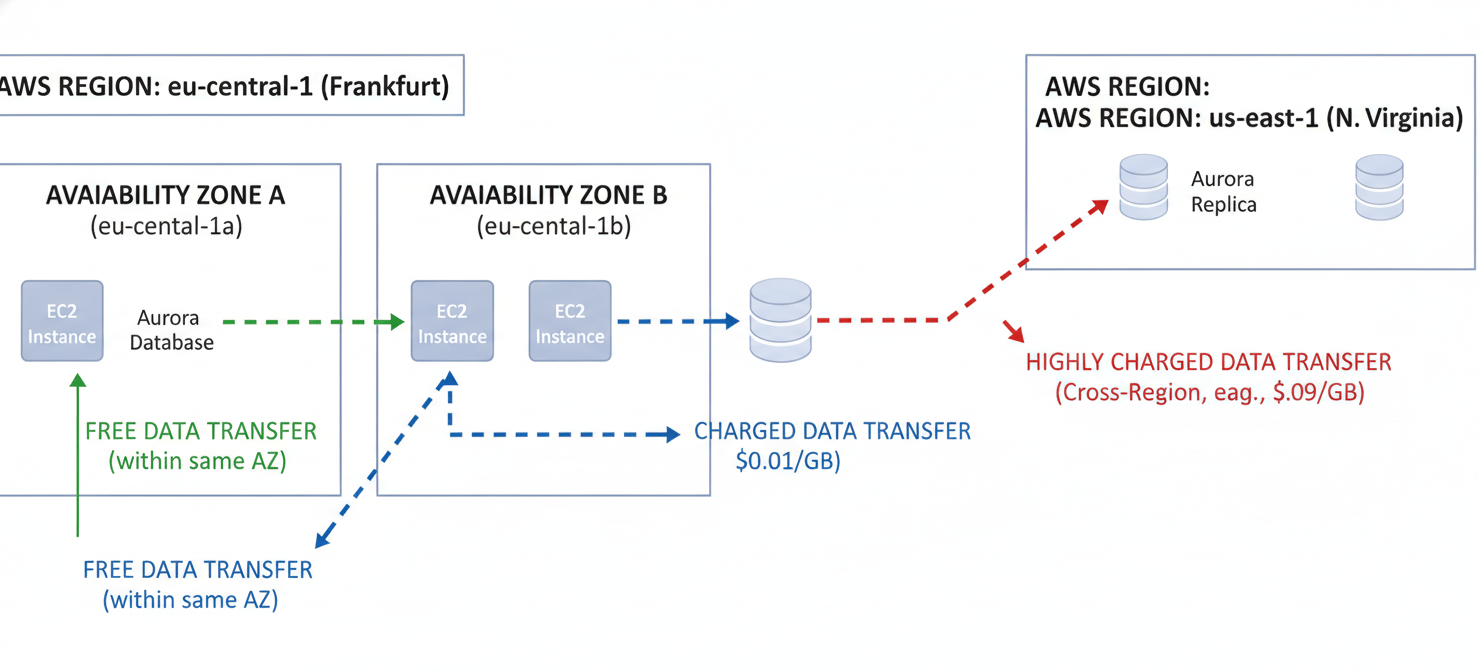
Data transfer is a frequently overlooked cost. While data transferred into Aurora from the internet is generally free, you are charged for data transferred out to the internet. Additionally, costs apply for data transferred between different Availability Zones (AZs) or across different AWS regions. For example, communication between an EC2 instance and an Aurora database in different AZs within the same region will incur charges.
Right-Sizing Your Instances
One of the most direct methods for AWS Aurora cost optimization is ensuring your database instances are correctly sized for their workload. Over-provisioning—paying for capacity you don’t use—is a common source of waste.
Analyze Performance Metrics
Before making changes, you must understand your database’s actual needs. Use Amazon CloudWatch to monitor key metrics like CPUUtilization, DatabaseConnections, and FreeableMemory. These metrics provide a clear picture of whether your instances are overworked, underutilized, or just right. For deeper analysis, AWS Compute Optimizer provides specific recommendations for Aurora instances, helping identify opportunities to downsize or upsize based on historical usage patterns.
Choose the Right Instance Family
Aurora offers various instance families optimized for different use cases.
- General Purpose (T and M families): These are suitable for a wide range of workloads with balanced compute, memory, and networking needs. T-class instances are burstable and can be cost-effective for development or test environments, but be aware of the CPU credit mechanism, as exceeding the baseline can lead to extra charges.
- Memory-Optimized (R and X families): These are ideal for memory-intensive applications, such as those performing large-scale data processing or real-time analytics.
- Graviton-Based (e.g., r6g, r7g): Instances powered by AWS Graviton processors can offer significantly better price-performance compared to their x86-based counterparts for many workloads.
Implement a Continuous Process
Right-sizing is not a one-time task. Your application’s workload patterns will evolve. Therefore, you should establish a regular cadence—quarterly, for instance—to review your performance metrics and adjust instance sizes accordingly. This continuous optimization ensures you aren’t paying for idle resources as your needs change.
Leveraging Reservations and Savings Plans
For workloads with predictable, steady-state usage, paying on-demand prices is inefficient. AWS offers commitment-based pricing models that provide significant discounts in exchange for a one-year or three-year commitment.
Reserved Instances (RIs)
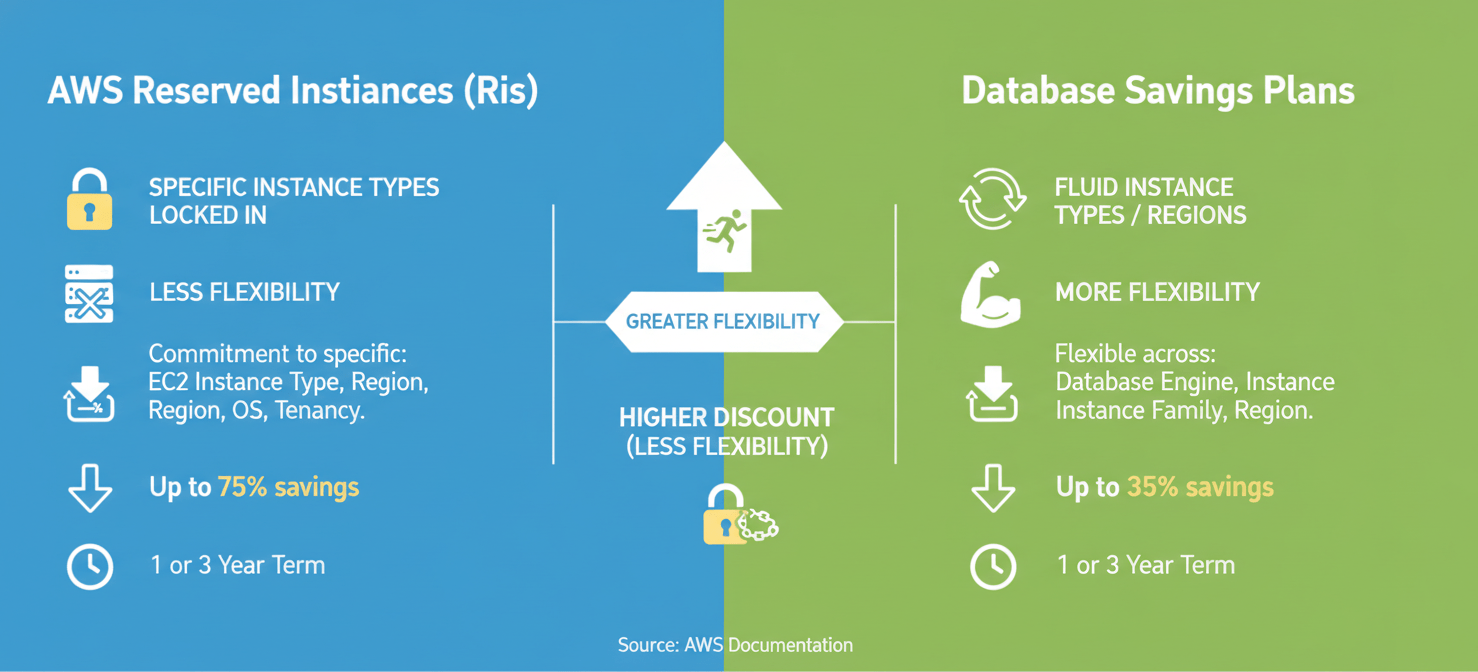
Reserved Instances offer a substantial discount compared to on-demand pricing. However, they come with less flexibility. When you purchase an RI, you commit to a specific instance family, size, and region for the term. This model is best suited for highly stable production workloads where you have high confidence that your instance configuration will not change.
Database Savings Plans
Introduced as a more flexible alternative, Database Savings Plans offer discounts of up to 35% for a one-year commitment to a consistent amount of usage (measured in $/hour). Unlike RIs, these plans are not tied to a specific instance family, size, or even AWS region. This flexibility allows you to modernize your instances, change regions, or even switch database engines (e.g., from RDS MySQL to Aurora) while continuing to receive the discounted rate. This makes them an excellent choice for organizations that anticipate architectural changes but still want to benefit from commitment discounts.
Optimizing I/O and Storage
After compute, I/O and storage are often the next largest components of an Aurora bill. Optimizing them requires a two-pronged approach: choosing the right storage configuration and managing your data effectively.
Aurora Standard vs. I/O-Optimized
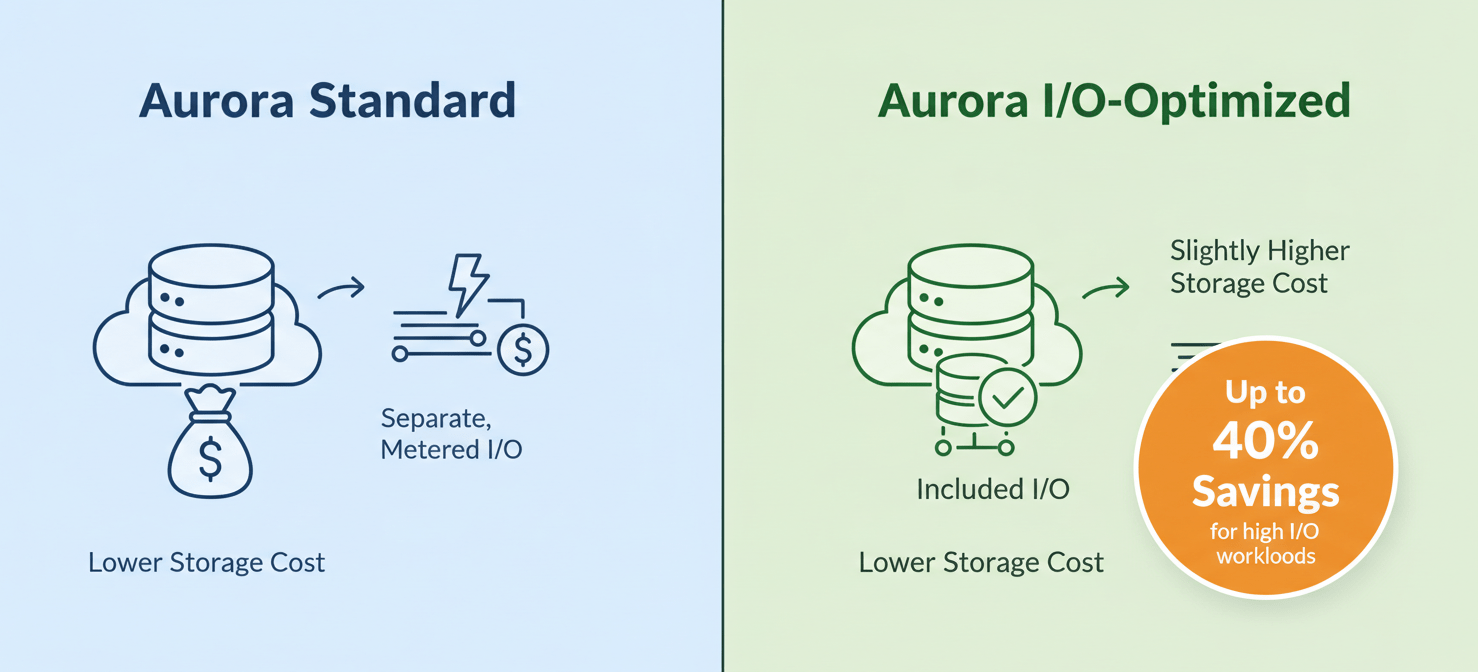
Aurora offers two cluster storage configurations that fundamentally change how you pay for I/O.
- Aurora Standard: This is the default configuration where you pay a lower rate for storage but are charged per million I/O requests ($0.20 per million requests is a typical rate). This is cost-effective for applications with low to moderate I/O activity.
- Aurora I/O-Optimized: This configuration has a higher storage and instance price but includes all I/O operations at no additional charge. According to AWS, you can save up to 40% on I/O-intensive workloads by switching to this model. A common rule of thumb is to consider I/O-Optimized when your I/O charges consistently exceed 25% of your total Aurora bill.
Smart Data Management
Reducing the amount of data you store and process directly lowers costs.
- Archive Old Data: Not all data needs to be in your primary, high-performance database. Implement a data lifecycle policy to archive historical or infrequently accessed data to a cheaper storage solution like Amazon S3. This reduces both your storage footprint and your backup costs.
- Optimize Queries and Indexes: Poorly written queries can scan millions of unnecessary rows, driving up I/O consumption. Use tools like Amazon RDS Performance Insights to identify and optimize inefficient queries. Furthermore, ensure your tables are properly indexed to minimize the I/O required for read operations.
- Prune Unused Tables and Indexes: Over time, databases can accumulate unused tables and indexes. Regularly audit your schema and drop these objects to reclaim storage space.
Managing Data Transfer Costs
Data transfer fees are often a surprise on the monthly AWS bill because they are driven by application architecture rather than database configuration alone.
Keep Traffic Within the Same Availability Zone
The most significant rule for minimizing data transfer costs is to co-locate your application and database. Data transfer between an EC2 instance and an Aurora database within the same Availability Zone using private IP addresses is free. However, as soon as that traffic crosses an AZ boundary, you are charged for data transfer in both directions (typically around $0.01 per GB each way). For high-traffic applications, these charges can add up quickly.
Be Mindful of Cross-Region Traffic
If you use features like cross-region read replicas or Aurora Global Database, be aware of the associated data transfer costs. Data transferred out of a region incurs a charge, which is significantly higher than intra-region transfer costs. While necessary for disaster recovery and global applications, these features should be used judiciously.
Monitor Your Data Transfer
Use the AWS Cost and Usage Report to get a detailed breakdown of your data transfer costs. Look for line items related to “DataTransfer-Regional-Bytes” to identify traffic crossing AZs. This visibility is the first step toward architecting your application for better cost efficiency.
Harnessing Aurora Serverless for Cost Efficiency
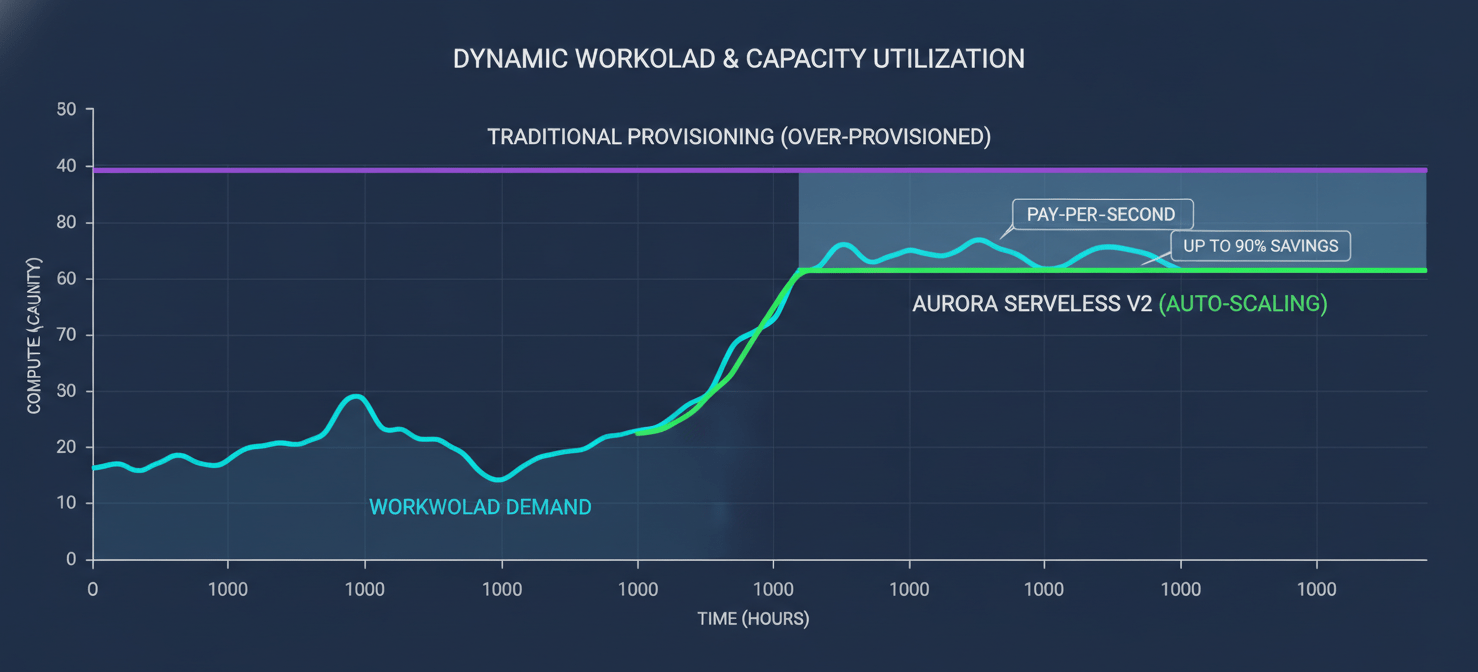
For workloads that are intermittent, unpredictable, or have long idle periods, provisioning a database instance to run 24/7 is wasteful. Aurora Serverless is designed to address this by automatically starting, scaling, and shutting down compute capacity based on application demand.
Aurora Serverless v2
Aurora Serverless v2 offers fine-grained, instantaneous scaling, adjusting capacity in small increments to precisely match the workload’s needs. You pay for the database capacity you consume on a per-second basis, which can lead to significant savings (up to 90%) compared to provisioning for peak load. It is an excellent fit for:
- Development and Test Environments: These environments are often idle outside of business hours. Serverless can scale down to a minimal footprint, or even to zero in some configurations, saving money overnight and on weekends.
- Infrequently Used Applications: Internal tools or applications with sporadic usage patterns are perfect candidates.
- Spiky and Unpredictable Workloads: Applications that experience sudden bursts of traffic can benefit from the rapid and automatic scaling of Serverless v2.
However, it’s important to note that for sustained, high-traffic workloads, a provisioned instance with a Savings Plan may be more cost-effective.
Controlling Costs in Aurora Global Databases
Aurora Global Database provides low-latency global reads and disaster recovery by replicating a database across multiple AWS regions. While powerful, this feature can also multiply costs if not managed carefully.
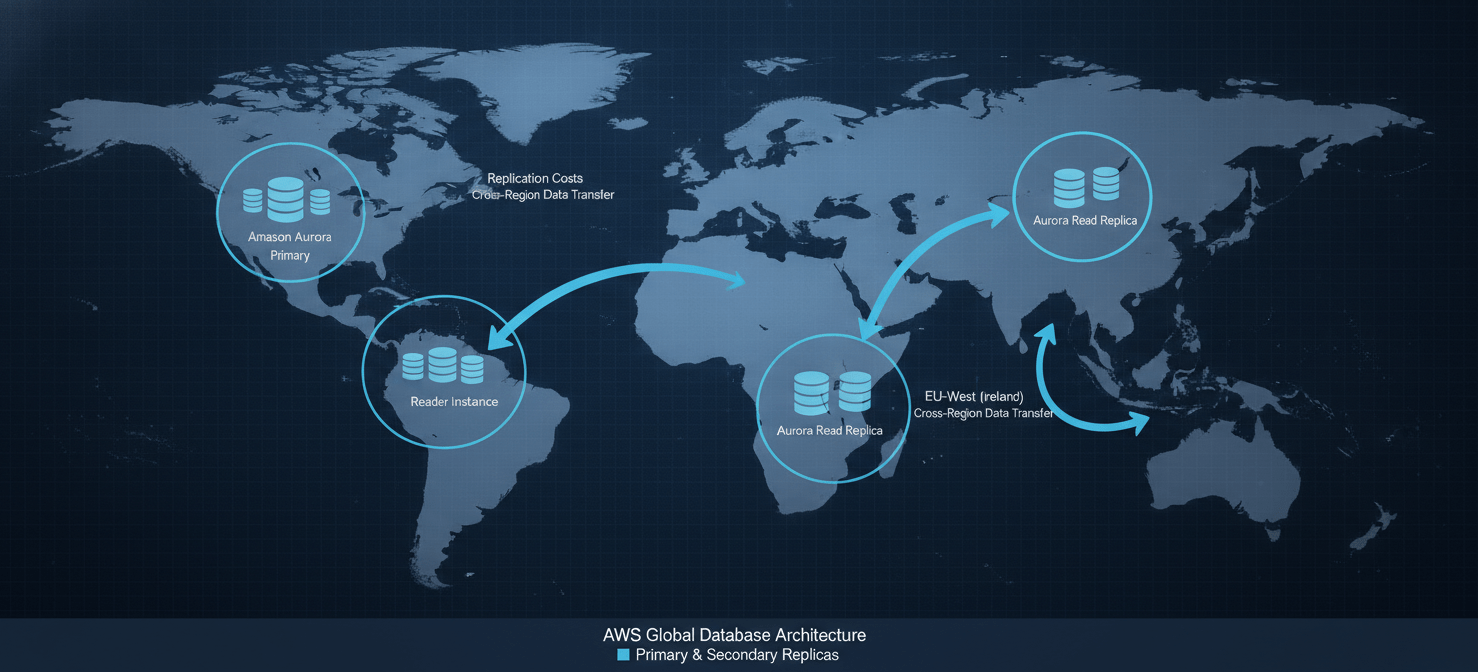
Each secondary region in a Global Database incurs its own charges for compute instances and storage. In addition, you are charged for the data replicated between the primary and secondary regions.
To control these costs:
- Validate the Need: Ensure that the business requirements for low-latency reads or cross-region disaster recovery justify the added expense.
- Right-Size Secondary Regions: The read replicas in secondary regions do not necessarily need to be the same size as the primary writer instance. Size them according to the read traffic they are expected to serve.
- Monitor Replication I/O: Keep an eye on the volume of replicated write I/Os, as this is a direct cost component.
Monitoring and Alerting for Cost Anomalies
The final pillar of a robust AWS Aurora cost optimization strategy is continuous monitoring. You cannot optimize what you cannot see.
Utilize AWS Cost Explorer
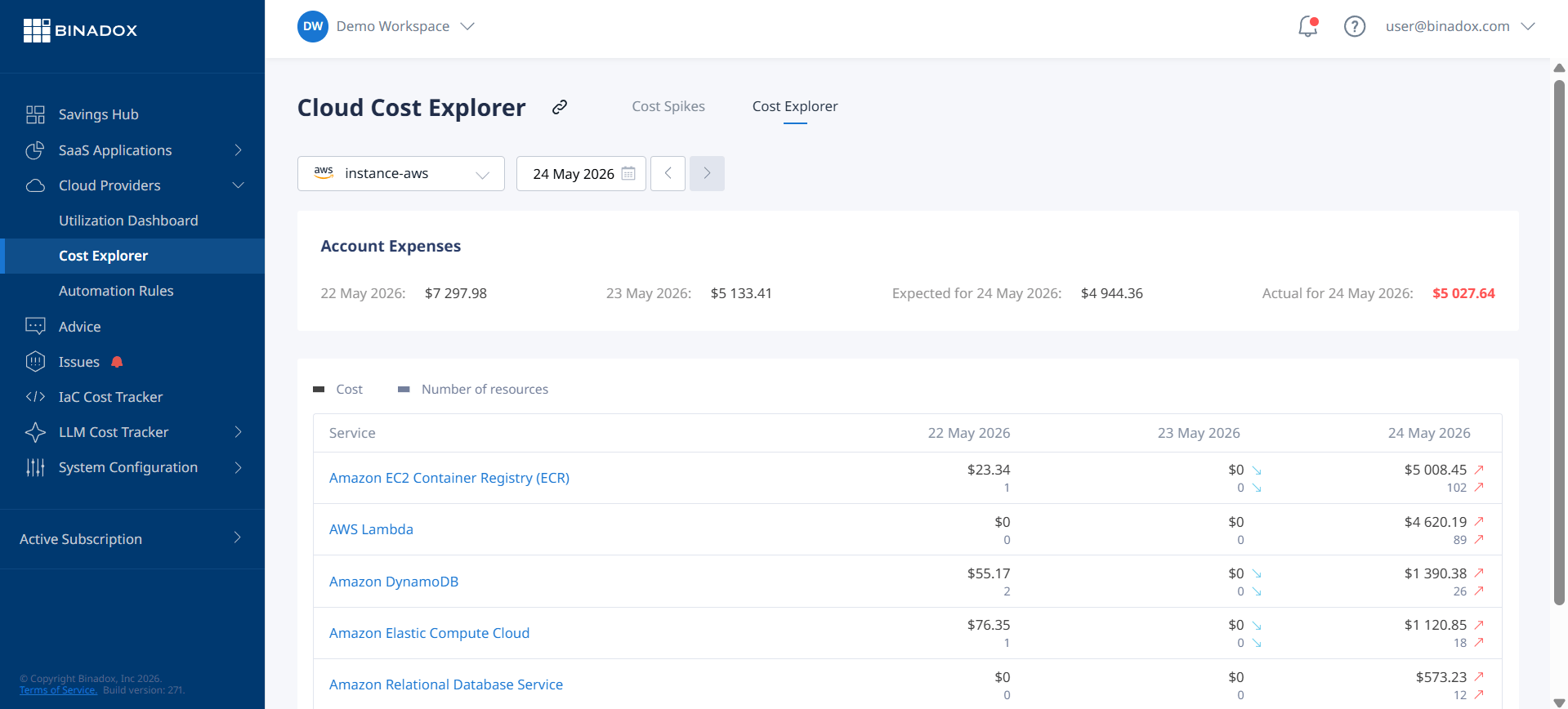
AWS Cost Explorer is your primary tool for visualizing and analyzing your Aurora spending. Use it to filter costs by service (Amazon RDS), tags, and usage type. This helps you understand which clusters are contributing most to your bill and identify spending trends over time.
Set Up AWS Budgets
Create budgets in AWS Budgets to track your Aurora costs against a defined threshold. You can configure alerts to notify your team via email or SNS when actual or forecasted spending exceeds your budget. This proactive approach helps you catch cost spikes before they become a major problem.
Implement Tagging
A consistent and comprehensive tagging strategy is crucial for cost allocation and accountability. Tag your Aurora clusters with relevant information such as project, environment (e.g., prod, dev, test), and owner. This allows you to precisely attribute costs and identify which teams or applications are driving expenses.
Conclusion
Mastering AWS Aurora cost optimization is an ongoing discipline, not a one-time project. It begins with a deep understanding of the pricing model—from instance-hours and I/O charges to the often-overlooked data transfer fees. By systematically right-sizing instances, leveraging commitment discounts like Savings Plans, and choosing the appropriate storage configuration, you can make a significant dent in your monthly bill. Furthermore, embracing modern solutions like Aurora Serverless v2 for variable workloads and diligently managing data lifecycle and backups will yield further savings. Ultimately, the goal is not just to spend less, but to spend smarter, ensuring that every dollar invested in your database delivers maximum value. Neglecting this process is akin to leaving the meter running on a taxi you’re no longer using—an expensive oversight in the long run.
To ensure every dollar invested in your Aurora database delivers maximum value, discover how our platform can simplify optimization; you can easily try it out with a free trial or see it in action by booking a personalized demo.
 7-day free trial