



Choosing the right compute service is a critical decision that directly impacts your application’s performance and your monthly cloud bill. Building a reliable cloud computing cost model is essential for making an informed choice between serverless options like AWS Lambda and traditional virtual servers like Amazon EC2. This article will walk you through the process of creating a cost model for both, helping you understand the financial trade-offs and select the best service for your workload.
Key takeaways
- EC2 costs are based on provisioned capacity (per hour or per second), while Lambda costs are based on execution requests and duration (per millisecond).
- A comprehensive cost model must account for more than just compute, including data transfer, storage, and associated services like API Gateway or Elastic Load Balancing.
- For workloads with inconsistent traffic, Lambda can be over 70% cheaper than a provisioned EC2 instance.
- Your cost analysis should start with four key inputs: memory requirements, average request duration, total monthly requests, and concurrency needs.
Understanding the Core Differences: Lambda vs. EC2
Before building a cost model, it’s crucial to understand the fundamental differences between AWS Lambda and Amazon EC2. They represent two distinct approaches to cloud computing: serverless functions versus virtual servers.
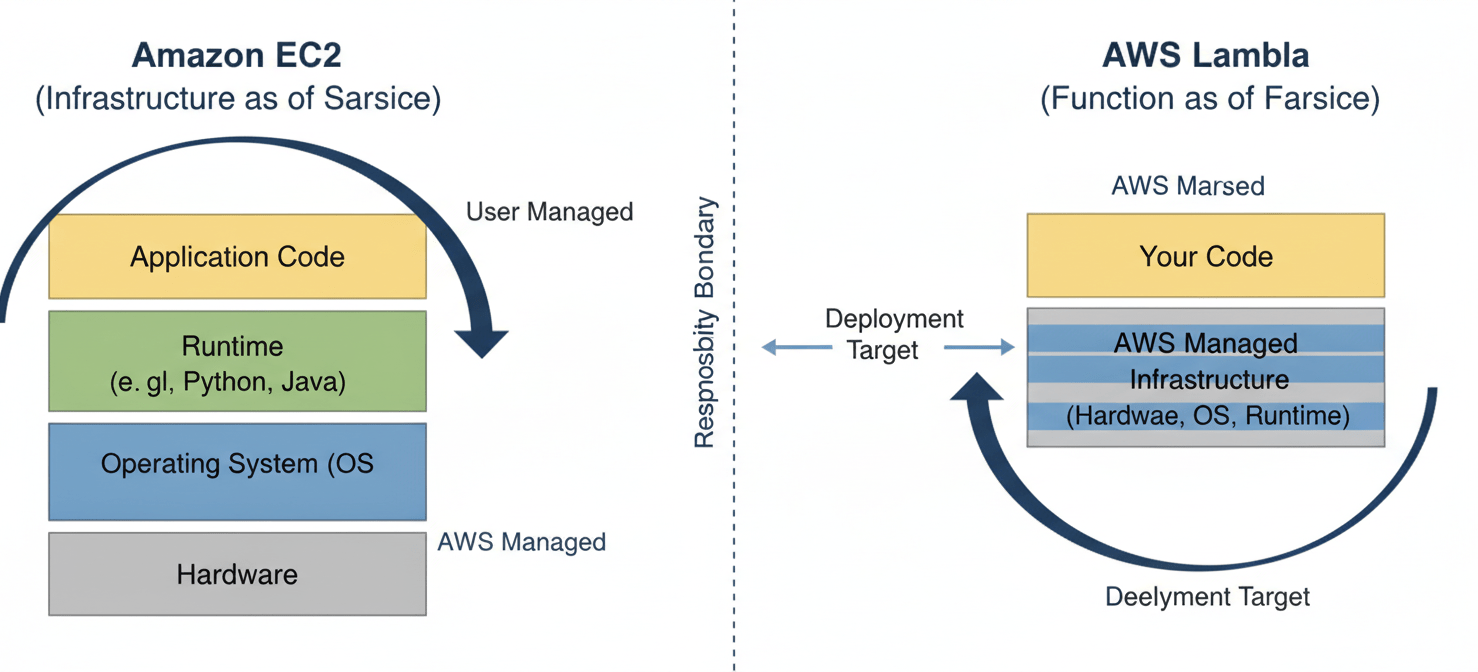
EC2 provides you with virtual machines, known as instances, over which you have complete control. You choose the instance type, operating system, and runtime. Furthermore, you are responsible for managing everything from security patches to scaling. You pay for the instance for as long as it’s running, regardless of whether it’s processing requests. This is a model of provisioned capacity.
Lambda, in contrast, is a serverless compute service. You upload your code as a function, and AWS handles all the underlying infrastructure management. This includes provisioning, scaling, and patching. The service automatically runs your code in response to triggers, such as an HTTP request or a new file in an S3 bucket. Consequently, you only pay for the compute time you actually consume, measured in milliseconds. This is a model of pay-per-execution.
This core difference in billing—provisioned vs. pay-per-execution—is the primary driver of cost variation. Therefore, your cloud computing cost model must accurately reflect how your application’s workload interacts with each of these pricing structures.
Key Components of a Cloud Computing Cost Model
A robust lambda vs ec2 cost analysis goes beyond simple price comparisons. A comprehensive model needs to incorporate several key components that apply to both services, although their impact will differ.
Compute Costs
This is the most direct cost. For EC2, it’s the hourly or per-second rate for your chosen instance type (e.g., t3.micro, m5.large). For Lambda, it’s a combination of the number of requests and the duration your code runs, metered in gigabyte-seconds (GB-s). AWS Lambda pricing includes a perpetual free tier of 1 million requests and 400,000 GB-seconds of compute time per month.
Data Transfer Costs
Data transfer is often an overlooked expense. AWS typically charges for data transferred out of its network to the internet. Data transfer between services within the same AWS region is sometimes free, but not always. For example, data processed by a Lambda function and sent to a user over the internet will incur data transfer fees. Similarly, an EC2 instance serving web traffic will generate these costs.
Associated Service Costs
Neither Lambda nor EC2 operates in a vacuum. Your application will likely rely on other AWS services, which have their own costs.
- For Lambda: You often need Amazon API Gateway to create an HTTP endpoint for your function. This service has its own pricing based on API calls, data transfer, and caching.
- For EC2: You might need an Elastic Load Balancer (ELB) to distribute traffic across multiple instances for high availability. ELBs have an hourly charge plus a fee based on data processed. You will also need Elastic Block Store (EBS) volumes for persistent storage, which are priced per GB-month.
Management and Operational Overhead
While not a direct line item on your AWS bill, operational overhead is a real cost. EC2 requires your team to manage the operating system, apply security patches, and configure scaling policies. This takes time and expertise. Lambda abstracts most of this away, reducing the operational burden and allowing your team to focus more on application code.
Building Your Lambda Cost Model
To build a serverless cost analysis for Lambda, you need to estimate four key variables for your workload.
- Memory Allocation (MB): How much memory does your function need to run efficiently? Lambda pricing is tiered based on the amount of memory you allocate.
- Average Request Duration (ms): How long, on average, does a single invocation of your function take to complete?
- Total Monthly Requests: How many times do you expect your function to be invoked each month?
- Concurrency: How many requests will your function need to handle simultaneously at peak times?
With these estimates, you can calculate your monthly cost. Let’s use an example:
- Memory: 512 MB (or 0.5 GB)
- Duration: 200 ms (or 0.2 seconds)
- Monthly Requests: 10 million
First, calculate the compute charges. The price for compute is $0.0000166667 for every GB-second.
- Total compute (seconds) = 10,000,000 requests * 0.2 s = 2,000,000 seconds
- Total GB-seconds = 2,000,000 s * 0.5 GB = 1,000,000 GB-s
- Compute Cost = (1,000,000 GB-s – 400,000 free tier GB-s) * $0.0000166667 = $10.00
Next, calculate the request charges. The price per request is $0.20 per 1 million requests.
- Request Cost = (10,000,000 requests – 1,000,000 free tier requests) * ($0.20 / 1,000,000) = $1.80
The total estimated monthly cost for Lambda, before considering associated services like API Gateway, would be approximately $11.80.
Building Your EC2 Cost Model
Modeling costs for EC2 requires a different approach focused on provisioned resources. You need to decide what infrastructure is required to handle your peak workload reliably.
- Instance Type: What CPU and memory configuration do you need? This choice directly sets your hourly rate. You must provision an instance (or instances) capable of handling your peak concurrency.
- Number of Instances: Will you need more than one instance for high availability or to handle the load?
- Pricing Model: Are you using On-Demand, Reserved Instances, or a Savings Plan? On-Demand is the most flexible but also the most expensive. Reserved Instances and Savings Plans offer significant discounts in exchange for a 1- or 3-year commitment.
- Storage (EBS): How much persistent storage do you need? EBS volumes are priced per GB-month.
Let’s model the cost for the same workload as the Lambda example (10 million requests at 200ms each). Assume the workload is spread evenly, but you need to handle peaks. A t3.small instance with 2 vCPUs and 2 GB of RAM might be a reasonable starting point.
- Instance:
t3.small(On-Demand, Linux, us-east-1) - Hourly Rate: Approximately $0.0208 per hour
- Hours per Month: 730
First, calculate the base compute cost.
- Monthly Instance Cost = $0.0208/hour * 730 hours/month = $15.18
This cost is for a single instance running 24/7. If your traffic is spiky, this instance will be idle for much of the time, but you still pay for it. In addition, you must add the cost of an EBS volume.
- Storage: 30 GB gp3 EBS volume
- Storage Cost: 30 GB * $0.08/GB-month = $2.40
The total estimated monthly cost for this single EC2 instance, before data transfer or load balancing, would be approximately $17.58. This assumes one instance is sufficient for your availability and performance needs. For a production workload, you would likely need at least two instances behind a load balancer, which would more than double this cost.
Comparing the Models: When Does Lambda Win?
The winner in the lambda vs ec2 cost comparison depends almost entirely on your workload’s traffic patterns.
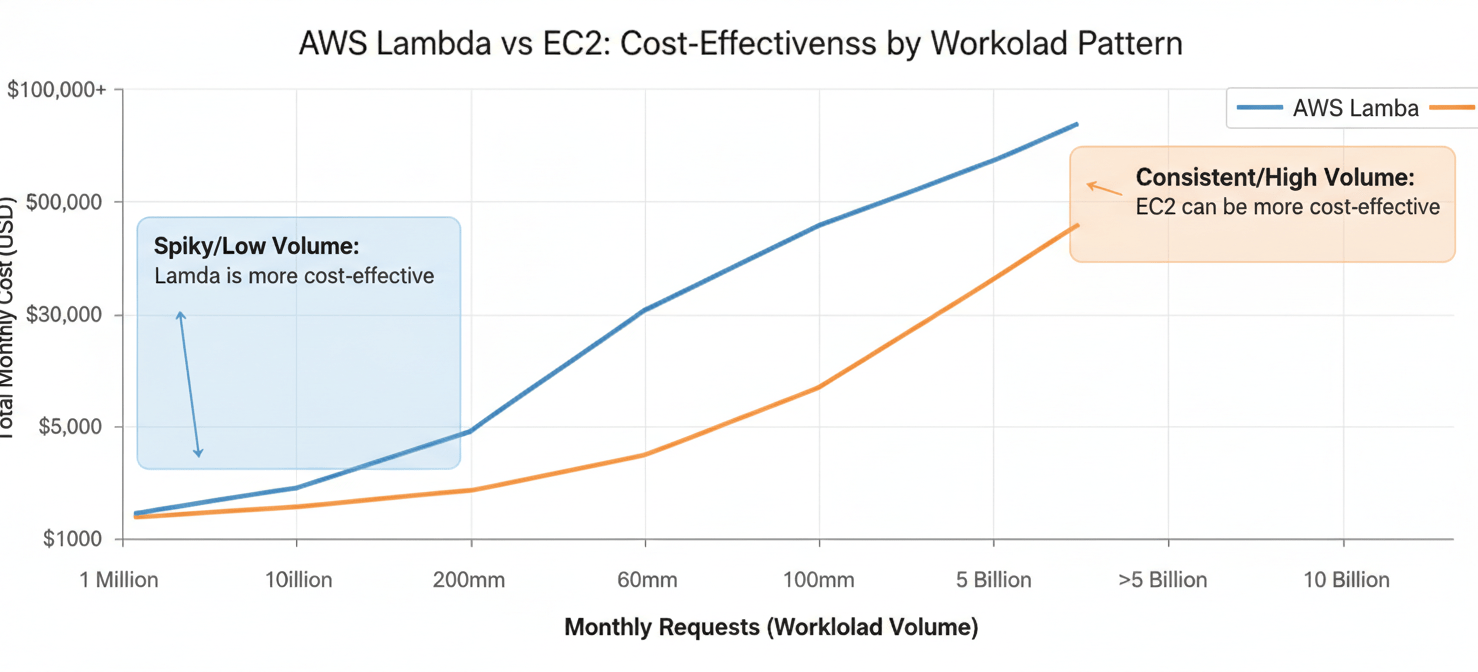
Lambda typically wins for:
- Spiky or Unpredictable Traffic: If your application experiences long periods of inactivity followed by sudden bursts of requests, Lambda is almost always more cost-effective. You are not paying for idle server time.
- Low-Volume Workloads: For applications with a few thousand or even a couple of million requests per month, the Lambda free tier can cover a significant portion, if not all, of your usage.
- Event-Driven Processing: For tasks like image resizing upon upload or processing data streams, Lambda’s event-driven nature is a natural and cost-efficient fit.
EC2 often becomes more economical for:
- Consistent, High-Volume Traffic: If you have a predictable, high-traffic workload running 24/7, a provisioned EC2 instance (especially with a Savings Plan or Reserved Instance) can be cheaper than paying for millions of individual Lambda invocations. The cost per request on EC2 decreases as volume increases because the server cost is fixed.
- Long-Running Tasks: Lambda functions have a maximum execution timeout of 15 minutes. For processes that need to run longer, such as complex data analysis or machine learning model training, EC2 is the necessary choice.
Beyond the Numbers: Qualitative Factors to Consider
A pure cost comparison is incomplete. You must also weigh qualitative factors that impact your total cost of ownership (TCO).
- Operational Simplicity: Lambda’s serverless model significantly reduces operational overhead. There are no servers to patch, no operating systems to manage, and scaling is automatic. This frees up your engineering team to focus on building features rather than managing infrastructure.
- Scalability: While you must configure Auto Scaling for EC2, Lambda scales automatically and instantly to meet demand (within account concurrency limits). This provides a level of elasticity that can be difficult and complex to replicate with EC2.
- Development Speed: For many use cases, particularly microservices, developing and deploying a Lambda function can be faster than setting up and configuring a full EC2 instance with a web server. This can accelerate your time to market.
- Resource Limits: Lambda has constraints, such as the 15-minute timeout and temporary storage limits. EC2 provides far more flexibility and control over the execution environment, which is essential for certain types of applications.
Conclusion
Ultimately, the choice between Lambda and EC2 is a trade-off between paying for provisioned capacity and paying for on-demand execution. Building a detailed cloud computing cost model is the only way to make a data-driven decision. Start by analyzing your application’s traffic patterns. If your workload is consistent and high-volume, the fixed cost of an EC2 instance purchased with a savings plan will likely be more economical. However, for the vast and growing number of applications with variable, unpredictable, or event-driven traffic, the pay-per-use model of Lambda offers compelling cost savings and operational simplicity. Don’t just look at the price per hour; model your total expected usage and include associated services to get a true picture. A good cloud computing cost model removes the guesswork, ensuring you don’t end up paying for idle servers or overpaying for predictable workloads.
To truly master your cloud spend and avoid unnecessary costs, you can explore how Binadox helps with detailed cost analysis or even experience our platform firsthand to see its benefits in action.
 7-day free trial