



Allocating database costs in a shared, multi-tenant environment can feel like trying to split a dinner bill with friends who only ordered appetizers. Someone inevitably feels they paid for another’s steak. For engineering teams using a shared Amazon Aurora cluster, this challenge is very real. A fair and transparent system is essential for accurate budgeting and accountability. Therefore, implementing a practical Aurora Postgres chargeback model is not just an accounting exercise; it’s a critical step toward efficient resource management. This approach helps you understand who is using what, ensuring each team or client pays their fair share of the total cost.
Key takeaways
- Aurora’s serverless architecture and bundled I/O costs complicate direct cost attribution for individual tenants.
- A successful chargeback model relies on correlating AWS cost data with internal database-level usage metrics.
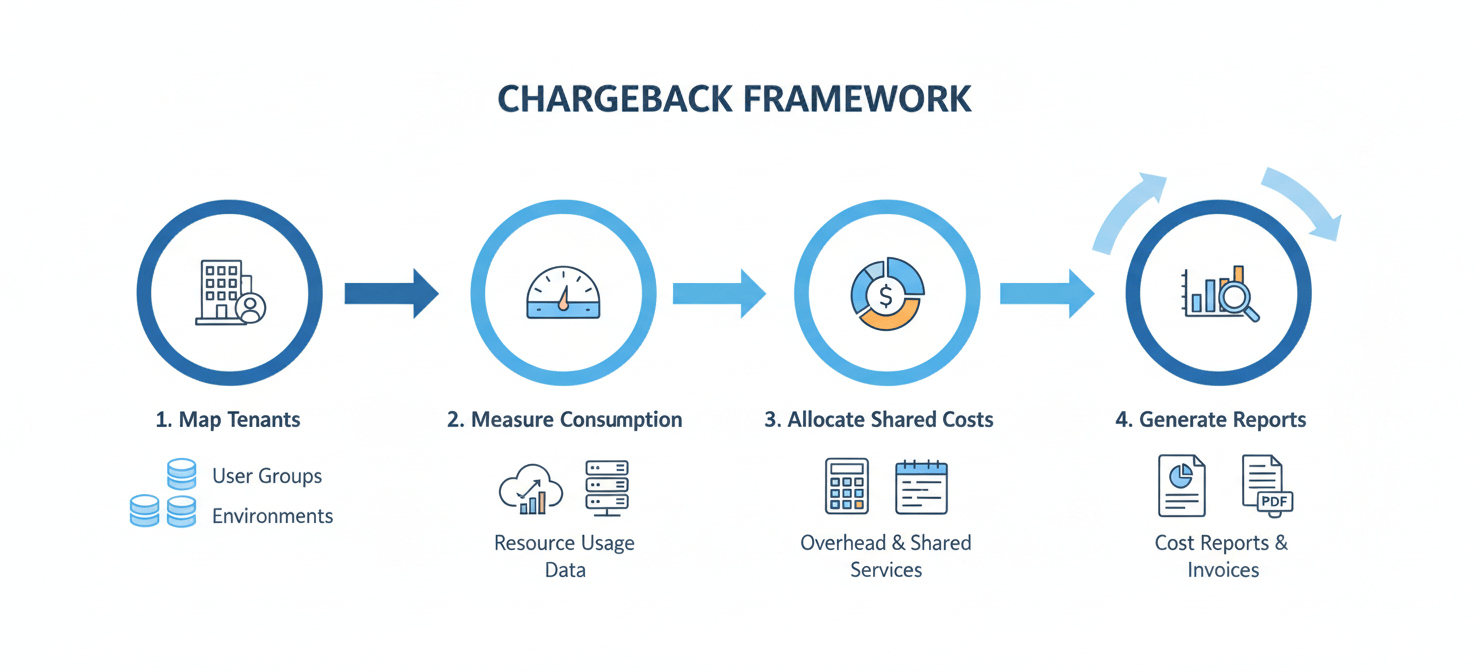
- Implementing a 4-step framework involves mapping tenants, measuring consumption, allocating shared costs, and generating reports.
- Key metrics for allocation include per-database storage, I/O operations, and CPU utilization derived from tools like
pg_stat_statements.
Why Chargeback for Aurora is Unavoidably Complex
Unlike traditional hosting where resources are siloed, Aurora is designed for shared resources, which is both a strength and a challenge for cost allocation. The primary difficulty arises because AWS bills at the cluster level. A single Aurora cluster often serves many different applications, teams, or customers (tenants), but the monthly invoice from AWS doesn’t break down costs per database or per user. It simply presents a total for compute, I/O, and storage for the entire cluster.
Furthermore, some of Aurora’s most significant costs are pooled. For example, I/O operations are billed as a single metric for the whole cluster, making it difficult to determine which tenant’s queries generated the most I/O. Similarly, with Aurora Serverless v2, compute capacity scales automatically for the entire cluster. As a result, you can’t easily assign the cost of a scaling event to a single tenant’s workload. This shared responsibility model requires a more sophisticated approach than simply dividing the bill by the number of tenants. You need a method that approximates each tenant’s actual resource consumption.
Core Components of Aurora Costs
To build a fair chargeback model, you first need to understand what you’re being billed for. An Aurora bill is primarily composed of a few key components. Your approach to multitenant aurora billing must account for each of these.
Compute Costs
For provisioned instances, compute is billed per instance-hour, based on the instance class (e.g., db.r6g.large). For Aurora Serverless v2, however, it’s billed in Aurora Capacity Units (ACUs) per hour. One ACU provides approximately 2 GiB of memory with corresponding CPU and networking. This model is flexible but makes direct attribution tricky, as the number of active ACUs can fluctuate throughout the hour based on total cluster workload.
Storage and I/O Costs
Aurora’s storage is a unique, distributed system that automatically grows as your data does. You are billed per GB-month for the actual storage your database cluster consumes. In addition, AWS charges for I/O operations per million requests. This is a critical cost component, as inefficient queries from one tenant can drive up I/O costs for everyone sharing the cluster. Backups also contribute to storage costs, billed per GB-month.
Other Potential Costs
Finally, don’t forget about data transfer costs. While data transfer within the same AWS Region is often free, transferring data out to the internet or between regions incurs charges. For a globally distributed application, these costs can be significant. Global Database and Snapshot Export charges may also apply depending on your architecture.
A 4-Step Aurora Postgres Chargeback Framework
A robust Aurora Postgres chargeback system requires combining high-level billing data from AWS with granular, database-level performance metrics. This framework provides a practical path to achieving fair cost allocation.
Step 1: Map Tenants to Databases
First, you must establish a clear link between a tenant (a team, service, or customer) and their corresponding database(s) within the shared cluster. The simplest model is one database per tenant. If multiple tenants share a single database using different schemas, the complexity increases. In that case, you must tag tables with an owner or rely on naming conventions to associate resources with the correct tenant. This mapping is the foundational layer of your chargeback model.
Step 2: Measure Resource Consumption per Tenant
Next, you need to collect usage data. This involves two sources of information.
- AWS Cost and Usage Report (CUR): This report provides the high-level cluster costs for compute, storage, and I/O. You will use this as the total bill that needs to be divided.
- PostgreSQL Statistics: Within Postgres itself, you can gather granular metrics. The
pg_stat_statementsextension is invaluable for tracking query execution statistics, including CPU time. You can also querypg_classto determine the storage size of tables and indexes owned by each tenant. For I/O, views likepg_stat_io_user_tablescan provide insights into I/O patterns at the table level.
Step 3: Allocate Shared Costs
With the data collected, you can now allocate the total cluster costs from your AWS bill. A weighted model is often the fairest approach.
For example, you can calculate each tenant’s share of the total cost based on their proportion of resource usage:
- Storage Cost: Allocate based on the percentage of total disk space each tenant’s tables and indexes consume.
- I/O Cost: Allocate based on the percentage of total I/O operations attributed to each tenant’s tables.
- Compute Cost: Allocate based on the percentage of total query execution time (from
pg_stat_statements) consumed by each tenant.
This method ensures that tenants with data-heavy, low-query applications pay more for storage, while tenants with small datasets but intensive queries pay more for compute and I/O.
Step 4: Generate and Review Reports
Finally, automate the process of generating monthly reports for each tenant. These reports should clearly itemize their allocated portion of the storage, I/O, and compute costs. Transparency is key. By showing tenants the data behind their bill, you empower them to optimize their queries and data models to reduce costs. This creates a virtuous cycle of accountability and efficiency. Regularly review the allocation logic to ensure it remains fair as workloads evolve.
Tools and Scripts for Implementation
Implementing this framework does not require expensive third-party software. Instead, you can leverage a combination of AWS services and open-source tools.
AWS Cost Explorer and the Cost and Usage Report (CUR) are your primary sources for billing data. The CUR, delivered to an S3 bucket, provides the most detailed billing information and is ideal for programmatic analysis. You can query it using Amazon Athena to aggregate cluster-level costs.
For the database-level metrics, you will need custom SQL scripts. These scripts can be run periodically via a cron job or a Lambda function to query PostgreSQL’s statistics views. For instance, a script could connect to your Aurora instance, calculate the size of all tables per schema, and log this data to a separate reporting table or a CSV file in S3. Similarly, another script can capture and reset pg_stat_statements data to measure CPU usage over a specific billing period. Combining the CUR data from Athena with your collected PostgreSQL metrics allows you to build a complete aws rds cost allocation dashboard in a tool like Amazon QuickSight or Grafana.
Conclusion
Implementing an Aurora Postgres chargeback system transforms an opaque, shared expense into a transparent, manageable cost. It forces a healthy level of accountability, encouraging teams to write more efficient queries and manage their data footprint responsibly. While the process requires some initial setup to map tenants, measure usage, and allocate costs, the long-term benefits of financial clarity and improved resource optimization are well worth the effort. Ultimately, a good chargeback model isn’t about pinching pennies; it’s about making sure the right pennies are pinched by the right people.
Achieving this level of financial clarity and optimizing your Aurora Postgres costs is within reach; you can experience its capabilities firsthand by exploring a free Binadox trial, or simply book a demo to discuss your specific needs with an expert.
 7-day free trial