



Managing cloud costs is a critical discipline, and for teams running containerized applications on Azure Kubernetes Service (AKS), it presents a unique set of challenges. While AKS simplifies Kubernetes management, the flexibility it offers can easily lead to spiraling expenses if not governed correctly. Effective kubernetes cost optimization is not about slashing budgets indiscriminately; instead, it’s about eliminating waste, paying only for the resources you truly need, and maximizing the value of every dollar spent on your Azure infrastructure. This guide provides a practical roadmap for controlling your AKS costs without compromising performance.
Key takeaways
- Right-size everything: Continuously adjust pod requests and node VM sizes to match actual workload demands, which can reduce compute costs by over 40%.
- Leverage diverse VM types: Use a mix of On-demand, Spot, and Reserved Instances or Savings Plans to align your spending with workload predictability and criticality.
- Automate scaling: Implement both pod-level (HPA/KEDA) and cluster-level (Cluster Autoscaler) scaling to dynamically match resources to real-time demand, preventing overprovisioning.
- Monitor and analyze: Utilize tools like Azure Cost Management and Azure Advisor to gain visibility into spending patterns and identify specific, actionable savings opportunities.
Understanding the Sources of AKS Costs
Before you can optimize, you must understand what you’re paying for. In AKS, costs are not a single line item but a composite of several underlying Azure resources. The primary drivers of your bill are the worker nodes—the virtual machines (VMs) that run your applications.
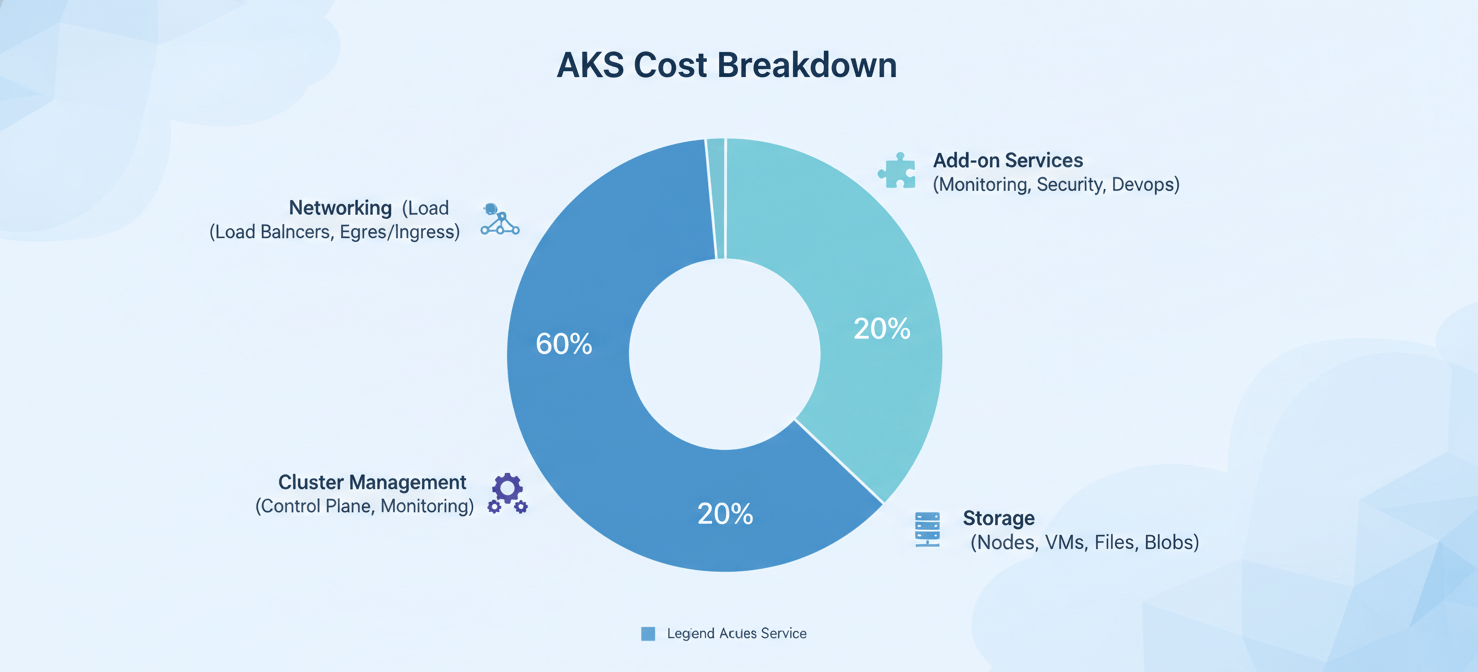
Here’s a breakdown of the main cost components:
- Compute (Worker Nodes): This is the most significant portion of your AKS bill. You pay for the Azure VMs that form your node pools. The cost is determined by the VM series (general purpose, compute-optimized, etc.), size (number of vCPUs and amount of RAM), and the total time they are running.
- Cluster Management: AKS offers a free tier where the Kubernetes control plane is managed by Azure at no cost. For production workloads requiring a higher level of availability, the Standard tier offers a financially-backed Service Level Agreement (SLA) for a fixed hourly fee per cluster. A Premium tier is also available for those needing long-term support.
- Storage: Your applications often require persistent storage. This typically involves Azure Managed Disks or Azure Files, and you are billed based on the type (e.g., Premium SSD, Standard SSD, Standard HDD), provisioned size, and, in some cases, the number of transactions.
- Networking: While inbound data traffic is generally free, outbound (egress) traffic from your cluster to the internet or other Azure regions incurs costs. Additionally, resources like Load Balancers and Public IP addresses, which are often used to expose your services, have their own associated charges.
- Add-on Services: Integrating other Azure services like Azure Monitor for Containers, Microsoft Defender for Cloud, or Azure Container Registry will add to your total cost, typically based on data ingestion and retention.
Right-Sizing Your Nodes and Pods
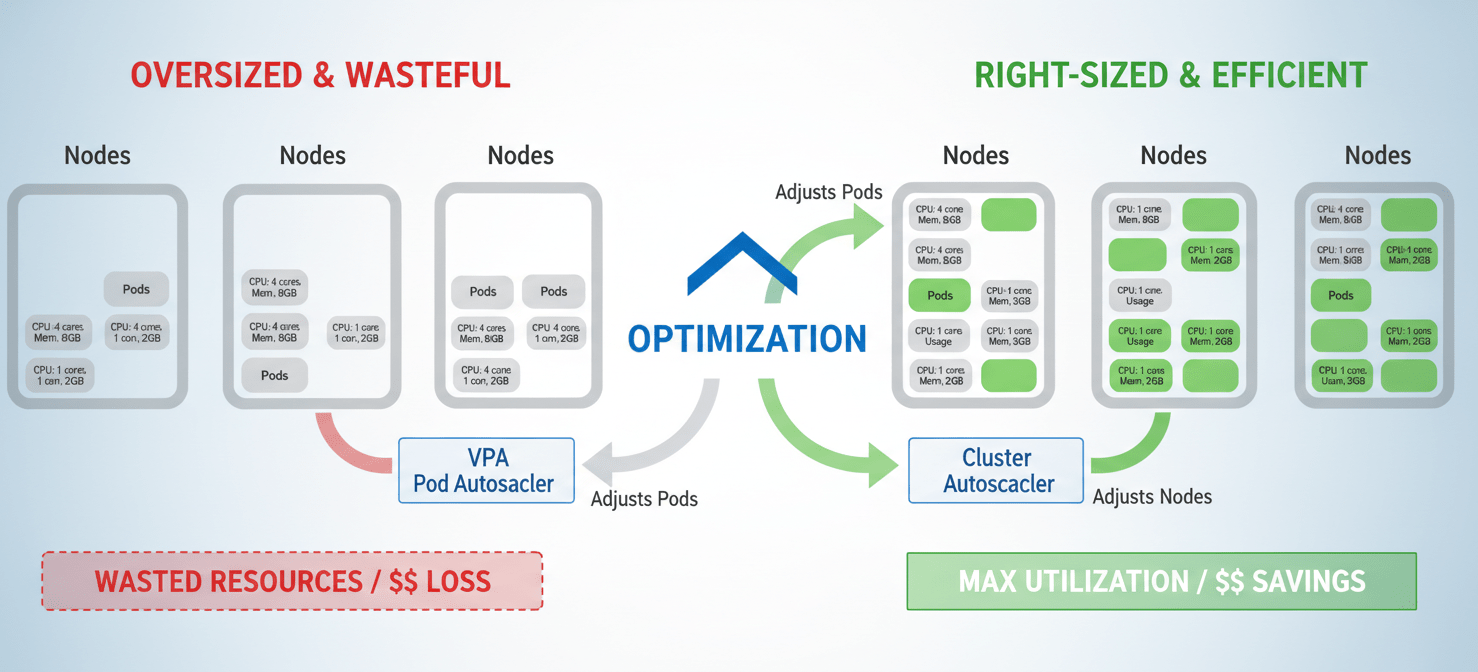
One of the most common sources of wasted cloud spend is overprovisioning—allocating more resources than your applications actually need. Right-sizing is the continuous process of matching your resource allocation to the actual demand of your workloads.
Fine-Tuning Pod Requests and Limits
In Kubernetes, you define resource requests (the minimum amount of CPU and memory a pod needs to run) and limits (the maximum it can consume). Setting these values accurately is fundamental to efficient cluster operation.
- If requests are too high, you’ll pay for resources that sit idle, as Kubernetes will reserve capacity that your application never uses.
- If requests are too low (or not set), you risk “noisy neighbor” problems where one application monopolizes node resources, potentially causing performance degradation or evictions for other pods.
Start by analyzing the historical consumption of your applications using monitoring tools. For a more automated approach, consider using the Vertical Pod Autoscaler (VPA). VPA can analyze the resource usage of pods over time and recommend appropriate request and limit values. Azure Advisor may also provide recommendations to enable VPA to help right-size your workloads.
Choosing the Right VM Size for Nodes
Just as pods can be oversized, so can your nodes. Choosing a massive VM instance for a node pool that runs only small workloads leads to significant waste. Instead, aim for high-density “bin packing,” where you efficiently schedule many pods onto a single node to maximize its utilization.
Create multiple node pools with different VM sizes and types. This allows you to direct different kinds of workloads to the most appropriate and cost-effective infrastructure. For example, you can have a node pool with memory-optimized VMs for your databases and another with compute-optimized VMs for your data processing jobs.
Leveraging Different Virtual Machine Types
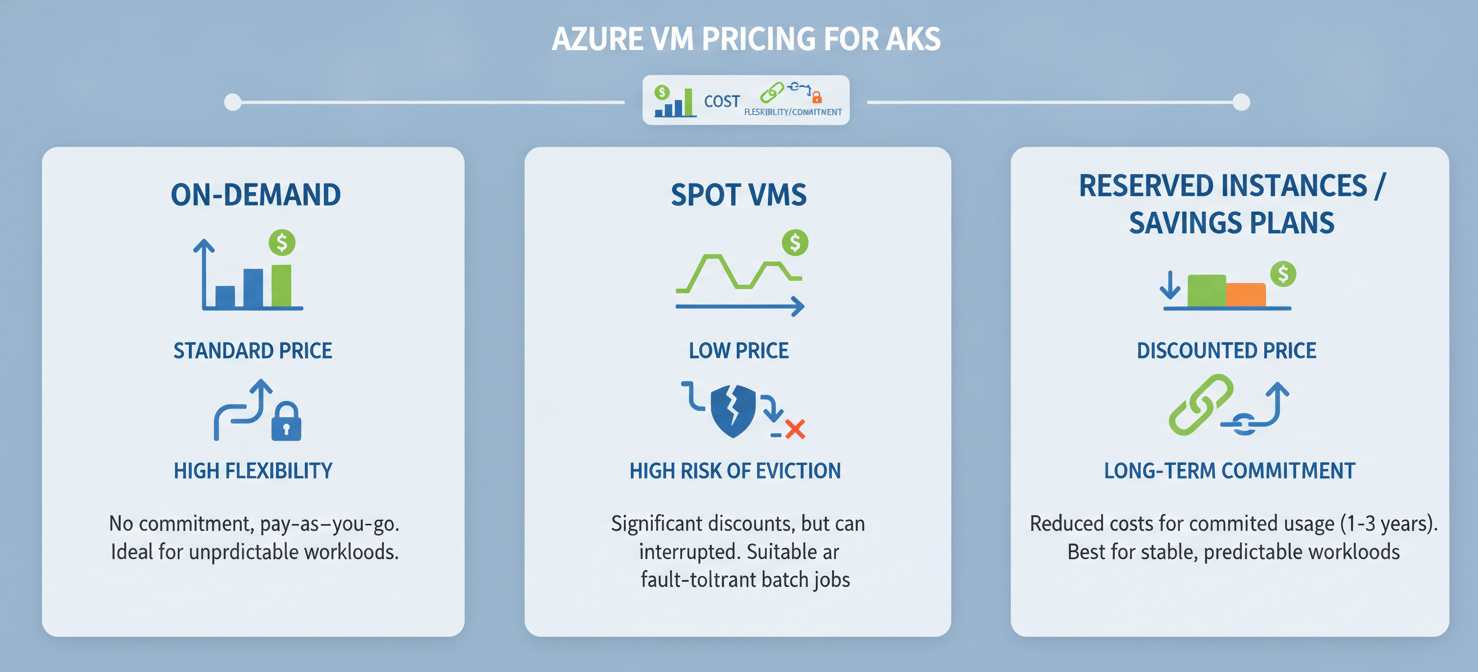
Azure offers several pricing models for its virtual machines, and using a strategic mix of them can dramatically lower your compute costs.
On-Demand VMs
This is the standard, pay-as-you-go pricing model. It offers the most flexibility, as you can spin up and shut down VMs at any time without any long-term commitment. On-demand is ideal for workloads with unpredictable traffic patterns or for development and testing environments where you need maximum agility. However, it is also the most expensive option.
Azure Spot Virtual Machines
Azure Spot Virtual Machines let you access unused Azure compute capacity at discounts of up to 90% compared to pay-as-you-go prices. The catch is that these VMs can be “evicted” with very little notice if Azure needs the capacity back.
This makes Spot VMs an excellent choice for fault-tolerant and interruptible workloads. Good candidates include:
- Batch processing jobs
- Data analysis and machine learning model training
- Development and testing environments
- Stateless applications that can handle interruptions gracefully
You can create a dedicated Spot node pool in your AKS cluster to run these types of workloads, significantly reducing their operational cost.
Burstable VMs (B-series)
For workloads that typically have low CPU usage but occasionally need to burst to a higher performance level, Azure’s B-series VMs can be highly cost-effective. These VMs accumulate credits when their CPU usage is low and then spend those credits during periods of high activity. This makes them perfect for small web servers, development environments, and other applications with intermittent traffic.
Implementing Smart Autoscaling for Kubernetes Cost Optimization
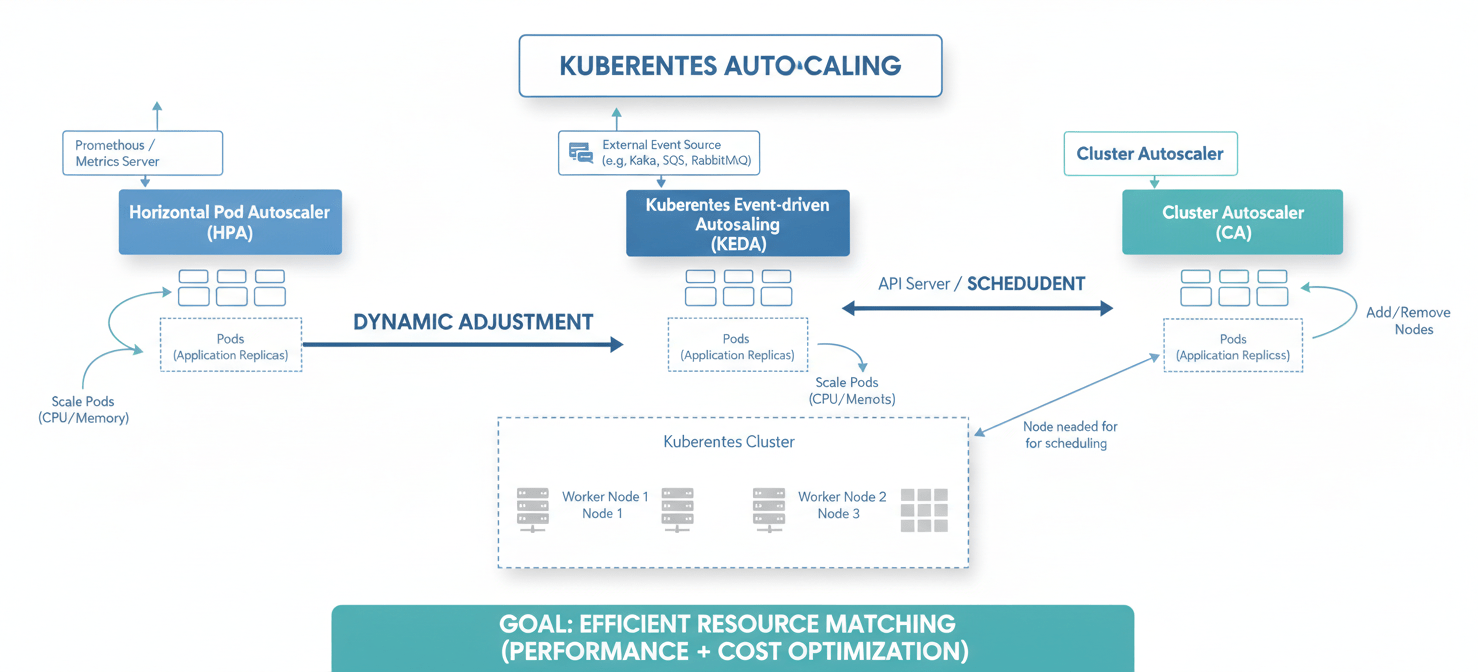
Autoscaling is the key to achieving a truly dynamic and cost-efficient infrastructure that adapts to real-time demand. In AKS, scaling happens at two levels: the pod level and the cluster level.
Pod-Level Scaling: HPA and KEDA
Horizontal Pod Autoscaler (HPA): The HPA automatically increases or decreases the number of pods (replicas) in a deployment based on observed metrics like CPU utilization or memory consumption. For example, you can configure an HPA to add more pods to your web application when the average CPU usage across all pods exceeds 70%. This ensures you have enough capacity to handle traffic spikes while scaling down during quiet periods to save money.
Kubernetes Event-Driven Autoscaling (KEDA): For applications that respond to events rather than traditional resource metrics, KEDA is an essential tool. KEDA is a lightweight component that can scale your applications based on the length of a message queue (like Azure Service Bus or RabbitMQ), the number of events in a stream, or dozens of other event sources. A powerful feature of KEDA is its ability to scale workloads down to zero replicas when there are no events to process, completely eliminating costs for idle applications.
Cluster-Level Scaling: The Cluster Autoscaler
The Cluster Autoscaler works in tandem with pod-level scalers. It automatically adjusts the number of nodes in your node pools. When the HPA or KEDA scales up your pods and there aren’t enough resources on the existing nodes to schedule them, the Cluster Autoscaler will provision new nodes. Conversely, when nodes are underutilized for a period of time and their pods can be safely moved elsewhere, it will terminate them to reduce costs.
Harnessing Azure-Specific Savings Mechanisms
Beyond VM pricing models, Azure provides commitment-based discounts that offer significant savings for predictable, long-term workloads.
Azure Reserved Virtual Machine Instances (RIs)
With Azure Reservations, you commit to a specific VM type in a particular Azure region for a one- or three-year term. In exchange, you can receive savings of up to 72% compared to pay-as-you-go pricing. RIs are best suited for stable, predictable workloads where you know you will need a certain amount of compute capacity consistently over a long period. This makes them ideal for the node pools that run your core, mission-critical applications.
Azure Savings Plans for Compute
Azure Savings Plans for compute offer a more flexible alternative to RIs. Instead of committing to a specific VM instance, you commit to spending a fixed hourly amount on compute services for a one- or three-year term. This discount automatically applies to your eligible compute usage across various VM families and regions, providing savings of up to 65%. This flexibility is beneficial if your workloads evolve over time, as the savings plan will adapt to changes in your VM usage without requiring you to modify your commitment.
Monitoring and Analyzing Your Kubernetes Costs
You cannot optimize what you cannot see. Gaining clear visibility into your AKS spending is a prerequisite for effective kubernetes cost management.
Azure Cost Management and Billing
Azure Cost Management is a native tool that provides a comprehensive view of your Azure spending. For AKS, you can enable the cost analysis add-on, which is built on the open-source OpenCost project. This feature allows you to break down your cluster costs by Kubernetes-specific constructs like namespaces, helping you attribute costs to specific teams or applications. You can create budgets, set up alerts for when spending exceeds certain thresholds, and analyze historical cost trends to identify anomalies.
Azure Advisor
Azure Advisor is a free, personalized cloud consultant that analyzes your resource configuration and usage. It provides proactive, actionable recommendations across several categories, including cost. For AKS, Advisor can identify idle resources, suggest more cost-effective VM SKUs, and recommend configurations that align with best practices for cost efficiency.
Optimizing Network Traffic and Storage
While compute often represents the largest portion of the bill, networking and storage costs can add up, especially at scale.
Managing Network Costs
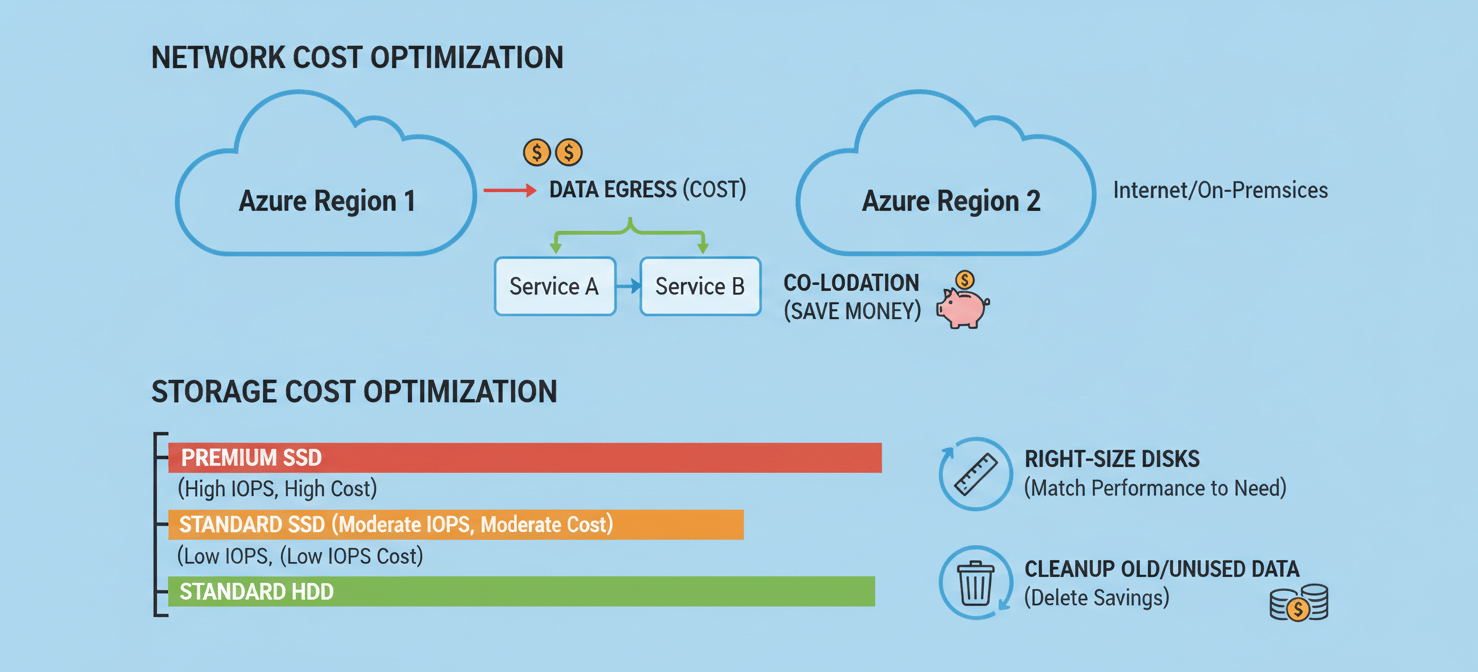
Data egress—traffic leaving an Azure region—is a primary driver of network costs. To minimize this, try to locate your AKS clusters and other dependent Azure services (like databases or storage accounts) in the same region. If your applications communicate frequently across different availability zones within the same region, be aware that this can also incur data transfer charges. Using a private cluster can sometimes lead to an increase in private endpoints, which are not free and can contribute to rising network costs if not managed carefully.
Choosing Cost-Effective Storage
Azure offers various storage tiers with different performance characteristics and price points.
- Premium SSDs offer high performance and low latency, making them suitable for production databases and other I/O-intensive workloads.
- Standard SSDs provide a good balance of performance and cost for most general-purpose workloads.
- Standard HDDs are the most cost-effective option for backup, archival, or workloads that are not latency-sensitive.
Always provision the smallest disk size that meets your needs, as you are billed for the provisioned capacity, not just what you use. Also, regularly clean up unused Persistent Volume Claims (PVCs) and their underlying disks to avoid paying for storage that is no longer needed.
Conclusion
Achieving meaningful kubernetes cost optimization in Azure is not a one-time project but an ongoing practice of vigilance and refinement. It begins with a clear understanding of where your money is going, from the worker nodes that power your applications to the storage that holds your data. By diligently right-sizing your pods and nodes, you eliminate the pervasive waste of overprovisioning.
Furthermore, by embracing a strategic mix of VM types—using Spot instances for interruptible tasks and leveraging Savings Plans for your stable workloads—you can fundamentally alter your cost structure. Smart, automated scaling ensures that your infrastructure breathes with your application’s demand, never again leaving you to pay for idle capacity during quiet hours. The final piece is consistent monitoring; using tools like Azure Cost Management and Advisor transforms cost management from a guessing game into a data-driven discipline. Ultimately, taming your AKS bill isn’t about magic; it’s about making deliberate, informed choices. Get it right, and you’ll find your cloud spend is no longer a source of anxiety, but a predictable and efficient engine for your business.
To truly master your AKS costs and ensure every dollar delivers value, consider how a specialized tool could help; you can easily start a free trial to see it in action, or for a personalized overview, book a demo with our team.
 7-day free trial