



You’ve done your due diligence. The project is paused, the application servers are off, and you’ve stopped your Amazon Aurora cluster to save on costs. Yet, when the monthly AWS bill arrives, you find a surprising charge tied to that supposedly dormant database. This experience is common and frustrating. The core reason your inactive aurora cluster is still costing you money is that stopping the compute instances doesn’t stop all the billing. Several other services continue to accrue charges.
Understanding the Aurora pricing model is key to managing your cloud spend effectively. Unlike a simple virtual machine that you can turn off, an Aurora cluster has a more complex architecture with decoupled compute and storage, which has significant billing implications.
Key takeaways:
- Storage is billed continuously: Even when your Aurora cluster’s compute instances are stopped, you are still charged for all the storage your data occupies.
- Backups and snapshots add up: Manual snapshots and automated backup storage beyond your free tier will continue to cost you money indefinitely until you delete them.
- Stopping has a 7-day limit: An Aurora cluster can only be stopped for a maximum of seven days before AWS automatically restarts it, primarily for maintenance updates.
- Compute is only one part of the bill: The total Aurora cost is a sum of compute, storage, I/O operations, backups, and data transfer fees. Stopping the cluster only eliminates the compute charges.
The Core Issue: Storage Doesn’t Stop
The most significant reason you see ongoing charges from a stopped cluster is the fundamental design of Amazon Aurora. It separates compute resources (the DB instances that process queries) from the storage layer. When you “stop” an Aurora cluster, you are only halting the DB instances. You are not being charged for instance-hours anymore, which is often a large portion of the cost.
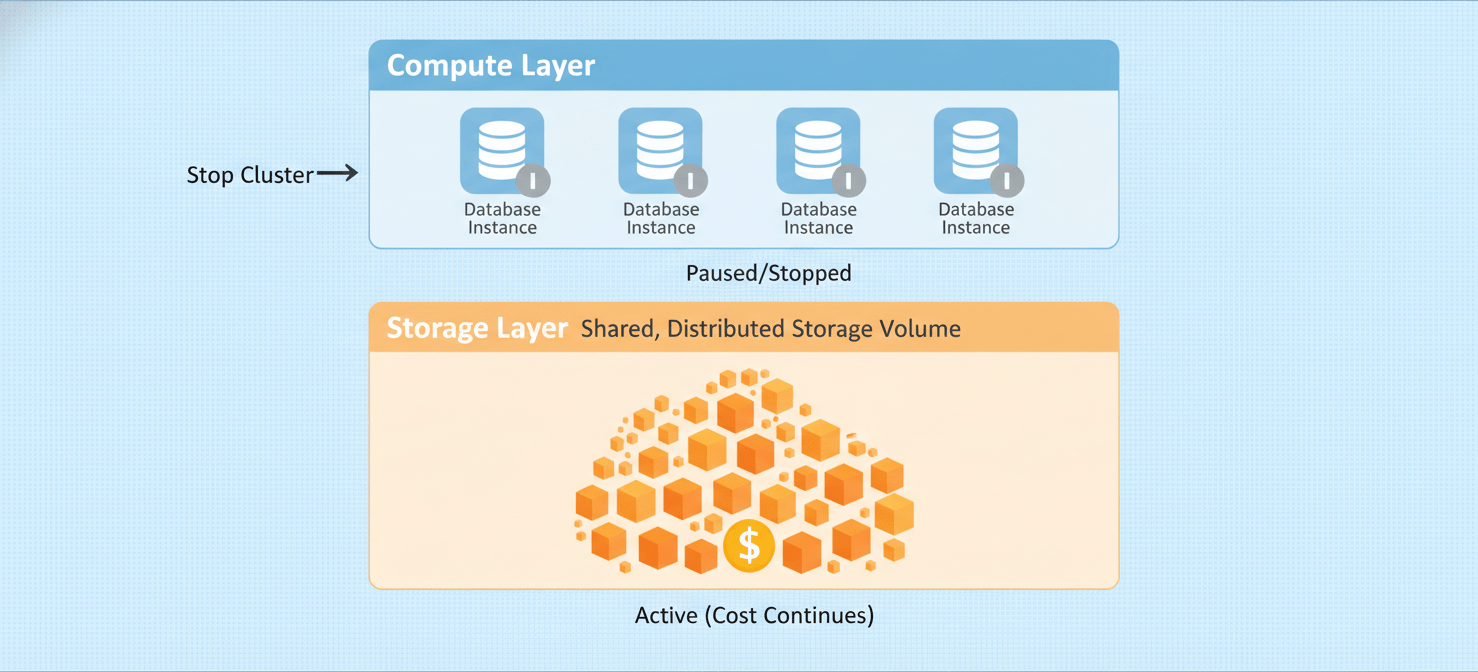
However, the underlying distributed storage volume that holds your data remains active and provisioned. AWS charges for this storage by the gigabyte-month. Whether your cluster is active or inactive, the six copies of your data spread across three Availability Zones are still occupying space, and that space has a price tag. This aurora storage costs model ensures your data is durable and ready for a quick start, but it’s the primary source of your stopped rds instance cost.
For example, with the Aurora Standard configuration, you pay for the storage your database consumes regardless of the cluster’s activity. If you have a large database, this can be a substantial and unexpected recurring charge.
Beyond Storage: Other Hidden Costs of an Inactive Aurora Cluster
While storage is the main culprit, other services associated with your cluster can also contribute to the monthly bill even when it’s inactive.
Automated Backups and Manual Snapshots
Aurora provides a free tier for backup storage, typically equivalent to 100% of your total database storage size for active clusters. However, charges apply for any automated backup storage that exceeds this amount.
More importantly, manual snapshots are a frequent source of surprise costs. When you delete a cluster, any manual snapshots you created are not deleted automatically. These snapshots persist and are billed at the standard backup storage rate until you manually remove them. It’s easy to forget about a snapshot taken months ago for a development project, only to find it has been quietly adding to your bill ever since.
I/O Operations (for Aurora Standard)
If you use the Aurora Standard storage configuration, you are billed for I/O operations—the reads and writes your database performs. While a truly stopped cluster will have minimal I/O, any brief activity or automated process could generate some I/O that adds to your costs. For workloads with even moderate I/O, these charges can become significant. Alternatively, the Aurora I/O-Optimized option includes all I/O operations for a higher storage and instance price, offering more predictable pricing for I/O-heavy applications.
Other Potential Charges
Less common but still possible are charges from other services linked to your cluster:
- Data Transfer: If any processes are moving data out of the cluster to the internet or across AWS regions, standard data transfer fees apply.
- Enhanced Monitoring: If you have Enhanced Monitoring enabled, it sends metrics to CloudWatch Logs, which has its own pricing for data ingestion and storage.
- Performance Insights: Retaining Performance Insights data beyond the free seven-day period incurs costs.
How to Truly Minimize Costs for an Inactive Aurora Cluster
Simply stopping the cluster is a temporary solution for short-term savings, especially since it will automatically restart after seven days. To genuinely cut costs for a database you don’t need for an extended period, you need to take more definitive steps.
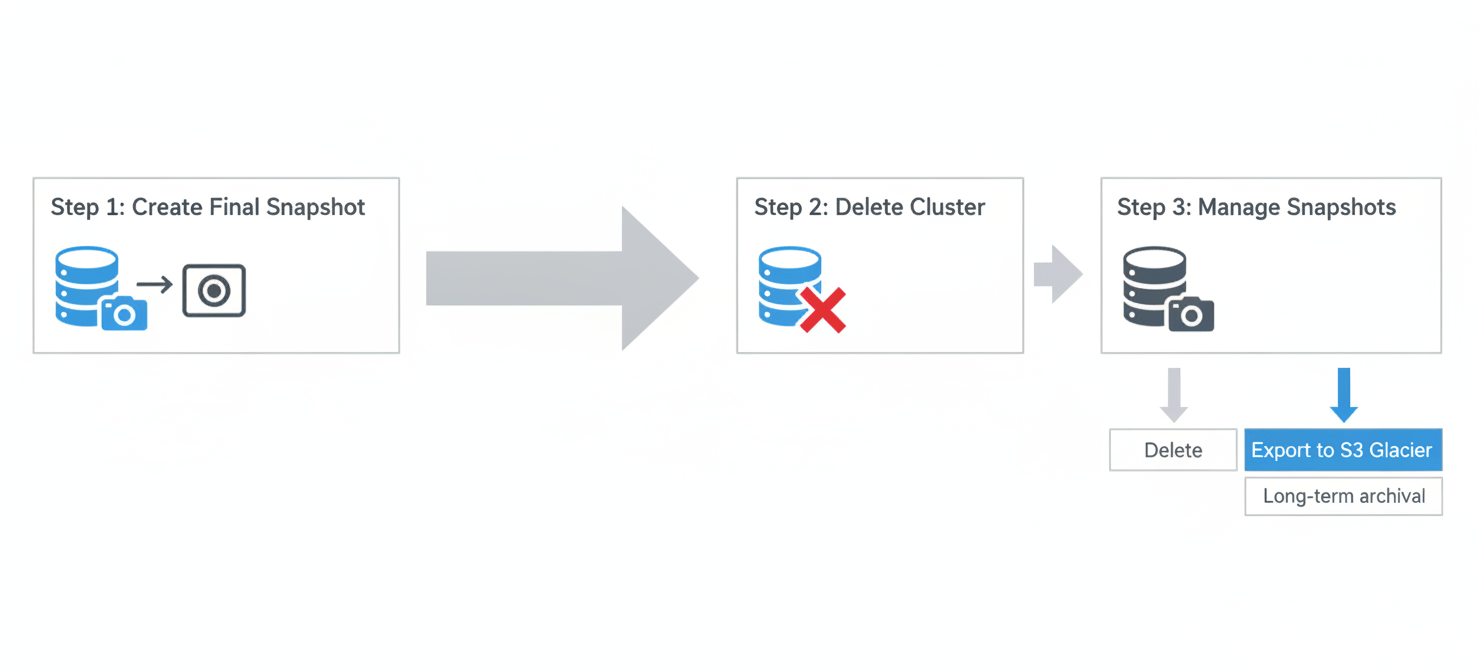
1. Create a Final Snapshot: Before doing anything else, create a manual snapshot of your cluster. This ensures you have a complete backup of your data that you can restore from later.
2. Delete the Cluster: The most effective way to stop all charges is to delete the cluster itself. This action removes the compute instances and the automated backups. Remember, this does not delete your manual snapshots.
3. Manage Your Snapshots: That final manual snapshot you created will continue to incur storage costs. For long-term archival, consider exporting the snapshot data to Amazon S3. S3 offers much cheaper storage tiers, like Glacier Instant Retrieval or Glacier Deep Archive, which are designed for data you don’t need to access frequently. This can reduce your long-term storage costs significantly compared to keeping the data in a live snapshot.
4. Automate Cleanup: For development and testing environments where clusters are frequently created and destroyed, implement an automated cleanup process. Use scripts or AWS Lambda functions to delete old, unneeded manual snapshots to prevent them from accumulating and driving up costs.
Conclusion
The surprise bill from an inactive aurora cluster stems from a misunderstanding of Aurora’s architecture. Stopping the compute instances is just one piece of the puzzle; the persistent, durable storage layer and associated backups continue to generate costs. While this design is excellent for reliability and quick recovery, it requires a more proactive approach to cost management for non-production environments. The next time you need to sideline a database, don’t just stop it. Instead, take a final snapshot, delete the cluster, and manage your snapshot lifecycle to ensure you’re only paying for what you truly need. After all, the only thing worse than a bug in your code is a leak in your cloud budget.
To truly plug those leaks in your cloud budget and gain clear visibility into all your AWS expenditures, you can explore how Binadox helps optimize your resources, or schedule a personalized demonstration to see our platform in action.
 7-day free trial