




Choosing a professional email setup is a key step for any business. For many, bundling Microsoft 365 with their GoDaddy domain seems like a simple solution. However, this convenience often comes at a premium. It is crucial to analyze the GoDaddy Microsoft 365 email cost compared to purchasing directly from Microsoft. This analysis can reveal significant savings and offer greater flexibility for your team. A closer look at the pricing and features shows you might be paying more for less.
Key takeaways
- GoDaddy often has appealing introductory prices, but renewal rates can be significantly higher than Microsoft’s consistent pricing. For example, a plan comparable to Microsoft 365 Business Standard can renew at nearly $7.50 more per user per month.
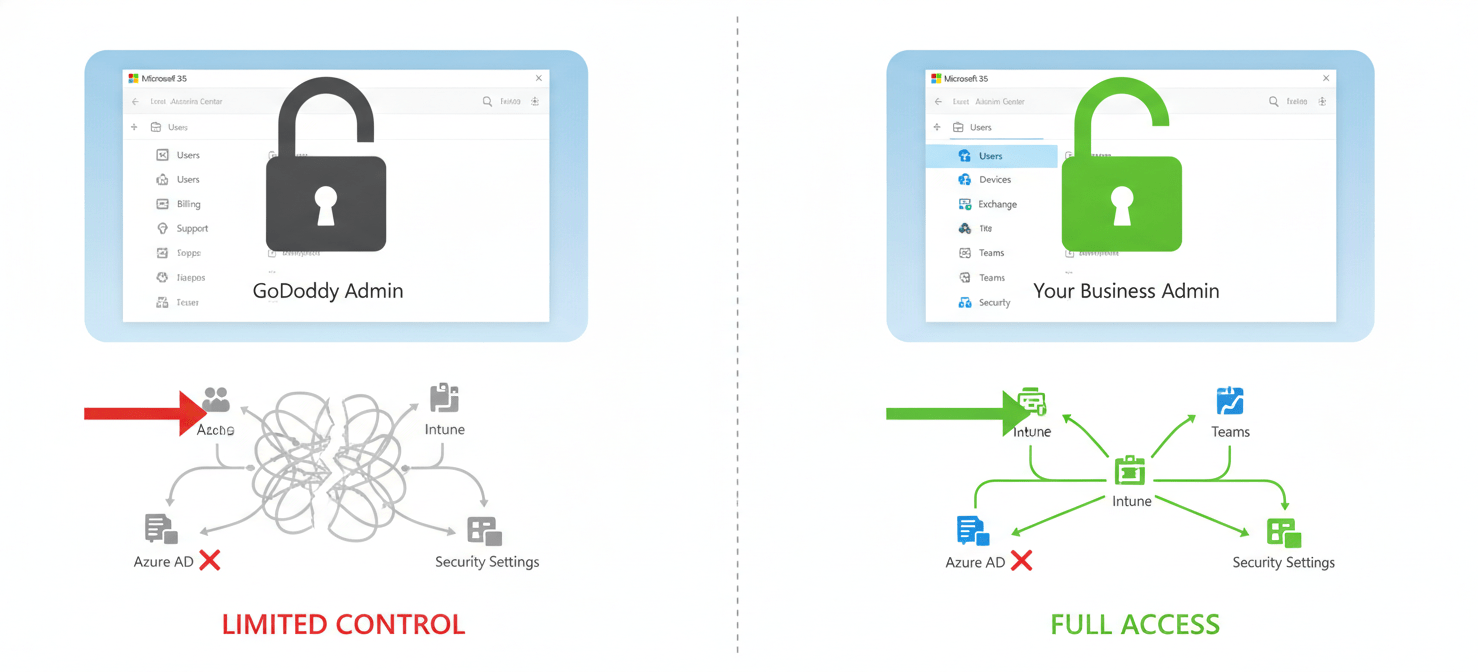
- Purchasing from GoDaddy limits your administrative control, restricting access to advanced settings and customization available through the native Microsoft 365 admin center.
- Migrating from GoDaddy to a direct Microsoft plan is a well-defined process called “defederation,” which can be completed in a few days and grants you full control over your licenses and security.
Understanding GoDaddy’s Microsoft 365 Email Plans
GoDaddy offers several Microsoft 365 plans, often bundled with their domain and hosting services for a streamlined setup. These packages are designed for simplicity, appealing to small businesses without dedicated IT staff. The plans typically range from basic email-only options to more comprehensive packages that include the full suite of Microsoft Office applications.
For instance, GoDaddy’s “Email Essentials” plan provides a professional email address with your domain, along with calendar and contacts, offering 10 GB of storage. A step up is the “Email Plus” plan, which increases storage to 50 GB. For businesses needing more, the “Online Business Essentials” plan includes web versions of Office apps and 1 TB of OneDrive storage, which closely mirrors Microsoft’s Business Basic plan. Their top-tier plan for small businesses, often called “Business Professional,” includes desktop versions of Office apps, corresponding to the Microsoft 365 Business Standard package.
While GoDaddy’s initial setup is straightforward, this convenience comes with trade-offs. The administrative interface is a simplified version of Microsoft’s, which means you lose access to many advanced controls. Furthermore, GoDaddy acts as the primary administrator of your Microsoft 365 tenant, which can create limitations on security settings, user management, and integrations.
Direct from Microsoft: A Price Comparison
When you compare the GoDaddy Microsoft 365 email cost with Microsoft’s direct pricing, the long-term financial implications become clear. GoDaddy frequently uses attractive introductory offers to draw in customers, but the renewal prices are often substantially higher.
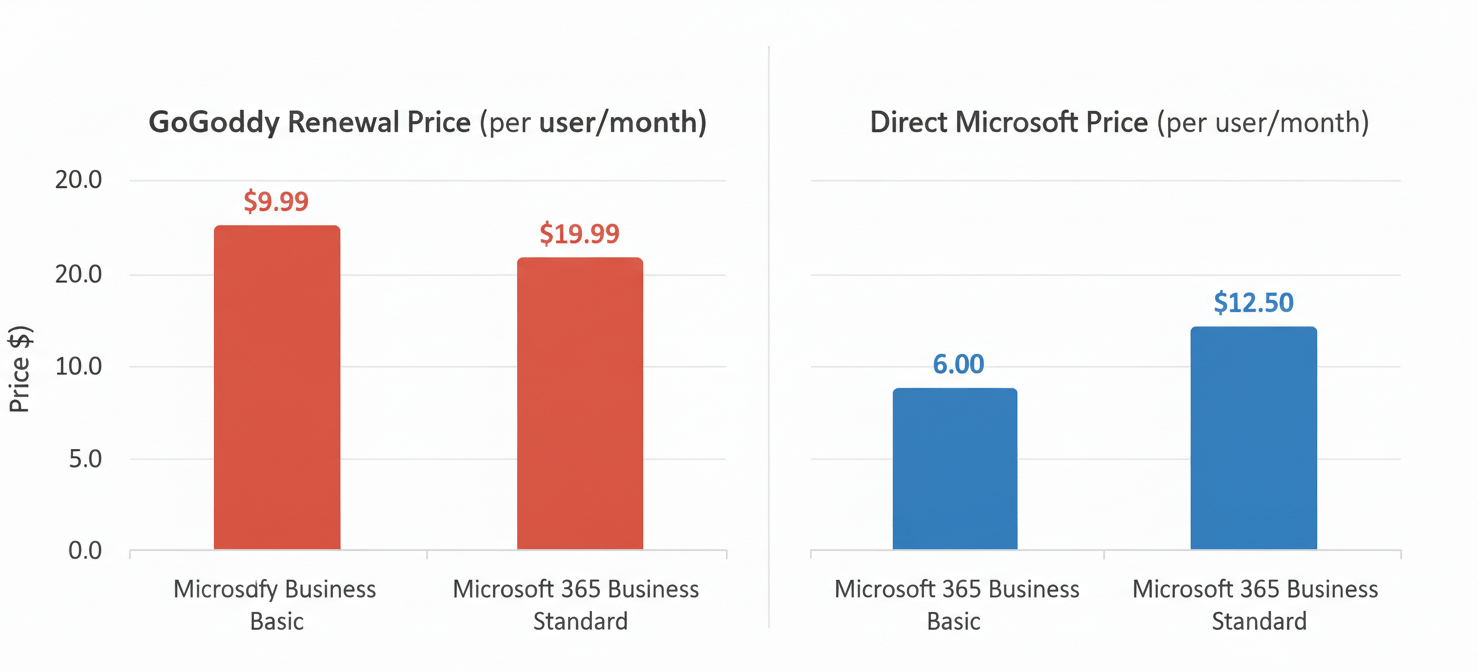
As of early 2026, here is a general price comparison for similar plans:
- Microsoft 365 Business Basic: Microsoft directly offers this plan for approximately $6.00 per user per month with an annual commitment. GoDaddy’s equivalent, “Online Business Essentials,” may have a lower initial price, but renewal costs can be significantly higher.
- Microsoft 365 Business Standard: Directly from Microsoft, this plan costs around $12.50 per user per month (annual plan). GoDaddy’s comparable “Business Professional” plan might start cheaper but can renew for as much as $19.99 per user per month, a considerable markup.
These price differences add up quickly, especially as your team grows. A business with 10 users on a Business Standard equivalent plan could pay over $890 more per year by sticking with GoDaddy’s renewal rates compared to Microsoft’s direct pricing. This extra cost does not come with added features; in fact, you often get a more restricted version of the service.
The Hidden Costs of Convenience
The convenience of bundling your email with your domain registrar has several hidden costs and limitations that are not immediately obvious. These drawbacks can impact your business’s flexibility, security, and scalability.
Administrative and Control Limitations
When you purchase a GoDaddy Office 365 license, you are not the top-level administrator. GoDaddy is. This arrangement results in a simplified, locked-down admin portal that prevents you from accessing the full Microsoft 365 admin center. Consequently, you lose the ability to manage advanced security settings, create complex mail flow rules, or fully integrate with other powerful Microsoft services like Azure Active Directory and Intune.
Support and Troubleshooting
Another significant issue is customer support. When you encounter a technical problem, you must go through GoDaddy’s support team. Since GoDaddy is a reseller, their support often acts as a middleman, escalating complex issues to Microsoft. This extra layer can lead to slower resolution times and miscommunication, causing unnecessary downtime for your business. Direct Microsoft support, in contrast, connects you with experts on the platform.
Scalability and Flexibility
GoDaddy’s Microsoft 365 plans are primarily aimed at small businesses and have a user limit, typically around 300 users. If your business grows beyond this, you will be forced to migrate. Furthermore, the licensing options are often more rigid, making it difficult to mix and match different plans for various user needs within your organization—a standard feature when you buy directly from Microsoft.
GoDaddy Microsoft 365 Email Cost: The Migration Path
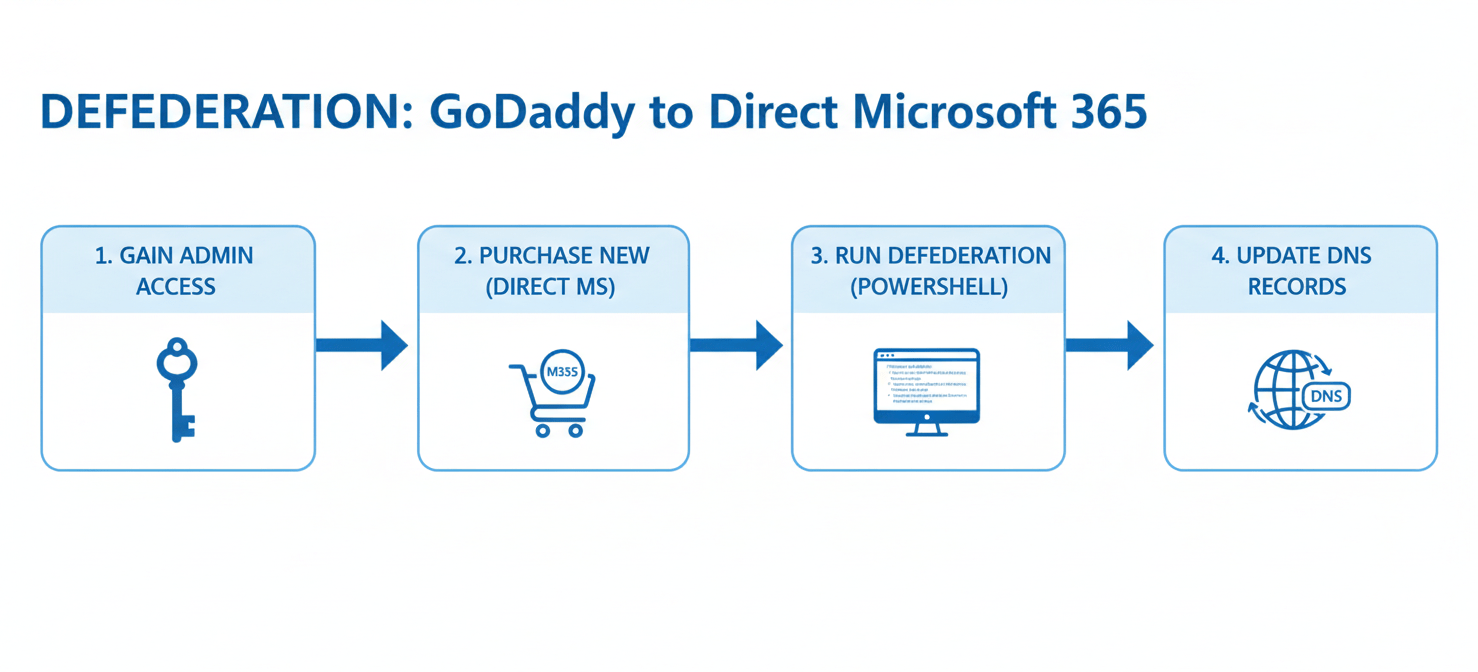
If you have concluded that you are overpaying or are too restricted by GoDaddy’s ecosystem, the good news is that you can migrate. The process involves detaching your Microsoft 365 tenant from GoDaddy’s administrative control, a procedure known as “defederation.”
The Defederation Process
Defederation is the core step that gives you back full administrative control of your Microsoft 365 environment. It breaks the link with GoDaddy, allowing you to purchase licenses directly from Microsoft or another Cloud Solution Provider (CSP) without losing your data. For most small businesses, this process is less disruptive than a full tenant-to-tenant migration because your user accounts, emails, and files remain in place.
The typical steps involve:
- Gaining Administrative Access: You will need to work through a process, sometimes with GoDaddy’s help, to have a user in your organization promoted to Global Administrator.
- Purchasing New Licenses: You must buy the necessary Microsoft 365 licenses directly from Microsoft for all your users before you cancel the GoDaddy ones.
- Running the Defederation: This often involves running a few PowerShell commands to remove GoDaddy’s domain federation.
- Updating DNS Records: You may need to update certain DNS records in your domain registrar to point directly to Microsoft’s services.
While the process can be technical, it is a well-trodden path. Many IT service providers specialize in these migrations and can handle the entire process for a fee, which can range from a per-user cost to a flat project fee. For a small team of around 35 users, the migration can often be completed within a few days.
Beyond Price: Support and Integration Differences
The argument for moving away from GoDaddy extends beyond just the direct cost. The quality of support and the ability to integrate other tools are critical factors for a growing business.

Direct Microsoft support provides access to specialized technicians who can resolve complex issues efficiently. GoDaddy’s support, while available, is generalized and may not have the depth of knowledge for specific Microsoft 365 problems, leading to frustrating delays.
Furthermore, a direct Microsoft 365 subscription integrates seamlessly with the entire Microsoft ecosystem. This includes powerful tools like Power BI, Dynamics 365, and advanced security features available in higher-tier plans. With a GoDaddy Office 365 license, accessing these integrations can be difficult or impossible due to the limited administrative control. This restriction can stifle your ability to adopt more sophisticated workflows and security measures as your business evolves.
Conclusion
Ultimately, while GoDaddy offers a simple entry point into professional email, its long-term value is questionable. The attractive initial pricing often gives way to expensive renewals that can cost a small business thousands of extra dollars over time. The limitations on administrative control, scalability, and support create hidden costs that can hinder your company’s growth and security posture. By carefully evaluating the godaddy microsoft 365 email cost against the benefits of a direct Microsoft subscription, it becomes clear that paying a premium for less control is not a sustainable strategy. Making the switch might seem daunting, but the freedom to manage your own digital workspace is a far more valuable asset than the fleeting convenience of a bundled bill.
If you’re ready to take control of your Microsoft 365 costs and administration, you can gain full oversight by creating your free Binadox account, or learn how to streamline your transition by scheduling a demo with our team.
 7-day free trial