



Amazon S3 provides powerful, scalable, and durable object storage, but its flexibility can lead to unexpectedly high costs if not managed carefully. As your data footprint grows, what starts as a rounding error on your monthly bill can quickly escalate into a significant operational expense. Effective S3 cost optimization is not about using the service less; it’s about using it more intelligently. By understanding your usage patterns, choosing the right storage options, and automating data management, you can significantly reduce your spending without compromising on performance or availability. This guide provides a comprehensive framework for how to reduce S3 costs, turning a potentially runaway expense into a well-managed and predictable part of your cloud budget.
Key takeaways
- Automate with Lifecycle Policies: Implement S3 Lifecycle policies to automatically transition objects to cheaper storage tiers or delete them entirely, which can reduce storage costs for archived data by up to 95%.
- Use Intelligent-Tiering for Unpredictable Data: For data with unknown or changing access patterns, use the S3 Intelligent-Tiering storage class to automatically move objects between frequent and infrequent access tiers, saving money without manual intervention.
- Monitor and Analyze Usage: Regularly use tools like S3 Storage Lens and AWS Cost Explorer to gain visibility into your storage patterns, identify your largest cost drivers, and find actionable opportunities for savings.
- Clean Up Incomplete Uploads and Old Versions: Configure lifecycle rules to automatically delete incomplete multipart uploads and old object versions, eliminating storage costs for data that provides no value.
Understanding Your S3 Bill: The First Step to Savings
Before you can effectively implement any S3 cost optimization strategies, you must first understand what you are paying for. An Amazon S3 bill is not a single line item; it’s a combination of several distinct usage components. Misunderstanding these components is a common reason why costs spiral out of control. Your monthly charges are primarily driven by three main factors: storage volume, request and data retrieval operations, and data transfer.
Storage Costs: Paying for What You Store
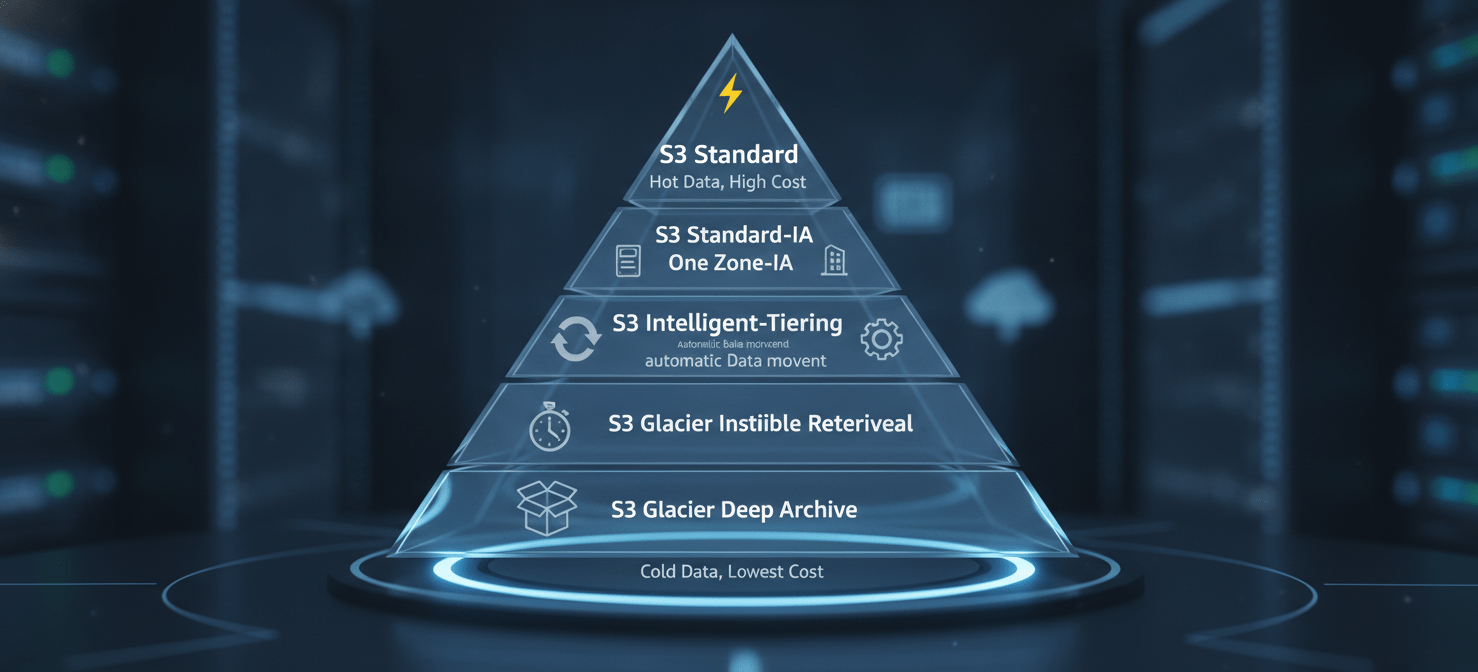
The most obvious charge on your S3 bill is for the data you store. This is calculated on a per-gigabyte-per-month basis, but the actual rate depends heavily on the S3 storage class you select for your objects. Each storage class is designed for a different access pattern and comes with its own pricing model. For example, data in S3 Standard, designed for frequently accessed data, costs more to store than data in S3 Glacier Deep Archive, which is intended for long-term archiving. Therefore, aligning your data with the appropriate storage class is a foundational step in any aws s3 cost reduction effort.
Request and Data Retrieval Costs: Paying for What You Do
Beyond just storing data, AWS charges for interactions with your data. These operations, known as requests, include actions like PUT (uploading), GET (downloading), COPY, POST, and LIST. The cost for these requests varies by type and storage class. For instance, a PUT request to S3 Standard is significantly cheaper than a retrieval request from an archive tier like S3 Glacier Flexible Retrieval. For storage classes designed for infrequent access, you often pay a per-gigabyte retrieval fee in addition to the request cost, which can become a major expense if you frequently access “cold” data.
Data Transfer Costs: Paying for Where Data Goes
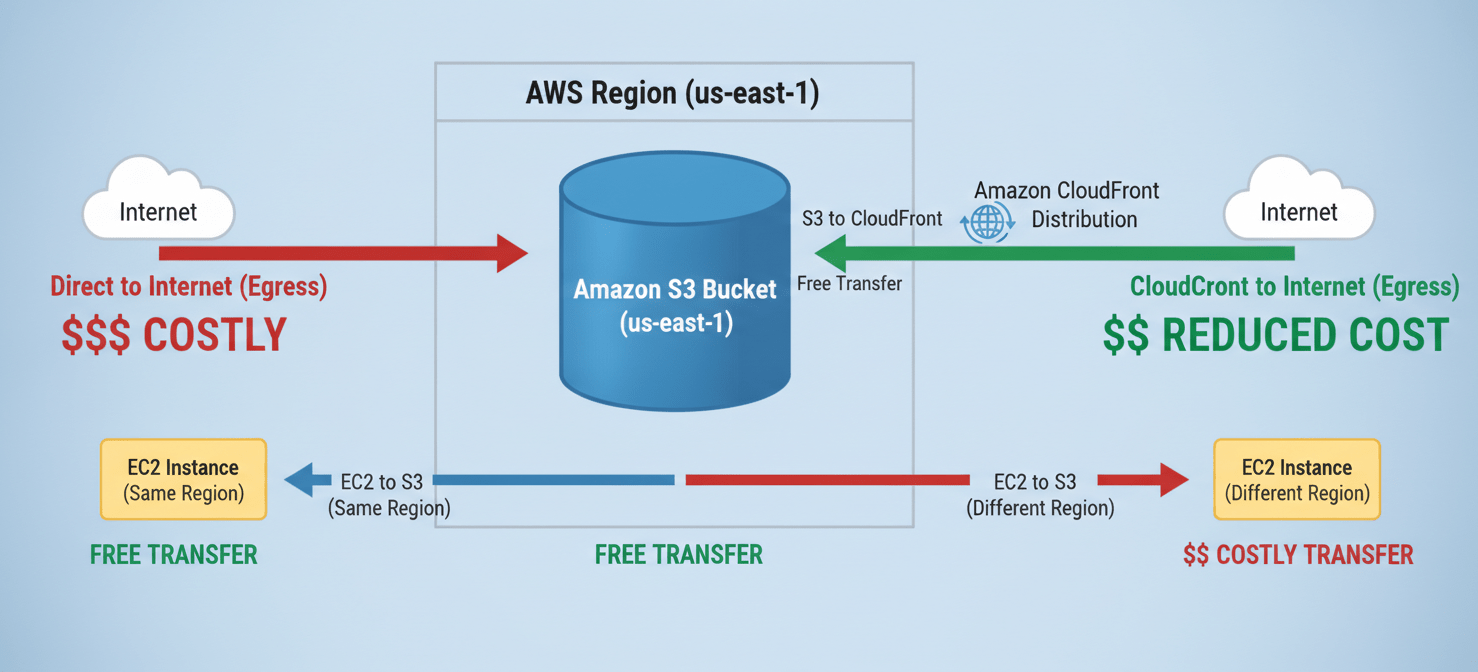
Data transfer is another critical component of your S3 bill that is often overlooked. While transferring data into S3 from the internet is generally free, transferring data out of S3 is not. These “egress” charges apply when you transfer data to the public internet or to another AWS region. The exact rate depends on the destination and the amount of data transferred. Even data transfers between AWS services in the same region can sometimes incur costs if not configured correctly, for example, by routing traffic through a NAT Gateway instead of a free VPC Gateway Endpoint.
Choosing the Right S3 Storage Class for Your Data
Selecting the appropriate storage class for your objects is one of the most impactful S3 cost optimization techniques. Amazon S3 offers a range of storage classes, each tailored to specific data access patterns, performance needs, and cost requirements. Storing infrequently accessed data in a high-performance tier is a common source of unnecessary spending, while placing frequently needed data in a cold storage tier can lead to high retrieval fees and slow performance.
For Frequently Accessed Data
S3 Standard: This is the default storage class and is designed for “hot” data that requires frequent access with millisecond latency. It offers high durability and availability by storing data across multiple Availability Zones (AZs). S3 Standard has the highest storage cost but no retrieval fees, making it ideal for dynamic websites, content distribution, mobile applications, and active data analytics workloads.
For Infrequently Accessed Data
S3 Standard-Infrequent Access (S3 Standard-IA): This class is optimized for data that is accessed less frequently but requires rapid access when needed. It offers a lower per-gigabyte storage price than S3 Standard but charges a fee for data retrieval. This makes it a cost-effective choice for long-term storage, backups, and disaster recovery files where you don’t expect to access the data often but need it quickly if you do.
S3 One Zone-Infrequent Access (S3 One Zone-IA): Similar to S3 Standard-IA, this class is for infrequently accessed data, but it stores data in a single Availability Zone instead of multiple. This design choice makes it about 20% cheaper than S3 Standard-IA for storage. However, it means the data is not resilient to the physical loss of that AZ. It’s a good option for storing secondary backup copies or easily reproducible data where regional redundancy is not a requirement.
For Data with Unknown or Changing Access Patterns
S3 Intelligent-Tiering: This storage class is designed to automate cost savings for data with unknown, changing, or unpredictable access patterns. It works by monitoring access patterns and automatically moving objects between a frequent access tier and a lower-cost infrequent access tier. If an object hasn’t been accessed for 30 consecutive days, it’s moved to the infrequent tier, saving up to 40% on storage costs. If accessed again, it’s moved back to the frequent tier. This happens without any performance impact, retrieval fees, or operational overhead, making it an excellent default choice for many workloads.
For Archival Data
S3 Glacier Instant Retrieval: This archive storage class offers the lowest-cost storage with millisecond retrieval times for data that is rarely accessed. It’s a good fit for use cases like medical images or news media assets that may be needed instantly but are typically stored for long periods.
S3 Glacier Flexible Retrieval: This class provides low-cost storage for archive data where retrieval times of minutes to hours are acceptable. It offers flexible retrieval options, allowing you to pay more for faster access when needed. It is well-suited for backup and disaster recovery use cases where large datasets must be retrieved, but immediate access is not required.
S3 Glacier Deep Archive: This is the lowest-cost storage class in all of AWS, designed for long-term data retention and digital preservation. It’s intended for data that is accessed perhaps once or twice a year, with retrieval times typically taking up to 12 hours. This makes it an ideal solution for meeting compliance requirements in highly regulated industries like financial services or healthcare.
Automating Savings with S3 Lifecycle Policies and Intelligent-Tiering
Manually managing the storage class for every object in your buckets is impractical and inefficient. The key to scalable and effective S3 cost optimization is automation. AWS provides two primary mechanisms for this: S3 Lifecycle policies and the S3 Intelligent-Tiering storage class. Both help you lower costs by moving data to more cost-effective storage tiers, but they operate differently and are suited for different scenarios.
S3 Lifecycle Policies: Rule-Based Automation
An S3 Lifecycle policy is a set of rules that automates the management of your objects’ lifecycles. You can define rules to automatically transition objects to a different storage class or expire (permanently delete) them after a certain period. This is a powerful tool for aws s3 cost reduction, especially for data with predictable access patterns.
For example, you can create a lifecycle policy that does the following:
- Transition Actions: Move log files from S3 Standard to S3 Standard-IA 30 days after they are created. Then, move them to S3 Glacier Flexible Retrieval after 90 days for long-term archiving.
- Expiration Actions: Permanently delete temporary files or old object versions after 60 days to avoid paying for storage you no longer need.
You can apply these rules to an entire bucket or filter them to apply only to objects with a specific prefix (e.g., logs/) or object tags. This allows you to create granular policies that align with your business and compliance requirements, saving engineering time and ensuring consistent cost management.
S3 Intelligent-Tiering: Automatic, Access-Based Tiering
While lifecycle policies are excellent for predictable data patterns, many workloads have data with unknown or changing access needs. This is where the S3 Intelligent-Tiering storage class excels. It is the only cloud storage class that delivers automatic cost savings by moving data between access tiers based on actual usage, without performance impact or retrieval fees.
Here’s how it works:
- When you upload an object to S3 Intelligent-Tiering, it starts in the Frequent Access tier, which has the same performance and pricing as S3 Standard.
- S3 monitors the object’s access patterns. If the object is not accessed for 30 consecutive days, it is automatically moved to the Infrequent Access tier, which has a lower storage price.
- If the object is accessed again, it is automatically moved back to the Frequent Access tier.
For a small monthly monitoring and automation fee per object, this service removes the guesswork from storage tiering. You can also activate optional, deeper archive tiers for data that becomes rarely accessed, which can save up to 95% on storage costs for that data.
Monitoring and Analysis for S3 Cost Optimization
You cannot optimize what you cannot measure. A critical component of any successful S3 cost optimization strategy is continuous monitoring and analysis. AWS provides several native tools that give you deep visibility into your storage usage, access patterns, and costs. By leveraging these tools, your team can identify inefficiencies, uncover hidden costs, and make data-driven decisions to reduce your S3 bill.
AWS Cost Explorer
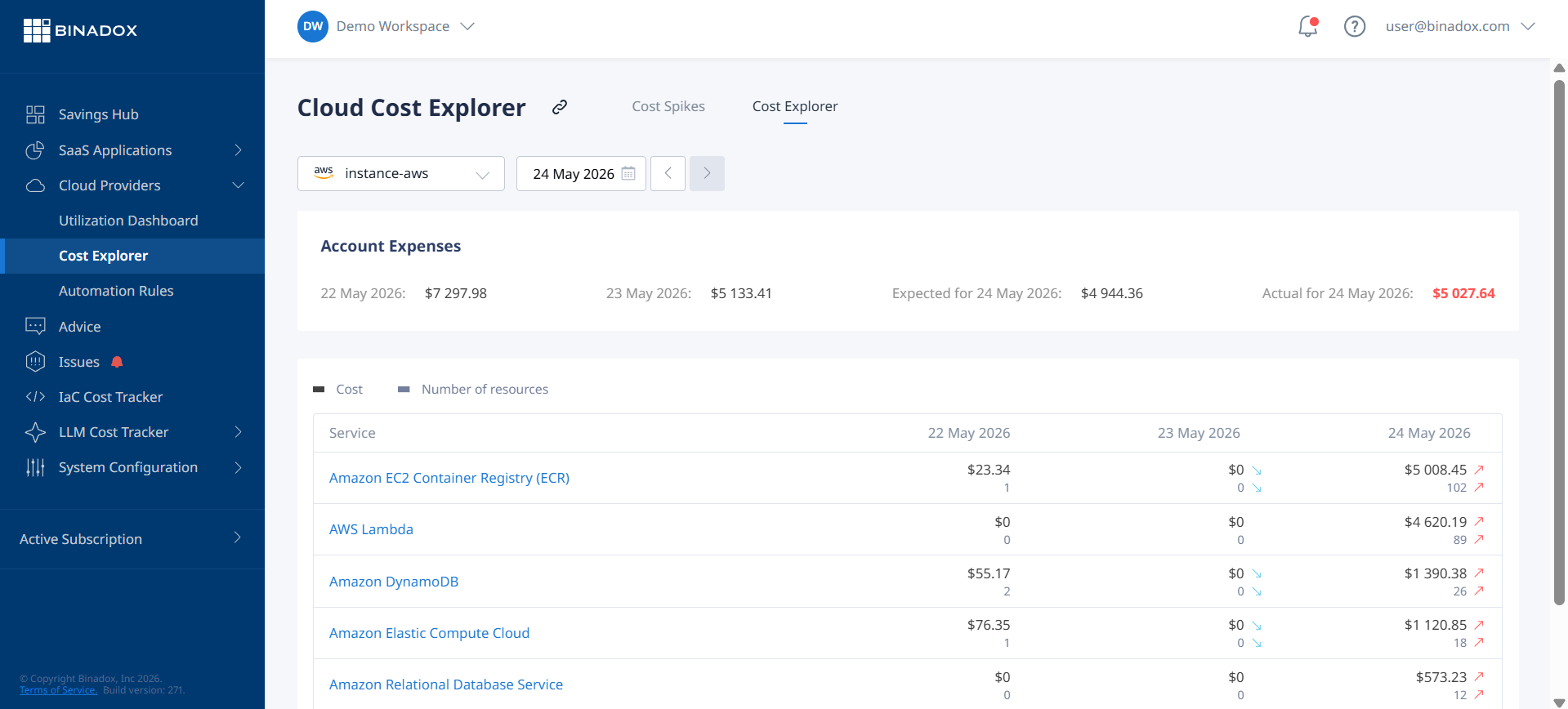
AWS Cost Explorer is a foundational tool for understanding your cloud spending. It provides a user-friendly interface to visualize, understand, and manage your AWS costs and usage over time. You can filter your S3 costs by various dimensions, such as bucket name, storage class, or region. This helps you pinpoint exactly which buckets are contributing the most to your bill and identify trends in your spending. For example, a sudden spike in data transfer costs could indicate an application misconfiguration, while steadily increasing storage costs in a specific bucket might signal the need for a lifecycle policy.
Amazon S3 Storage Lens
For a much deeper, organization-wide view of your object storage, Amazon S3 Storage Lens is an invaluable analytics tool. It provides a single, interactive dashboard with dozens of metrics on your S3 usage and activity across all your accounts and regions. S3 Storage Lens helps you answer critical questions for aws s3 cost reduction, such as:
- Which are my largest and fastest-growing buckets?
- How much of my storage consists of old, noncurrent object versions?
- Which buckets have incomplete multipart uploads that are costing me money?
- Are my data protection best practices, like encryption, being followed consistently?
The dashboard provides actionable recommendations to help you optimize costs. For instance, it might highlight a bucket with a high percentage of infrequently accessed data as a prime candidate for S3 Intelligent-Tiering or a lifecycle policy to transition data to S3 Standard-IA.
S3 Storage Class Analysis
Another useful tool is S3 Storage Class Analysis. This feature monitors the access patterns of objects within a bucket to help you determine the most appropriate storage class. After observing data access over a period (typically 30 days or more), it provides recommendations. For example, it might analyze a bucket and report that “70% of storage was infrequently accessed and could be moved to Standard-IA to save $X per month.” These reports provide the concrete data needed to confidently create effective lifecycle policies and achieve significant savings.
Reducing S3 Data Transfer Costs
Data transfer costs are often a surprising and significant portion of an S3 bill. While data ingress (transferring data into S3) is free, data egress (transferring data out of S3) to the internet or other AWS regions incurs charges that can add up quickly. Therefore, a key part of how to reduce S3 costs involves a smart data transfer strategy.
Keep Compute and Storage in the Same Region
One of the simplest yet most effective ways to avoid data transfer fees is to ensure your S3 buckets and the AWS services that access them (like EC2 instances or Lambda functions) are located in the same AWS Region. Data transfer between S3 and other AWS services within the same region is free. Transferring data across regions, however, costs money. By co-locating your resources, you can eliminate these cross-region transfer charges entirely.
Use VPC Gateway Endpoints
When your EC2 instances in a private subnet need to access S3, they might route traffic through a NAT Gateway. This configuration not only sends your internal traffic out to the public internet and back but also incurs NAT Gateway data processing charges. A much more cost-effective solution is to use a VPC Gateway Endpoint for S3. This creates a private and secure connection between your VPC and S3, keeping all traffic within the AWS network. Best of all, using a VPC Gateway Endpoint is free and eliminates the NAT Gateway charges for S3 traffic.
Leverage Amazon CloudFront
If you are serving content from S3 directly to users on the internet, you are paying for S3 data transfer out to the internet, which can be expensive. A better approach is to use Amazon CloudFront, AWS’s content delivery network (CDN). When you put CloudFront in front of your S3 bucket, data transfer from S3 to CloudFront is free. Your users then fetch content from a nearby CloudFront edge location, which improves latency. You only pay for CloudFront’s data transfer out, which is typically cheaper than S3’s, especially at higher volumes. Furthermore, CloudFront caches your content, so subsequent requests for the same object are served from the cache without hitting your S3 bucket at all, further reducing costs.
Compress Your Data
A straightforward but often overlooked technique is to compress your data before uploading it to S3. Smaller objects consume less storage space and, more importantly, result in less data being transferred when they are downloaded. For text-based files like logs, JSON, or CSVs, compression algorithms like Gzip or Zstandard can reduce object size by 70-90%, leading to proportional savings on both storage and data transfer costs.
Optimizing Storage by Managing Object Versions and Deleting Incomplete Uploads
Some of the most common sources of unnecessary S3 spending come from data you don’t even realize you’re storing. Two major culprits are old object versions and incomplete multipart uploads. These can silently accumulate in your buckets, consuming storage space and inflating your bill. A robust S3 cost optimization strategy must include processes to manage this hidden storage.
Taming S3 Versioning
S3 Versioning is a valuable feature for data protection, as it preserves every version of an object, protecting you from accidental deletions or overwrites. However, this protection comes at a cost. Every time an object is overwritten, S3 retains the old version, and you are billed for storing both the current and all previous versions. Over time, buckets with frequently updated objects can accumulate a large number of noncurrent versions, leading to significant storage bloat.
The solution is to implement a lifecycle policy to manage these old versions. You can configure a rule to:
- Transition noncurrent versions to a cheaper storage class (like S3 Standard-IA or S3 Glacier) after a certain number of days.
- Permanently delete noncurrent versions after they are no longer needed for compliance or recovery purposes.
This allows you to retain the benefits of versioning for recent changes while automatically cleaning up older, unnecessary data to control costs.
Cleaning Up Incomplete Multipart Uploads
When you upload large files to S3, the upload often happens in parts through a process called multipart upload. If this process is interrupted and fails to complete, the uploaded parts are not automatically deleted. These orphaned parts remain in your bucket, are invisible in the standard S3 console view, and you are billed for their storage even though they are unusable.
This is a pure waste of money. Fortunately, you can automate the cleanup process. The best practice is to create a bucket lifecycle rule specifically designed to abort and delete incomplete multipart uploads after a specified number of days (e.g., 7 days). This simple, one-time setup ensures that you never pay for failed uploads again. You can use a tool like S3 Storage Lens to identify which of your buckets have accumulated incomplete multipart uploads and prioritize them for cleanup.
The Hidden Costs: How S3 Security and Management Features Impact Your Bill
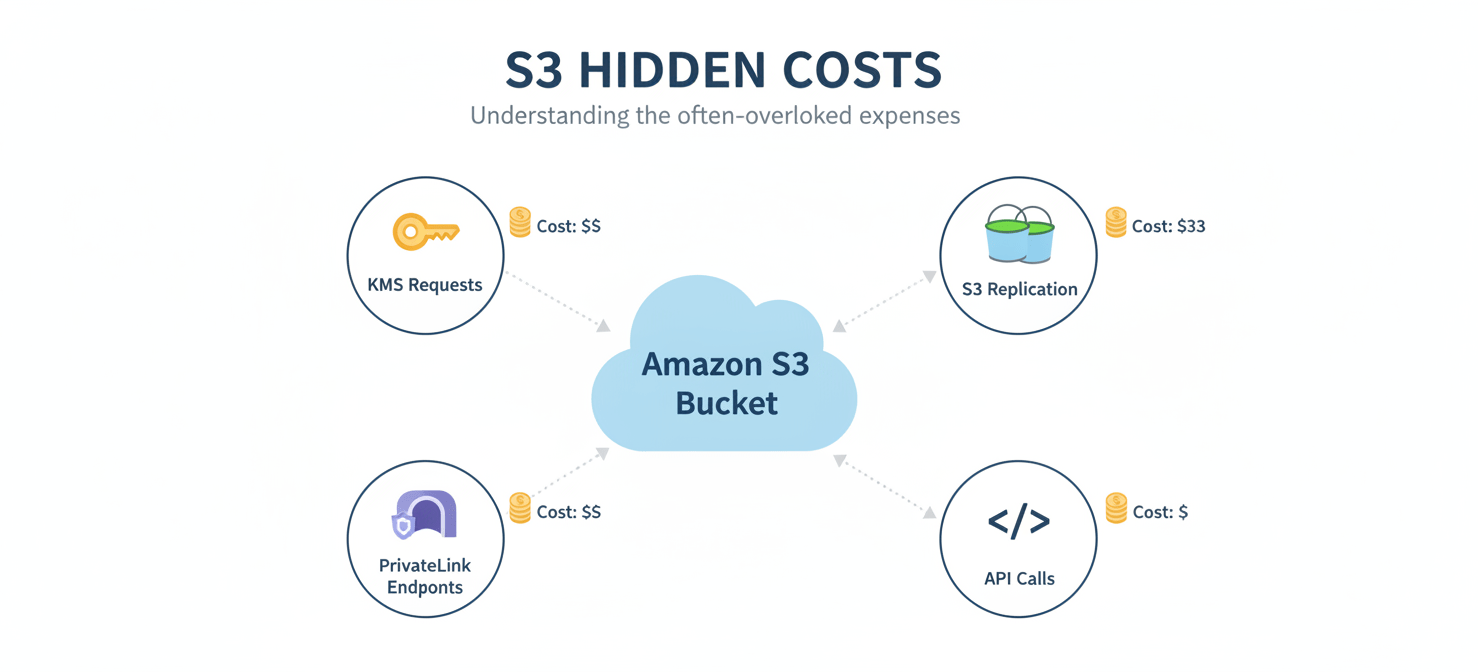
While the primary drivers of your S3 bill are storage, requests, and data transfer, several other features related to security, management, and operations can also contribute to your overall costs. Understanding these “hidden” costs is an important part of a thorough S3 cost optimization plan. While these features are often essential for security and compliance, being aware of their pricing models can help you use them more efficiently.
Request and API Call Costs
As mentioned earlier, every action you take on your S3 objects via the API—such as PUT, GET, LIST, and COPY—incurs a small charge. While the cost per request is tiny (often fractions of a cent per 1,000 requests), these can add up significantly in applications that perform millions or billions of requests per month. For example, an application that frequently lists the contents of a large bucket or processes many small files can generate a surprisingly high request bill. To mitigate this, consider batching operations when possible or redesigning application logic to be less “chatty” with the S3 API.
Security and Compliance Costs
Implementing robust security is non-negotiable, but some features have cost implications.
- Server-Side Encryption with AWS KMS (SSE-KMS): When you use SSE-KMS, you are charged for the storage of the customer-managed keys in AWS Key Management Service (KMS) and for each API request made to KMS to encrypt or decrypt your S3 objects. For workloads with very high request volumes, these KMS request costs can become noticeable. To reduce this, you can enable S3 Bucket Keys, which create a temporary, bucket-level key to reduce the number of calls to KMS, potentially lowering encryption costs by up to 99%.
- S3 Replication: Replicating data to another bucket (either in the same or a different region) for disaster recovery or compliance is a common practice. However, you pay for the storage of the replicated data in the destination bucket, the
PUTrequests for replication, and any inter-region data transfer costs. It’s important to factor these costs into your replication strategy. - AWS PrivateLink for S3: Using PrivateLink provides secure, private connectivity to S3 from your on-premises network or other VPCs. However, you are charged an hourly fee for each PrivateLink endpoint and a per-gigabyte data processing charge.
By being mindful of these additional cost drivers, you can make more informed architectural decisions that balance security, functionality, and cost-effectiveness.
Conclusion
Tackling your AWS S3 bill doesn’t require a magic wand, just a methodical approach. The path to S3 cost optimization begins with a clear understanding of your bill—dissecting the charges for storage, requests, and data transfer. From there, the strategy is one of alignment and automation. You must align your data with the correct storage class, ensuring that frequently accessed data lives in performant tiers while archival data rests in more economical ones.
However, manual alignment is a recipe for failure at scale. The real leverage comes from automation. By implementing S3 Lifecycle policies for predictable data and embracing S3 Intelligent-Tiering for everything else, you can put your storage savings on autopilot. This frees up your team to focus on higher-value tasks, confident that data is being managed efficiently in the background. Finally, continuous monitoring with tools like S3 Storage Lens closes the loop, providing the visibility needed to spot new optimization opportunities and prevent costs from creeping back up. An optimized S3 environment isn’t a one-time project; it’s a reflection of operational discipline. And it’s far cheaper than the alternative.
To truly master your S3 spending and ensure operational discipline, you might want to explore our platform’s capabilities by starting a free trial or gain personalized insights into optimizing your specific setup when you book a demo with our team.
 7-day free trial