



Shadow IT—the use of any application, device, or service without your IT department’s knowledge or approval—is more than just a nuisance. It’s a significant and growing security blind spot. When employees use unvetted tools, they can unintentionally expose sensitive company data, create compliance issues, and open the door to cyberattacks. The good news is that you can regain control. By implementing the right shadow IT discovery tools and processes, your team can uncover these hidden risks and secure your network effectively.
This isn’t about restricting employees; it’s about enabling them to work productively and safely. Most of the time, staff members use unsanctioned apps because they are trying to be more efficient, not because they have malicious intent.
Key takeaways
- Massive Visibility Gaps: Many IT departments estimate they use around 91 cloud services, but the actual number is often closer to 1,220, a more than 10-fold difference.
- Significant Financial Drain: Shadow IT can account for 30-40% of IT spending in large enterprises, leading to redundant subscriptions and wasted resources.
- A 5-Step Management Process: Effectively tackling shadow IT involves a continuous cycle: discover, classify, engage, resolve, and prevent.
- Policy is Proactive: A clear, well-communicated policy is crucial for preventing shadow IT, not just reacting to it. It should define what shadow IT is, outline a simple approval process, and clarify employee responsibilities.
What Is Shadow IT and Why Is It a Risk?
Shadow IT refers to any technology—hardware, software, or cloud service—used for business purposes without the IT department’s explicit approval. This can range from using a personal Dropbox account to share work files to a whole department purchasing a project management subscription on a company card. The rapid growth of cloud-based Software-as-a-Service (SaaS) has made this easier than ever, accelerating the spread of shadow IT.
While often born from a desire for efficiency, this practice introduces serious risks:
- Data Security Breaches: Unsanctioned applications may lack proper security controls, making them prime targets for data breaches. In fact, nearly half of all cyberattacks have been linked to shadow IT. When employees store sensitive data on these platforms, your IT team has no visibility and no way to protect it.
- Compliance Violations: Regulations like GDPR, HIPAA, and PCI have strict data handling requirements. Using non-compliant apps for regulated data can lead to severe fines and legal trouble.
- Increased Costs: Without centralized oversight, departments may purchase redundant or overlapping software licenses. Gartner estimates that shadow IT accounts for 30-40% of IT spending in large organizations.
- Operational Inefficiency: When data is scattered across dozens of unsanctioned apps, it creates data silos. This makes it difficult to maintain data consistency and can lead to employees working with outdated or incorrect information.
The Rise of Shadow AI
A newer, more complex version of this problem is “Shadow AI.” This occurs when employees use generative AI tools like ChatGPT without company oversight, potentially feeding sensitive intellectual property or customer data into public models. This creates new vectors for data loss and security incidents, with one report noting that 60% of organizations have experienced data exposure from an employee’s use of public AI.
How Do Shadow IT Discovery Tools Work?
You can’t manage what you can’t see. Shadow IT discovery tools are designed to illuminate these blind spots by identifying unmanaged applications and services across your network. The most effective tools don’t rely on a single method; instead, they combine multiple data sources to create a comprehensive inventory of all software in use.
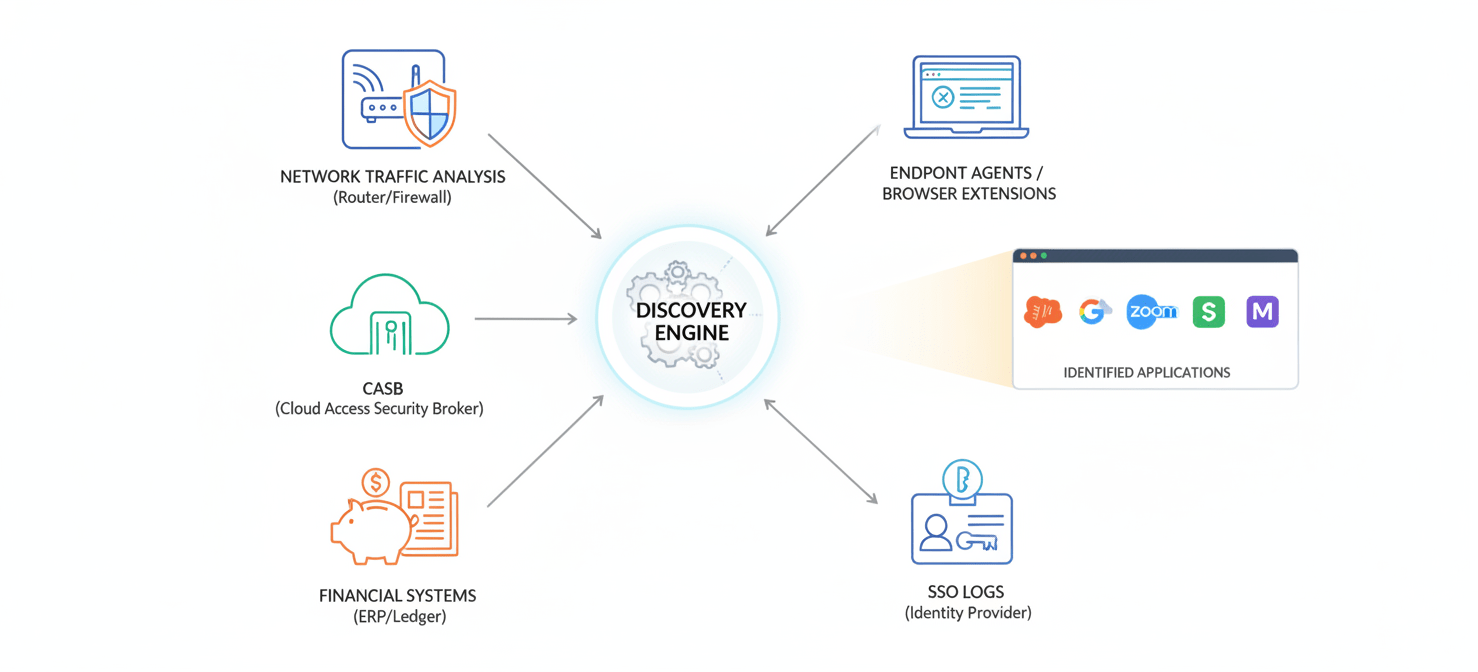
Common discovery methods include:
- Network Traffic Analysis: These tools monitor data flowing through your network, identifying traffic to and from known cloud service providers. By analyzing logs from firewalls, proxies, and DNS queries, they can spot connections to unapproved apps.
- Cloud Access Security Brokers (CASBs): A CASB acts as a gatekeeper between your users and cloud services. It logs all access attempts, providing a clear picture of which cloud apps are being used and allowing you to enforce security policies.
- Financial and Expense System Integration: Many shadow IT purchases are made on company credit cards or expensed by employees. By integrating with finance systems, discovery tools can automatically flag software subscriptions and payments, revealing tools that network analysis might miss.
- Browser Extensions and Endpoint Agents: For remote workforces operating outside the corporate network, lightweight browser extensions or agents installed on devices can track application usage directly from the source.
- SSO and Identity Provider Logs: Analyzing logs from your single sign-on (SSO) provider (like Okta or Entra ID) can reveal which applications users are authenticating to, including those not formally managed by IT.
Key Features to Look for in SaaS Discovery Tools
When evaluating different SaaS discovery tools, focus on platforms that provide more than just a list of applications. The goal is to gain actionable intelligence that helps you assess risk and make informed decisions.
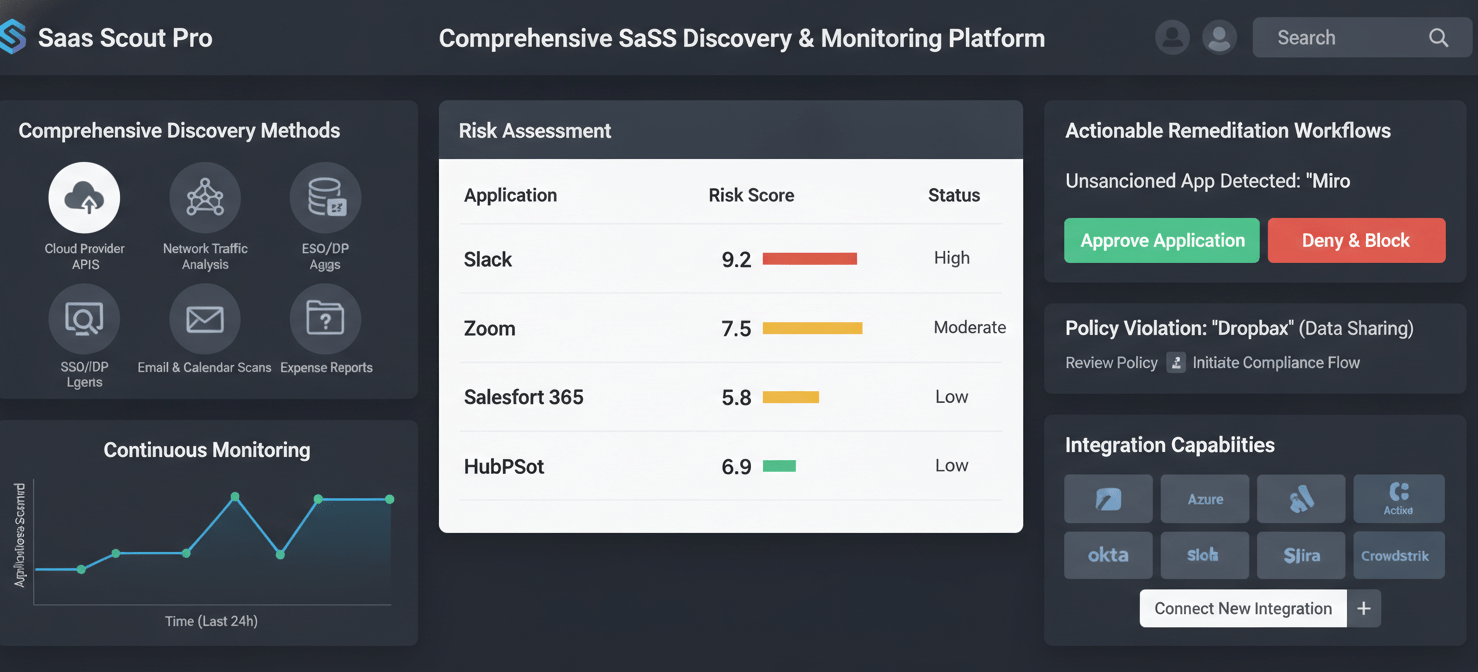
Look for these key features:
- Comprehensive Discovery Methods: The best tools use multiple data sources for the most accurate and complete picture. A tool that only scans network traffic will miss apps used by remote workers, while one that only checks expense reports will miss free tools.
- Continuous and Automated Monitoring: Shadow IT isn’t a one-time cleanup project. You need a tool that continuously scans your environment and provides real-time alerts when new, unapproved applications are detected.
- Risk Assessment and Context: A good tool won’t just tell you what apps are being used, but will also provide context. This includes categorizing apps by function, providing risk scores based on security and compliance standards, and showing who is using the app and how often.
- Actionable Remediation Workflows: Discovery is only the first step. Look for platforms that allow you to take action directly from the dashboard, such as triggering an approval workflow, de-provisioning an application, or communicating with the user who adopted the tool.
- Integration Capabilities: The tool should integrate seamlessly with your existing IT stack, including your identity provider, security information and event management (SIEM) system, and configuration management database (CMDB).
Creating a Shadow IT Policy That Works
Technology alone won’t solve the problem. An effective strategy combines powerful tools with a clear, practical, and well-communicated shadow IT policy. The goal is not to punish employees but to create a framework that encourages them to work with IT.
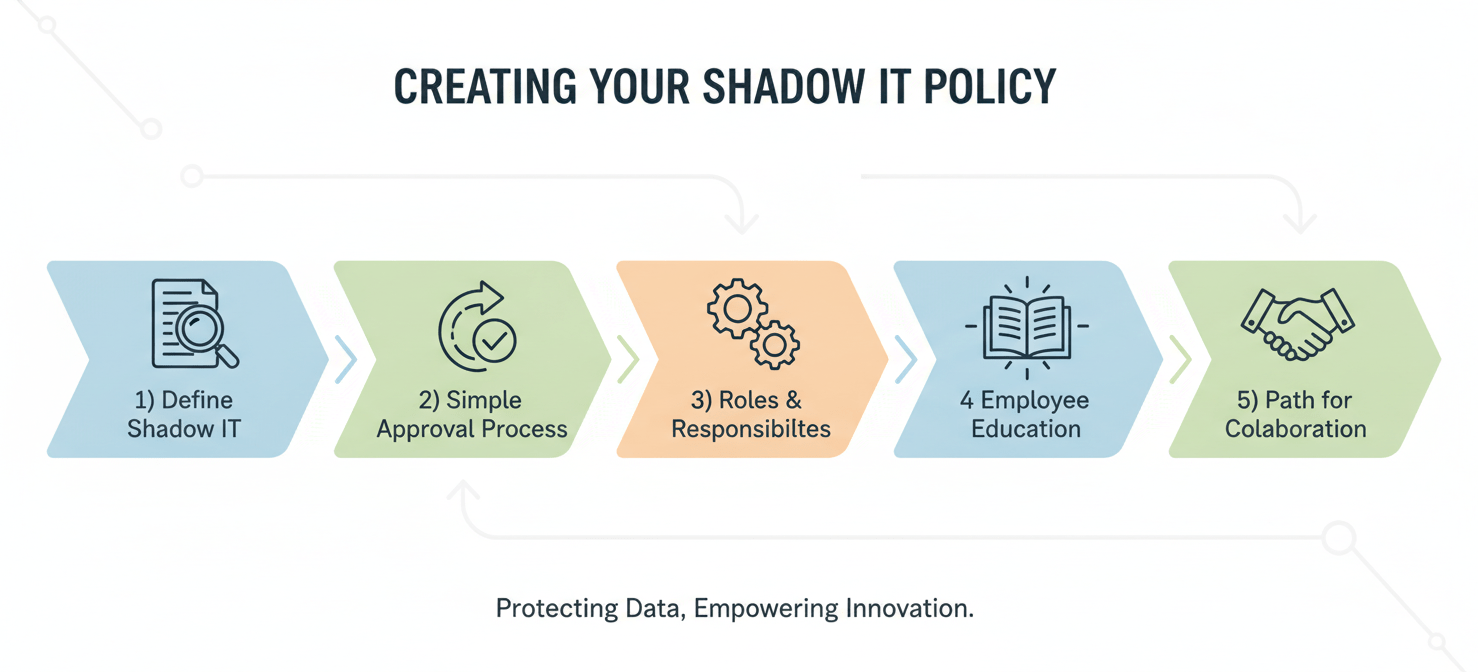
A successful policy should include:
- A Clear Definition: Start by defining what constitutes shadow IT within your organization. Use specific examples relevant to your business to avoid ambiguity.
- A Simple Approval Process: One of the main reasons employees turn to shadow IT is that official procurement processes are too slow. Create a streamlined, easy-to-understand process for requesting and vetting new software. Consider a tiered approach where low-risk tools can be approved more quickly.
- Defined Roles and Responsibilities: Clearly outline who is responsible for approving new tools and managing the policy. This ensures accountability and avoids confusion.
- Employee Education: Don’t just publish the policy and expect everyone to read it. Conduct regular training to help employees understand the risks associated with unapproved software and the importance of following the process. Frame it as a shared responsibility to protect the company.
- A Path for Collaboration: Position the IT department as a partner, not a roadblock. Encourage employees to come to you with their needs and work with them to find secure, approved solutions that help them do their jobs effectively.
How to Choose the Right Shadow IT Discovery Tools for Your Business
Selecting the right tool depends on your organization’s specific needs, size, and existing infrastructure. Before you start comparing vendors, take the time to define your requirements.
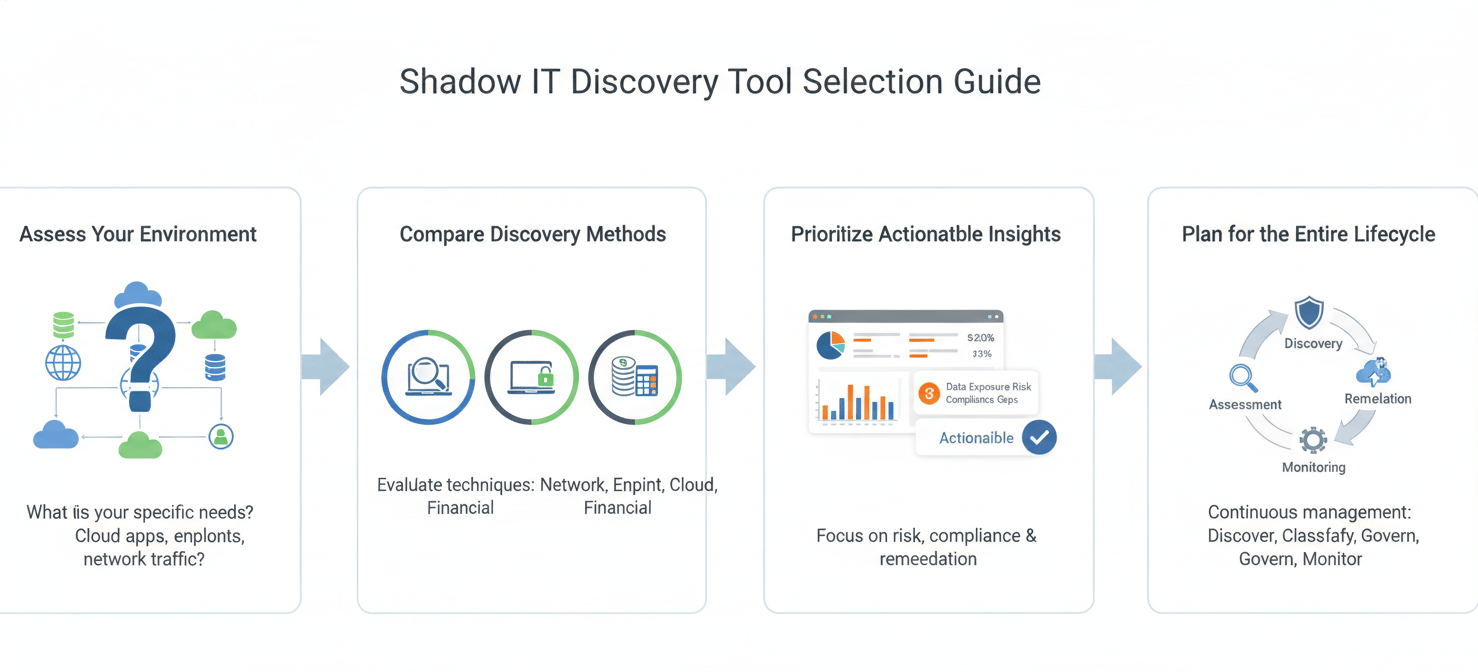
Assess Your Current Environment
First, understand your primary pain points. Are you most concerned about data security, compliance, or uncontrolled spending? Is your workforce primarily on-premises or remote? Answering these questions will help you prioritize which features are most important. For example, a fully remote company will need a tool with strong endpoint agent or browser-based discovery capabilities.
Compare Discovery Methods and Coverage
Evaluate how different tools discover applications. Look for a platform that offers broad coverage across multiple sources to minimize blind spots. Ask vendors for specifics on how they handle different scenarios, such as discovering free applications that don’t show up in financial records or apps connected via third-party integrations (SaaS-to-SaaS connections).
Prioritize Actionable Insights over Raw Data
A long list of discovered apps is overwhelming, not helpful. The best tools provide context and analytics that allow you to prioritize your efforts. Look for features like automated risk scoring, usage analytics, and dashboards that highlight the most critical issues. This helps your team focus on the 20% of applications that pose 80% of the risk.
Plan for the Entire Lifecycle
Finally, think beyond initial discovery. Choose a tool that supports the entire management lifecycle, from detection and assessment to remediation and ongoing monitoring. A platform that integrates discovery with automated governance workflows will be far more effective in the long run than a simple scanning tool.
Conclusion
Ignoring unsanctioned applications is no longer an option. The security, compliance, and financial risks are simply too great. However, the solution isn’t to lock everything down and stifle the productivity that employees were seeking in the first place. Instead, a balanced approach is required. By combining modern shadow IT discovery tools with a clear and collaborative policy, you can bring these hidden applications out of the shadows. This allows your team to manage the associated risks effectively while still empowering employees with the tools they need to succeed. The alternative is letting your network’s security posture be defined by a thousand unmanaged loose ends, which is a poor strategy for anyone who enjoys sleeping at night.
Ready to bring your hidden applications into the light and secure your network effectively? You can begin by trying our discovery tools free, or for a personalized walkthrough, book a 15-minute demo with our team.
 7-day free trial