




It’s a common scenario: an employee leaves, a project wraps up, or your team structure changes. Suddenly, you have Microsoft 365 licenses sitting in your admin center, unassigned to any user. This situation often leads to a critical question for IT managers and budget holders: do these unassigned Microsoft 365 licenses cost money? The short answer can be an unwelcome surprise for those not actively managing their subscription.
Key takeaways
- Yes, you pay for them. Unassigned Microsoft 365 licenses cost money because you pay for the total number of licenses in your subscription, not just the ones currently in use.
- It’s a subscription model. Think of it like a gym membership; you pay the monthly fee whether you go or not. Microsoft bills for the license “seat” you’ve purchased.
- Find and remove them in 4 steps. You can locate and remove unassigned licenses directly from the Microsoft 365 admin center to reduce your monthly or annual bill.
- Wasted spend is significant. Globally, a large percentage of software licenses go unused, leading to billions in wasted corporate spending each year.
The Short Answer: Yes, They Do
Unassigned Microsoft 365 licenses absolutely cost money. When you subscribe to a Microsoft 365 business plan, you purchase a specific number of licenses, often referred to as “seats.” Microsoft bills you for the total quantity of licenses you have procured, regardless of whether they are assigned to an active user.

Therefore, every license sitting in your account represents a recurring charge on your bill. If you have 100 licenses but only 90 are assigned to employees, you are still paying for all 100. This is a fundamental aspect of the Software-as-a-Service (SaaS) subscription model that can easily lead to budget drain if not managed carefully.
Why Do Unassigned Microsoft 365 Licenses Cost Money?
The reason you pay for unassigned licenses is rooted in how Microsoft structures its subscription service. You aren’t paying for active usage; instead, you are paying for the right to use the software. The license is the product.
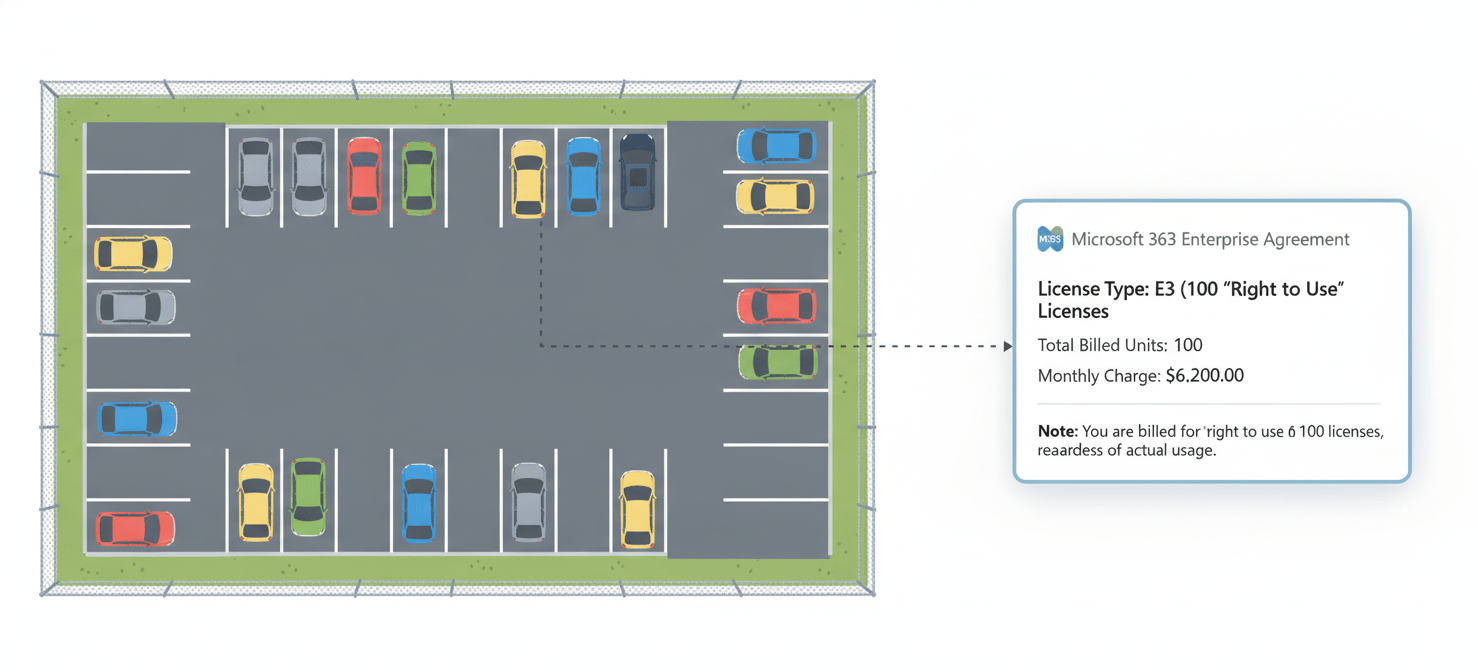
Think of it this way: you’ve purchased a block of 50 parking spaces for your employees for the year. If only 45 employees drive to work on a given day, you don’t get a refund for the five empty spaces. You paid for the availability of all 50 spots. The M365 license pool operates on the same principle. You commit to a certain number of licenses for a billing period (monthly or annually), and that commitment determines your cost.
This model provides predictability for both you and Microsoft. However, it also places the responsibility of license management squarely on your shoulders. Forgetting to de-provision licenses after an employee departs is a common and costly oversight.
How to Find and Manage Your Unassigned Licenses
Fortunately, identifying and managing your unassigned licenses is a straightforward process within the Microsoft 365 admin center. Regular audits are essential to prevent unnecessary spending.
A 4-Step Process to Reclaim Costs
You can reduce the number of licenses you’re paying for by following these steps:
- Navigate to the Admin Center: First, sign in to the Microsoft 365 admin center with your administrator credentials.
- Go to Billing: In the left-hand navigation menu, expand the “Billing” section and then select “Your products.”
- Select the Subscription: On this page, you will see a list of your active subscriptions. Click on the specific subscription you want to manage (e.g., Microsoft 365 Business Standard).
- Remove Licenses: On the subscription details page, you will see an option to “Add/Remove licenses.” Click this, and then reduce the total number of licenses to match your current needs.
It’s important to note that you cannot reduce your license count if all of them are currently assigned. You must first unassign the license from the user before you can remove it from your total subscription count. For organizations with annual commitments under Microsoft’s New Commerce Experience (NCE), you may only be able to reduce seat counts during your renewal window.
The Financial Impact of an Unchecked M365 License Pool
The financial drain from an unmanaged m365 license pool can be substantial. While a single unused license at $12.50 per month for Business Standard may seem trivial, the costs multiply quickly with scale and time.

Consider a mid-sized company with 300 employees. An employee turnover rate of just 10% annually means 30 people leave each year. If their licenses are not reclaimed for even two months post-departure, the company could waste thousands of dollars. Studies on software licensing have found that a significant percentage of all purchased licenses go unused, contributing to millions in wasted spending.
This “shelfware”—software that is paid for but not used—ties up budget that could be invested in other strategic initiatives. Furthermore, active licenses tied to inactive accounts can pose a security risk, creating potential entry points for bad actors if not properly offboarded. Proactive management of assigning M365 licenses is therefore not just a matter of fiscal prudence but also a component of sound security policy.
Conclusion
To directly answer the question: yes, you are paying for every single Microsoft 365 license in your subscription, whether it’s assigned to a user or sitting idle. The subscription model charges for the seat, not for its occupant. This makes understanding and managing your unassigned microsoft 365 licenses cost a critical task for any organization. Leaving these licenses unattended is the digital equivalent of leaving the lights on in an empty room—a needless and easily corrected expense. Regular, simple audits in the admin center can turn that waste back into a valuable budget. Don’t pay for ghosts in the machine.
To avoid this unnecessary expense and gain better control over your SaaS spend, you can create your free Binadox account for comprehensive license management, or if you prefer a guided tour, book a demo with our experts.
 7-day free trial