



In a sprawling cloud environment, metrics can feel like they have a life of their own. Every new instance, function, and managed service emits a stream of data by default. While this data is essential for observability, an unmanaged approach quickly leads to overwhelming noise and a surprisingly high bill. The solution is not to monitor less, but to monitor smarter. Developing a deliberate cloud monitoring strategy allows your team to focus on the signals that matter, reduce alert fatigue, and cut unnecessary costs by eliminating the metrics you don’t actually use.
Key takeaways
- Default metrics are not free: Cloud providers automatically generate numerous metrics, but custom and high-resolution metrics can significantly increase costs.
- Focus on actionable signals: A successful strategy prioritizes metrics tied directly to business outcomes and user experience over collecting raw data volume.
- Implement a 3-step culling process: Systematically reduce metric sprawl by identifying all metrics, analyzing their actual usage, and then eliminating or consolidating the ones that provide no value.
- Cost savings can be substantial: Teams often overpay for monitoring by 30% or more due to unused or low-value metrics.
Why You’re Paying for Metrics You Don’t Need
Cloud monitoring costs often creep up silently. The issue stems from a combination of default configurations, developer habits, and the nature of cloud service pricing. Most major cloud services, like Amazon EC2 or Google Compute Engine, automatically push basic metrics. However, enabling “detailed” or “enhanced” monitoring, or adding your own custom metrics, comes at a direct cost.

For example, the first 10,000 custom metrics in AWS CloudWatch each cost $0.30 per month. While this seems small, it adds up quickly. A team running a few hundred microservices, each with dozens of custom metrics, can easily generate tens of thousands of unique time series. This “metrics sprawl” happens when development teams add new metrics for temporary debugging or new features without a central plan or a process for removing them later.
The consequences go beyond the monthly bill. An excess of metrics creates significant operational noise. When every minor fluctuation can trigger an alert, engineers experience alert fatigue and begin to ignore notifications. This makes it harder to spot the critical signals indicating a genuine problem, ultimately slowing down incident response and impacting reliability.
How to Create a Lean and Effective Cloud Monitoring Strategy
A proactive and lean cloud monitoring strategy shifts the focus from “collect everything” to “collect what matters.” This requires defining what you need to measure and establishing rules to prevent unnecessary metric creation in the first place.

Define Your Goals and KPIs
Before you measure anything, you must know why you are measuring it. The most effective monitoring is tied directly to business and operational goals. Start by defining your Key Performance Indicators (KPIs) and Service Level Objectives (SLOs).
For a user-facing application, your goals might revolve around reliability and user experience. In this case, you would prioritize metrics that reflect the “Four Golden Signals”:
- Latency: The time it takes to service a request.
- Traffic: The demand being placed on your system.
- Errors: The rate of requests that are failing.
- Saturation: How “full” your service is, highlighting constrained resources.
By focusing on these outcome-oriented signals, you ensure that your monitoring efforts are directly aligned with maintaining service health and user satisfaction.
Establish a Metrics Governance Policy
To prevent future sprawl, your team needs clear guidelines for instrumentation. A metrics governance policy establishes a standardized process for how new metrics are created, named, and managed. This policy should include:
- Naming Conventions: A consistent naming scheme (e.g.,
service.component.action.result) makes metrics easier to find, query, and understand. - Required Tagging: Enforce tags or labels that identify the team, service, and environment associated with a metric. This is crucial for cost allocation and targeted cleanup efforts.
- Review Process: Implement a lightweight review process for adding new high-cost metrics, such as high-cardinality custom metrics. This ensures that every new metric has a clear purpose and owner.
Step-by-Step: Culling Unnecessary Cloud Metrics
Once you have a forward-looking strategy, it’s time to address the metrics you already have. This process involves a systematic audit to identify and remove data that provides no value.
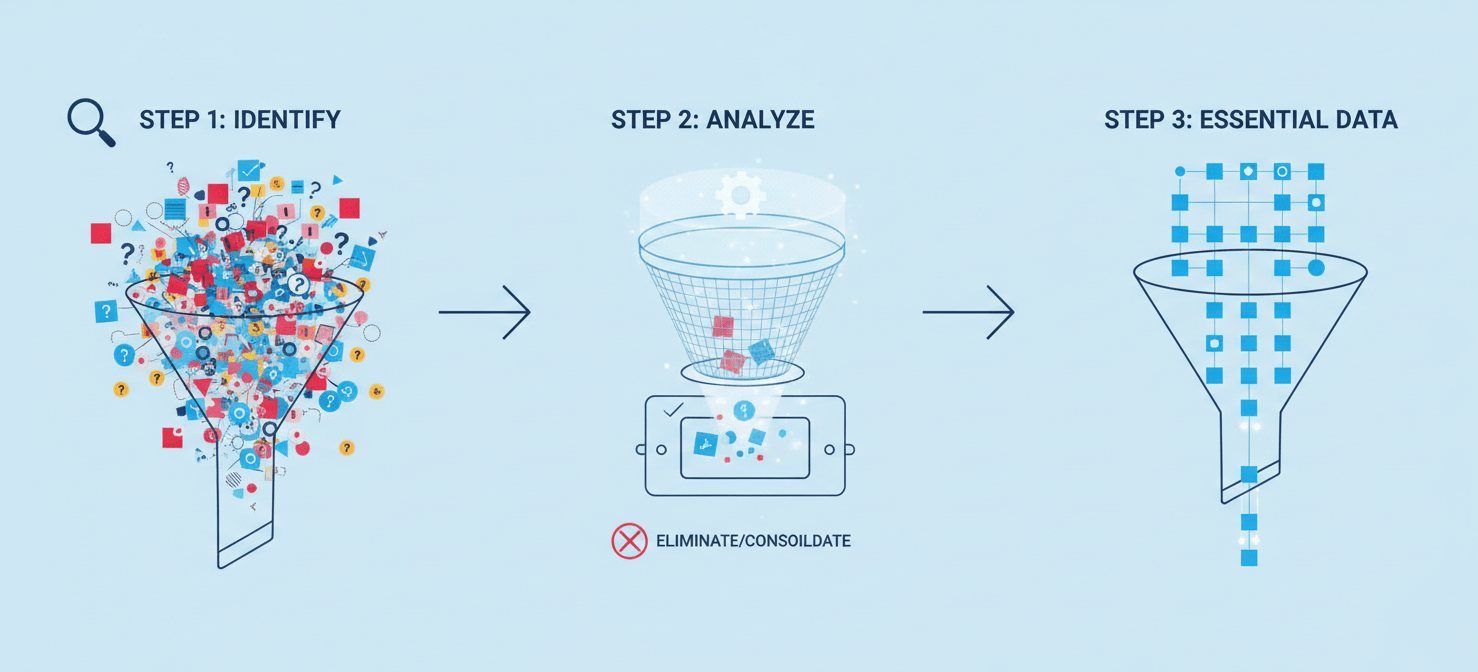
Step 1: Identify and Inventory
First, you need a complete picture of every metric your organization is paying for. Use your cloud provider’s billing and cost management tools to get a list of all active custom metrics. Tools like AWS Cost Explorer or Google Cloud’s Metrics Management page can help you see which services and metrics contribute most to your bill.
Filter this list to find prime candidates for removal. Look for metrics that have:
- No associated alarms.
- No presence on any active dashboards.
- Been queried infrequently or not at all over the last 30-60 days.
Step 2: Analyze Usage and Impact
With a list of potential candidates, the next step is to validate that they are truly unused. A metric might not be on a dashboard but could be used in an automated report or a script that runs periodically.
Engage directly with the development teams who own the services. Present them with the list of suspected unused metrics and ask for confirmation. This collaborative approach prevents the accidental removal of a metric that is critical for a specific, non-obvious purpose. Furthermore, it raises awareness among engineers about monitoring costs and best practices.
Step 3: Eliminate and Consolidate
After confirming a metric is unnecessary, create a plan for its removal. This often involves more than just deleting it from the monitoring system. You may need to:
- Update application code or agent configurations that are sending the metric.
- Remove associated alarms and dashboard widgets first.
- Archive the historical data if required for compliance before deleting the metric itself.
In addition, look for opportunities to consolidate multiple metrics into one. For example, instead of having separate metrics like http_errors_404, http_errors_500, and http_errors_503, you could have a single metric named http_errors with a response_code dimension. This approach, a key part of cloudwatch metrics optimization, can drastically reduce the total number of unique metrics you pay for.
Maintaining Your Optimized Monitoring Environment
Culling metrics is not a one-time project; it’s an ongoing process. Your systems and services are constantly evolving, and metrics sprawl can easily return without vigilance.

To maintain a lean environment, schedule periodic reviews of your metrics—quarterly is a good starting point. Automate the detection of unused metrics where possible. You can write scripts that query your monitoring platform’s API to flag metrics that haven’t been accessed or have no associated alarms for an extended period.
Finally, continue to educate your teams on aws monitoring best practices. When engineers understand the cost and operational impact of the metrics they create, they become partners in maintaining an efficient and effective monitoring system.
Conclusion
A cluttered monitoring system is both expensive and ineffective. It buries critical signals in a sea of noise, leading to higher costs, slower incident response, and frustrated engineers. By implementing a thoughtful cloud monitoring strategy, you can cut through the noise and focus on what truly matters. The goal is not simply to monitor everything you can, but to monitor everything you should. Your budget—and your on-call team—will thank you for learning the difference.
Ready to cut through the noise and implement a truly lean cloud monitoring strategy? You can discover how Binadox streamlines these efforts by starting a free trial, or schedule a personalized demonstration to see our platform in action.
 7-day free trial