



As a FinOps lead, your world revolves around data, attribution, and driving financial accountability. You translate cloud spend into business value. However, one of the largest and most opaque line items in your SaaS budget is likely Microsoft 365. Its bundled nature and sprawling service adoption can make true cost allocation feel like a guessing game. You need a way to move beyond top-line figures and into granular, actionable insights. This is precisely where a dedicated saas optimization platform becomes essential, providing the visibility and control required to manage M365 spend effectively.
Key takeaways:
- Native M365 admin tools often fail to provide the granular, department-level cost attribution needed for effective FinOps showback or chargeback models.
- A dedicated platform can identify license waste, such as inactive or underutilized accounts, potentially cutting M365 costs by up to 30% through right-sizing and reclamation.
- Automating license management and reporting frees up FinOps teams from manual data crunching in spreadsheets, saving dozens of hours per month.
- Integrating M365 consumption data with your broader FinOps dashboards provides a single, unified view of cloud and SaaS spend, improving forecasting accuracy.
The M365 Cost Allocation Black Box
For FinOps teams, accurate cost allocation is the foundation of accountability. Without it, you cannot implement effective showback or chargeback, and business units remain disconnected from their consumption. Microsoft 365, despite its ubiquity, presents a significant challenge in this area. The invoice from Microsoft provides a total, but it doesn’t tell you that the marketing department is over-provisioned on E5 licenses while the engineering team is making full use of them.

This lack of native granularity creates a black box. You know what you’re spending in total, but attributing that spend to specific cost centers, projects, or teams is a manual, error-prone nightmare. Consequently, you are likely forced to allocate costs using simple headcount-based formulas. This method, however, ignores actual usage and value derived. A department with 100 employees using only basic Outlook and Teams is charged the same as a 100-person data science team leveraging every advanced feature in the E5 suite.
This inaccuracy undermines the core principles of FinOps. It prevents business units from making informed decisions about their software consumption. Furthermore, it makes it impossible to tie M365 costs to specific business outcomes, a key KPI for any mature FinOps practice. You’re left with a large, unallocated expense that skews your unit economics and frustrates departmental budget owners who demand justification for their IT cross-charges.
Beyond Native Tools: Why Excel and Admin Centers Fall Short
Many organizations initially try to solve the M365 cost puzzle using a combination of the Microsoft 365 admin center and spreadsheets. While these tools are useful for basic license assignment and user management, they are fundamentally inadequate for sophisticated cost analysis and optimization. The native admin portal can show you who has a license, but it provides limited insight into whether that license is actually being used effectively.

The Limits of Manual Analysis
Exporting raw data from Microsoft’s portals and attempting to wrangle it in Excel is a common first step. However, this approach is not scalable and is fraught with challenges. First, the data is often incomplete for FinOps purposes. It lacks the organizational context, like cost center or department, needed for proper chargeback. Manually merging this data from HR systems is time-consuming and must be repeated constantly.
Second, the process is incredibly labor-intensive. A cost analyst can spend days each month pulling reports, cleaning data, and creating pivot tables just to get a rough snapshot of the previous month’s usage. This is reactive, not proactive. By the time you identify an issue, weeks of waste have already occurred. Furthermore, this manual effort is a low-value use of a FinOps professional’s time, distracting from strategic initiatives like forecasting and budget variance analysis.
Finally, native tools offer minimal automation for optimization. Identifying an inactive user with an expensive E5 license is one thing; automatically triggering a workflow to downgrade or reclaim that license is another. Without automation, the burden falls on IT and FinOps teams to manually chase down approvals and execute changes, creating significant operational drag.
How a SaaS Optimization Platform Drives FinOps KPIs
This is where a dedicated saas optimization platform provides a clear advantage. It moves beyond the limitations of native tools by connecting M365 usage data with your business structure, automating data collection, and providing the specific metrics FinOps teams need to measure success. Instead of just managing licenses, you can start managing value.
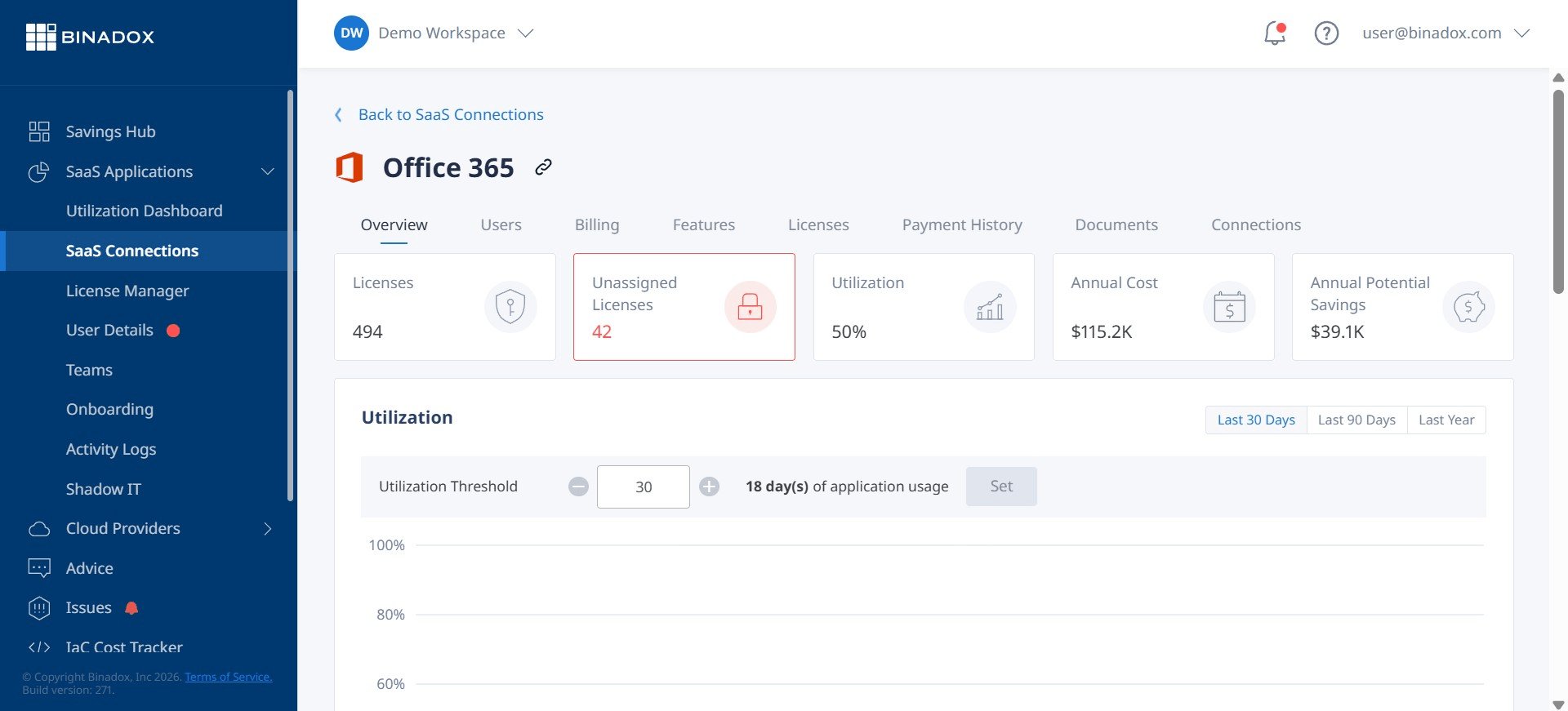
A key function of these platforms is to provide true, usage-based cost attribution. By integrating with your HRIS and finance systems, the platform can automatically map every M365 license and its associated cost to the correct employee, department, and cost center. This immediately solves the allocation black box problem. As a result, you can implement fair and transparent showback or chargeback models. Department heads can see exactly what they are paying for and why, fostering a culture of cost consciousness.
Furthermore, these platforms are built to track the KPIs that matter to you. You can move beyond simple license counts to metrics like:
- Cost per employee by department: Identify which business units are your most expensive consumers of M365 services.
- License utilization rate: See the percentage of assigned licenses that are actively being used, flagging waste from inactive or departed employees.
- Feature adoption rate: Determine if you are getting value from premium features included in expensive bundles like E5. For example, are users actually leveraging Power BI Pro or Microsoft Defender for Office 365? According to Microsoft’s own documentation, the E5 suite includes a wide array of security and analytics tools, and a platform can show if they are being ignored.
- License reclamation and avoidance: Quantify the direct cost savings generated by downgrading underutilized licenses and preventing the purchase of unnecessary new ones.
By tracking these metrics, you can demonstrate the tangible impact of your optimization efforts on the bottom line.
From Attribution to Action: Activating Your M365 Cost Data
Gaining visibility into M365 spend is only half the battle. The true value of a finops saas management solution lies in its ability to turn that data into action. An effective platform doesn’t just show you a problem on a dashboard; it helps you solve it through automation and streamlined workflows.
Automating License Reclamation
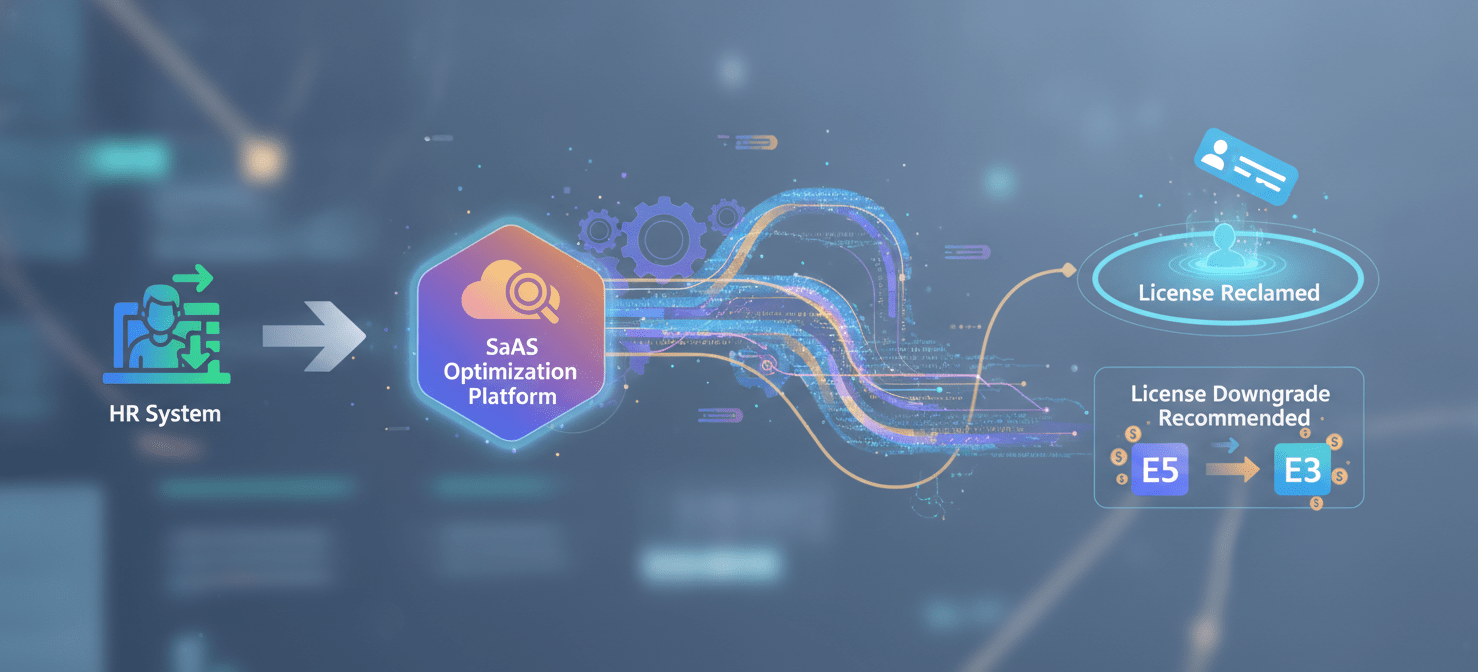
One of the most significant sources of M365 waste comes from “ghost licenses” assigned to employees who have left the company or are on extended leave. A saas optimization platform can integrate with your HR system to automatically detect when an employee’s status changes. When someone departs, a workflow can be triggered to immediately reclaim their license and place it back into a pool for reallocation. This single feature can generate substantial savings, especially in large organizations with high turnover. Industry analyses suggest that 15-20% of SaaS licenses in a typical enterprise are inactive or underutilized.
Right-Sizing and Downgrade Recommendations
Another powerful capability is intelligent license right-sizing. The platform analyzes individual usage patterns across the M365 suite. For example, it might identify a user with a full E5 license who only uses Outlook and Teams. Based on this data, it can proactively recommend downgrading that user to a less expensive E1 or E3 license, aligning cost with actual need.
These recommendations are not just based on activity logs but on nuanced usage. Does the user access advanced Excel features? Do they use Power BI? By analyzing these specific data points, the platform ensures that downgrades don’t disrupt employee productivity. It provides the data you need to have confident conversations with department managers about optimizing their team’s license assignments without impacting their work. This data-driven approach replaces guesswork with evidence, making optimization a collaborative effort rather than a top-down mandate.
Choosing the Right SaaS Optimization Platform for M365
When evaluating a saas optimization platform, it’s crucial to look for features that specifically address the needs of a FinOps team. Not all SaaS management tools are created equal, and many are designed with an IT-centric, rather than a finance-centric, worldview.
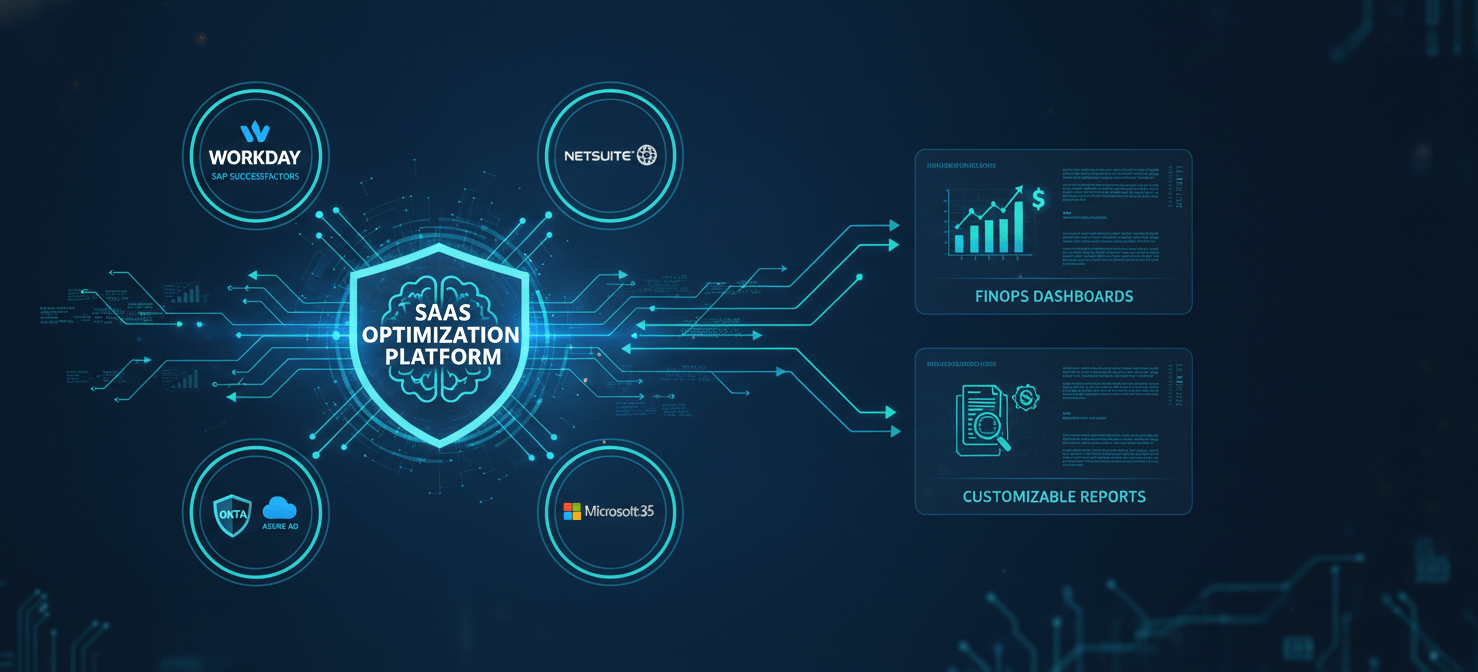
First, prioritize deep integration capabilities. The platform must be able to connect seamlessly with Microsoft 365, but also with your core business systems: your HRIS (like Workday or SAP SuccessFactors) for employee data, your ERP (like NetSuite or Oracle) for cost center information, and your identity provider (like Okta or Azure AD) for user management. This ecosystem of integrations is what enables automated, accurate cost attribution.
Second, look for robust automation and workflow engines. The platform should allow you to build custom rules for license reclamation, de-provisioning, and right-sizing recommendations. You should be able to define the approval chains and notifications that match your organization’s governance policies. The goal is to automate the operational tasks so your team can focus on strategic analysis.
Third, ensure the reporting and dashboarding capabilities are designed for a FinOps audience. You need more than just a list of users and licenses. Look for customizable dashboards that can visualize spend by department, track license utilization trends over time, and calculate the ROI of your optimization activities. The platform should make it easy to export data for your corporate financial planning and analysis (FP&A) tools, enabling a unified view of all technology spend.
Finally, consider the vendor’s expertise in Microsoft 365. The M365 ecosystem is complex and constantly changing. A vendor with deep knowledge of Microsoft’s licensing rules, product bundles, and APIs will provide a more effective and reliable solution. They can help you navigate the nuances of license agreements and ensure you are maximizing the value of your Microsoft investment.
Conclusion
Managing Microsoft 365 spend without the right tools is like trying to navigate a ship in a storm with a broken compass. You know you’re spending a lot of money, but you have little visibility into where it’s going or whether it’s providing value. For a FinOps team tasked with driving financial accountability, this ambiguity is unacceptable. Relying on spreadsheets and native admin centers is a reactive, inefficient strategy that fails to address the core challenges of cost attribution and optimization.
A modern saas optimization platform provides the clarity and control necessary to manage this critical area of spend. By automating data collection, mapping costs directly to business units, and providing actionable insights for right-sizing, these platforms transform M365 from an opaque operational expense into a transparent, manageable investment. It allows you to move beyond simply paying the bill to actively shaping consumption and demonstrating value back to the business. Ultimately, it’s not about spending less; it’s about spending smarter. And in the world of FinOps, that is the only metric that truly matters.
To gain this essential clarity and transform your M365 spend into a strategic asset, you can explore the platform’s capabilities with a free Binadox trial or connect with an expert to book a demo.
 7-day free trial