



As a FinOps lead or cost analyst, you are under constant pressure to optimize spending and demonstrate the value of every dollar. In the sprawling landscape of Software-as-a-Service (SaaS), this pressure is acute. Decentralized purchasing, opaque usage data, and the relentless cadence of auto-renewals create a perfect storm of uncontrolled expenditure. Effective FinOps SaaS management is no longer a nice-to-have; it is a critical discipline for maintaining financial accountability. This article moves beyond the basics of discovery and visibility, focusing on a high-impact area ripe for optimization: automating the SaaS renewal workflow. By transforming this reactive, often chaotic process into a proactive, data-driven system, your team can reclaim significant value, improve forecasting accuracy, and align software spending directly with business outcomes.
Key takeaways
- Stop the Bleed: On average, 25-30% of SaaS licenses go unused, representing a significant and recoverable source of waste. Automating renewal workflows is the most effective control point to eliminate this drain.
- Proactive, Not Reactive: An automated system should trigger renewal reviews at least 90 days before the deadline, providing ample time for data collection, stakeholder alignment, and negotiation.
- Data-Driven Decisions: The core of an automated workflow is integrating usage metrics (like license utilization rate) and cost data to determine whether to renew, right-size, or terminate a contract.
- Centralize to Control: A centralized system for managing SaaS contracts and renewals is the foundational step, providing the visibility needed to identify savings of 30% or more.
The Hidden Costs of Manual Renewal Management
Manual renewal management, often reliant on spreadsheets and calendar reminders, is a significant source of financial leakage and operational risk. The average enterprise contends with hundreds of applications, with renewals occurring almost daily. This sheer volume makes manual tracking an unsustainable and error-prone endeavor.
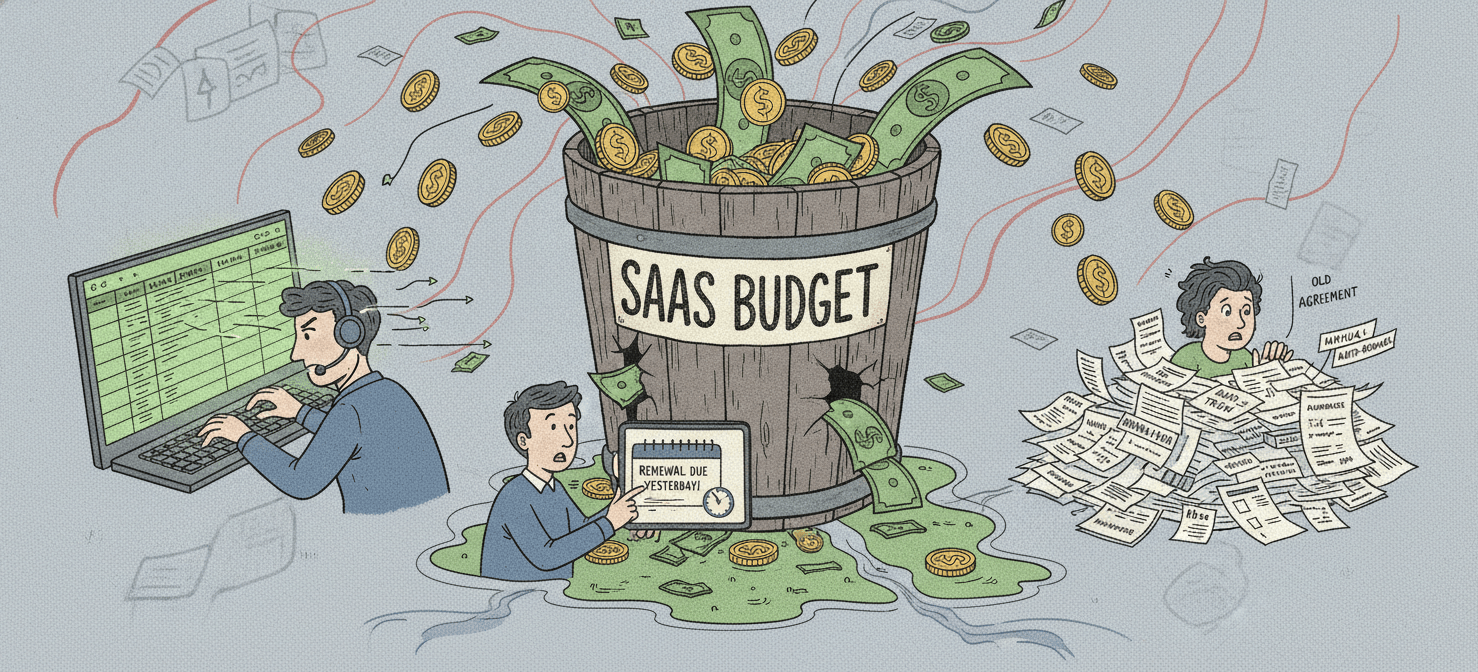
The most immediate cost is unwanted auto-renewals. Most SaaS contracts include clauses that automatically extend the subscription unless notice is given within a specific window, typically 30 to 90 days. Missing this window locks your organization into another term for a tool that may be underutilized, redundant, or no longer aligned with business needs. With organizations wasting an average of $19.8 million annually on unused licenses, these missed deadlines are not trivial administrative errors; they are substantial financial losses.
Beyond unwanted contracts, manual processes cripple your ability to negotiate effectively. When the renewal notification from a vendor is the first trigger for a review, your team is already on the back foot. There is insufficient time to gather the necessary data on usage, consult with business unit stakeholders, or benchmark pricing against the market. This reactive posture forces a hasty approval, often with a vendor-imposed price uplift, and misses the single best opportunity to optimize the contract terms.
Finally, the operational drag on your team is immense. Chasing down contract owners, manually pulling usage reports from disparate admin consoles, and reconciling invoices against provisioned licenses consumes countless hours that could be dedicated to higher-value analysis. This inefficiency not only increases costs but also leads to burnout and prevents your FinOps practice from maturing.
Building the Foundation: Centralized SaaS Visibility
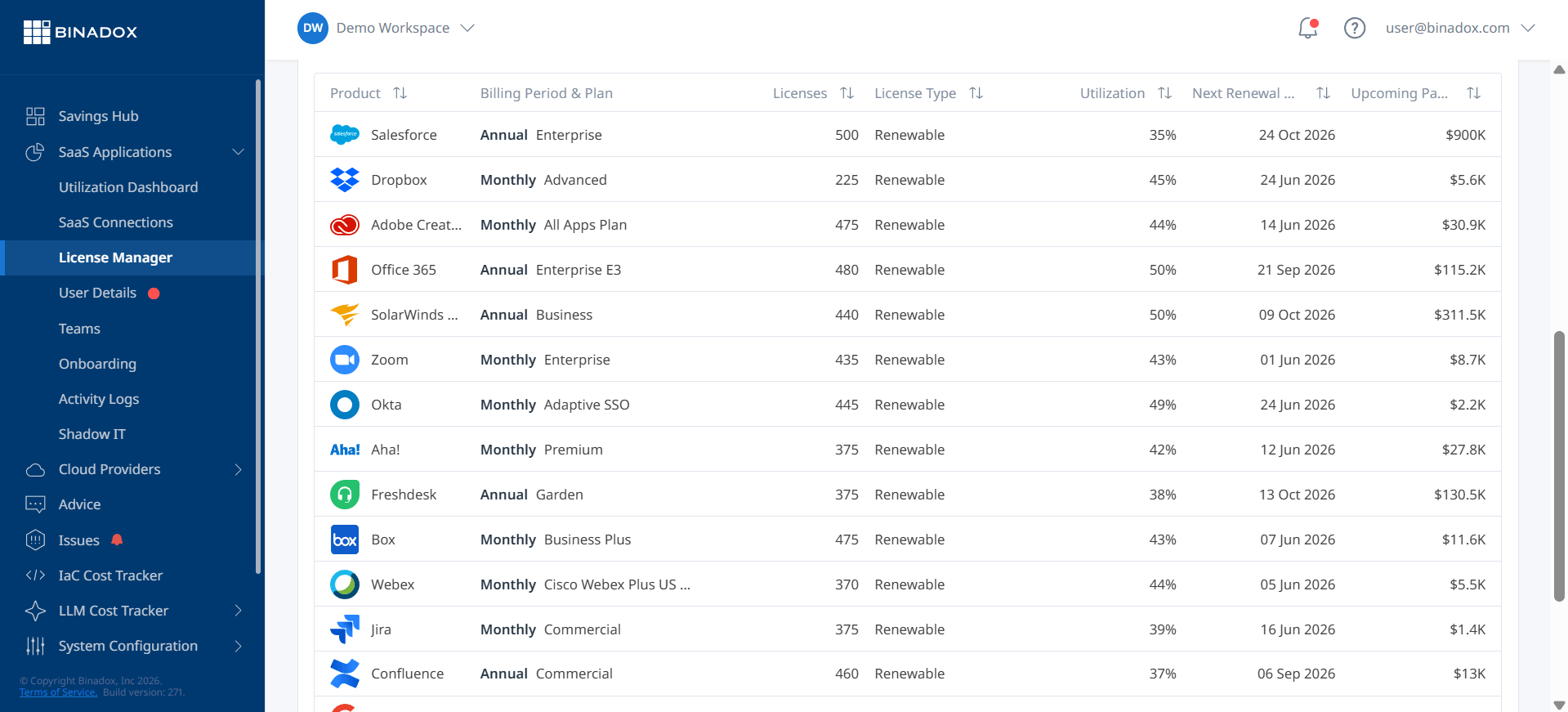
You cannot automate what you cannot see. Before an effective renewal workflow can be built, you must first establish a centralized, authoritative inventory of your entire SaaS portfolio. This is the foundational layer of any credible SaaS cost governance program. The goal is to move from a fragmented, incomplete picture—often complicated by shadow IT—to a single source of truth.
Discovering Your SaaS Stack
Achieving comprehensive visibility requires a multi-pronged discovery approach. Start by integrating with your financial systems (like accounts payable and expense management) to identify all software-related payments. This will uncover both sanctioned and unsanctioned (“shadow IT”) applications, which can account for over a third of a company’s SaaS portfolio.
Next, connect to your Single Sign-On (SSO) and Identity Access Management (IAM) systems. These platforms provide a clear view of which users are logging into which applications, forming the basis for initial usage analysis. This data is crucial for identifying orphaned licenses—those assigned to former employees that are still active and incurring costs.
Finally, direct integrations with major SaaS vendors via API can pull in granular details about specific license tiers, provisioning dates, and in-app activity. A robust SaaS Management Platform (SMP) can automate this data ingestion process, consolidating information from hundreds of sources into a unified dashboard. This centralized view is the prerequisite for accurate cost allocation and effective renewal management.
From Inventory to Intelligence
Once the inventory is established, the next step is to enrich it with the data needed for FinOps decision-making. This involves mapping each application to its owner, the business unit or cost center responsible for the budget, and the contract renewal date.
Key data points to capture for each application include:
- Contract Details: Renewal date, notice period, contract value, and license tier.
- Financials: Invoice history, payment method, and cost center allocation.
- Ownership: Business owner, technical owner, and executive sponsor.
- Usage Data: License utilization rates, user login frequency, and feature adoption metrics.
This enriched inventory becomes the engine for your attribution dashboards and showback/chargeback models. It allows you to move beyond simply tracking total SaaS spend to understanding the cost per user, per department, and per project. This level of granularity is essential for holding business units accountable and for making informed, data-driven decisions when a renewal date approaches.
Designing the Automated Renewal Workflow
With a centralized data foundation in place, you can design an automated workflow that transforms renewals from a reactive scramble into a strategic, proactive process. The objective is to ensure that every renewal decision is deliberate, data-driven, and made with sufficient lead time. A well-designed workflow should automatically trigger alerts, gather necessary data, route approvals, and provide negotiators with the leverage they need.
Step 1: The 90-Day Renewal Trigger
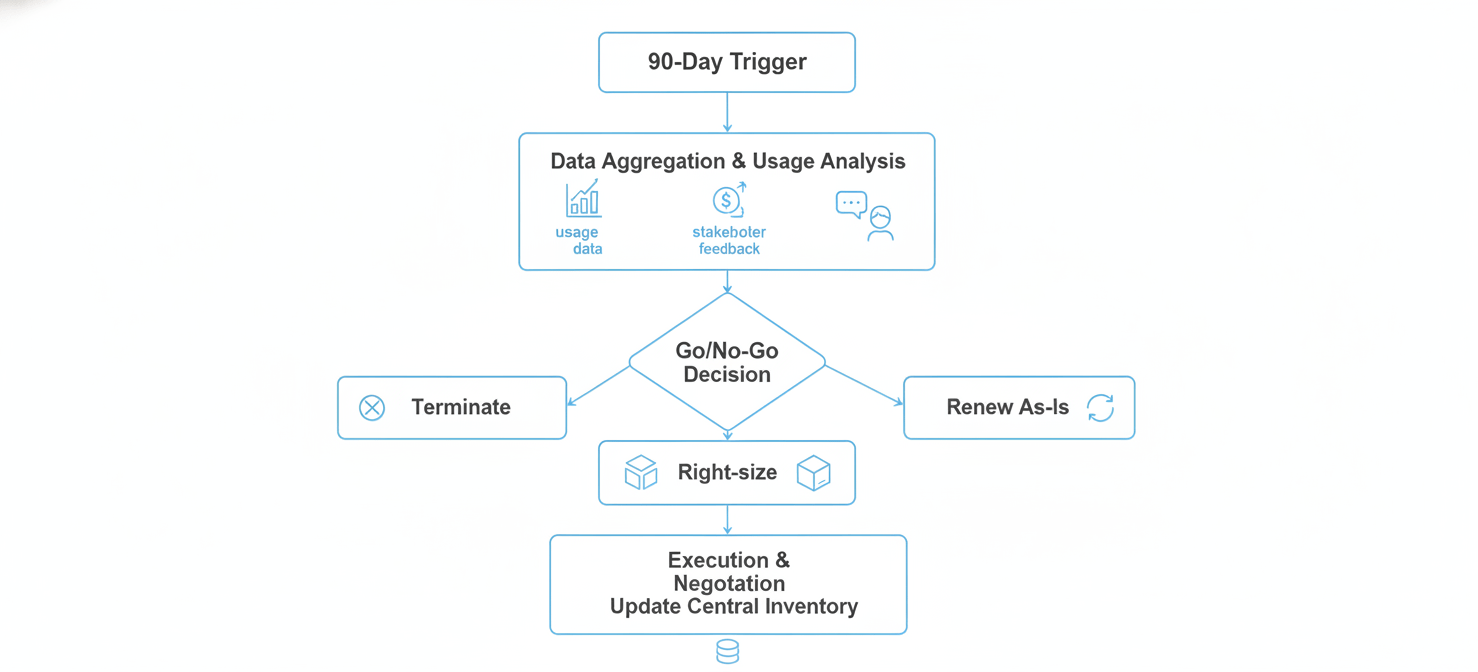
The workflow should begin automatically at a predefined interval before the renewal notice deadline, typically 90 days out. This initial trigger is the most critical step, as it provides the runway for proper due diligence.
Upon triggering, the workflow should:
- Create a Renewal Record: A new task or ticket is generated in your system of record (e.g., a SaaS management platform, an IT service management tool, or even a project management board).
- Notify Stakeholders: An automated alert is sent to the designated application owner, the relevant finance partner, and the procurement manager. This initial notification serves as a heads-up that the renewal process has begun.
- Compile an Initial Data Packet: The system should automatically pull together a preliminary report containing key contract details, historical spend, and the number of provisioned licenses.
This first step replaces the manual calendar reminder and immediately brings the right people into the loop with baseline information, preventing last-minute surprises.
Step 2: Data Aggregation and Usage Analysis (90 to 60 Days Out)
The next phase focuses on gathering the quantitative and qualitative data needed to assess the application’s value. The workflow should automate as much of this as possible.
- Quantitative Analysis: The system should query integrated data sources to pull real-time usage metrics. The most important KPI here is the license utilization rate—the percentage of purchased licenses that are actively used. On average, almost half of all SaaS licenses are unused in a given month, making this the primary metric for identifying immediate cost savings. Other valuable metrics include login frequency, key feature adoption, and the date of last activity for each user.
- Qualitative Analysis: The workflow should automatically send a survey or questionnaire to the application’s business owner. This survey should ask targeted questions about the tool’s business impact, its role in critical processes, user sentiment, and whether any alternative tools are being considered.
This combination of hard data and business context provides a 360-degree view of the application’s ROI, forming the basis for the renewal decision.
Step 3: The Go/No-Go Decision (60 to 45 Days Out)
With the data in hand, the stakeholders must make a decision. The workflow should facilitate this by routing the compiled data packet for formal review and approval. Based on the analysis, there are three primary paths:
- Terminate: If usage is critically low and the business owner indicates the tool is no longer essential, the decision is made to terminate the contract. The workflow should then generate a task for the procurement team to provide notice of non-renewal to the vendor before the deadline.
- Right-size (Optimize): If usage data shows a significant number of inactive or underutilized licenses, the decision is to renew but at a reduced license count or a lower-cost tier. The workflow should document the target license count and provide the usage report as evidence for the upcoming negotiation.
- Renew As-Is: If the application is fully utilized and critical to business operations, the decision is to renew. However, this does not mean simply accepting the vendor’s terms. The procurement team should still be tasked with negotiating on price and other key terms.
The workflow should capture this decision and the associated justification, creating an audit trail for future reference.
Step 4: Execution and Negotiation (45 Days to Renewal)
Once a decision is made, the workflow moves to the execution phase. It assigns a final task to the procurement or legal team to take the required action.
- For Terminations: Send the official non-renewal notice.
- For Renewals/Right-sizing: Initiate negotiations with the vendor. The data packet compiled by the workflow—containing benchmark pricing, usage statistics, and stakeholder feedback—becomes a powerful negotiation asset. It allows your team to argue from a position of strength, countering vendor assumptions with hard evidence.
After the negotiation is complete, the final contract details (new price, term, and license count) are updated in the central SaaS inventory, and the workflow for that renewal cycle is closed. This ensures the system of record is always accurate, feeding reliable data into the next cycle.
Measuring Success: KPIs for FinOps SaaS Management
To demonstrate the value of your automated renewal workflow and drive continuous improvement, you must track the right Key Performance Indicators (KPIs). These metrics move beyond simple spend tracking to measure the efficiency, effectiveness, and business impact of your SaaS cost governance efforts. They provide the data needed for your attribution dashboards and to prove the ROI of your FinOps practice to leadership.
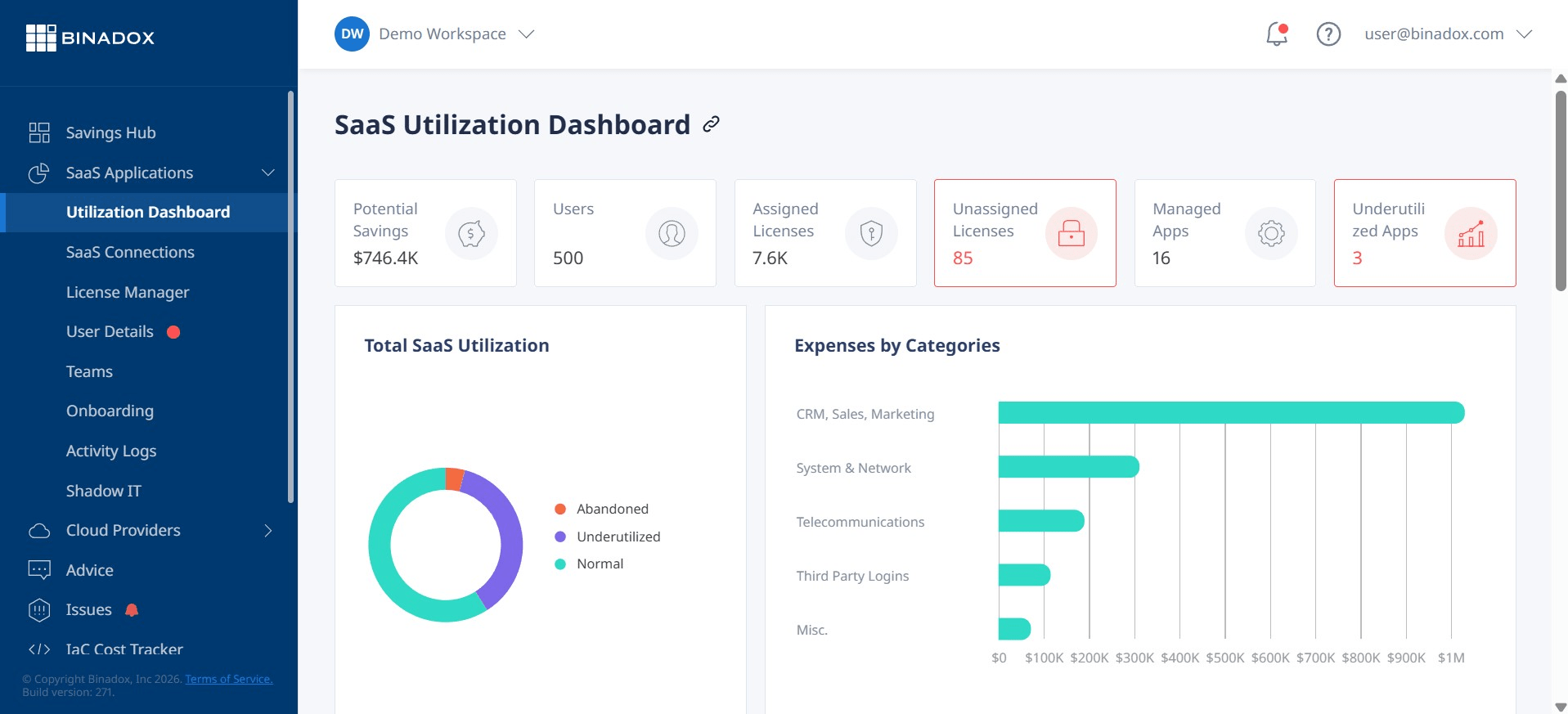
Core Renewal Process KPIs
These metrics measure the operational health of your renewal workflow itself.
- Renewal Cadence Compliance: What percentage of renewals are processed through the automated workflow ahead of the notice period? The goal should be 100%. This KPI tracks your team’s adherence to the process and highlights any gaps in your SaaS inventory.
- Automated vs. Manual Renewals: Track the ratio of renewals handled through the automated system versus those that slip through and require manual, last-minute intervention. A decreasing number of manual renewals indicates a maturing process.
- Mean Time to Renew: How long does it take from the 90-day trigger to the final contract signature? A shorter cycle time indicates an efficient, well-oiled process with clear ownership and minimal bottlenecks.
Cost Optimization and Allocation KPIs
These KPIs measure the direct financial impact of your program.
- Cost Savings from Renewals: This is the most critical metric for demonstrating value. It should be broken down into two categories:
- Cost Reduction: The total dollar amount saved by reducing license counts, moving to lower-cost tiers, or negotiating price reductions on existing contracts. Organizations with mature SaaS governance can save 23-30% on their software spending.
- Cost Avoidance: The total value of contracts terminated through the renewal process, representing spending that would have been incurred had the auto-renewal not been stopped.
- Percentage of SaaS Spend Allocated: This measures the completeness of your cost attribution efforts. The formula is
(Total SaaS spend allocated to a business unit / Total SaaS spend) * 100. Your goal should be to have over 90% of your SaaS costs directly attributed to a specific cost center, enabling accurate showback or chargeback. - SaaS Unit Cost: For critical applications, develop unit economic metrics that tie cost to business value. Examples include “cost per sales representative” for a CRM or “cost per support ticket” for a helpdesk tool. Tracking this over time shows whether you are scaling costs efficiently.
Business Alignment KPIs
These metrics connect SaaS spending to broader business outcomes.
- License Utilization Rate: Tracked portfolio-wide and for individual applications, this KPI is a direct measure of waste. The industry average utilization is shockingly low, with some reports indicating that only 54% of paid licenses are actively used. Continuously improving this rate is a primary goal.
- Redundant Application Ratio: Identify and track the number of applications in your portfolio that serve the same or overlapping functions. A successful program will consolidate these redundant tools, reducing both cost and complexity.
- SaaS Cost as a Percentage of Revenue: This high-level metric helps leadership understand how SaaS spending scales with business growth. A stable or decreasing percentage indicates that your FinOps practice is effectively managing costs as the company grows.
By consistently tracking and reporting on these KPIs, you can move the conversation from “How much are we spending on SaaS?” to “What value are we getting from our SaaS investments?” This shift is the hallmark of a mature SaaS FinOps practice.
Conclusion
The relentless growth of SaaS is not a trend; it is the operational reality for modern enterprises. For FinOps leads and cost analysts, this presents both a formidable challenge and a significant opportunity. Relying on manual spreadsheets and last-minute email chains to manage renewals is no longer a viable strategy. It is a direct path to value leakage, budget overruns, and a weakened negotiating position.
By implementing a systematic, automated approach to renewal management, you transform a point of financial risk into a powerful lever for cost control. The process—centralizing visibility, designing an automated workflow triggered 90 days out, and measuring success with clear KPIs—provides a clear roadmap. It enables your team to shift from being reactive administrators to proactive, strategic partners who can confidently answer not just what is being spent, but why. Ultimately, effective FinOps SaaS management is about reclaiming control. It ensures that every software dollar is deliberate, defensible, and directly tied to a business outcome. The alternative is to let hundreds of automated renewals make those decisions for you.
To fully reclaim control over your SaaS portfolio and ensure every software dollar is deliberate and defensible, you can experience Binadox firsthand with a free trial or arrange a detailed walkthrough to see its full capabilities.
 7-day free trial