




In any cloud environment, data encryption is fundamental, and the keys that lock and unlock that data are among your most critical assets. In AWS, the Key Management Service (KMS) is the backbone of this security. However, the accidental or malicious deletion of a KMS key can be catastrophic, rendering all data encrypted by that key permanently unrecoverable. Therefore, understanding the risks and implementing robust controls around kms key deletion is not just a best practice; it’s an operational necessity. This article details the proactive and detective measures your team can take to protect your keys from unauthorized deletion and exposure.
Key takeaways
- Deletion is irreversible: Once a KMS key is deleted after its waiting period, all data encrypted with it becomes permanently inaccessible.
- Implement a mandatory waiting period: AWS enforces a waiting period of 7 to 30 days before a key is permanently deleted, giving you a crucial window to cancel the action.
- Use IAM and Key Policies: Employ the principle of least privilege to strictly control who has permissions for
kms:ScheduleKeyDeletionandkms:CancelKeyDeletion. - Automate alerts: You can configure CloudWatch alarms to automatically notify your team whenever a key deletion is scheduled or a key pending deletion is accessed.
Understanding the Risks of KMS Key Deletion and Exposure
Deleting a KMS key is a destructive action. When a key is deleted, its key material and all associated metadata are permanently removed. As a result, any data encrypted with that key becomes unrecoverable ciphertext. This presents a significant operational risk. For example, if a key used to encrypt an Amazon EBS volume is deleted, the data on that volume is lost forever.
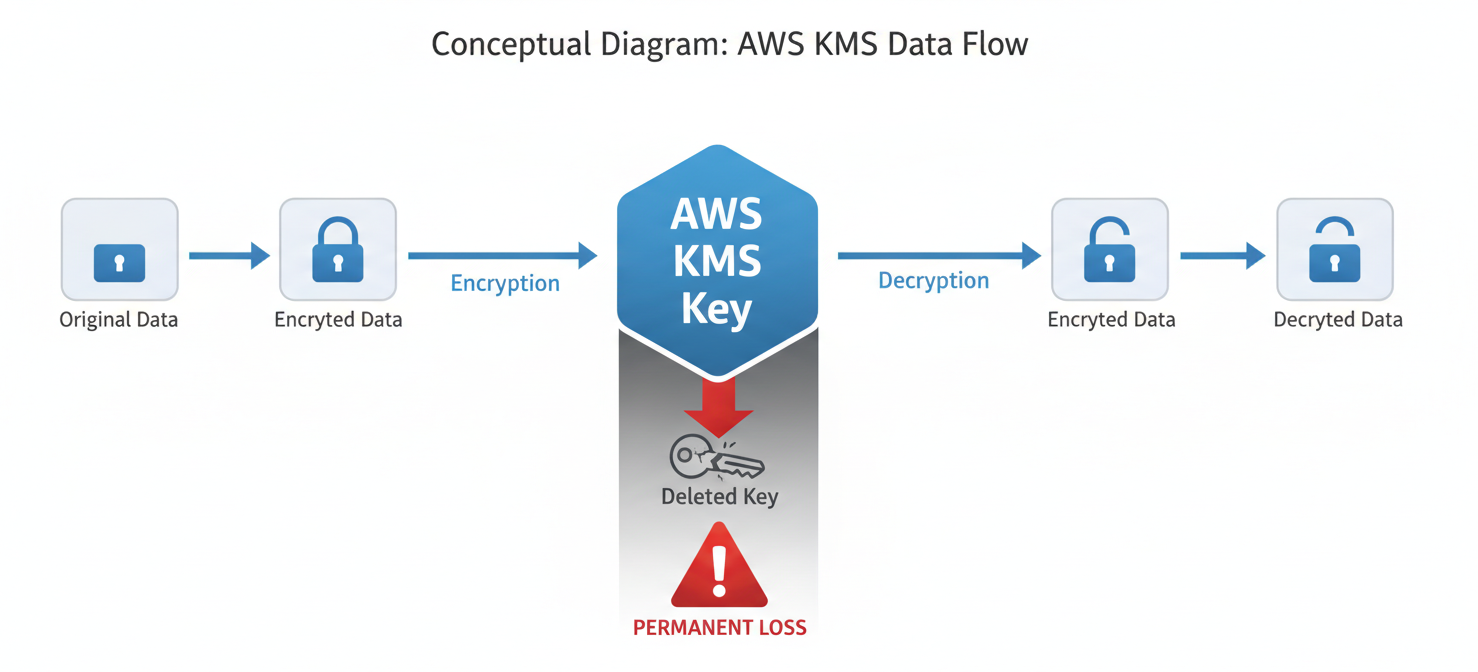
Exposure of key material is another critical risk, although AWS KMS is designed to prevent this. For symmetric keys, the key material never leaves AWS KMS unencrypted. You have full control over customer-managed keys, including their policies and rotation, but you cannot export the key material itself. This design minimizes the risk of direct key exposure.
The primary threat, therefore, comes from misuse of permissions. An attacker or a misconfigured script with excessive permissions could schedule a key for deletion, leading to data loss. Similarly, overly permissive key policies could allow unauthorized users or services to use a key for encryption or decryption, indirectly exposing the data it protects.
Proactive Safeguards: Preventing Unauthorized Deletion
The most effective strategy is to prevent unauthorized deletions from happening in the first place. This involves a layered approach focused on rigorous access control.
IAM and Key Policies
Your first line of defense is a well-configured set of IAM policies and KMS key policies. These policies should adhere strictly to the principle of least privilege.
- Limit Deletion Permissions: The
kms:ScheduleKeyDeletionandkms:CancelKeyDeletionpermissions are powerful. Restrict them to a very small, trusted group of administrators. Avoid using wildcard permissions likekms:*in IAM policies, as this grants these sensitive permissions implicitly. - Separate Duties: Do not grant the same principal the ability to both manage keys (create, delete) and use them for cryptographic operations (encrypt, decrypt). This separation of duties ensures that developers using keys cannot accidentally delete them.
- Use Condition Keys: Strengthen your key policies by using condition keys. For instance, you can use
kms:ViaServiceto restrict a key’s use to specific AWS services, preventing it from being used in unintended ways.
The Mandatory Waiting Period
AWS provides a crucial safety net: a mandatory waiting period for key deletion. When you schedule a key for deletion, it enters a PendingDeletion state. It is not deleted immediately. Instead, you must specify a waiting period between 7 and 30 days (the default is 30).
During this period, the key cannot be used for any new cryptographic operations. Most importantly, you can cancel the deletion at any time before the waiting period expires. This window is your opportunity to react to an accidental or malicious deletion event. You should always configure the longest possible waiting period (30 days) for critical keys to maximize this recovery window.
Detective Controls: Setting Up Alarms for kms key deletion
While proactive controls are essential, you also need detective mechanisms to alert you when a potential threat occurs. Setting up alarms for kms key deletion events ensures that your security team is notified immediately, allowing them to investigate and respond during the mandatory waiting period.
Leveraging CloudTrail and CloudWatch
AWS CloudTrail records all API calls made to KMS, including ScheduleKeyDeletion. These logs are the authoritative source for auditing all key-related activity. By integrating CloudTrail with Amazon CloudWatch, you can create powerful, automated alarms.
Here is a high-level overview of the process:
- Ensure CloudTrail is Logging: First, confirm that you have a CloudTrail trail enabled that is capturing all management events for KMS.
- Create a Metric Filter: In the CloudWatch console, create a metric filter that scans your CloudTrail log group for specific API calls. You can create a filter pattern to specifically match the
ScheduleKeyDeletionandDisableKeyevent names from thekms.amazonaws.comevent source. - Create a CloudWatch Alarm: Next, create a CloudWatch alarm based on the metric filter you just configured. This alarm will trigger whenever the filter finds a match (i.e., whenever a key deletion is scheduled).
- Configure Notifications: Finally, configure the alarm to send a notification to an Amazon SNS (Simple Notification Service) topic. You can then subscribe your security team’s email distribution list or a messaging channel (like Slack) to this SNS topic to receive immediate alerts.
In addition to alarming on the scheduling event, you should also create an alarm for any attempt to use a key that is pending deletion. Such an attempt indicates that a service or user still depends on a key that is about to be permanently destroyed. The process is similar, but the metric filter should look for the error message is pending deletion in the CloudTrail logs.
Incident Response: What to Do When a Key Is Deleted or Exposed
If you receive an alarm that a key has been scheduled for deletion, your response must be swift and decisive.
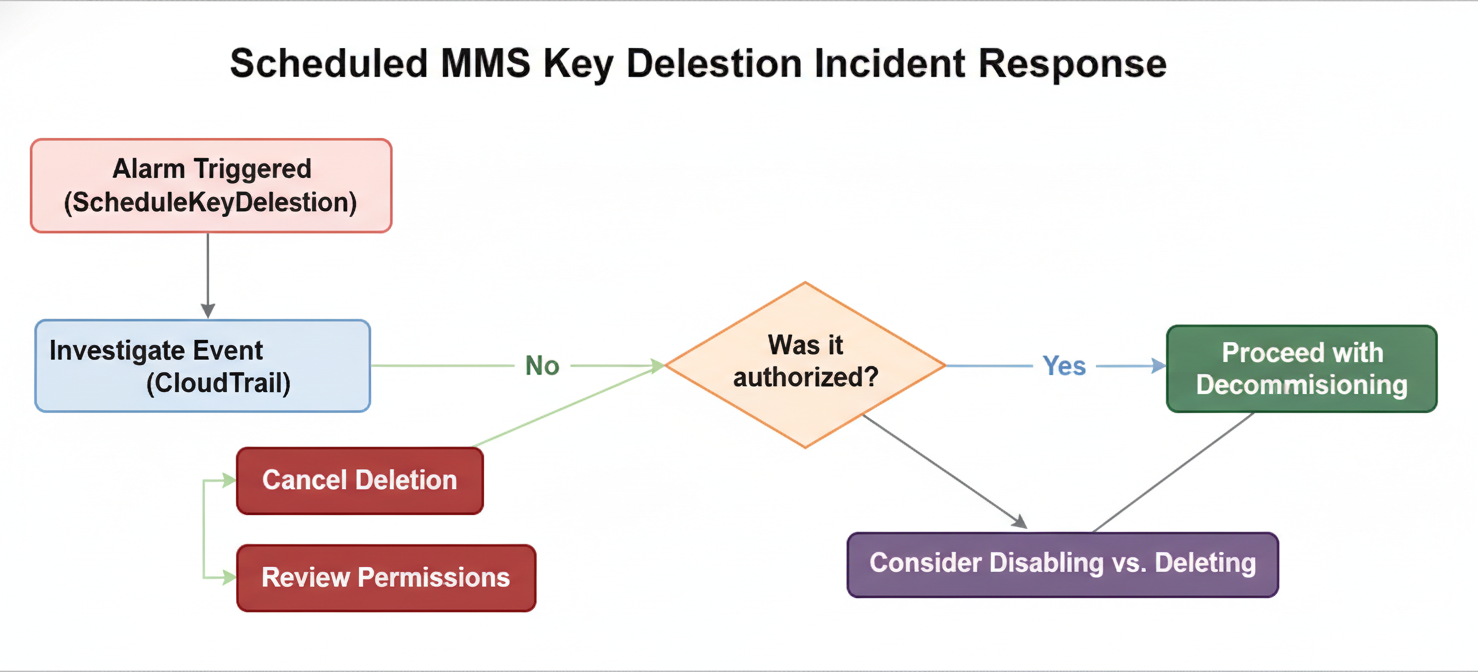
- Investigate the Event: Use the information in the CloudTrail log entry to understand the context. Identify who scheduled the deletion (the principal ARN), from where (the source IP address), and when. This will help you determine if the action was accidental, malicious, or part of a planned decommissioning process.
- Cancel the Deletion (If Necessary): If the deletion was unauthorized or accidental, immediately navigate to the KMS console and cancel the key deletion. As long as you are within the waiting period, you can recover the key.
- Review Permissions: Conduct an immediate audit of the IAM user, role, or service that initiated the deletion. If the permissions were overly broad, restrict them immediately to prevent a recurrence.
- Disable Instead of Deleting: If you are unsure whether a key is still in use, a safer alternative to deletion is to disable it. A disabled key can be re-enabled at any time, whereas deletion is final. Disabling the key allows you to test the impact on your applications without taking an irreversible step.
Conclusion
Managing the lifecycle of your encryption keys is as important as managing the data they protect. The irreversible nature of kms key deletion means that mistakes can have permanent consequences. However, by combining strong, proactive safeguards like least-privilege policies with vigilant, automated detective controls, you can build a robust defense. Use IAM and key policies to lock down who can delete keys, enforce a lengthy waiting period to give yourself a buffer, and configure CloudWatch alarms to tell you the instant something goes wrong. After all, the only thing worse than losing data is realizing you could have prevented it with a simple alarm.
To truly fortify your AWS environment against the irreversible impact of KMS key deletion, you can easily explore our comprehensive security platform by starting a free trial, or for a more personalized walkthrough, book a demo with our experts.
 7-day free trial