



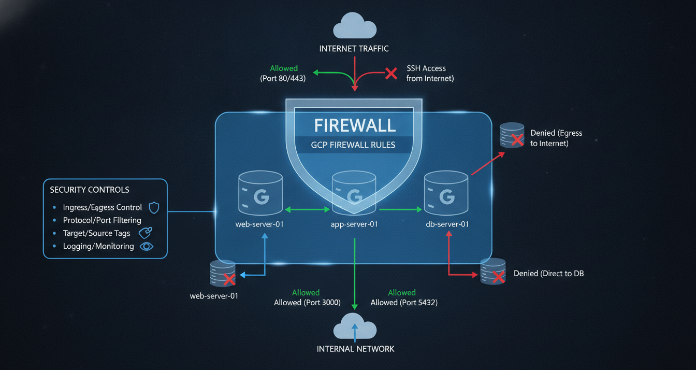
Controlling network traffic is a fundamental aspect of cloud security. For teams using Google Cloud, this means mastering Virtual Private Cloud (VPC) firewall rules. These rules allow or deny traffic to and from your virtual machine (VM) instances, acting as a distributed firewall to protect your resources. Effectively managing gcp firewall rules involves more than just initial setup; it requires ongoing attention to logging, monitoring, and precise configuration of protocols and port ranges. This article explores these critical components to help you build a more secure and manageable network environment.
Key takeaways
- Firewall Rule Logging can be enabled individually for each rule, providing near real-time visibility into both allowed and denied connections.
- Firewall Insights helps you identify misconfigured or overly permissive rules by analyzing traffic patterns over a 24-month period.
- Following the principle of least privilege is crucial; you should only allow traffic to the specific protocols and ports necessary for your applications to function.
- GCP firewall rules are stateful, meaning if a connection is allowed, the return traffic for that same connection is automatically permitted without needing a separate rule.
Understanding GCP Firewall Rules
GCP firewall rules are defined at the VPC network level but are enforced on a per-instance basis. This distributed nature means they protect your instances regardless of their operating system or whether they have even started up. Each rule you create specifies a set of conditions, such as the direction of traffic (ingress or egress), source or destination IP ranges, network tags, and service accounts.
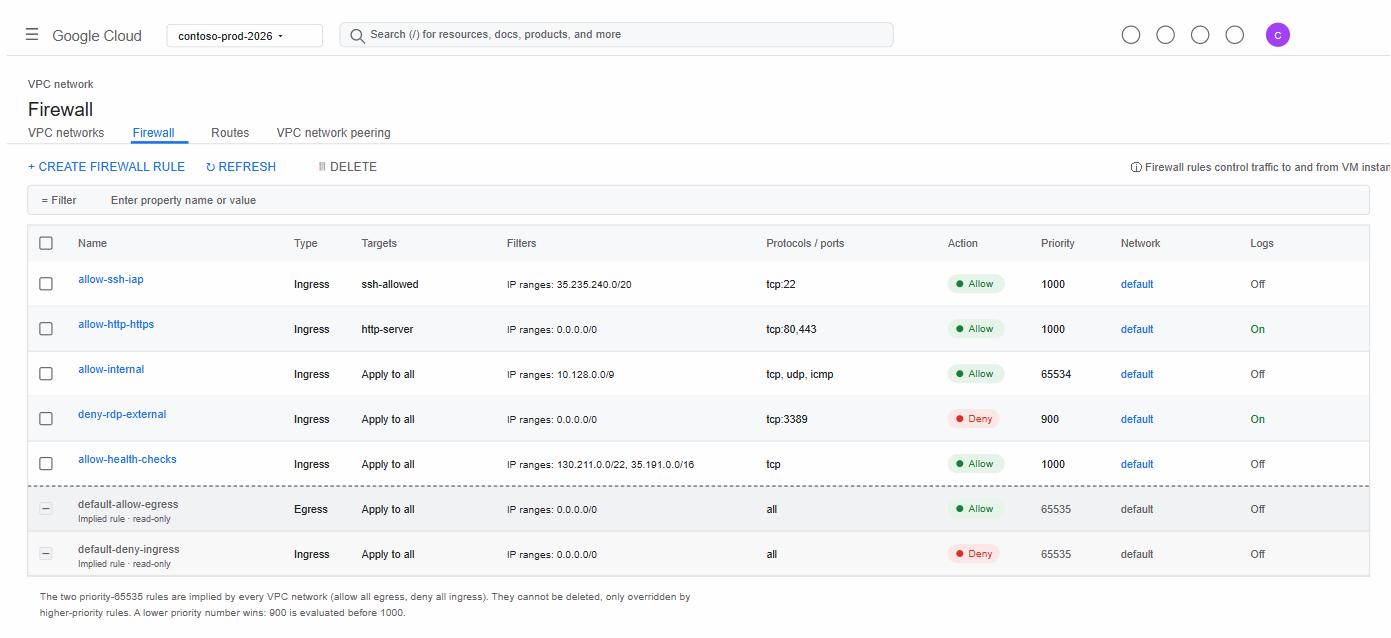
Every VPC network comes with two implied firewall rules that are not logged: an “allow egress” rule for all outbound traffic and a “deny ingress” rule for all inbound traffic. These have the lowest possible priority, ensuring that any rules you create will take precedence.
Rules are evaluated based on a priority number, from 0 to 65535, where lower numbers indicate higher priority. When traffic matches a rule, that rule’s action (allow or deny) is taken, and the evaluation stops. This “first hit, not best fit” principle makes rule order critical for correct traffic control.
Configuring Firewall Rule Logging
To understand the impact of your firewall rules, you need visibility into the traffic they handle. Firewall Rules Logging provides this by recording an entry for each TCP and UDP connection that a specific rule allows or denies. This feature is essential for auditing, troubleshooting, and analyzing your security posture.
How to Enable Logging
You can enable logging for any individual firewall rule, whether its action is to allow or deny traffic. This is done through a simple configuration change in the Google Cloud Console or via the gcloud command-line tool. When enabled, logs are generated and sent to Cloud Logging, where they can be viewed, queried, and exported.
What Gets Logged
Each log entry, or connection record, contains valuable information, including the 5-tuple of the connection (source/destination IP, source/destination port, protocol), whether the traffic was allowed or denied, and which specific rule was applied. For allowed connections, a single log is generated when the connection is established. For denied connections, logs are repeated every five seconds as long as the denied packets are observed.
It’s important to note that enabling logging can incur costs based on the volume of log data ingested and stored. As of early 2023, Cloud Logging charges approximately $0.50 per GiB for ingestion, with the first 50 GB per month being free. Therefore, it’s wise to enable logging selectively on rules that are critical for security monitoring or troubleshooting.
Monitoring Firewall Activity
Beyond basic logging, Google Cloud provides more advanced tools for monitoring and optimizing your firewall configurations. These tools help you move from raw data to actionable insights, making it easier to maintain a strong security posture.
Using Firewall Insights
Firewall Insights, part of the Network Intelligence Center, uses machine learning and usage analysis to help you understand how your rules are being used. It provides reports that identify misconfigurations and offer recommendations for optimization.
Key insights you can gain include:
- Shadowed rules: These are rules that are completely or partially overlapped by other rules with a higher priority, meaning they may never be hit.
- Overly permissive rules: Firewall Insights can identify
allowrules with IP and port ranges that are too broad, have no traffic hits, or contain unused attributes. - Deny rules with hits: This insight shows you which deny rules are actively blocking traffic, which can help confirm that your security policies are working as intended.
By regularly reviewing these insights, your team can proactively simplify your rule set, tighten security boundaries, and reduce the risk of misconfiguration.
Integrating with Cloud Monitoring
Firewall rule activity can also be monitored through Cloud Monitoring. You can track metrics like the hit count for each firewall rule, which provides a clear view of how frequently a rule is being triggered. Setting up alerts on these metrics can notify you of unusual activity, such as a sudden spike in denied connections that might indicate a security threat.
Specifying Port Ranges in GCP Firewall Rules
Correctly configuring protocols and ports is at the heart of effective firewall management. The goal is to apply the principle of least privilege by only allowing the specific traffic your applications need.
Defining Protocols and Ports
When creating a firewall rule, you must specify the protocol (e.g., tcp, udp, icmp) and, for TCP and UDP, the destination ports. You can specify a single port, a comma-separated list of ports, or a contiguous range of ports. For example, to allow standard web traffic, you would specify tcp:80,443. To allow a range of ports for an application, you might use tcp:8080-8090.
If you specify a protocol without a port, the rule applies to all destination ports for that protocol. If you omit the protocol entirely, the rule applies to all protocols. However, for robust security, it is always better to be as specific as possible.
Using Network Tags and Service Accounts
Instead of applying rules based on IP addresses, which can be difficult to manage, GCP allows you to use network tags or service accounts as targets. You can apply a tag like web-server to all your web-facing VMs and then create a single firewall rule that allows ingress traffic on tcp:443 to any instance with that tag. This approach is more scalable and less error-prone than managing rules for individual IP addresses.
Best Practices for Managing GCP Firewall Rules
As your cloud environment grows, so does the complexity of your firewall configuration. Adhering to best practices is essential for maintaining security and manageability.
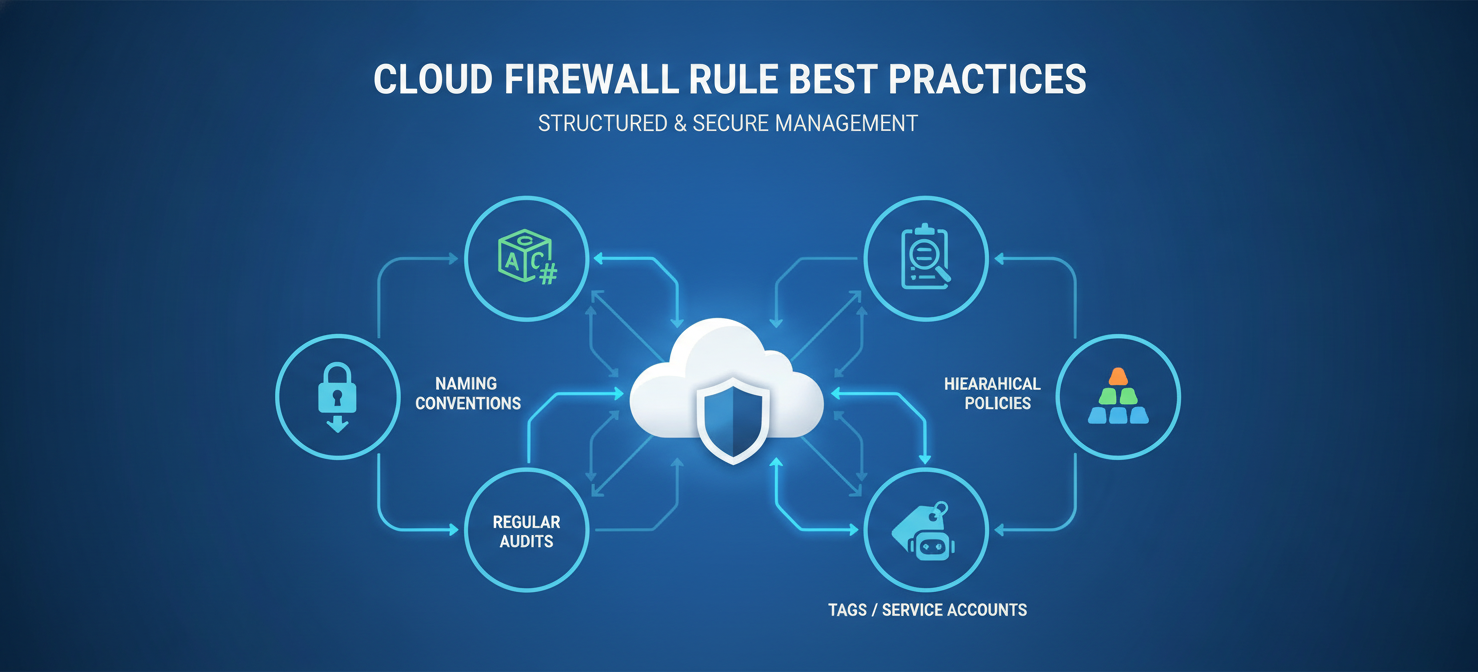
- Implement Least Privilege: Always start by denying all traffic and then create specific
allowrules for only the necessary protocols and ports. This minimizes your attack surface. - Use a Naming Convention: Adopt a clear and consistent naming convention for your rules. This makes it easier to understand the purpose of each rule at a glance.
- Regularly Audit and Clean Up Rules: Use Firewall Insights to identify and remove unused or shadowed rules. Accumulated, unused rules create complexity and can lead to misconfigurations.
- Leverage Hierarchical Firewall Policies: For larger organizations, use hierarchical firewall policies to enforce consistent security rules across multiple projects and folders.
- Prefer Tags and Service Accounts over IP Ranges: Whenever possible, use network tags or service accounts to apply rules to groups of instances. This simplifies management as your infrastructure scales.
Conclusion
Effectively managing gcp firewall rules is a continuous process of configuration, analysis, and refinement. By leveraging tools like Firewall Rules Logging and Firewall Insights, you can gain deep visibility into your network traffic and ensure your rules are working as intended. Combining these tools with best practices—such as applying the principle of least privilege, using network tags, and regularly auditing your rule set—allows your team to build a secure, scalable, and resilient network architecture. Neglecting these practices doesn’t just create clutter; it leaves doors open that you might not even know exist.
To truly optimize your network security and simplify rule management, you can easily begin a free trial of our platform or schedule a personalized demo to see it in action.
 7-day free trial