




Managing the lifecycle of secrets, keys, and certificates is fundamental to cloud security. Forgetting to rotate a credential before it expires can lead to application downtime, service disruptions, and security vulnerabilities. Therefore, a robust strategy for azure key vault expiration is not just a good idea; it’s a necessity for any team using Microsoft’s cloud platform. This guide provides practical, actionable best practices for setting, automating, and monitoring expiration policies in Azure Key Vault to ensure your applications remain secure and operational.
Key takeaways
- Always set an explicit expiration date on every secret, key, and certificate; by default, they never expire.
- Automate rotation and renewal by integrating Key Vault with Azure Event Grid and Azure Functions to act on near-expiry events.
- Configure monitoring to receive notifications at least 30 days before an object’s expiration to provide ample time for intervention.
- Use Azure Policy to enforce lifecycle management rules, such as requiring expiration dates on all new secrets.
What Are Expiration Policies in Azure Key Vault?
In Azure Key Vault, an expiration policy is a setting you apply to a secret, key, or certificate that defines its valid lifetime. It’s a simple but critical attribute: a timestamp that dictates when the credential should no longer be used. When you create a secret, for instance, you can set an expiration date. After this date, the secret becomes inactive and cannot be retrieved by applications, effectively disabling it.
This mechanism is a core component of credential hygiene. It forces your team to regularly rotate sensitive information, which is a foundational security practice. Without an expiration date, a credential could potentially remain active indefinitely, increasing the risk of compromise over time.
For certificates, the policies are more detailed. A certificate policy includes information about how to create and manage its lifecycle, such as key type, key length, and specific lifetime actions. These actions can trigger automatic renewal or send notifications as the expiration date approaches, helping to automate what would otherwise be a manual and error-prone process.
Why Is It Critical to Set Expiration Dates?
Setting expiration dates is not merely about compliance; it’s about mitigating real-world risks. Expired secrets are a common cause of production outages. An application can suddenly fail because a database connection string or API key stored in Key Vault expired without anyone noticing, leading to hours of troubleshooting and lost revenue.

From a security perspective, secrets that never expire present a much larger window of opportunity for attackers. If a key is compromised, a short lifespan limits the time an adversary has to use it. Regular rotation, enforced by expiration dates, shrinks this attack window significantly. It ensures that even if a secret is leaked, its utility to an attacker is temporary.
Furthermore, many compliance frameworks and security best practices mandate the regular rotation of cryptographic keys and other secrets. By setting expiration dates, you build this requirement directly into your infrastructure, making it easier to demonstrate compliance during audits. It transforms a manual, periodic task into a managed, automated process.
Best Practices for Azure Key Vault Expiration
To effectively manage the lifecycle of your secrets, your team should adopt a consistent set of best practices. These guidelines help prevent outages and strengthen your security posture.
Always Set an Expiration Date
The most important rule is to set an expiration date for every secret, key, and certificate you create. By default, objects in Key Vault do not expire, which can lead to a “set it and forget it” mentality. Enforcing this practice ensures that no credential can live forever, reducing the risk of it being compromised and used maliciously over an extended period.
Use Short, Realistic Lifetimes
While it might be tempting to set expiration dates far in the future to reduce the frequency of rotations, this defeats the purpose. The goal is to limit the potential exposure of a compromised secret. For many secrets, a lifetime of 90 days to one year is a reasonable starting point. For highly sensitive certificates, consider even shorter validity periods, such as 12 months or less. The ideal lifetime depends on your organization’s risk tolerance and the operational overhead of rotation.
Enforce Policies with Azure Policy
Human error is inevitable. To ensure that no secret is created without a defined lifecycle, use Azure Policy. You can implement built-in policies that audit or deny the creation of secrets, keys, or certificates that do not have an expiration date set. This provides a governance layer that enforces your security standards automatically.
How to Configure and Automate Expiration
Manually rotating secrets is not a scalable solution. The key to successful lifecycle management is automation. Azure provides the necessary tools to build a fully automated rotation and notification workflow.
Setting Expiration in the Azure Portal and CLI
When creating a new secret, key, or certificate through the Azure Portal, you will find an option to set an “Expiration Date.” Simply select a date from the calendar.
For automation scripts, you can use the Azure CLI. The command to set a secret, for example, includes an --expires parameter where you can specify the date and time in UTC format.
az keyvault secret set --vault-name "YourVaultName" --name "YourSecretName" --value "YourSecretValue" --expires "YYYY-MM-DDTHH:MM:SSZ"
Automating Rotation with Event Grid and Functions
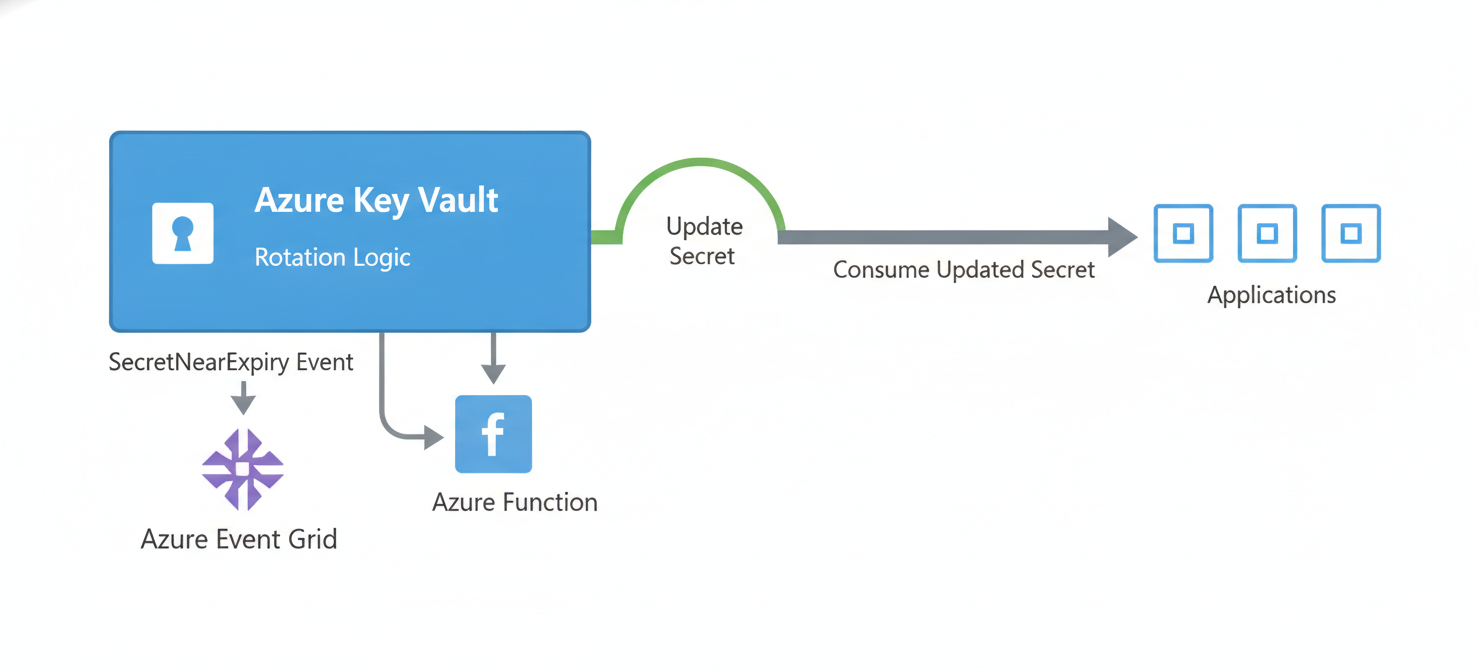
The most robust way to handle azure key vault expiration is to automate the rotation process. This typically involves a combination of Azure Key Vault, Azure Event Grid, and Azure Functions or Logic Apps.
- Event Subscription: First, configure an event subscription in your Key Vault. Key Vault can publish events to Event Grid when a secret is about to expire (the
SecretNearExpiryevent). This event is typically triggered 30 days before the expiration date. - Triggering an Action: Next, create an Azure Function or Logic App that subscribes to these
SecretNearExpiryevents from Event Grid. When Event Grid receives a notification, it will trigger your function. - Rotation Logic: Inside the function, you write the logic to generate a new secret value. For example, you might generate a new password for a SQL database or a new access key for a storage account.
- Updating the Secret: Finally, the function adds the newly generated credential to Key Vault as a new version of the existing secret and updates the corresponding service (e.g., resets the database password).
This event-driven architecture ensures that secrets are rotated automatically before they expire, without any manual intervention.
Monitoring and Responding to Expiration Events
Even with automation, robust monitoring is essential. It provides visibility into the lifecycle of your secrets and serves as a fallback in case automation fails.
Leveraging Azure Event Grid for Notifications
Azure Key Vault’s integration with Azure Event Grid is the cornerstone of proactive monitoring. You can configure Event Grid to send notifications for various lifecycle events, including SecretNearExpiry, KeyNearExpiry, and CertificateNearExpiry.
These events can be routed to various endpoints. For example, you can send an email to your security operations team, post a message in a Slack channel, or create a ticket in your IT service management system. This ensures that the right people are alerted and can take action if a secret is approaching its expiration date and has not been rotated.
Setting Up Alerts in Azure Monitor
For more advanced monitoring, you can use Azure Monitor. By enabling diagnostic logging for your Key Vault, you can collect detailed telemetry on all operations. You can then create alert rules in Azure Monitor based on log queries. For instance, you can set up an alert that triggers if a SecretNearExpiry event is logged, providing another layer of notification.
Creating a Response Plan
Your team should have a clear, documented plan for responding to expiration alerts. This plan should outline:
- Who is responsible for investigating the alert.
- How to verify if the automated rotation process was successful.
- Steps for manual rotation if the automation failed.
- How to update applications and services with the new credential.
A well-defined response plan minimizes confusion and ensures a swift resolution, preventing potential downtime.
In conclusion, managing azure key vault expiration is a critical discipline for maintaining a secure and reliable cloud environment. By treating every secret as having a finite lifespan, you fundamentally reduce risk. Implementing these best practices—setting expiration dates by default, automating rotation with event-driven workflows, and establishing comprehensive monitoring—moves your team from a reactive to a proactive security posture. After all, the only thing worse than a compromised secret is a compromised secret that you forgot existed.
Embrace a proactive security posture by ensuring your credentials are always fresh and secure; you can easily experience this streamlined management by starting a free trial, or for a deeper dive into its capabilities, book a demo with our specialists.
 7-day free trial