



As a FinOps lead, your world revolves around data-driven cost optimization. You need clear visibility into where every dollar is spent to enable effective showback, chargeback, and strategic decision-making. In the complex landscape of Azure, achieving this level of clarity requires a robust toolkit. This article explores the essential azure finops tools that provide the foundation for sophisticated cost allocation and governance, moving beyond mere reporting to active, intelligent cloud financial management. We will focus on the native services and third-party platforms that empower your team to translate cost data into actionable insights and enforce fiscal discipline across the organization.
Key takeaways:
- A disciplined tagging strategy is foundational; aim for 100% coverage on all new resources to ensure accurate cost allocation from day one.
- Leverage Azure Policy to automate governance, for instance, by enforcing the presence of specific tags on resource groups before deployment.
- Native tools like Azure Cost Management provide a strong starting point, but specialized third-party platforms often deliver deeper, multi-cloud analytics.
- Combine Azure Budgets with Action Groups to create automated responses to spending anomalies, such as notifying a specific team lead via Teams when their project exceeds 80% of its budget.
The Foundation: Azure’s Native Tooling for Cost Visibility
Before exploring external platforms, it’s critical to master the native tools within the Azure ecosystem. These services are the bedrock of any Azure cost management strategy, providing the raw data and basic controls necessary for effective FinOps. For your team, this is the source of truth for all consumption data.
Azure Cost Management + Billing
At the heart of Azure’s native capabilities is the Cost Management + Billing hub. This is your primary interface for analyzing, managing, and optimizing your Azure costs. Instead of just viewing a monthly bill, you can dissect spending with a high degree of granularity.
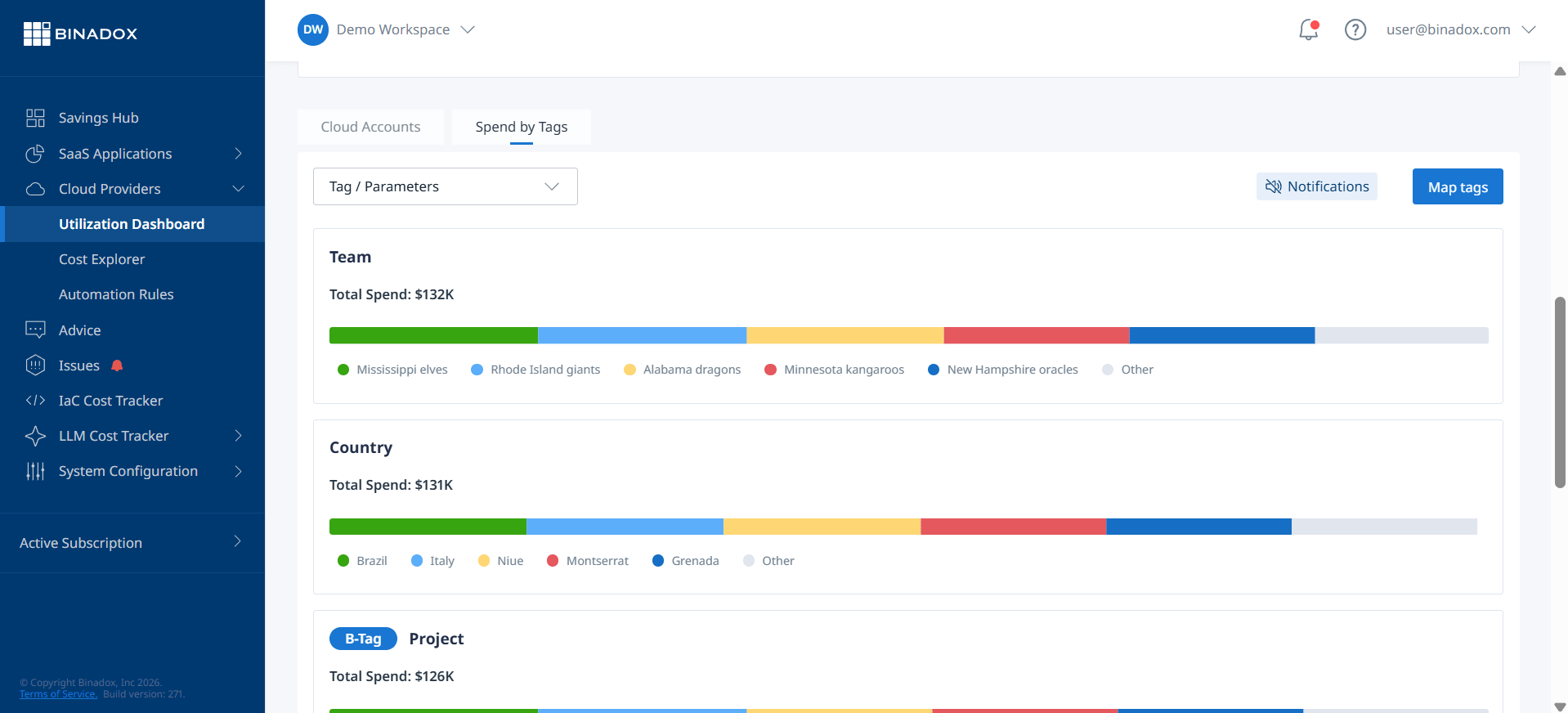
For example, the cost analysis feature allows you to group and filter costs by a wide range of properties, including subscription, resource group, and, most importantly, tags. This is fundamental for any showback or chargeback model. You can create customized views that align directly with your business’s structure—by department, project, or application—and save these reports for ongoing monitoring. Furthermore, you can schedule regular exports of this data to a storage account. As a result, your team can ingest it into other financial systems or BI tools like Power BI for more advanced analysis and dashboarding.
Azure Advisor
Think of Azure Advisor as a built-in cost consultant. It analyzes your resource configuration and usage telemetry to provide personalized recommendations across several categories, including cost. For a cost analyst, these recommendations are low-hanging fruit for immediate savings.
Advisor identifies idle and underutilized resources, such as virtual machines that can be resized or shut down, or unattached public IP addresses incurring charges. It also provides recommendations for purchasing Azure Reservations and Savings Plans to optimize your spend on predictable workloads. Each recommendation includes an estimated potential yearly saving, which is a critical KPI for demonstrating the value of your FinOps practice. You can then track the implementation of these recommendations and report on the realized savings.
Enforcing the Rules: Azure Cost Governance and Policy
Visibility without control is insufficient. True cost governance requires the ability to enforce financial policies automatically across your cloud environment. This is where Azure’s governance tools become indispensable for preventing cost overruns before they happen, rather than just reporting on them afterward.
Tagging Strategies for Allocation
A consistent and comprehensive tagging strategy is the single most important prerequisite for accurate cost allocation. Without it, you are flying blind. Your team should define a mandatory tagging policy that aligns with your organization’s financial reporting structure. Common tags include:
- CostCenter: The department or business unit to which the cost should be allocated.
- Project/Application: The specific project or application the resource supports.
- Owner: The individual or team responsible for the resource’s lifecycle.
- Environment: (e.g., Prod, Dev, QA) to differentiate spending across deployment stages.
The goal is to ensure every resource can be unambiguously attributed to a specific financial owner. This data directly feeds into your chargeback processes and attribution dashboards, making them accurate and defensible.
Azure Policy
Azure Policy is your enforcement engine. It allows you to create, assign, and manage policies that control or audit your resources. For cost governance, you can use it to enforce your tagging strategy. For instance, you can implement a policy that denies the creation of any new resource if it lacks a ‘CostCenter’ tag.
In addition, you can use policies to restrict the deployment of expensive VM SKUs or limit deployments to specific geographic regions to control data egress costs. By codifying your financial rules, Azure Policy shifts cost control from a reactive, manual process to a proactive, automated one. This reduces the risk of budget surprises and ensures that engineering teams are operating within established financial guardrails from the outset.
Analysis and Action: Budgets, Alerts, and Automation
Data and policies are foundational, but the next step is turning that information into timely action. This involves setting clear financial targets and creating automated workflows to respond when spending deviates from the plan. This is where your FinOps practice moves from passive monitoring to active management.
Azure Budgets and Alerts
Within Azure Cost Management, you can create budgets for different scopes, such as subscriptions, resource groups, or even specific filter sets based on tags. A budget is not just a static number; it’s a dynamic monitoring tool.
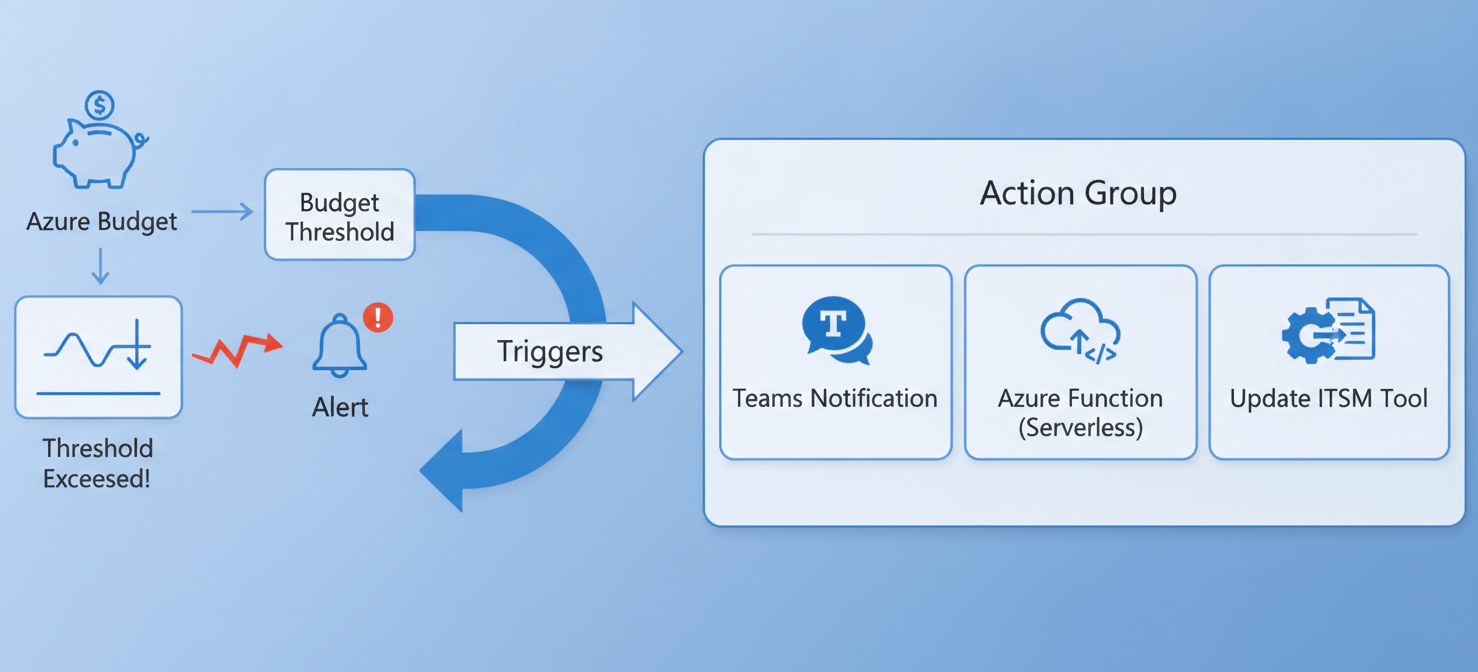
You can set multiple alert thresholds for each budget. For example, you might configure an alert to notify the project owner when spending reaches 75% of the monthly budget and a second, more critical alert to a FinOps distribution list when it hits 90%. This provides an early warning system, allowing teams to take corrective action before a significant overrun occurs. These alerts are crucial for maintaining budget adherence and fostering a culture of cost accountability among engineering teams.
Action Groups
The real power of Azure Budgets is realized when they are connected to Action Groups. An Action Group is a collection of notification preferences and actions that can be triggered by an alert. Instead of just sending an email, an Action Group can:
- Send a notification to a Microsoft Teams channel.
- Trigger an Azure Function to perform a custom action, like automatically shutting down non-production environments outside of business hours.
- Initiate a workflow in an ITSM tool like ServiceNow.
This level of automation allows your team to build sophisticated, automated responses to spending events. Therefore, you can scale your governance efforts without a linear increase in manual work, ensuring that cost control measures are applied consistently and immediately.
Beyond Native: Key Third-Party Azure FinOps Tools
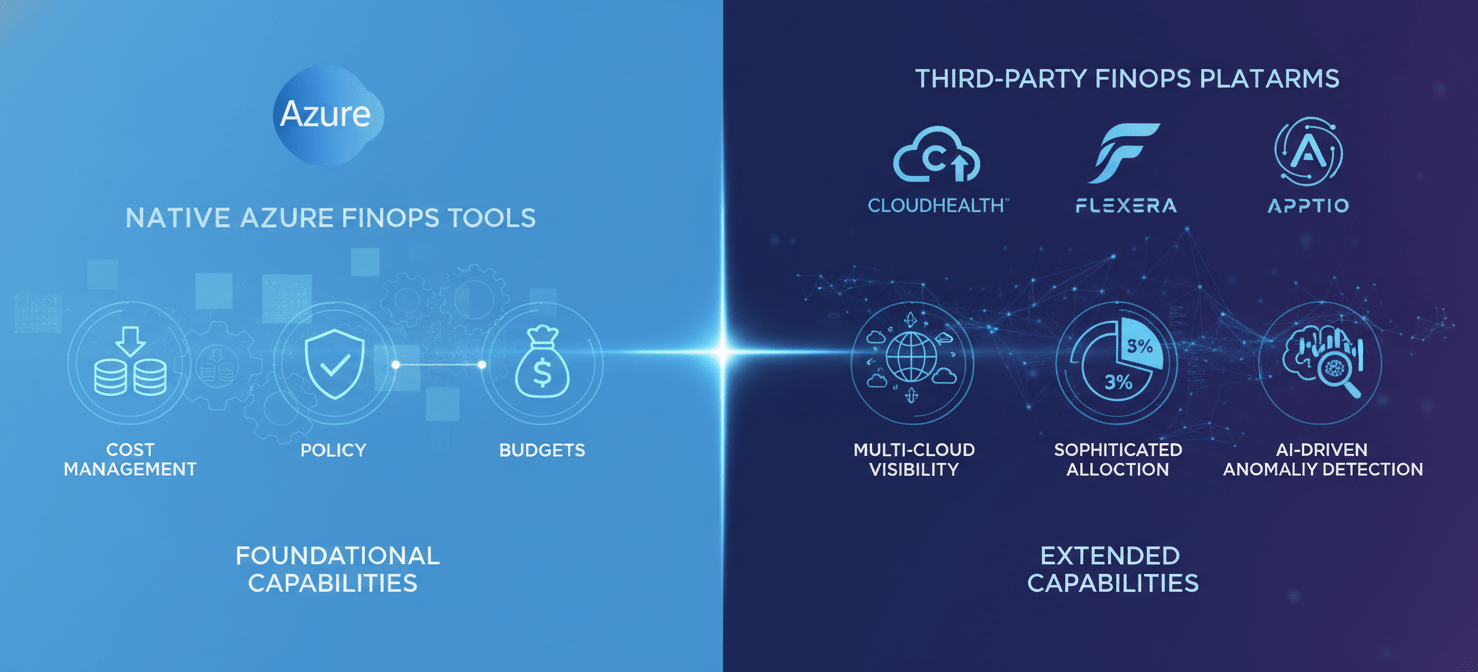
While Azure’s native tools are powerful, they are inherently focused on the Azure ecosystem. Many organizations operate in a multi-cloud or hybrid environment, creating visibility gaps. Furthermore, specialized third-party platforms often provide more advanced features for cost allocation, anomaly detection, and forecasting. These azure finops tools can augment and extend your capabilities.
When to Consider a Third-Party Platform
Your team should consider a dedicated FinOps platform when you face challenges like:
- Multi-Cloud Complexity: You need to consolidate cost data from Azure, AWS, and GCP into a single, unified dashboard for comprehensive showback.
- Advanced Allocation Needs: You require sophisticated allocation rules, such as distributing shared infrastructure costs (e.g., Kubernetes clusters, networking) based on proportional consumption by different applications. Native tools can struggle with this level of detail.
- Business-Centric Reporting: You need to map cloud costs directly to business KPIs, like cost per transaction or cost per user, which requires ingesting and correlating data from sources outside of Azure.
- Automated Anomaly Detection: You want machine learning-driven anomaly detection that can identify unexpected cost spikes in near real-time, often with more nuance than simple budget alerts.
Leading FinOps Platforms for Azure
Several platforms excel at providing these advanced capabilities. For example, tools like CloudHealth by VMware, Flexera, and Apptio Cloudability are recognized leaders in the space. They integrate directly with Azure’s billing APIs to pull in consumption data and then layer on their own analytics and automation engines. These platforms often provide more intuitive dashboards for non-technical stakeholders and offer robust features for managing reservations and savings plans across multiple clouds, ensuring you are maximizing your commitments. For instance, a Gartner® Magic Quadrant™ for Cloud FinOps Platforms can provide detailed vendor comparisons. Similarly, evaluations from firms like Forrester offer in-depth analysis of the market leaders.
Conclusion
Mastering cost allocation and governance in Azure is not about finding a single magic bullet. Instead, it requires a methodical, layered approach that begins with the foundational native services and expands as your organization’s complexity grows. By establishing a rigorous tagging strategy, you create the data foundation for accurate showback. By leveraging Azure Policy, you automate governance and enforce financial discipline. Finally, by combining Azure Budgets with Action Groups and, when necessary, integrating specialized third-party azure finops tools, you can build a responsive, intelligent, and scalable FinOps practice. The goal isn’t just to report on what was spent; it’s to proactively shape how money is spent, ensuring every dollar invested in the cloud drives maximum business value. After all, a cost report nobody acts on is just expensive trivia.
To truly transform your cloud spending into strategic investments and maximize business value, consider exploring advanced FinOps capabilities; you can easily start your free Binadox trial or book a demo to see how our platform integrates with Azure for unparalleled insights.
 7-day free trial