



Being the only IT person in a company can feel like you’re a superhero, a firefighter, and a help desk agent all rolled into one. You are the single point of contact for every technical issue, from a forgotten password to a full-scale server meltdown. This role demands a unique blend of technical expertise, strategic thinking, and sheer resilience. Adopting a set of sole IT person best practices is not just helpful; it’s essential for survival and success. Without a structured approach, the constant barrage of requests and responsibilities can quickly lead to chaos and burnout. This guide provides a practical framework for taming that chaos and transforming your one-person IT department into a model of efficiency.
Key takeaways
- Prioritize Ruthlessly: Implement a ticketing system and use a framework like the Eisenhower Matrix to sort tasks by urgency and importance. You can’t do everything at once, so focus on what truly matters.
- Automate and Document Everything: Leverage automation tools to handle repetitive tasks, freeing up at least 20% of your time for strategic projects. Furthermore, create detailed documentation for every process and system.
- Master Communication: Proactively manage expectations with leadership and users. Regular, clear communication prevents misunderstandings and builds trust in your capabilities.
- Follow the 3-2-1 Backup Rule: Maintain at least three copies of your data on two different types of media, with one copy stored off-site to ensure business continuity.
The Impossible Job: Why Being a Lone IT Wolf Is So Tough
Managing IT alone presents a distinct set of challenges that are often underestimated. The sheer breadth of responsibilities is the first major hurdle. One moment you are a network engineer troubleshooting a connectivity issue; the next, you are a security analyst investigating a phishing attempt. This constant context-switching is mentally taxing and makes deep, focused work difficult to achieve.

Another significant challenge is the lack of immediate peer support. When a complex problem arises, there is no one down the hall to bounce ideas off of or to escalate the issue to. This isolation means you are solely responsible for finding solutions, which can be stressful and time-consuming. Knowledge becomes siloed, creating a significant risk for the business if you are unavailable.
Finally, the reactive nature of the job can be overwhelming. User-generated issues and unexpected system failures often dictate your daily schedule, leaving little time for proactive, strategic initiatives that could prevent future problems. This constant “firefighting” mode is a direct path to burnout, as it leaves you feeling perpetually behind and undervalued.
Triage and Prioritization: Your First Line of Defense
When you’re managing IT alone, every request can feel urgent. However, without a system to manage the incoming flow, you’ll spend your days reacting to the loudest voice rather than the most critical need. This is where triage and prioritization become your most powerful tools.
Implementing a Ticketing System
First, you must stop managing requests via email, sticky notes, or hallway conversations. A dedicated help desk or ticketing system is non-negotiable. It centralizes all requests, provides a clear record of every issue, and allows you to track progress. Tools like Zoho Desk, Freshservice, or the free tier of HubSpot Service Hub can bring order to the chaos. Even open-source options like osTicket are a massive step up from an unmanaged inbox. A ticketing system ensures that no request is forgotten and provides valuable data on recurring issues.
The Eisenhower Matrix
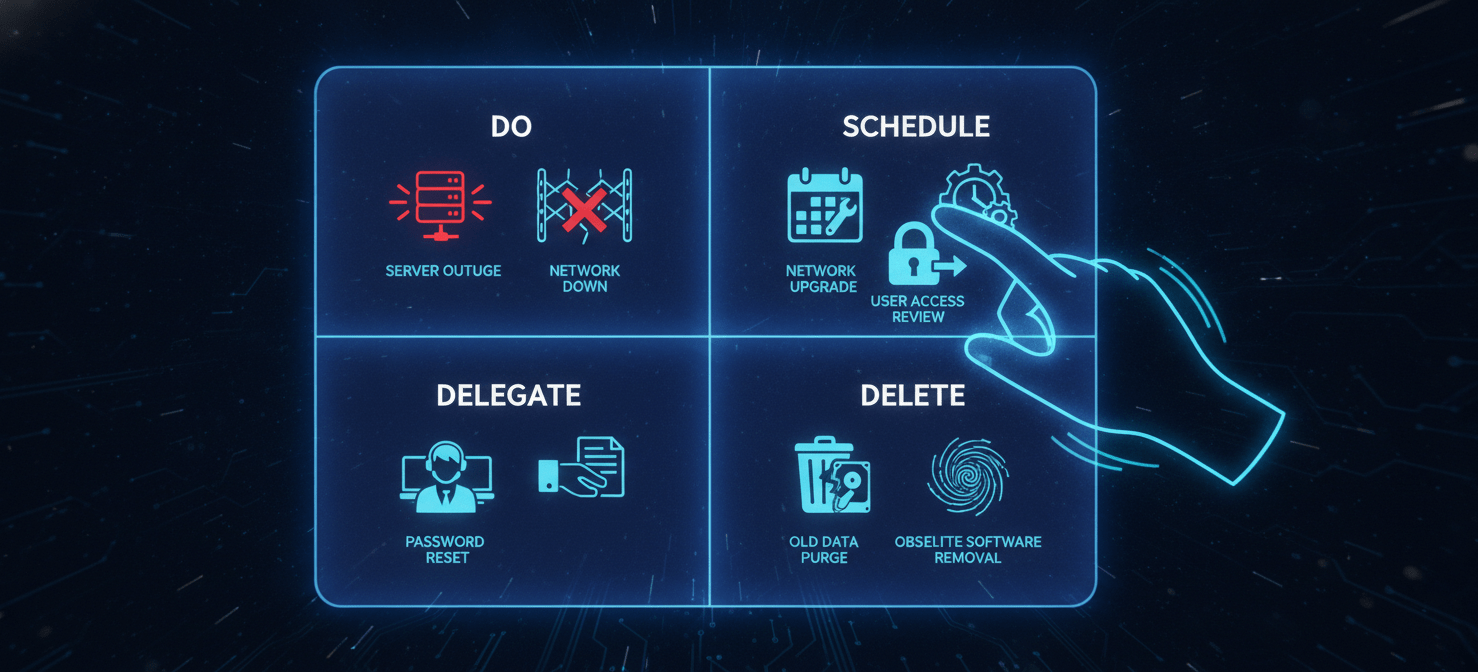
Once you have a centralized queue, you need a method to prioritize tasks. The Eisenhower Matrix is a simple but effective framework for this. It helps you categorize tasks based on their urgency and importance:
- Urgent and Important (Do): These are crises that need immediate attention, like a server outage or a critical security threat.
- Important but Not Urgent (Schedule): This is where strategic work lives. Think about planning a network upgrade, implementing a new security policy, or automating a manual process. You must schedule time for these tasks.
- Urgent but Not Important (Delegate/Automate): These are often interruptions, like a user needing a password reset. While you can’t delegate to another person, you can “delegate” to automation.
- Neither Urgent nor Important (Delete): These are time-wasting activities that should be eliminated.
By applying this matrix to your ticket queue, you can make conscious decisions about where to focus your limited time and energy, moving from a reactive state to a proactive one.
Automation: Your Unseen (and Unpaid) Assistant
As a one-person IT department, you cannot scale yourself, but you can scale your impact through automation. Repetitive, manual tasks are the biggest drain on your time. Automating them is like hiring an assistant who works 24/7 without complaint.

Identifying Automation Candidates
Start by identifying tasks that you perform regularly and that follow a predictable, rule-based process. Good candidates for automation include:
- User Onboarding/Offboarding: Automate account creation, permission setting, and account disabling.
- Software Updates and Patching: Use tools to schedule and deploy updates automatically across all workstations.
- Password Resets: Implement self-service password reset tools to empower users and reduce help desk tickets.
- Backups: All backup processes should be fully automated and verified regularly.
- Report Generation: Automate the creation and distribution of system health or security reports.
Tools for the Job
You don’t need to be a master coder to start automating. Many powerful tools are designed for IT professionals.
- PowerShell: For Windows environments, PowerShell is an indispensable tool for scripting and automating administrative tasks.
- Workflow Automation Platforms: Services like Zapier and Make allow you to connect different applications and create automated workflows without writing any code. For example, you could create a “Zap” that automatically creates a help desk ticket from a specific type of email.
- Configuration Management: Tools like Ansible or Puppet can automate the configuration of servers and workstations, ensuring consistency and saving immense amounts of time.
By investing time upfront to automate these processes, you free up valuable hours that can be redirected toward more strategic and high-impact projects.
Documentation: The Gospel of the One-Person IT Department
When you are the sole keeper of all technical knowledge, documentation is not just a good practice—it’s a critical business continuity tool. If you were to be unavailable for any reason, your documentation is the only thing standing between order and operational collapse. It is your legacy and your backup brain.

What to Document
Your goal should be to create a centralized knowledge base that someone with a reasonable level of technical skill could use to understand and manage the environment. Key areas to document include:
- Network Infrastructure: Create detailed diagrams of your network topology, including IP schemes, VLANs, and hardware configurations.
- Server and Application Configurations: Document the setup, purpose, and maintenance procedures for every server and critical application.
- Standard Operating Procedures (SOPs): Create step-by-step guides for common tasks like setting up a new user, restoring a file from a backup, or troubleshooting a common printer issue.
- Credentials and Licenses: Use a secure password manager to store all administrative credentials and keep a detailed record of all software licenses and renewal dates.
- Vendor Information: Maintain a list of all IT vendors, their contact information, and support contract details.
Building the Habit
Documentation can feel like a chore, especially when you are busy fighting fires. The key is to make it a part of your workflow. Don’t close a ticket for a new setup or a complex fix until you’ve documented the process. Use a simple, accessible tool like a wiki (Confluence, BookStack) or even a well-organized set of documents in a shared drive. The effort you put into documentation today is a gift to your future self and a safety net for the entire organization.
Security: You Are the Only Gatekeeper
In a one-person IT department, you are the chief security officer, the security analyst, and the incident response team. This is a heavy burden, but a layered, fundamentals-focused approach can provide robust protection without requiring a massive budget.

Foundational Security Practices
Your primary goal is to make your organization a difficult target. Start with the basics:
- Endpoint Protection: Ensure every server and workstation has modern antivirus and anti-malware software that is always up to date.
- Firewall and Network Security: Configure your firewall to block all unnecessary inbound traffic. Segment your network where possible to limit the lateral movement of an attacker.
- Patch Management: Consistently apply security patches to operating systems, software, and firmware. This is one of the most effective defenses against known vulnerabilities.
- Data Backup and Recovery: A reliable backup is your last line of defense against ransomware. Follow the 3-2-1 rule: three copies of your data, on two different media types, with one copy off-site. Crucially, you must also test your backups regularly to ensure they can be restored.
Empowering Your Users
Your users can be either your biggest security weakness or a valuable part of your defense.
- Password Security: Implement a strong password policy and use a business password manager like 1Password or Bitwarden. These tools make it easy for users to generate and store unique, complex passwords for every service, reducing the risk from credential stuffing attacks.
- Multi-Factor Authentication (MFA): Enable MFA wherever possible, especially for email, VPN, and critical applications. This provides a crucial layer of protection against compromised passwords.
- Security Awareness Training: Regularly train users to recognize phishing emails and other common social engineering tactics. A well-informed user is far less likely to click on a malicious link.
Managing Up and Out: Communication and Expectations
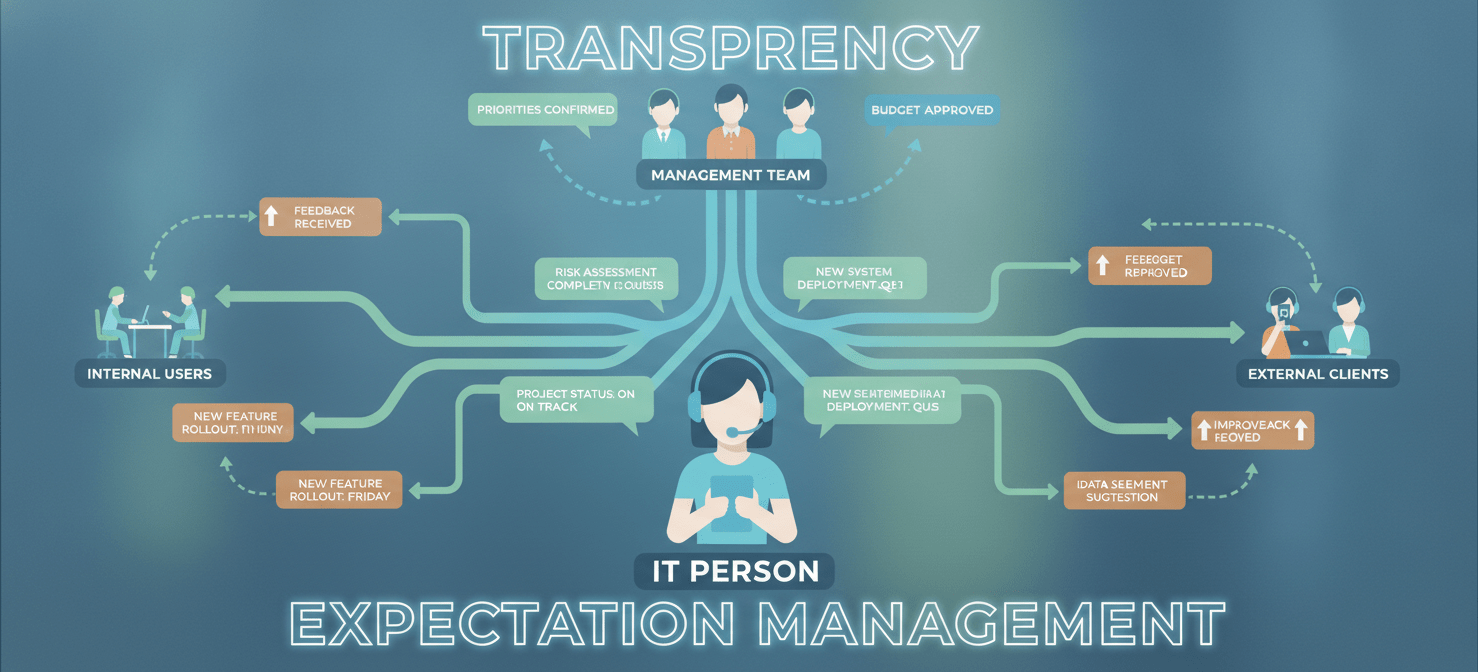
Technical skills alone are not enough to succeed as a sole IT person. Your ability to communicate effectively and manage expectations is just as important. You must be able to translate technical jargon into business impact and proactively communicate your priorities and limitations.
Communicating with Leadership
Management needs to understand the value IT brings and the risks the business faces.
- Regular Reporting: Provide simple, concise reports on IT health, project status, and security posture. Focus on metrics that matter to the business, such as system uptime, number of critical security threats blocked, and progress on strategic IT initiatives.
- Budgeting and Planning: Be proactive in your budget requests. Justify your needs by linking them to business goals, such as improving productivity, reducing risk, or enabling new capabilities.
- Setting Realistic Expectations: Be transparent about your workload and what you can realistically accomplish. If a new project is requested, clearly communicate the impact it will have on your existing priorities.
Communicating with Users
For your users, you are the face of IT. Building a positive relationship is key.
- Be Approachable and Empathetic: Remember that when users come to you with a problem, they are often frustrated. Practice active listening and show that you understand their issue.
- Provide Clear and Timely Updates: If you are working on a user’s issue, keep them informed of your progress. Even a quick “I’m still working on it” is better than silence.
- Create Self-Service Resources: Use your documentation to build a user-facing knowledge base with answers to common questions. This empowers users to solve simple problems themselves and reduces your ticket volume.
Essential Tools for the Sole IT Person
Having the right tools can make a world of difference in your efficiency and effectiveness. While the specific tools will vary based on your environment, here are some essential categories for any solo IT admin.

- Network Monitoring: You need to know about problems before your users do. Tools like PRTG Network Monitor (which has a free tier for up to 100 sensors), Zabbix, or WhatsUp Gold can monitor the health of your servers, switches, and other critical devices and alert you to issues.
- Help Desk/Ticketing System: As mentioned earlier, this is non-negotiable. Options range from Freshdesk and Zoho Desk to open-source solutions like osTicket.
- Password Manager: A business-grade password manager like Bitwarden, 1Password, or LastPass is crucial for securely storing and sharing administrative credentials.
- Backup and Recovery: Whether you use a cloud-based solution like Backblaze or an on-premises solution with cloud replication, your backup software must be reliable and automated.
- Remote Access: Tools like mRemoteNG or a secure VPN are essential for managing systems when you are not physically on-site.
- Endpoint Management: Solutions that allow you to remotely manage and deploy software to workstations can save an enormous amount of time.
- Scripting and Automation: PowerShell ISE for Windows and general-purpose scripting languages like Python are invaluable for automating repetitive tasks.
Sole IT Person Best Practices for Avoiding Burnout
The role of a sole IT person is demanding and can easily lead to burnout if not managed carefully. The feeling of being constantly overwhelmed, coupled with the pressure of being the only one responsible, is a recipe for exhaustion. Protecting your own well-being is a critical part of the job.

Setting Boundaries
First and foremost, you must set clear boundaries between your work and personal life. This can be difficult when you are the only one who can fix a problem, but it is essential.
- Define Your Work Hours: Communicate your standard hours of availability and stick to them as much as possible.
- Establish After-Hours Support Policies: Work with management to define what constitutes a true emergency that requires an after-hours response. Not every issue is a crisis.
- Take Your Time Off: You must take vacations and disconnect completely. This requires having solid documentation and, potentially, a third-party contractor on call for true emergencies while you are away.
Investing in Yourself
Furthermore, continuous learning is not just a career booster; it’s a way to stay engaged and prevent stagnation.
- Schedule Time for Learning: Dedicate a few hours each week to learning about new technologies, reading industry blogs, or taking online courses.
- Build a Professional Network: Even though you work alone, you don’t have to be isolated. Join online communities, attend local tech meetups, or connect with other IT professionals on platforms like LinkedIn. Having a network of peers provides a valuable resource for troubleshooting and advice.
Knowing When to Ask for Help
Finally, recognize that you cannot do everything. There will be projects or problems that are outside your expertise or simply too large for one person to handle. It is a sign of strength, not weakness, to know when to bring in outside help, such as a managed service provider (MSP) or a specialized consultant.
Conclusion
Managing IT as a department of one is a formidable challenge, but it is not an impossible one. By implementing these sole IT person best practices, you can move from a state of constant chaos to one of control and strategic influence. It begins with ruthless prioritization and a commitment to automation, freeing you from the tyranny of the urgent. It is sustained by meticulous documentation, which acts as your safety net, and a proactive approach to security that protects the entire organization. Ultimately, success in this role hinges on your ability to manage expectations through clear communication and to protect your own well-being by setting firm boundaries. The job will never be easy, but with the right systems in place, you can tame the chaos and prove that a one-person IT department can indeed be a powerful force for the business.
To truly transform your one-person IT department into a model of efficiency and strategic influence, consider how dedicated solutions can simplify your daily tasks; you can easily experience a free version or schedule a personalized demonstration to see the impact firsthand.
 7-day free trial