



As a DevOps engineer, you’re tasked with maintaining infrastructure that is both resilient and cost-effective. However, manually managing AWS Savings Plans to optimize costs is a time-consuming process that often fails to keep pace with dynamic cloud environments. This article provides a practitioner’s guide on how to automate cloud spend reduction using AWS Savings Plans, focusing on workflows, tools, and key performance indicators (KPIs) that align with your operational goals. By implementing these strategies, your team can systematically lower costs without sacrificing the flexibility needed to support your applications.
Key takeaways
- Programmatic Management: You can manage the entire Savings Plans lifecycle programmatically using the AWS CLI and SDKs, enabling integration with your existing CI/CD pipelines and internal approval workflows.
- Three-Phase Automation: A successful automation strategy involves three distinct phases: planning based on historical usage, executing purchases with idempotent controls, and continuous monitoring of utilization and coverage.
- Leverage Native Tooling: AWS Cost Explorer provides robust recommendations and analysis tools that can be accessed via API, forming the data foundation for your automation scripts.
- Maximize Savings: Properly managed Compute Savings Plans can reduce your compute costs on services like EC2, Fargate, and Lambda by up to 66% compared to On-Demand pricing.
Why Manual Savings Plan Management Fails DevOps Teams
Manual management of Savings Plans introduces significant friction into the DevOps lifecycle. The process is often reactive, relying on a FinOps team or a platform engineer to periodically review recommendations in the AWS Cost Management console. This approach is inherently flawed for several reasons that directly impact your team’s velocity and efficiency.
First, manual analysis is slow. The AWS console provides recommendations based on a lookback period of 7, 30, or 60 days, but this data can be up to 72 hours old. In an environment with frequent deployments, autoscaling events, and infrastructure changes, a three-day-old snapshot of your usage is already obsolete. Consequently, by the time a manual purchase is approved and executed, the underlying usage patterns may have already shifted, leading to either under-commitment (leaving savings on the table) or over-commitment (wasting money on unused capacity).
Second, manual purchasing creates operational bottlenecks. It often requires a series of approvals that exist outside of your established infrastructure-as-code or CI/CD workflows. This not only slows down the process but also disconnects financial commitments from the engineering decisions that drive them. Furthermore, as your environment scales across multiple accounts and regions, the complexity of coordinating these purchases manually increases exponentially, making it nearly impossible to maintain an optimal commitment portfolio.
Finally, the risk of human error is high. A misplaced decimal point or a misunderstanding of which workloads are covered can lead to significant financial waste. For example, committing to an EC2 Instance Savings Plan when a more flexible Compute Savings Plan was needed can lock you into a specific instance family and region, negating the benefit if your team decides to migrate to a different instance type or region. This rigidity works against the very agility that DevOps practices are meant to foster. You are still responsible for the financial commitment even if your usage drops to zero.
How to Automate Cloud Spend Reduction with AWS Savings Plans
To effectively automate cloud spend reduction, you need to treat Savings Plan management as an engineering problem. This involves moving from a manual, console-driven process to a programmatic workflow that is data-driven, repeatable, and integrated with your existing toolchain. The core principle is to use AWS APIs to continuously analyze usage, model purchase scenarios, and execute commitments in a controlled manner.
The Three-Phase Programmatic Workflow
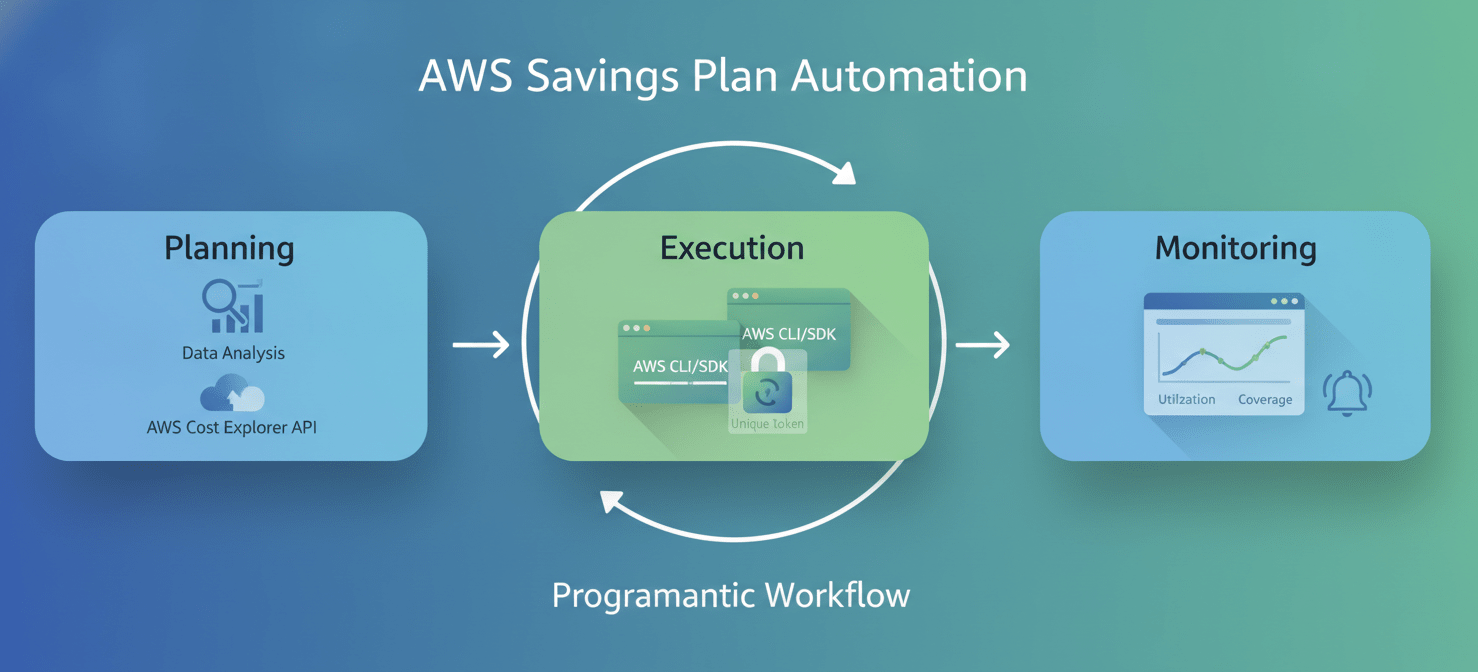
A robust automation strategy can be broken down into three phases: planning, execution, and monitoring.
-
Planning: This phase is all about data analysis. Instead of relying on the static recommendations in the console, your automation scripts should query the AWS Cost Explorer API directly. This allows you to fetch granular, up-to-date usage data and build a more accurate picture of your baseline compute spend. You can then use the Savings Plans Purchase Analyzer to model different commitment scenarios before making a financial decision. For example, you can simulate the impact of a $50/hour commitment versus a $60/hour commitment to see how it affects your estimated savings and utilization.
-
Execution: Once you have determined the optimal commitment, the next step is to execute the purchase programmatically. The AWS CLI and SDKs provide the necessary commands and functions to create Savings Plans. A critical best practice in this phase is to implement idempotency controls. This ensures that if your automation script runs multiple times, it doesn’t accidentally purchase the same Savings Plan repeatedly. You can achieve this by using a unique client token for each purchase request.
-
Continuous Monitoring: A “set and forget” approach does not work for Savings Plans. Therefore, your automation should continuously monitor the performance of your commitments. The two most important metrics to track are utilization and coverage. Utilization tells you what percentage of your committed spend is actually being used, while coverage shows what percentage of your eligible compute usage is covered by a Savings Plan. By tracking these KPIs, you can identify when adjustments are needed, such as purchasing additional plans to increase coverage or right-sizing existing commitments as they expire.
Integrating with Your DevOps Toolchain
The real power of cloud spend automation comes from integrating it into your existing workflows. For instance, you can create a CI/CD pipeline that triggers your Savings Plan analysis script on a regular schedule (e.g., weekly). The output of this script could be a report that is automatically sent to a Slack channel for review. For more advanced automation, you could configure the pipeline to automatically purchase new Savings Plans up to a certain threshold, with larger commitments requiring manual approval.
By treating Savings Plan management as code, you gain the ability to version control your commitment strategy, peer review changes, and maintain a clear audit trail of all purchases. This approach transforms cost optimization from a reactive, manual task into a proactive, automated process that scales with your infrastructure.
Step-by-Step: Building Your Savings Plan Automation Workflow
Building an automated workflow for managing AWS Savings Plans involves a series of logical steps, from setting up the necessary permissions to deploying your monitoring and execution scripts. Here is a practical, step-by-step guide to help your team get started.
1. Configure IAM Permissions
Before you can interact with the AWS APIs for Cost Explorer and Savings Plans, you need to create an IAM role or user with the appropriate permissions. For security, always follow the principle of least privilege. The essential permissions required are:
ce:GetSavingsPlansPurchaseRecommendationce:GetSavingsPlansCoveragece:GetSavingsPlansUtilizationsavingsplans:DescribeSavingsPlanssavingsplans:CreateSavingsPlansavingsplans:ListTagsForResourcesavingsplans:TagResource
It is a best practice to create a dedicated IAM role for this automation and have your script or execution environment assume that role.
2. Analyze Historical Usage with the Cost Explorer API
The foundation of any good commitment strategy is a thorough understanding of your historical usage. The AWS Cost Explorer API is the primary tool for this analysis. You can use the get_savings_plans_purchase_recommendation action to retrieve AWS-generated recommendations based on your past usage.
Here is a sample AWS CLI command to get recommendations for a one-year, all-upfront Compute Savings Plan, based on the last 30 days of usage:
aws ce get-savings-plans-purchase-recommendation \
    --savings-plans-type COMPUTE_SP \
    --term-in-years ONE_YEAR \
    --payment-option ALL_UPFRONT \
    --lookback-period-in-days THIRTY_DAYS
The output of this command will provide a recommended hourly commitment, along with estimated savings. While these recommendations are a good starting point, remember that they are based on historical data and do not account for future changes in your infrastructure.
3. Programmatically Purchase Savings Plans
Once you have determined the appropriate hourly commitment, you can use the create-savings-plan command to make the purchase. It is crucial to include a unique client request token to prevent duplicate purchases.
Here is an example of how to purchase a Savings Plan with a $10/hour commitment:
aws savingsplans create-savings-plan \
    --savings-plan-offering-id <offering_id> \
    --commitment "10.00" \
    --upfront-payment-amount <amount> \
    --client-token <unique_token>
You will need to first query for the correct savings-plan-offering-id based on the plan type, term, and payment option you have chosen.
4. Set Up Automated Monitoring and Alerting
After purchasing a Savings Plan, you need to continuously monitor its performance. You can use the get_savings_plans_utilization and get_savings_plans_coverage actions in the Cost Explorer API to track your key metrics.
Your automation script should run on a regular schedule (e.g., daily or weekly) to fetch this data. You can then set up alerts to notify your team if utilization drops below a certain threshold (e.g., 90%) or if coverage is not meeting your target. AWS Budgets can also be configured to send alerts based on Savings Plan utilization and coverage.
For a more advanced setup, you can use Amazon EventBridge to create event-driven workflows. For example, you could create a rule that triggers a Lambda function whenever a new Savings Plan is purchased, which then adds the details of the plan to a central tracking database.
Measuring Success: KPIs for Automated Cloud Cost Optimization
To ensure your cloud spend automation efforts are delivering value, you must track the right Key Performance Indicators (KPIs). These metrics provide objective feedback on the effectiveness of your strategy and help you identify areas for improvement. For DevOps teams, the most relevant KPIs go beyond simple cost savings and measure the efficiency and health of your commitment portfolio.
Core Performance Metrics
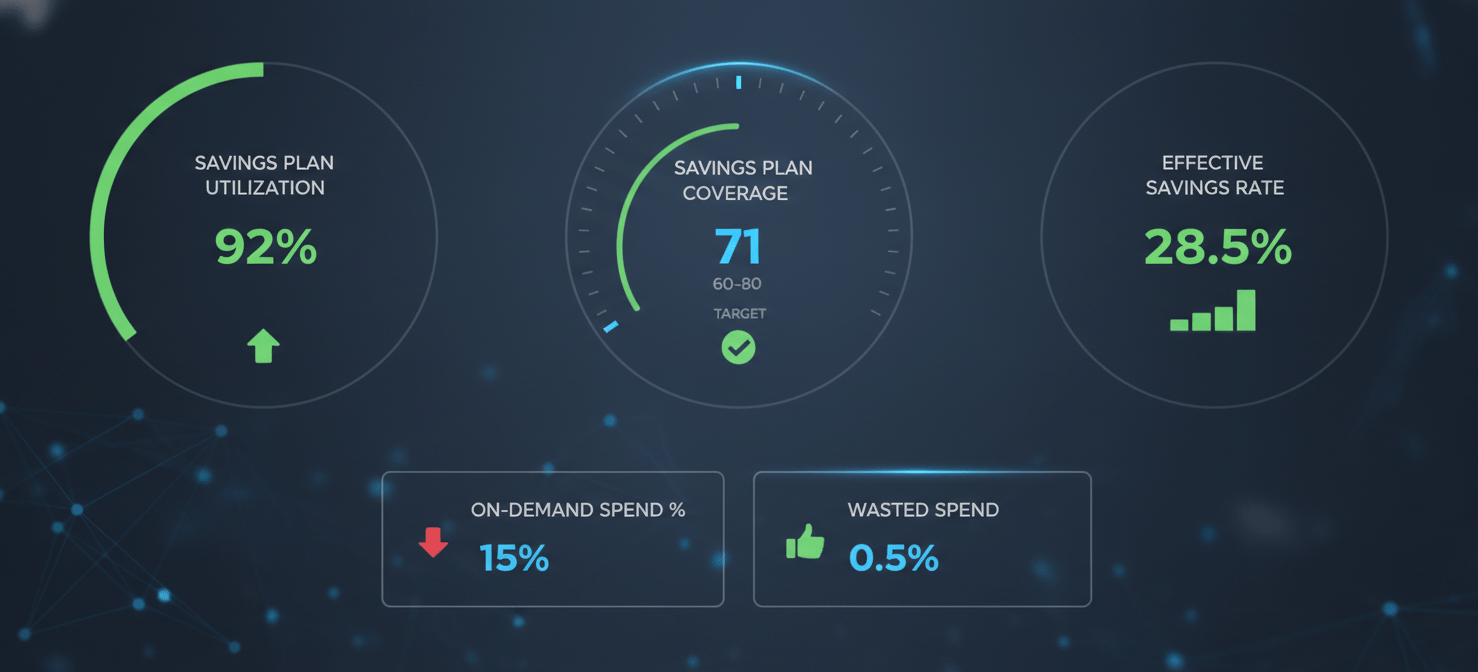
- Savings Plan Utilization: This is the most critical KPI for measuring the efficiency of your commitments. It represents the percentage of your purchased Savings Plan commitment that is being applied to eligible usage. A consistently high utilization rate (ideally 95% or higher) indicates that you are not wasting money on unused commitments. Conversely, a low utilization rate signals that you have over-committed and are paying for capacity you don’t need.
- Savings Plan Coverage: This metric measures the percentage of your total eligible compute spend (EC2, Fargate, Lambda) that is covered by Savings Plans. While 100% coverage might seem ideal, it can be risky in dynamic environments. A more practical target for many organizations is between 80% and 95%, as this provides a buffer for unexpected usage spikes that are better served by On-Demand pricing.
- Effective Savings Rate (ESR): This KPI calculates the actual, blended discount you are achieving across your entire compute spend. It is calculated by comparing your total compute costs with what you would have paid at On-Demand rates. ESR provides a holistic view of your cost optimization efforts, factoring in the performance of both your Savings Plans and any other discount instruments you may be using.
Operational and Financial Metrics
- On-Demand Spend as a Percentage of Total Compute: This metric helps you understand how much of your compute spend is still exposed to the highest pricing tier. A primary goal of cloud spend automation is to minimize this percentage by strategically increasing your Savings Plan coverage. Tracking this over time will clearly demonstrate the impact of your automation efforts.
- Commitment Churn Rate: This KPI tracks how frequently you are letting Savings Plans expire without renewing or replacing them. A high churn rate can lead to gaps in coverage and a sudden increase in On-Demand spend. An automated workflow should aim to minimize churn by queuing renewals for expiring plans well in advance.
- Wasted Spend: This is the dollar value of your underutilized Savings Plan commitments. It is calculated by multiplying your hourly commitment by the number of hours in a month and then subtracting the actual usage covered by the plan. This is a direct measure of financial inefficiency and should be driven as close to zero as possible.
By regularly tracking and reporting on these KPIs, you can provide clear, data-backed evidence of the value your automation is delivering. This not only justifies the engineering effort involved but also fosters a culture of cost awareness within your team.
Tools and Services for Advanced Automation
While building your own automation scripts using the AWS CLI and SDKs provides a high degree of control, several third-party tools and services can accelerate your efforts and provide more advanced capabilities. These platforms are designed specifically for cloud financial management and can significantly reduce the engineering overhead required to maintain an optimal commitment portfolio.
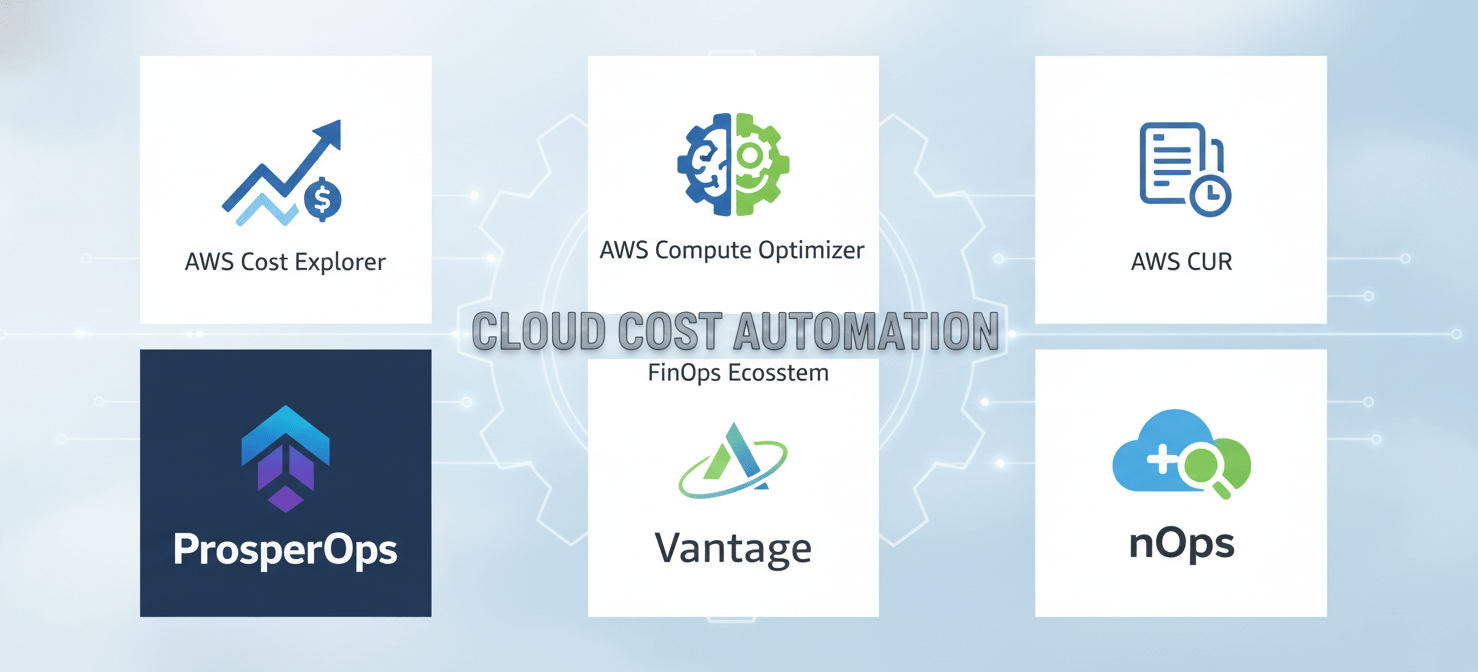
Third-Party Automation Platforms
Several vendors offer platforms that specialize in the autonomous management of AWS commitments. These tools typically connect to your AWS billing data and use proprietary algorithms to continuously analyze your usage patterns and automatically execute Savings Plan purchases and sales.
- ProsperOps: This platform automates a “rolling” or “laddered” Savings Plan strategy, where commitments are distributed across multiple smaller plans with staggered expiration dates. This approach improves flexibility and reduces the risk associated with long-term, monolithic commitments. ProsperOps continuously analyzes usage and adjusts the commitment portfolio to maintain optimal coverage.
- Vantage: Vantage offers a feature called Autopilot, which automates the management of Savings Plans. It can be configured to operate in either an automatic or an approval-based mode. The platform analyzes your compute spend, provides a savings estimate, and can be enabled to automatically purchase commitments to cover your on-demand usage.
- nOps: This tool provides a broader FinOps platform that includes capabilities for automating commitment management. It monitors your usage and existing commitments to move workloads between Savings Plans and Spot Instances to maximize savings.
These platforms typically charge a percentage of the savings they generate, which can be a cost-effective model for organizations that want to implement advanced cloud spend automation without dedicating significant internal engineering resources.
Native AWS Services for Deeper Analysis
In addition to the core Cost Explorer API, AWS offers other services that can enhance your automation and analysis capabilities:
- AWS Cost and Usage Report (CUR): The CUR provides the most detailed billing data available, with hourly granularity. You can deliver this report to an Amazon S3 bucket and then use services like Amazon Athena and Amazon QuickSight to perform deep analysis of your usage patterns. This data can be invaluable for building sophisticated forecasting models to inform your Savings Plan purchases.
- AWS Compute Optimizer: This service analyzes the configuration and utilization metrics of your resources to recommend optimal sizing. Integrating Compute Optimizer recommendations into your workflow before purchasing Savings Plans is a critical best practice. Right-sizing your instances first ensures that you are not committing to paying for underutilized resources for one or three years.
By combining the power of native AWS services with the advanced automation capabilities of third-party platforms, you can build a comprehensive and highly effective strategy for automated cloud cost optimization.
Conclusion
Moving from a manual, reactive approach to a programmatic, automated strategy for managing AWS Savings Plans is essential for any DevOps team serious about controlling costs. Manual processes are too slow and error-prone to keep up with the dynamic nature of modern cloud infrastructure, inevitably leading to wasted spend or missed savings opportunities. By treating commitment management as an engineering discipline—leveraging APIs, building automated workflows, and tracking the right KPIs—you can transform cost optimization from a periodic chore into a continuous, efficient process. This is how you effectively automate cloud spend reduction.
The tools and data are readily available through native AWS services like the Cost Explorer API. For teams looking to accelerate their efforts, third-party platforms offer sophisticated automation out of the box. Ultimately, the specific implementation matters less than the shift in mindset. Stop clicking buttons in the console and start writing code. After all, if a task is repetitive, data-driven, and critical to your budget, the only sensible thing to do is automate it. Your finance department will thank you.
If you’re ready to move beyond manual processes and fully automate your AWS Savings Plans management, you can begin a free Binadox trial today or book a demo to discover how our platform integrates seamlessly with your existing DevOps toolchain.
 7-day free trial