



As an enterprise architect, you are constantly evaluating how to standardize platforms, consolidate vendors, and design for multi-cloud realities. When it comes to delivering applications on Azure, two key services—Application Gateway and Azure Front Door—present a critical decision point. They both manage web traffic, but they operate at fundamentally different scopes. Making the wrong choice can lead to performance bottlenecks, security gaps, and significant cost overruns. This analysis moves beyond a simple feature comparison to dissect the azure application gateway vs front door cost implications from an architectural standpoint.
Key takeaways
- Global vs. Regional: Front Door is a global edge service for internet-facing applications, while Application Gateway is a regional service for traffic management inside your virtual network (VNet).
- Pricing Model Divergence: Front Door uses a consumption-based model with a base monthly fee (starting at $35/month for the Standard tier) plus charges for data transfer and requests. Application Gateway V2 has fixed hourly costs plus consumption-based “Capacity Units.”
- Combined Architecture: For complex, resilient applications, the optimal and often most cost-effective solution involves using both services together. Front Door handles global routing and edge security, while Application Gateway manages intricate routing within each region.
- Hidden Costs: The most significant cost drivers are often not the hourly fees but the variable charges for data processing and outbound data transfers, which can account for a large portion of the monthly bill if not managed.
The Core Distinction: Regional vs. Global
The most critical factor in the Azure Application Gateway vs. Front Door decision is the service’s operational scope. This distinction directly impacts your architecture, performance KPIs, and ultimately, your budget.
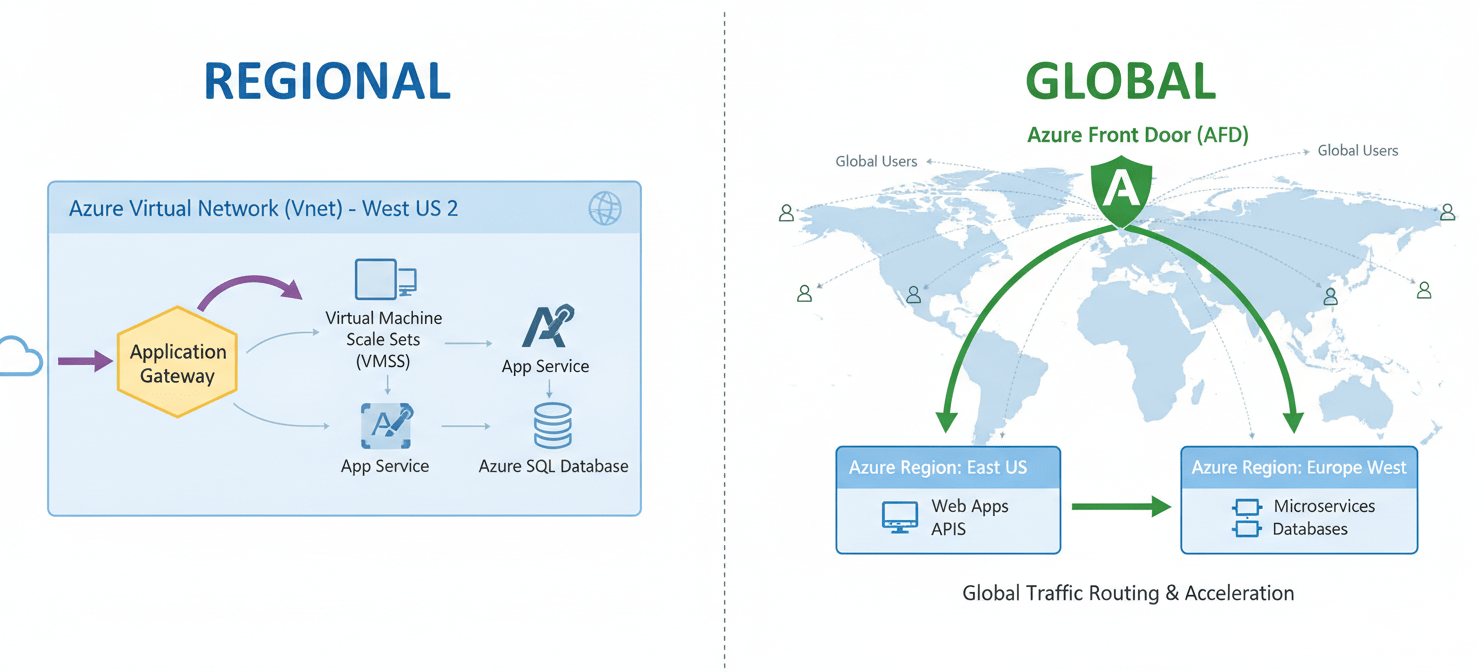
Azure Application Gateway is a regional Layer 7 load balancer. It operates within your Virtual Network (VNet), making it an ideal choice for managing traffic between tiers of an application or for intricate routing of traffic that has already entered your Azure environment. Think of it as a sophisticated traffic controller for a specific metropolitan area. Its strengths lie in features like SSL termination, URL path-based routing, and multi-site hosting within a single region.
Azure Front Door, in contrast, is a global service that operates at the edge of Microsoft’s network. It uses Anycast to route incoming user requests to the nearest and most performant application backend, regardless of which Azure region it resides in. This makes it a content delivery network (CDN) and global load balancer rolled into one. It is designed for public-facing applications that serve a geographically dispersed user base.
For your team, this means the initial choice is dictated by your application’s footprint. If you are standardizing a platform for a single-region deployment, Application Gateway is a strong contender. However, for any multi-region or global strategy, Front Door becomes almost a necessity for performance and availability.
Architectural Patterns and Their Cost Implications
The choice between these services is not always an either/or decision. Often, the most robust and cost-efficient architecture for an enterprise application involves using them together.
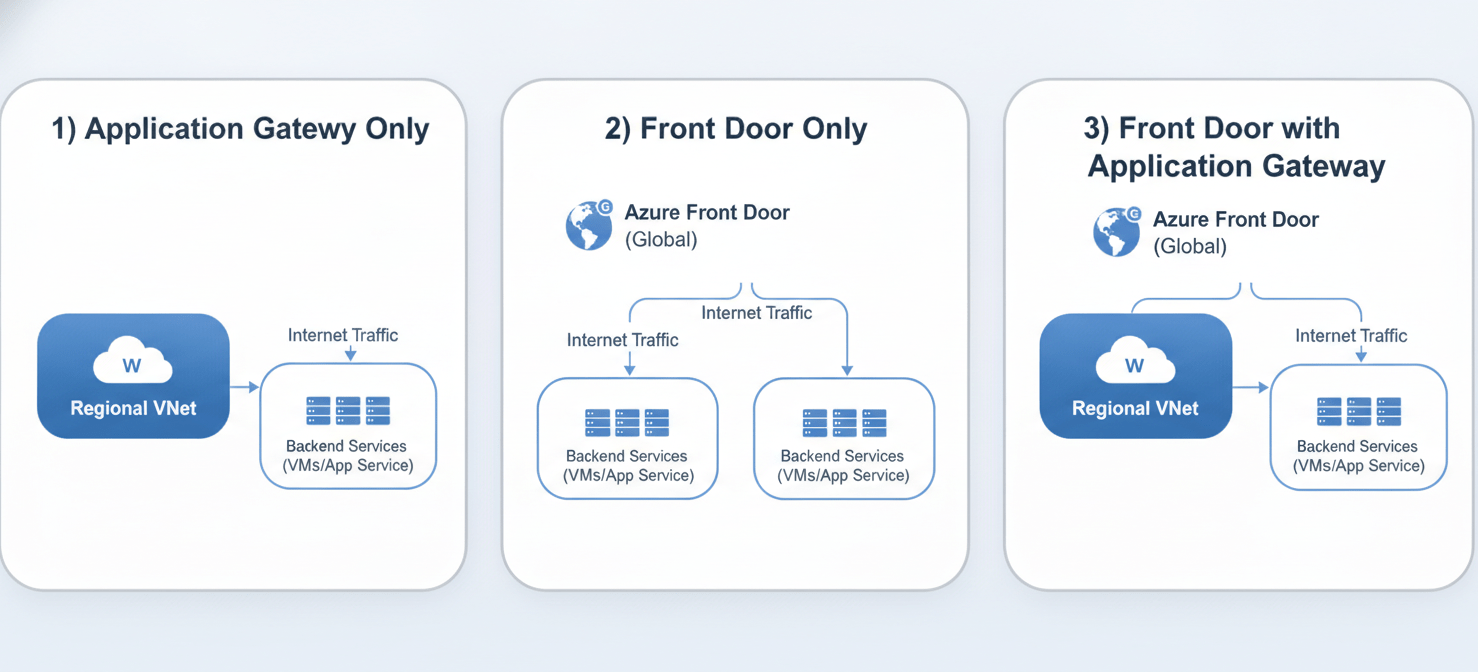
Pattern 1: Application Gateway Only (Regional Workloads)
In this model, an Application Gateway is deployed within a VNet to manage traffic to backend services like VMs, container instances, or App Services. This is a common pattern for traditional enterprise applications that are not globally distributed.
- Cost Profile: You pay an hourly rate for the gateway being provisioned and available, plus a variable cost for the amount of data it processes. The V2 SKU introduces “Capacity Units,” which is a consumption-based measure combining compute, persistent connections, and throughput. This model can be cost-effective for predictable, regional traffic but does not address global latency issues.
Pattern 2: Front Door Only (Simple Global Workloads)
Here, Front Door acts as the single global entry point, routing traffic directly to backend services in various regions. This is suitable for modern web applications or APIs that need global reach but have simple routing requirements.
- Cost Profile: The pricing model includes a fixed monthly base fee for the profile and variable costs for outbound data transfer (edge to client), requests, and data transfer from the edge to your origin. For applications with high volumes of cacheable content, Front Door can be cheaper per-GB than direct storage egress.
Pattern 3: Front Door with Application Gateway (Comprehensive Enterprise Architecture)
This is the recommended pattern for complex, mission-critical applications. Front Door sits at the edge, providing global load balancing, DDoS protection, and WAF capabilities. It then routes traffic to a regional Application Gateway. The Application Gateway handles the fine-grained routing within the VNet, such as path-based rules and SSL offloading.
- Cost Profile: This pattern incurs costs for both services. However, it can lead to overall TCO reduction. Front Door’s WAF can filter malicious traffic at the edge, reducing the data processing load (and cost) on the regional Application Gateways. Furthermore, Front Door’s caching can offload requests entirely, preventing them from ever hitting your backend infrastructure.
Feature Breakdown: Where the Hidden Costs Lie
A simple comparison of hourly rates is misleading. The true cost of either service is deeply tied to its features and how you use them.
Web Application Firewall (WAF)
Both services offer a WAF, but the pricing and integration differ significantly.
- Application Gateway WAF: The WAF is integrated into specific WAF SKUs of the Application Gateway. For the V2 SKU, you pay a fixed hourly price plus a charge per “Capacity Unit hour.” This provides defense-in-depth for traffic already inside your regional network.
- Front Door WAF: WAF capabilities are included with the Premium tier of Front Door, which has a higher base monthly fee (around $330/month). This allows you to block threats at the network edge before they consume resources in your primary datacenter. For a global application, paying the premium for Front Door’s WAF can be more cost-effective than processing and filtering attack traffic at multiple regional gateways.
Content Caching and Acceleration
This is a key differentiator and a major factor in the azure global load balancing cost.
- Application Gateway: Does not offer built-in content caching.
- Front Door: Provides robust caching capabilities similar to a traditional CDN. By caching static content at edge locations, Front Door reduces latency for users and significantly lowers costs by reducing the amount of data transferred from your origin servers. Each request served from the cache avoids an edge-to-origin data transfer charge.
SSL/TLS Offloading
Both services can terminate SSL/TLS connections, which offloads the computationally expensive decryption and encryption work from your backend servers.
- Application Gateway: Provides end-to-end SSL encryption, where it decrypts traffic, inspects it, and then re-encrypts it before sending it to the backend.
- Front Door: Also handles SSL termination at the edge. This reduces the initial connection latency for users. The cost for this feature is bundled into the base service fees.
Azure Application Gateway vs Front Door Cost: A Detailed Comparison
To make an informed decision, you must model your costs based on expected traffic patterns. Let’s consider a hypothetical scenario.
Scenario: An enterprise application with backends in two Azure regions (US East and West Europe) serving 10TB of outbound data transfer per month with 50 million requests.
-
Application Gateway (V2 WAF SKU):
- Fixed Costs: You would need at least one gateway per region. The hourly cost for the gateway itself would be a primary component.
- Variable Costs: The main driver would be the “Capacity Units” consumed and the data processed. Since Application Gateway is regional, you would also need a separate global load balancer like Azure Traffic Manager to direct users to the correct regional gateway, adding another layer of cost and complexity.
-
Azure Front Door (Premium SKU for WAF):
- Fixed Costs: A single monthly fee for the Premium profile (e.g., $330/month).
- Variable Costs:
- Outbound Data Transfer (Edge to Client): The first 10TB from North America or Europe is charged at a specific rate per GB (e.g., $0.083/GB).
- Requests: A charge per 10,000 requests.
- Edge to Origin Data Transfer: A lower rate per GB for traffic that is not cached.
In this scenario, while the base fee for Front Door seems high, the elimination of a separate global load balancer and the potential for cost savings through caching could make it the more economical choice for a multi-region deployment. The azure front door or application gateway decision hinges on these variable, usage-based metrics.
Making the Right Choice for Your Enterprise
Your decision framework should be rooted in your architectural principles of standardization, consolidation, and cost management.
-
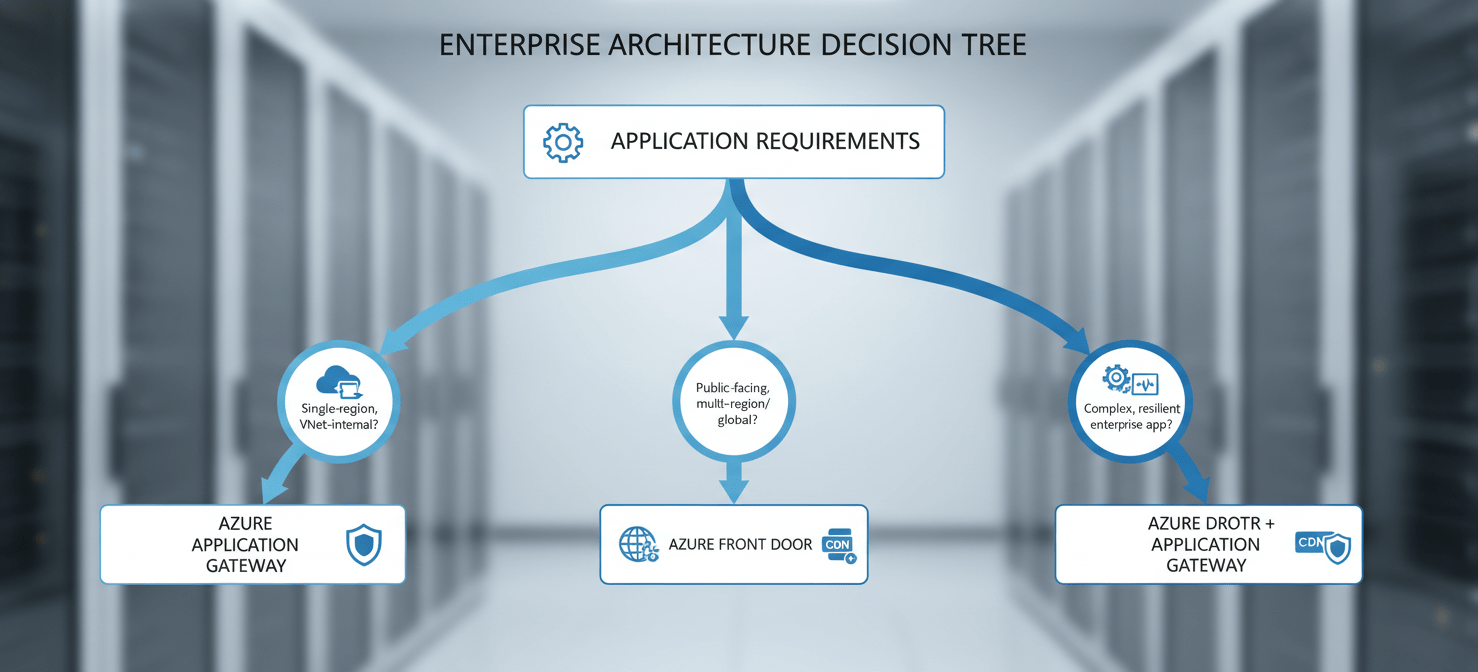
For single-region, VNet-internal workloads: If your application serves users from a single region and requires complex internal routing (e.g., URL-based routing to different microservices), Application Gateway is the more direct and cost-effective solution. It provides granular control where you need it, inside your network perimeter.
-
For all public-facing, multi-region, or global workloads: If your application is internet-facing and serves a geographically diverse user base, Azure Front Door should be your default starting point. Its global load balancing, edge caching, and integrated WAF provide performance and security benefits that a regional gateway cannot match. The potential for latency reduction and data transfer cost savings through caching is significant.
-
For resilient, complex enterprise applications: The hybrid model of Front Door with Application Gateway in each region offers the most robust solution. This architecture allows you to standardize your global entry point and edge security with Front Door, while delegating region-specific routing logic to Application Gateway. This layered approach aligns with a defense-in-depth security posture and provides the best of both worlds.
Conclusion
Ultimately, the debate over Azure Application Gateway vs. Front Door is not about which service is “better,” but which tool is right for the job. Application Gateway is a scalpel for regional traffic surgery, while Front Door is the global shield and accelerator for your internet-facing estate. A superficial glance at hourly rates will lead you astray. Instead, a thorough analysis of your traffic patterns, geographic distribution, and security requirements is essential. By modeling the variable data transfer and processing fees, you can accurately forecast the total cost of ownership. The correct architectural choice will not only optimize performance and security but also provide a predictable and manageable answer to the azure application gateway vs front door cost question, preventing the kind of budget surprises that no enterprise architect enjoys explaining.
To truly master your Azure architecture and avoid unexpected costs, it’s crucial to gain deep insights into your specific usage patterns; you can then connect with our experts to explore optimization strategies or access your free Binadox trial to see the savings firsthand.
 7-day free trial