



Azure’s networking gateways are the gatekeepers of your cloud environment, managing traffic between your virtual networks, on-premises data centers, and the public internet. While essential for connectivity and security, these services can become a significant and often overlooked part of your monthly Azure bill. Effective Azure gateway cost optimization requires a clear understanding of how each gateway is priced, how to choose the right components, and how to monitor usage to eliminate waste. This guide provides a complete framework for managing and reducing your Azure networking costs.
Key takeaways
- Right-size your SKUs: Choosing the correct gateway SKU based on your actual throughput and feature needs is the single most important factor. Overprovisioning is a primary source of wasted spend.
- Understand data transfer costs: While ingress data is free, egress and inter-regional data transfers incur charges that can accumulate quickly. Plan your architecture to minimize cross-region traffic.
- Leverage monitoring tools: Use Azure Advisor and Azure Cost Management + Billing to get actionable recommendations, such as identifying idle gateways or opportunities for resizing, potentially reducing costs by shutting down underutilized instances.
- Automate de-provisioning: Implement scripts or policies to automatically shut down or delete gateways in non-production environments during off-hours to stop hourly charges for idle resources.
Understanding the Pricing Models of Key Azure Gateways
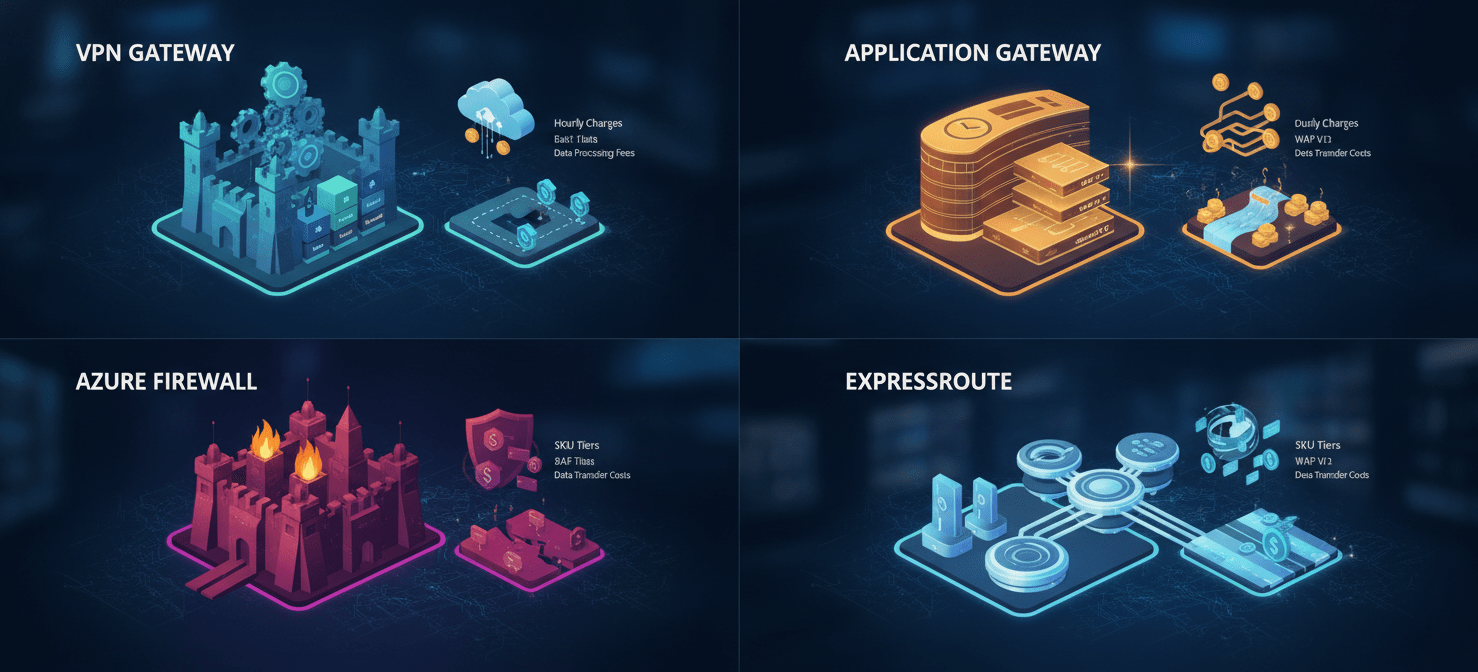
Optimizing costs begins with a firm grasp of how Azure bills for its various gateway services. Each gateway has a unique pricing structure, typically combining fixed hourly charges with variable data processing fees. Misunderstanding these models often leads to budget overruns.
VPN Gateway
Azure VPN Gateway provides secure connectivity between your Azure Virtual Network (VNet) and on-premises locations or other VNets. Its pricing is primarily based on an hourly charge for the gateway itself, which varies significantly depending on the selected SKU (e.g., Basic, VpnGw1, VpnGw2AZ).
- Gateway Hours: You are billed for each hour the VPN gateway is provisioned and available. Monthly estimates are often based on 730 hours of usage.
- SKU Selection: The SKU determines the gateway’s performance, throughput, and the number of supported tunnels. Higher-tier SKUs like VpnGw5AZ cost substantially more per hour than the Basic SKU. Zone-redundant SKUs (ending in “AZ”) offer higher availability but also come at a premium.
- Data Transfer: While setting up a virtual network is free, outbound data transfers from the VPN gateway are charged at standard data transfer rates. Inter-VNet data transfers are now discounted from standard rates.
Application Gateway and WAF
Azure Application Gateway is a web traffic load balancer that enables you to manage traffic to your web applications. When equipped with the Web Application Firewall (WAF), it provides protection against common web vulnerabilities.
- Fixed and Variable Costs: The total cost is a combination of a fixed hourly price and a variable data processing cost. You are billed for the time the gateway is provisioned and for the data it processes.
- SKU and Instance Count: The V1 SKUs (Standard/WAF) are billed based on size (Small, Medium, Large) and the number of instances. The V2 SKUs (Standard_v2/WAF_v2) introduce “Capacity Units,” a measure of consumption based on compute units, persistent connections, and throughput, in addition to a fixed hourly cost. The WAF tiers add a significant cost premium over the standard tiers.
- Data Processing: You are charged for the amount of data processed by the gateway. For some V1 SKUs, a certain amount of data processing is included, with charges applying after that threshold is met.
Azure Firewall
Azure Firewall is a managed, cloud-based network security service that protects your Azure Virtual Network resources. Its pricing is also two-fold.
- Deployment Hour: A fixed fee is charged for each hour the firewall is deployed. This hourly rate differs between the Basic, Standard, and Premium SKUs, with Premium being the most expensive due to its advanced threat protection capabilities.
- Data Processing: A variable fee is charged per gigabyte of data processed by the firewall. The per-GB rate for the Standard and Premium SKUs is significantly lower than for the Basic SKU.
ExpressRoute
For enterprises needing a private, dedicated connection to Azure, ExpressRoute is the solution. Its pricing is more complex, involving multiple components.
- Port Speed and SKU: You choose a specific port speed (e.g., 50 Mbps to 100 Gbps) and a circuit SKU (Local, Standard, or Premium). The Premium SKU allows global connectivity to all Azure regions for a higher fee.
- Billing Model: You can choose between a metered data plan, where you pay for outbound data transfer, or an unlimited data plan, which has a higher monthly fee but includes all data transfer. The unlimited plan is generally cost-effective only at very high sustained utilization rates (around 65% or more).
- Gateway Costs: In addition to the circuit cost, you must also provision an ExpressRoute gateway in your VNet, which has its own hourly charge based on its SKU (e.g., Standard, High Performance, Ultra Performance).
Right-Sizing Your Gateways: The Core of Azure Gateway Cost Optimization
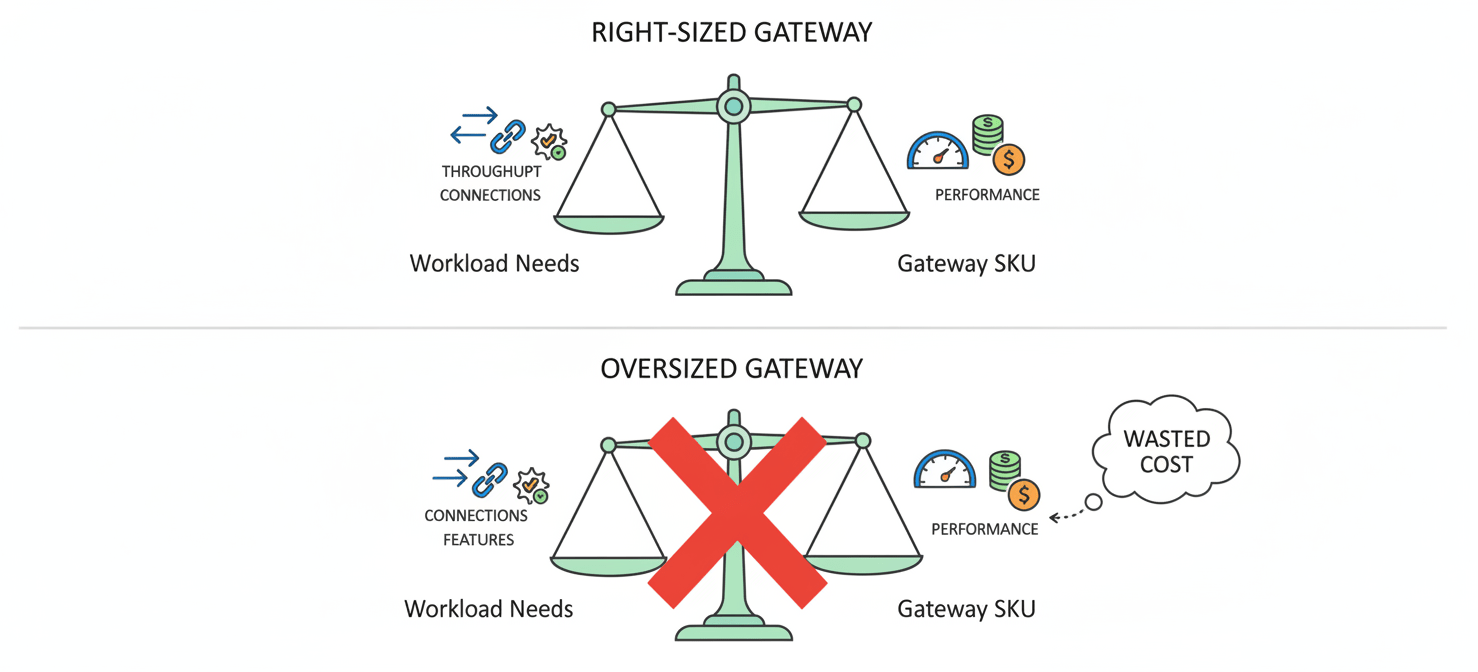
The most direct path to Azure gateway cost optimization is ensuring every gateway is correctly sized for its workload. Overprovisioning is a common and costly mistake. An oversized gateway accrues unnecessary hourly charges without providing any additional benefit.
How to Analyze Your Needs
Before deploying a gateway, your team should perform a thorough analysis of your requirements.
- Throughput: What is the expected peak and average data transfer volume? Analyze historical network traffic data if available. For new applications, create realistic estimates based on user load and data size.
- Connections: How many concurrent site-to-site (S2S) tunnels, point-to-site (P2S) user connections, or web application sessions do you need to support? Each gateway SKU has specific limits.
- Features: Do you require advanced features like zone redundancy for high availability, TLS inspection (Azure Firewall Premium), or global VNet peering (ExpressRoute Premium)? These features are tied to more expensive SKUs.
Choosing the Right SKU
Once you have a clear picture of your needs, you can select the most appropriate and cost-effective SKU.
- Start Small and Scale: For new deployments with uncertain traffic patterns, it’s often best to start with a lower-tier SKU and monitor its performance. Azure makes it relatively easy to scale up to a higher SKU if the initial choice proves insufficient.
- Match SKU to Throughput: For a VPN Gateway, if your expected aggregate throughput is 500 Mbps, choosing the VpnGw1 SKU (with a 650 Mbps benchmark) is more prudent than jumping to the VpnGw2 SKU (1 Gbps).
- Evaluate Redundancy Needs: Zone-redundant gateways (e.g., VpnGw1AZ) provide higher uptime SLAs but cost more than their single-zone counterparts. Assess whether the criticality of the workload justifies the added expense. For less critical dev/test environments, non-redundant SKUs are a sensible way to save money.
Regularly Review and Adjust
Azure networking cost management is not a one-time task. Your workloads and traffic patterns will change over time.
- Use Azure Monitor: Set up alerts in Azure Monitor to track key metrics like Gateway P2S/S2S Bandwidth and CPU Utilization. Consistently low utilization is a clear indicator that you can safely scale down to a cheaper SKU.
- Quarterly Reviews: Institute a process for your team to review the utilization and performance of all provisioned gateways on a quarterly basis. This ensures that gateways deployed for temporary projects are decommissioned and that production gateways remain appropriately sized.
Managing Data Transfer Costs
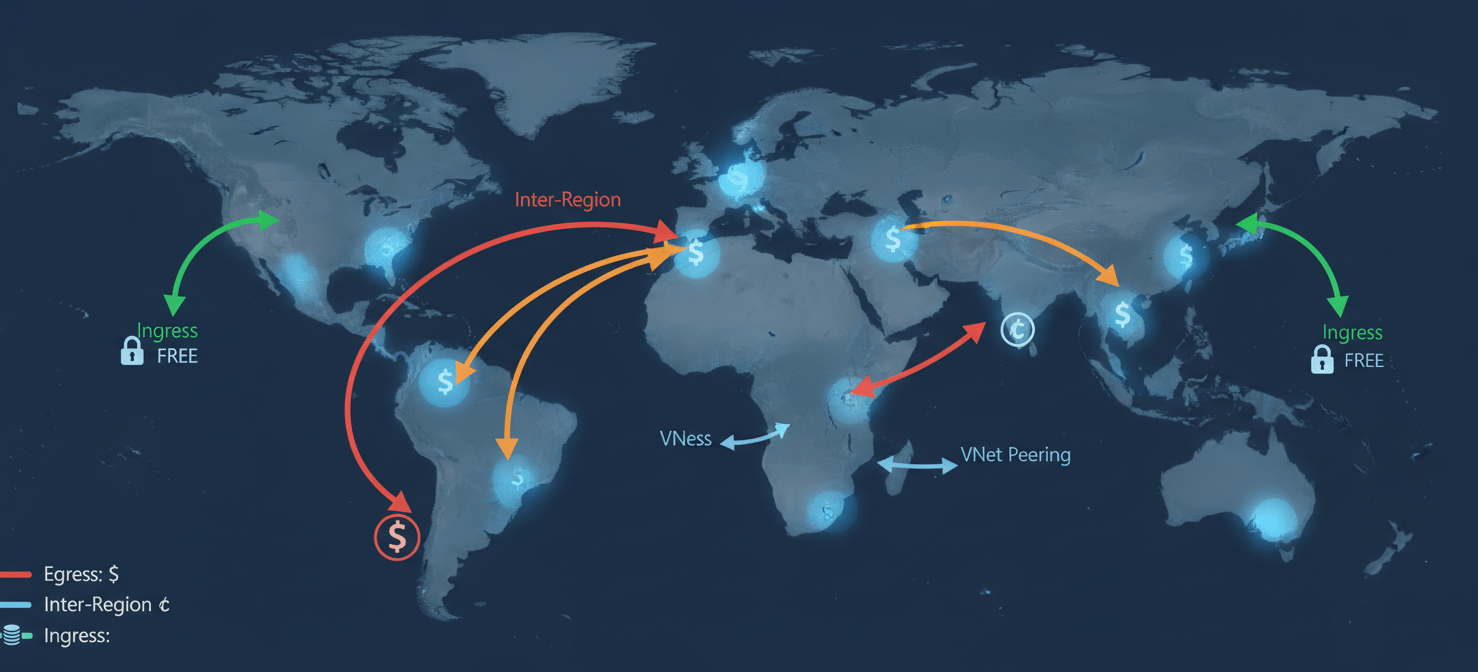
Data transfer fees are a subtle but significant component of networking costs. While data ingress (inbound to Azure) is generally free, data egress (outbound from Azure) and transfers between regions are not.
Understanding Egress and Cross-Region Traffic
- Internet Egress: Data leaving an Azure datacenter for the public internet is charged per GB. The rate varies by region and the total volume of data transferred.
- Inter-Region Transfer: Traffic between different Azure regions also incurs per-GB charges. For example, moving data from East US to West Europe costs more than moving it within North America.
- VNet Peering: Connecting VNets in the same region incurs a per-GB charge for both inbound and outbound traffic on the peering link.
- Availability Zones: Previously a source of cost, Microsoft has eliminated data transfer charges between Availability Zones within the same region, encouraging more resilient architectures without financial penalty.
Strategies to Minimize Data Transfer Fees
- Regional Resource Colocation: The most effective strategy is to place resources that communicate frequently, such as an application server and its database, in the same Azure region. This minimizes costly inter-region data transfers.
- Use Azure CDN: For serving large amounts of static content to geographically dispersed users, use Azure Content Delivery Network (CDN). Data transfer from Azure services to the CDN is free. You then pay for egress from the CDN edge locations, which can be cheaper than direct egress from your primary region.
- Optimize ExpressRoute Billing: If you use ExpressRoute, carefully analyze your outbound data patterns. The “Unlimited” data plan is only cost-effective for circuits with very high, sustained outbound traffic. For many workloads, the “Metered” plan is cheaper.
- Compress Data: Before transferring data out of Azure, compress it. This simple step can significantly reduce the volume of data subject to egress charges.
Leveraging Azure’s Cost Management Tools
Azure provides a powerful suite of native tools designed to help you monitor, control, and optimize your cloud spending. Integrating these tools into your regular operations is crucial for effective Azure networking cost management.
Azure Cost Management + Billing
This is your central hub for analyzing all Azure costs. It provides detailed breakdowns of where your money is going, allowing you to identify trends and unexpected spikes in spending.
- Cost Analysis: Use the cost analysis tool to filter and group expenses by service, resource group, or tag. For example, you can create a view that shows only the costs associated with your “Azure Firewall” resources across all subscriptions.
- Budgets and Alerts: Create spending budgets for specific subscriptions, resource groups, or tags. You can configure alerts to notify stakeholders via email or trigger an automated action (like running an Azure Function) when spending reaches a certain percentage of your budget. This proactive monitoring helps prevent surprises at the end of the billing cycle.
- Tagging Strategy: Implement a consistent tagging strategy for all your resources. For instance, use tags like
environment:prod,cost-center:finance, orproject:q3-reporting. This allows you to accurately allocate gateway costs back to the specific teams or projects that incurred them.
Azure Advisor
Azure Advisor is a personalized cloud consultant that analyzes your resource configuration and usage telemetry to provide actionable recommendations. Its cost recommendations are low-hanging fruit for optimization.
- Identifying Idle Resources: Advisor can automatically identify resources like Application Gateways or VPN Gateways that are provisioned but have little to no traffic. It will recommend deleting these idle resources to stop the hourly charges.
- Right-Sizing Recommendations: Based on historical usage data, Advisor will suggest resizing underutilized gateways to a smaller, less expensive SKU. For example, it might recommend changing a VpnGw2 to a VpnGw1 if it observes consistently low bandwidth usage.
- Actionable Insights: Each recommendation comes with an estimated annual savings figure, helping you prioritize the most impactful changes. You can often implement the recommended action with just a few clicks directly from the Advisor dashboard.
Architectural and Operational Best Practices
Beyond right-sizing and monitoring, certain architectural patterns and operational habits can lead to significant long-term savings.
Consolidate Gateways Where Possible
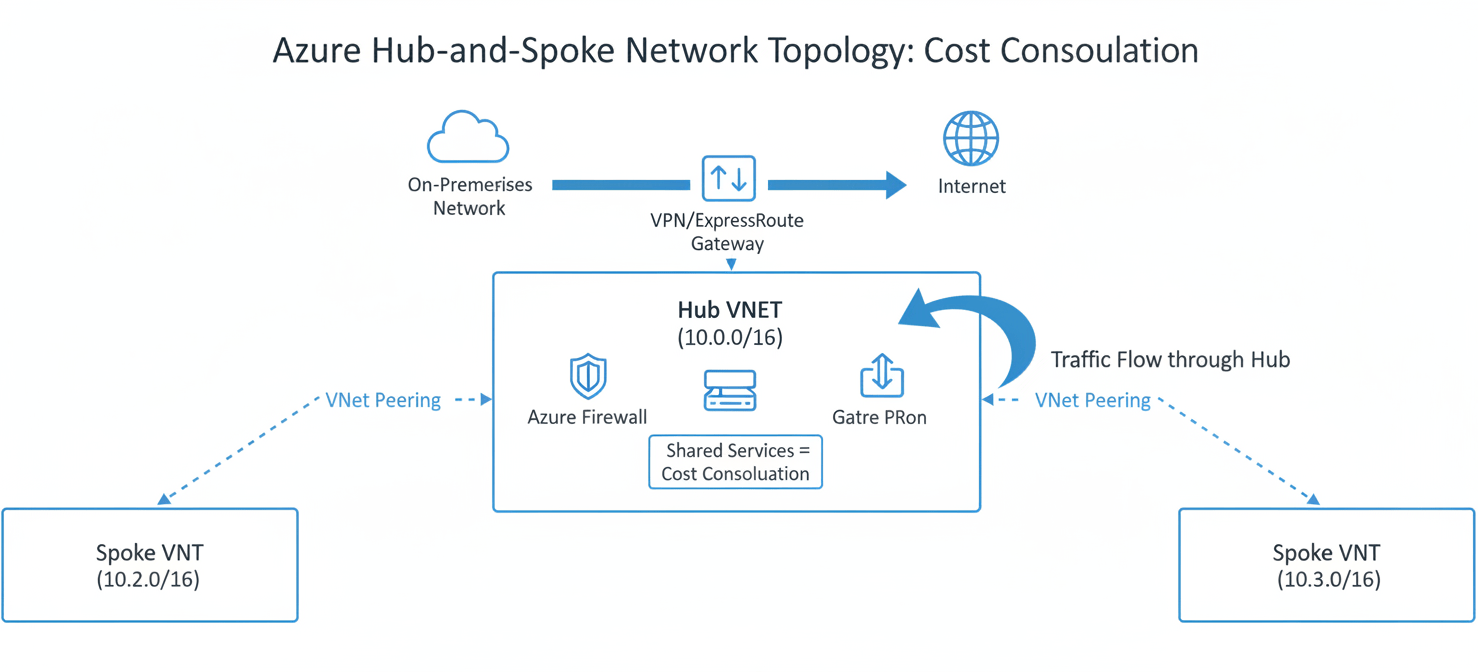
Instead of deploying a separate gateway for every VNet, consider a hub-and-spoke network topology.
- Hub-Spoke Model: In this design, a central “hub” VNet contains shared services, including a single, robust Azure Firewall and VPN or ExpressRoute gateway. Multiple “spoke” VNets are peered with the hub. All traffic from the spokes to on-premises or the internet is routed through the central hub gateway.
- Cost Savings: This model reduces the number of gateways you need to deploy and manage, consolidating costs into a single, shared resource. It also simplifies security management, as all traffic inspection policies are applied in one place.
Automate Non-Production Environments
Development and testing environments are often a major source of wasted spend, as gateways are left running 24/7 even when they are only needed during business hours.
- Scheduled Shutdowns: Use Azure Automation runbooks or simple scripts to automatically de-provision or shut down gateways in non-production environments overnight and on weekends. An Azure NAT Gateway, for example, is billed hourly from the moment it’s deployed until it’s deleted. Stopping these resources can cut their costs by over 60%.
- Infrastructure as Code (IaC): Use tools like Terraform or Bicep to define your gateway infrastructure. This makes it easy to quickly tear down and redeploy entire test environments, ensuring you only pay for resources when they are actively being used.
Consider Alternatives for Specific Use Cases
Not every scenario requires a full-fledged VPN or Application Gateway.
- Azure Bastion: For secure administrative access (RDP/SSH) to virtual machines without exposing them to the public internet, use Azure Bastion. It’s a fully managed PaaS service that provides a more secure and often more cost-effective alternative to deploying and managing a dedicated “jump box” VM. Bastion is billed hourly from the moment it’s deployed.
- NAT Gateway: For workloads that only need outbound internet connectivity (e.g., for software updates), an Azure NAT Gateway is a simpler and often cheaper solution than routing traffic through an Azure Firewall just for source network address translation (SNAT). However, be mindful of its per-GB data processing charge on top of the hourly fee.
Conclusion
Effectively managing your Azure gateway costs is not about cutting corners on performance or security; it is about eliminating waste through informed decision-making and diligent oversight. The core principles of Azure gateway cost optimization involve selecting the right tool for the job, sizing it correctly, and continuously monitoring its usage. By understanding the nuanced pricing models of each gateway, leveraging Azure’s native cost management tools, and adopting smart architectural patterns, your team can prevent networking costs from becoming an unchecked drain on your cloud budget. The goal is to pay only for what you need and use, and nothing more—a simple concept that requires a surprisingly disciplined approach to achieve.
To truly master your cloud spending and ensure optimal resource utilization, you can explore our platform’s capabilities with a free trial, or for a personalized walkthrough, book a demo with our experts.
 7-day free trial