



As an enterprise architect, you are responsible for designing a cloud environment that is not only scalable and secure but also cost-effective. In a sprawling Azure estate with hundreds or thousands of subscriptions, achieving consistent cost control is a significant challenge. This is where a well-defined strategy for Azure Management Groups becomes essential. Effective enterprise cloud cost governance hinges on the ability to apply policies, access controls, and budgets hierarchically. This article provides a detailed perspective on Azure cost governance best practices, focusing on how to leverage Management Groups to enforce financial accountability and prevent cost overruns before they impact your bottom line.
Key takeaways
- A well-designed Management Group hierarchy should be kept relatively flat, ideally with no more than three to four levels to reduce complexity.
- Enforce cost control by using Azure Policy at the Management Group level to restrict expensive VM SKUs, mandate resource tags, and limit deployments to specific regions.
- Start with a core set of five to eight mandatory tags for cost allocation, such as
CostCenter,Owner, andEnvironment, and enforce them using “deny” policies for new resources. - Use a combination of built-in Azure RBAC roles like Cost Management Contributor and custom roles to provide granular cost visibility to finance and business teams without granting excessive permissions.
The Role of Management Groups in Enterprise Cloud Cost Governance
Azure Management Groups are containers that help you manage access, policy, and compliance across multiple Azure subscriptions. Think of them as the foundational scaffolding for your entire governance strategy. Instead of configuring settings on each subscription individually—a process fraught with inconsistency and operational overhead—you can establish a hierarchy and apply governance conditions that cascade down through inheritance.
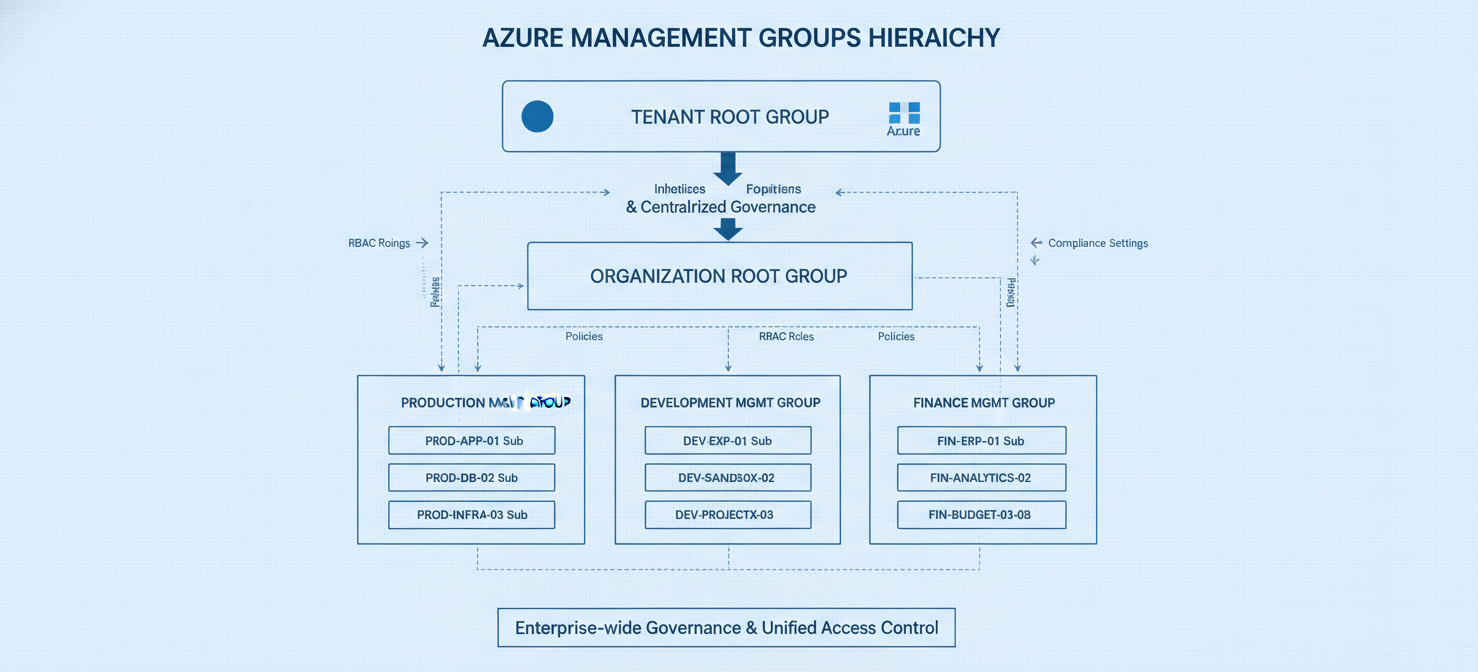
For an enterprise architect, their primary value lies in standardization at scale. When a new subscription is created, it can be placed into the appropriate management group and automatically inherit the necessary guardrails. This proactive approach to governance is far more effective than reactive cleanup efforts. From a cost perspective, this means you can enforce the rules that prevent budget blowouts from the very beginning.
Furthermore, Management Groups provide a consolidated view of costs. By scoping Azure Cost Management to a management group, you can track aggregate spending across a collection of subscriptions, which is invaluable for departmental chargebacks or analyzing the total cost of a specific business unit or environment.
Designing Your Management Group Hierarchy for Cost Control
The structure of your Management Group hierarchy is a critical decision that directly impacts the effectiveness of your cost governance. A poorly designed hierarchy can create unnecessary complexity, while a well-designed one provides clarity and control.
Start with a Foundational Structure
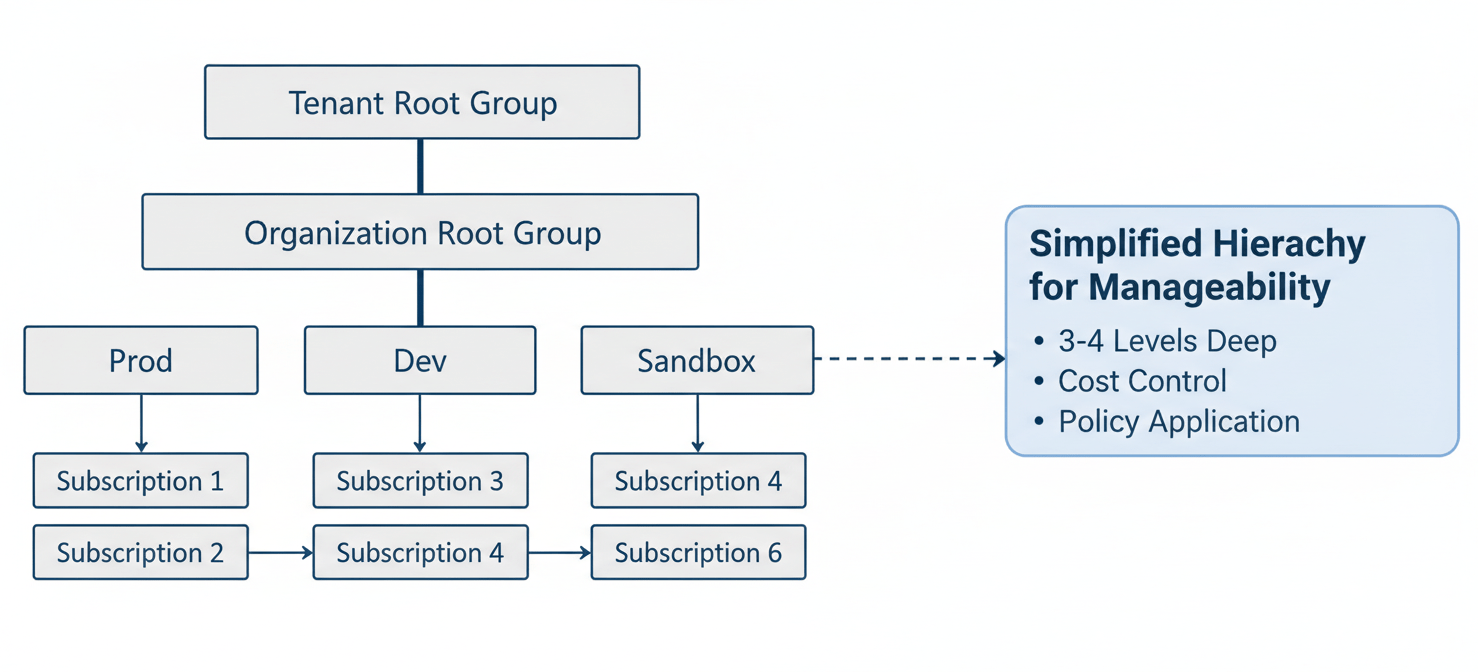
Microsoft’s Cloud Adoption Framework provides a recommended starting point that aligns well with most enterprise needs. It suggests a relatively flat structure, which is easier to manage and debug. A typical and effective hierarchy includes:
- Tenant Root Group: The top-level group that contains all other management groups and subscriptions. It’s a best practice to apply only a very limited set of global policies here.
- Organization Root Group: A single management group directly under the tenant root, often named after your organization. This serves as the primary container for all your subscriptions and prevents you from cluttering the tenant root.
- Primary Groups: Below the organization root, create groups that reflect your operational or business structure. Common models include:
- By Environment: (e.g., Production, Development, Sandbox) This is a simple and effective model for applying different cost control policies based on the environment’s criticality.
- By Business Unit: (e.g., Finance, HR, Marketing) This aligns costs directly with departmental budgets.
- By Application Archetype: (e.g., Landing Zones – Corp, Landing Zones – Online) This is useful for grouping applications with similar infrastructure and compliance needs.
A management group tree can support up to six levels of depth, not including the root or subscription levels. However, for the sake of simplicity and manageability, a flatter hierarchy of three to four levels is highly recommended.
Key Design Principles
When designing your hierarchy, adhere to these principles:
- Keep it Simple: Avoid replicating your entire organizational chart. A deep, complex hierarchy is difficult to navigate and troubleshoot.
- Align with Governance Needs: The structure should primarily serve policy assignment and access management, not just organizational mapping.
- Plan for the Future: Design a structure that can accommodate new business units, environments, or acquisitions without requiring a complete overhaul.
Implementing Azure Cost Governance Best Practices with Policies
Once your Management Group hierarchy is in place, Azure Policy becomes your primary tool for enforcing cost controls. Policies allow you to define and enforce rules for resource configuration, ensuring that all deployments adhere to your financial guardrails.
Essential Cost-Related Policies
Assigning policies at a high-level management group ensures they are inherited by all child subscriptions, creating a consistent baseline of cost control. Here are some of the most impactful policies for cost governance:
- Allowed Virtual Machine SKUs: Prevent the deployment of overly expensive or unnecessary VM sizes. This is a simple yet powerful way to curb a common source of budget overruns.
- Allowed Locations: Restrict resource deployments to specific Azure regions. This can help you take advantage of regional pricing differences and comply with data sovereignty requirements.
- Require a Tag and its Value: Enforce a consistent tagging strategy, which is the cornerstone of cost allocation and showback. For example, you can mandate that every resource group must have a
CostCentertag with a valid value from a predefined list. - Allowed Resource Types: Prevent the creation of specific resource types that are not approved for use within a particular environment. For instance, you might block premium storage SKUs in development environments.
The Power of Tagging Enforcement
A robust tagging strategy is non-negotiable for effective enterprise cloud cost governance. Tags provide the metadata needed to categorize resources for billing, helping you answer critical questions like, “How much is the marketing department spending on its production environment?”
Your policy strategy should enforce a minimum set of mandatory tags on all resources. A good starting point includes:
CostCenter: To allocate costs to a specific department or business unit.Owner: To identify the team or individual responsible for the resource.Environment: To distinguish between production, staging, and development resources.ApplicationName: To group resources that belong to a single application or service.
Use Azure Policy to not only require the presence of these tags but also to enforce standardized naming conventions and allowed values to prevent variations like “prod” vs. “Production”.
RBAC and Cost Visibility: Who Sees What
Controlling who can spend money is only half the battle; you also need to control who can see the spending data. Azure Role-Based Access Control (RBAC), when applied to the Management Group hierarchy, allows you to provide tailored cost visibility to different stakeholders.
Assigning Roles for Cost Management
By assigning roles at the management group level, permissions are inherited by all subscriptions within that group, simplifying access management. Key built-in roles for cost management include:
- Cost Management Reader: Can view cost data, budgets, and recommendations. This role is ideal for finance teams, business unit managers, and project leads who need visibility into spending without needing to manage resources.
- Cost Management Contributor: Can view costs and also manage budgets and exports. This is suitable for FinOps practitioners or platform teams responsible for setting and managing spending alerts.
- Billing Reader: Provides read-only access to billing information, allowing users to view and download invoices.
Principle of Least Privilege
It is crucial to adhere to the principle of least privilege. Avoid assigning broad roles like Owner or Contributor at high-level management groups, as this can grant excessive permissions across a large number of subscriptions. Instead, grant resource management permissions at the subscription or resource group scope. For cost visibility, use the more restrictive Cost Management roles at the appropriate management group level to give teams the data they need without exposing sensitive resources.
In some cases, the built-in roles may not be sufficient. You can create custom RBAC roles that exclude specific permissions, such as Microsoft.Billing/* or Microsoft.CostManagement/*, to further refine access for specific user groups.
Automation and Auditing for Continuous Cost Optimization
Cost governance is not a one-time setup; it requires continuous monitoring and refinement. Automation and regular auditing are key to maintaining an optimized and compliant environment.
Automating Governance with Blueprints and IaC
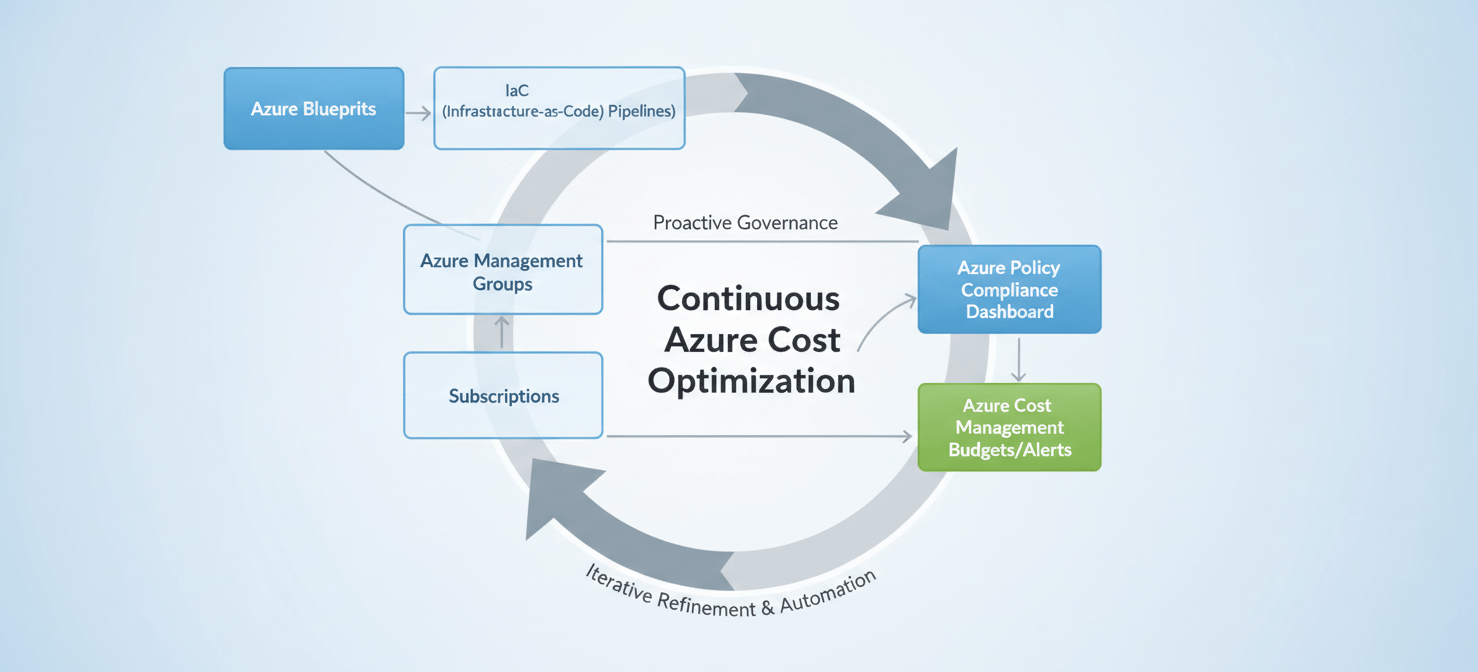
Azure Blueprints allow you to package and deploy a repeatable set of Azure resources, policies, and RBAC assignments. You can define a cost-controlled “stamp” for new subscriptions, ensuring that every new environment is provisioned with the correct governance guardrails from day one.
Furthermore, integrating your policy and tagging standards directly into your Infrastructure as Code (IaC) pipelines (e.g., ARM templates, Terraform) is a best practice. This shifts governance left, catching non-compliant configurations before they are ever deployed.
Continuous Auditing and Reporting
Azure Policy provides a compliance dashboard that gives you a real-time view of the compliance state of your environment. Regularly review this dashboard to identify resources that are out of compliance with your cost governance policies. For example, you can quickly find all resources that are missing a CostCenter tag.
In addition, use Azure Cost Management tools to set budgets at the management group or subscription scope. Configure action groups to trigger alerts when spending approaches or exceeds your defined thresholds. These proactive notifications enable you to take corrective action before a minor overspend becomes a major financial issue. For more advanced analysis, you can schedule recurring exports of your cost data to a storage account for ingestion into Power BI or other financial reporting tools.
Conclusion
For enterprise architects, mastering Azure Management Groups is fundamental to building a scalable and financially sound cloud platform. By designing a logical hierarchy, you create the structure needed for effective Azure cost governance best practices. This structure allows you to apply consistent policies that restrict wasteful configurations and enforce a standardized tagging strategy for accurate cost allocation. Layering on a well-considered RBAC model provides the right level of cost visibility to business stakeholders without compromising security.
Ultimately, this is not about creating restrictive bureaucracy. It’s about establishing predictable, automated guardrails that empower engineering teams to innovate safely within a financially accountable framework. Neglect this foundation, and you’ll be perpetually chasing down costs after the fact. Build it correctly, and you’ll have a governance engine that scales with your business, not your budget.
To truly master your Azure cost governance and move beyond reactive fixes, consider how a dedicated platform can provide the insights and automation you need; you can easily arrange a brief consultation to see it in action or begin using Binadox with a complimentary trial today to experience its capabilities firsthand.
 7-day free trial