



Managing cloud costs effectively is no longer a luxury; it’s a core business necessity. While the Azure portal provides a suite of tools for visual cost analysis, mature organizations require a more robust, automated, and integrated approach. This is where the Azure Cost Management API becomes essential. It provides programmatic access to the same detailed cost and usage data that powers the portal, allowing your team to build custom solutions, automate financial operations (FinOps), and gain deeper insights into your cloud expenditure.
Key takeaways
- Direct Data Access: The API provides programmatic access to granular cost and usage data, enabling custom dashboards, automated reporting, and integration with third-party financial systems.
- Multiple API Endpoints: Azure offers a suite of APIs for different tasks, including the Query API for flexible analysis, the Exports API for handling large datasets, and the Budgets API for programmatic control over spending thresholds.
- Authentication is Key: Accessing the API requires setting up a Service Principal in Microsoft Entra ID with the appropriate Role-Based Access Control (RBAC) permissions, such as “Cost Management Reader,” to ensure secure, non-interactive access.
- Mind the Limits: Be aware of technical constraints like data latency, which can be between 8 and 24 hours, and API rate limits of approximately 30 calls per minute to avoid throttling.
What Is the Azure Cost Management API?
The Azure Cost Management API is a set of RESTful web services that allow you to programmatically access and manage your Azure billing and cost data. Instead of manually navigating the Azure portal to view dashboards or download reports, you can write scripts and build applications that interact directly with the cost data. This opens up a world of possibilities for automation, custom analysis, and integration with your existing financial tools.
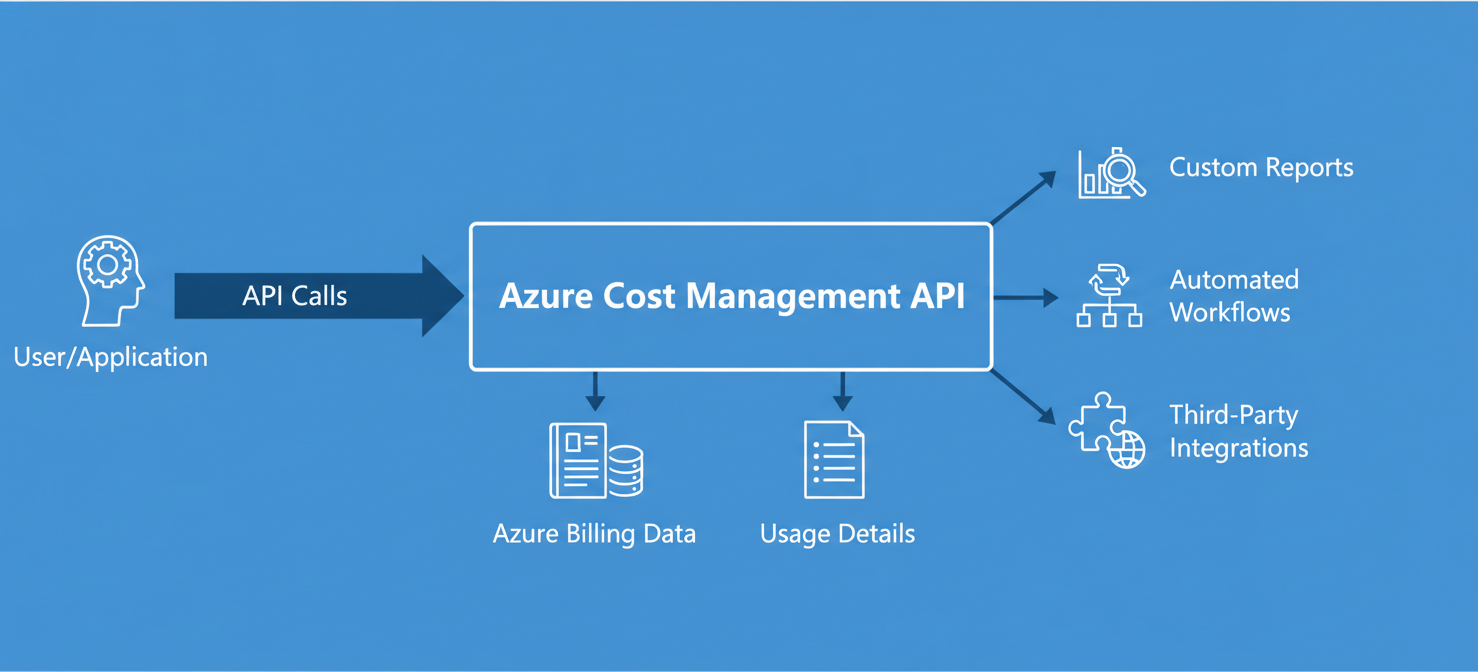
Think of it as the engine under the hood of the Azure Cost Management portal experience. Every chart, every report, and every recommendation you see in the portal is powered by this underlying data. The API gives you direct access to that same raw data, empowering you to use it in ways that are specific to your organization’s needs. This is particularly crucial for organizations that need to consolidate Azure spending with costs from other cloud providers to get a complete picture of their multicloud environment.
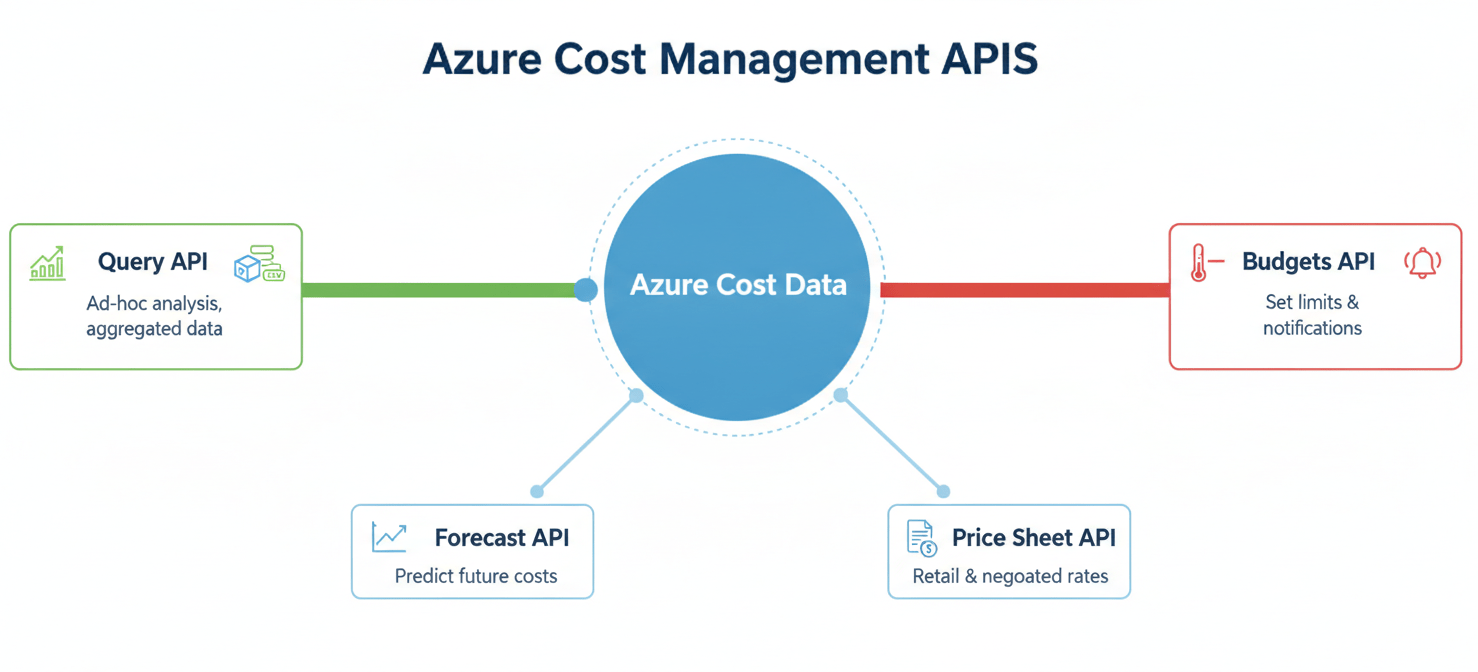
The API isn’t a single endpoint but rather a collection of related services designed for different purposes. These include APIs for querying aggregated data, exporting large and detailed usage files, creating and managing budgets, and even forecasting future costs based on historical trends. This comprehensive suite of tools provides the foundation for building a mature and automated cloud financial management practice.
Why Use the Azure Cost Management API?
While the Azure portal is an excellent starting point for cost analysis, organizations often reach a point where its limitations become a bottleneck. The portal is a user interface, designed for human interaction. As your cloud usage scales and your financial processes mature, you’ll encounter scenarios where manual, UI-based operations are too slow, too rigid, or simply not possible.

The primary reason to use the API is to achieve automation and integration. You can schedule scripts to run daily that pull cost data, format it into a custom report, and email it to stakeholders. You can integrate Azure cost data directly into your internal financial dashboards, such as Power BI, providing a single source of truth for all company expenditures. Furthermore, you can build automated governance workflows; for example, if a specific project’s costs spike unexpectedly, an API call could trigger an alert in Slack or create a ticket in Jira for immediate investigation.
Another key benefit is the ability to perform custom and complex analytics. The portal’s tools are powerful but offer a predefined set of filters and groupings. With the API, you can pull raw data and analyze it using any dimension, metric, or business logic you require. This allows you to answer highly specific questions, such as “What is the daily cost of our Kubernetes pods tagged with ‘env:production’?” or “How has our data egress cost for a specific resource group changed month-over-month?” This level of customized analysis is often impossible to achieve through a standard user interface.
Finally, the API is essential for multicloud FinOps. Most large enterprises operate in a multicloud environment, using services from Azure, AWS, and Google Cloud. The Azure portal, by itself, only shows you one piece of the puzzle. To get a holistic view of your total cloud spend, you need to extract the data from each provider programmatically and consolidate it into a central system. The Azure Cost Management API is the designated tool for pulling your Azure cost data into that unified view.
Getting Started: Authentication and Permissions
Before you can make your first call to the Azure Cost Management API, you need to handle authentication and permissions. You cannot simply use your personal Azure login credentials in a script. Instead, you need to create a dedicated identity for your application, which is accomplished using a Service Principal.
Creating a Service Principal
A Service Principal is essentially a non-human user account that your application or script can use to authenticate with Azure. You create one by registering an application within Microsoft Entra ID (formerly Azure Active Directory). This process will generate three critical pieces of information you’ll need for authentication:
- Client ID: The unique identifier for your application.
- Tenant ID: The identifier for your Microsoft Entra ID instance.
- Client Secret or Certificate: The “password” for your Service Principal.
It is crucial to treat these credentials as securely as you would any user password. Store them in a secure location like Azure Key Vault, and never hardcode them directly into your scripts.
Assigning the Right Permissions (RBAC)
Once you have a Service Principal, it doesn’t have any permissions by default. You must grant it the necessary access to read cost and billing data using Azure’s Role-Based Access Control (RBAC) system. The principle of least privilege should be applied here; only grant the minimum permissions required for the task.
For reading cost data, the Cost Management Reader role is typically sufficient. This role allows the Service Principal to view costs, usage data, and budgets but not to modify anything. If your application needs to create or modify budgets or data exports, you would need to assign the Cost Management Contributor role.
Understanding Scope
Permissions in Azure are applied at a specific scope. This determines which resources the Service Principal can access. You can assign the role at different levels of your Azure hierarchy:
- Management Group: Provides access to cost data across all subscriptions within that group. Ideal for enterprise-wide reporting.
- Subscription: The most common scope, restricting access to a single subscription. Perfect for project-level or business-unit-level reporting.
- Resource Group: The most granular scope, limiting access to the resources within a specific group. This is useful for application-level chargeback models.
Choosing the correct scope is critical. If the scope is too broad, your application will have access to more data than it needs, which is a security risk. If it’s too narrow, your API calls will fail with permission errors. You must assign the role at the scope you intend to query.
Core APIs for Cost Analysis
The Azure Cost Management suite offers several distinct APIs, each tailored for specific tasks. Understanding which API to use for your scenario is key to building an effective and efficient solution.
Query API
The Query API is arguably the most flexible and powerful tool for ad-hoc analysis. It allows you to retrieve aggregated cost and usage data by defining a custom query with specific timeframes, filters, and groupings. This is the API you would use to build custom dashboards or to answer specific, targeted questions about your spending. For example, you can use the Query API to get the total cost for the last 30 days, grouped by service name and filtered to a specific resource group. The data is returned in a structured format, ready for visualization or further processing.
Exports API
While the Query API is excellent for aggregated data, it is not designed for pulling large volumes of raw, unaggregated cost details. For that, you should use the Exports API. This API allows you to schedule a recurring task that automatically exports your detailed cost and usage data to an Azure Storage account in CSV format.
This is the recommended and most scalable solution for ingesting large datasets into your own systems, such as a data warehouse or a Power BI model. You can configure exports to run daily, weekly, or monthly, ensuring your external systems are always populated with the latest cost data without having to repeatedly query an API.
Budgets API
The Budgets API allows you to programmatically create, manage, and monitor budgets for your Azure resources. This is a powerful tool for automating cost governance. Instead of manually setting budgets in the Azure portal for hundreds of subscriptions or resource groups, you can write a script that creates them based on a predefined template.
Furthermore, you can use the Budgets API to configure action groups that trigger when a budget threshold is reached. For example, when spending reaches 90% of the budget, you could automatically trigger an Azure Function that sends a notification to a team’s channel or even initiates a process to scale down non-critical resources.
Other Important APIs
In addition to the core three, several other APIs serve important functions:
- Forecast API: Provides a projection of your future costs based on historical usage patterns, which is useful for proactive budgeting.
- Dimensions API: Lists the available dimensions (like resource groups, tags, or locations) that you can use for filtering and grouping in your queries.
- Price Sheet and Retail Prices APIs: These APIs allow you to retrieve pricing information for Azure services. The Price Sheet API provides custom pricing for enterprise agreements, while the Retail Prices API offers public pay-as-you-go rates.
Common Use Cases and Scenarios
The true value of the Azure Cost Management API is realized when you apply it to solve real-world business problems. Its flexibility allows for a wide range of applications, from simple reporting automation to sophisticated financial analysis.
Custom Dashboards and Reporting
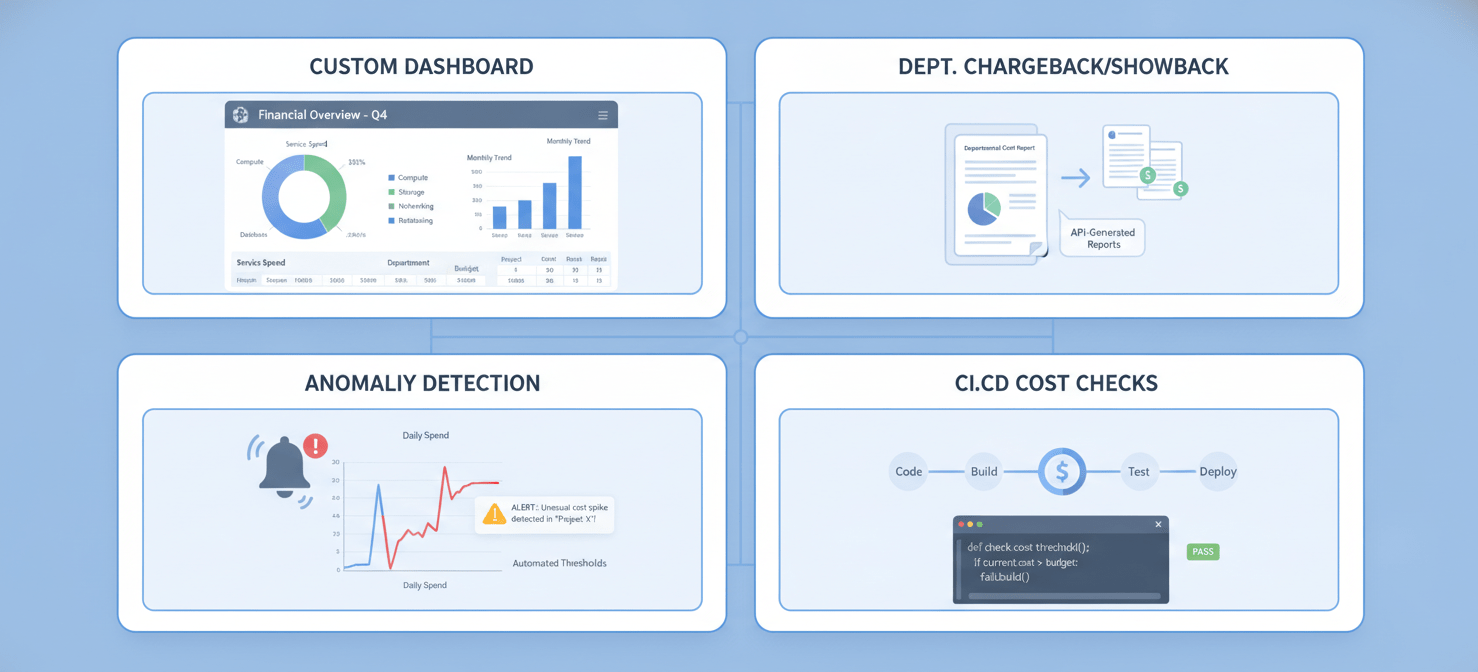
One of the most common use cases is building custom cost dashboards. While the Azure portal’s Cost Analysis tool is useful, it may not meet the specific needs of every stakeholder. For example, your finance team might need a report that combines Azure costs with on-premises infrastructure spending, while an engineering team might want a dashboard that shows the cost per transaction for their specific microservice.
Using the Query API, you can pull precisely the data you need and visualize it in a tool like Power BI, Grafana, or a custom web application. This allows you to create tailored views that present cost data in the context of your business metrics, making it more meaningful and actionable for different audiences.
Chargeback and Showback
In large organizations, it’s essential to allocate cloud costs back to the departments or projects that incurred them. This process, known as chargeback (when you actually bill the department) or showback (when you simply report on their spending), drives accountability.
The API is instrumental in automating this process. You can write a script that queries cost data, groups it by subscription, resource group, or tags that correspond to different business units, and then generates a detailed report for each one. This eliminates the tedious and error-prone process of manually creating these reports each month.
Anomaly Detection
Sudden, unexpected spikes in cloud spending can be a major problem, often indicating a misconfiguration, a resource leak, or inefficient architecture. The API can be used to build an automated anomaly detection system.
A script could run on a schedule, perhaps every few hours, to query recent cost data. It would then compare this data to a historical baseline. If the current spending deviates from the norm by a certain percentage, the system could automatically trigger an alert. This proactive monitoring allows you to catch and address cost overruns quickly, before they have a significant impact on your bill.
Integration with CI/CD Pipelines
For a truly mature FinOps practice, cost should be a consideration throughout the development lifecycle, not just an afterthought. You can integrate cost analysis directly into your Continuous Integration/Continuous Deployment (CI/CD) pipelines.
For example, after a new version of an application is deployed, an automated script could use the API to monitor the cost of its underlying resources for a period of time. If the new version causes a significant increase in cost compared to the previous one, it could automatically flag the deployment for review or even trigger a rollback. This “shift-left” approach to cost management empowers engineers to make more cost-conscious decisions.
Automation and Integration Strategies
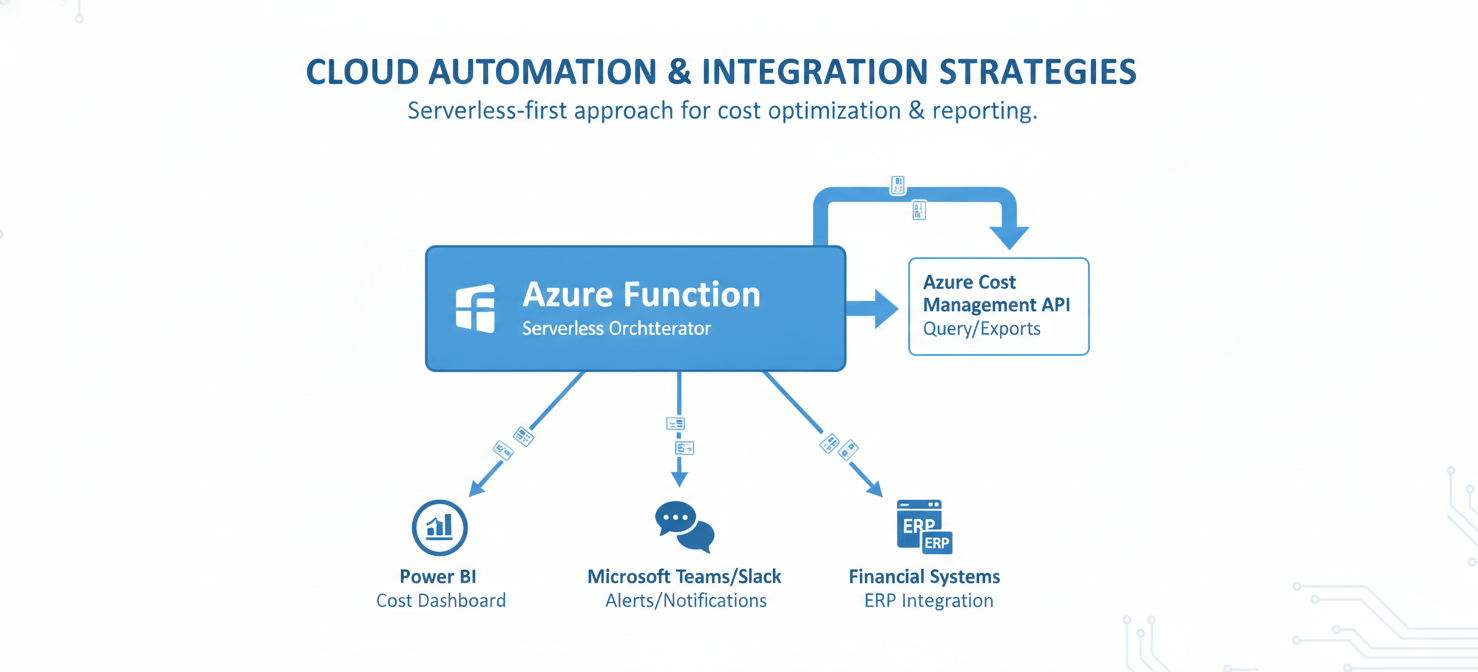
The real power of programmatic azure cost data is unlocked through automation and integration. By connecting the API to other systems and services, you can create powerful, automated workflows that streamline your FinOps processes and provide timely, actionable insights.
Automating with Azure Functions
Azure Functions, a serverless compute service, is an excellent tool for automating tasks with the Cost Management API. You can write a small, event-driven function that is triggered on a schedule (e.g., once a day). This function can authenticate using a managed identity, call the Query or Exports API to retrieve cost data, process it, and then send the results to another system.
For example, you could create a daily scheduled Azure Function that:
- Fetches the previous day’s costs, grouped by project tag.
- Compares the cost for each project to its budget.
- If any project is over budget, sends a formatted message to a specific Microsoft Teams channel.
This creates a fully automated and serverless monitoring solution that requires minimal infrastructure to maintain.
Integrating with Power BI
For sophisticated and interactive data visualization, integrating the API with Power BI is a popular choice. While Power BI has a native connector for Azure Cost Management, using the API directly offers more flexibility.
The recommended approach for large datasets is to use the Exports API to schedule a daily export of your cost details to an Azure Storage account. You can then connect Power BI directly to the CSV files in that storage account. This method is more robust and performant than making direct API calls from Power BI, especially as your data volume grows. It allows you to build rich, interactive reports that can be refreshed automatically, providing stakeholders with an always-up-to-date view of cloud spending.
Connecting to Third-Party Tools
The API’s RESTful nature makes it straightforward to integrate with a wide variety of third-party tools. You can connect it to:
- Financial Systems: Ingest Azure cost data into your organization’s ERP or accounting software for consolidated financial reporting.
- IT Service Management (ITSM) Tools: Automatically create tickets in systems like ServiceNow or Jira when cost anomalies are detected or budgets are exceeded.
- Communication Platforms: Push targeted cost alerts and reports to platforms like Slack or Microsoft Teams, ensuring that the information reaches the right people in the tools they use every day.
This integration capability allows you to embed cost data and financial governance directly into your existing business processes, making FinOps a natural part of your team’s workflow rather than a separate, isolated activity.
Best Practices for Effective Cost Management
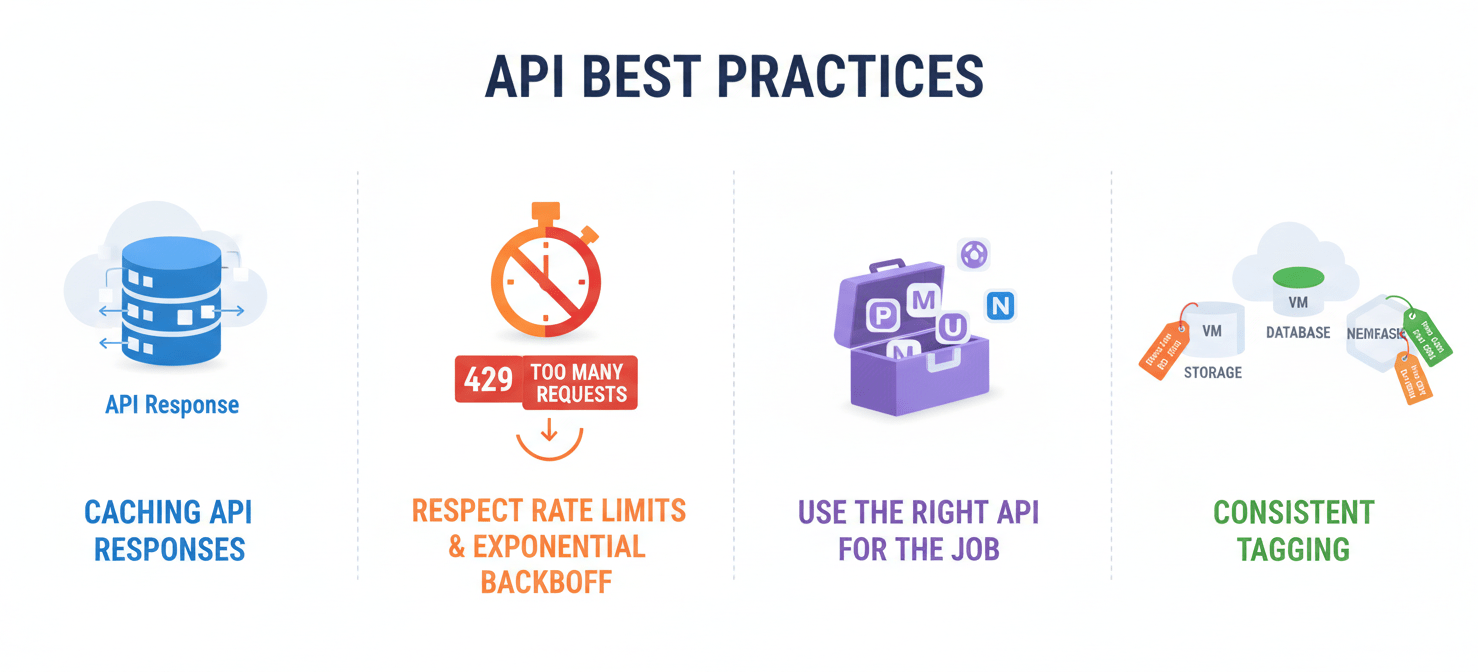
Simply having access to the Azure Cost Management API is not enough. To use it effectively and build robust, scalable solutions, it’s important to follow a set of best practices. These guidelines will help you avoid common pitfalls and get the most value out of the data.
Cache API Responses
Cost and usage data does not update in real-time; there is typically a delay of 8 to 24 hours before usage is reflected in the Cost Management system. Therefore, there is no benefit to querying the API every few minutes. Doing so will only lead to hitting rate limits and putting unnecessary load on the service.
A crucial best practice is to cache the API responses. If you are building a dashboard, for instance, fetch the data once and store it in a cache. Serve all subsequent user requests from the cache, and only refresh the data from the API every few hours or once a day. This will make your application much more performant and resilient.
Respect Rate Limits
The Cost Management API, like most cloud services, enforces rate limits to ensure stability and fair usage. These limits restrict the number of API calls you can make in a given period. For example, a common limit is around 30 calls per minute. If you exceed this limit, your requests will be throttled, and you will receive a 429 Too Many Requests error.
Your code should be designed to handle these limits gracefully. Implement an exponential backoff strategy: if a request fails with a 429 error, wait for a short period before retrying. If it fails again, double the waiting period, and so on. Additionally, structure your queries efficiently to retrieve the data you need in the fewest possible calls.
Use the Right API for the Job
As discussed earlier, Azure provides different APIs for different purposes. Using the wrong one can lead to inefficiency and poor performance.
- For aggregated data and custom queries, use the Query API.
- For large, raw, unaggregated datasets, always use the Exports API. Attempting to download millions of rows of usage details through the Query API is not a scalable approach and is likely to fail or be very slow.
Choosing the correct tool for your specific use case is fundamental to building a reliable cost management solution.
Tag Your Resources Consistently
The data you get from the API is only as good as the metadata you have on your Azure resources. Tagging is the mechanism for applying your own business context—such as cost center, project name, or owner—to resources.
A consistent and enforced tagging strategy is critical for effective cost analysis. Without it, it’s impossible to accurately allocate costs or understand which teams or applications are responsible for your cloud spend. Before you even start building with the API, ensure your organization has a solid tagging policy in place. This will make the data you retrieve infinitely more valuable.
Limitations and Considerations
While the Azure Cost Management API is a powerful tool, it’s important to be aware of its limitations and the context in which it operates. Understanding these factors will help you set realistic expectations and design more resilient systems.
Data Latency
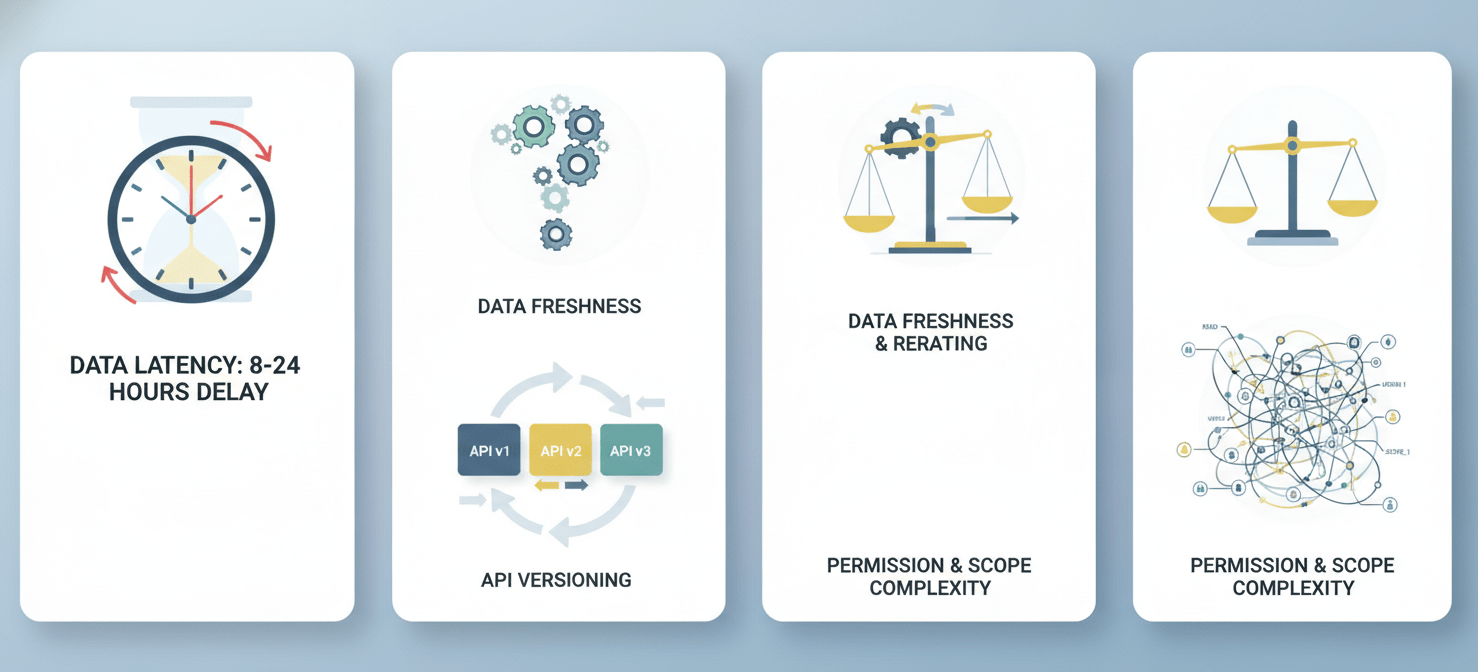
The most significant consideration is data latency. The cost and usage data available through the API is not real-time. There is an inherent delay as Azure services emit their usage data and the billing system processes it. This delay is typically between 8 and 24 hours, but it can sometimes be longer, especially for certain Marketplace services.
This means the API is not suitable for real-time cost monitoring. It is a tool for analyzing recent and historical trends, not for getting an instantaneous view of costs the moment a resource is provisioned. Your automation and reporting should be designed with this “near-real-time” nature in mind.
Data Freshness and Rerating
Even after data appears, it may not be final. The estimated charges for the current billing period can change as more usage is reported. Furthermore, costs can be “rerated” until the monthly invoice is finalized. This means that the cost figures you see mid-month might be slightly adjusted by the time the final bill is issued. For this reason, data from the API should be treated as highly accurate but potentially subject to minor changes until the billing period closes.
API Versioning
Like any evolving cloud service, the Azure Cost Management APIs are versioned. Microsoft may release new versions of the API that introduce new features or change existing ones. It’s important to specify the API version you are targeting in your requests and to keep an eye on the Azure documentation for any announcements about new versions or the deprecation of older ones. Building your code against a specific, stable API version will prevent your applications from breaking unexpectedly when changes are rolled out.
Scope and Permissions Complexity
While the ability to define scope at different levels of the Azure hierarchy is powerful, it can also introduce complexity. Managing permissions for a Service Principal across dozens of subscriptions or management groups can be challenging. It’s easy to make a mistake that either grants overly broad permissions or causes your API calls to fail due to insufficient access. Careful planning and automation of your RBAC assignments are essential, especially in large and complex enterprise environments.
Conclusion
The Azure Cost Management API is the cornerstone of a mature, automated, and scalable cloud financial management strategy. Moving beyond the manual clicks of the Azure portal allows your organization to integrate cost data directly into its core financial and operational workflows. By leveraging the programmatic azure cost data available through endpoints like the Query and Exports APIs, you can build custom dashboards, automate chargeback reporting, and implement proactive anomaly detection. This transforms cost management from a reactive, monthly exercise into a continuous, data-driven practice.
However, wielding this power effectively requires a clear understanding of its mechanics—from setting up secure authentication with Service Principals to respecting rate limits and accounting for data latency. The API is not a magic bullet; it is a professional-grade tool that rewards careful implementation. By following best practices, such as caching responses and enforcing a consistent tagging strategy, you can build robust solutions that provide real business value. Ultimately, mastering the Azure Cost Management API allows you to move from simply observing your cloud spend to actively and intelligently controlling it.
To truly master your cloud spend and implement these advanced FinOps strategies, consider how our platform can integrate seamlessly with the Azure Cost Management API. You can easily begin a free trial to explore its capabilities or schedule a personalized demo to see it in action.
 7-day free trial